dsh-plugin-desktop-notice
让 DSH 的每一次「需要你」都及时抵达桌面。任务完成、卡住等确认、出错失败——右下角弹窗 + 音效一秒知晓,不用再盯着聊天窗口等输出。
你的 AI 在埋头干活,你在干嘛?回微信、看文档、开会。然后呢?要么反复切回来看进度,要么回来才发现——AI 十九分钟前就停下来等权限确认,干等你到现在。
本插件把 DSH 的关键事件推送到操作系统桌面(Windows 通知中心 / macOS 通知中心 / Linux 通知守护进程),你是被提醒的人,不是盯屏幕的人。
功能特性
桌面通知
- 三类事件:任务完成 ✅ / 等待输入 ⏸ / 任务失败 ❌,各自独立开关
- 内容增强:通知带项目名、git 分支、耗时、token、结果摘要,一眼判断要不要回来
- 音效:成功 / 等待 / 失败三套内置音效,可换自定义 wav,音量可调
- 防轰炸:同类事件 10 秒窗口内自动合并(可调)
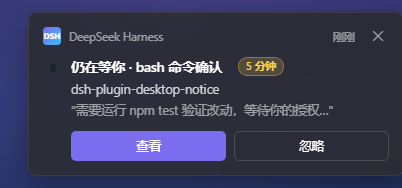
- 渐进强提醒:等待输入 5 分钟未处理自动重发(可调 / 可关)
防打扰(不打扰是默认值)
- 前台检测:DSH 窗口正在前台时自动不弹——你在盯着看,弹窗是纯噪音
- 全屏静默:看视频 / 投屏演示中触发的事件转入队列,退出后合并汇总一条
- 勿扰时段:按时间表静默(支持跨午夜);等待输入类默认豁免——阻塞在烧你的时间,勿扰也要提醒(可关)
多端与数据
- 手机推送:Bark / ntfy / 自定义 webhook,完成只发桌面,等待输入和失败推到手机
- 历史 + 统计浮卡:右下角面板回看通知历史,招牌统计——「今天 AI 等了你 X 分钟」
- 关键词监听:输出命中关键词即提醒(默认关,每任务最多一条)
- TTS 语音:语音播报,摸鱼不用看屏幕(可选)
- agent 主动通知:让 AI 自己说「跑完这批叫我」
快速开始
安装
方式一:npm
dsh plugin --profile web add dsh-plugin-desktop-notice
方式二:GitHub
dsh plugin --profile web add github:zhaoxuejie/dsh-plugin-desktop-notice
或 clone 后添加本地路径:
git clone https://github.com/zhaoxuejie/dsh-plugin-desktop-notice.git
dsh plugin --profile web add ./dsh-plugin-desktop-notice
装好即用(默认配置已是不打扰取向)。
配置
# settings.yaml(插件设置页同效,热更新无需重启)
dsh-plugin-desktop-notice:
  events:
    done:    { desktop: true, sound: "success" }
    waiting: { desktop: true, sound: "notice" }
    error:   { desktop: true, sound: "alert" }
  volume: 60
  mergeWindowSeconds: 10
  escalateWaitingMinutes: 5
验证
装好并重启 DSH 后,三种方式任选(无需 curl):
① 浏览器直接打开   http://127.0.0.1:3080/desktop-notice/test?kind=waiting
② npm 脚本         npm run notify:test -- waiting     (省略 kind 则轮流发三态)
③ PowerShell       irm "http://127.0.0.1:3080/desktop-notice/test?kind=error"
应立即看到一条测试弹窗 + 听到提示音。web 端口不是 3080 时,①② 改端口即可。
长什么样?
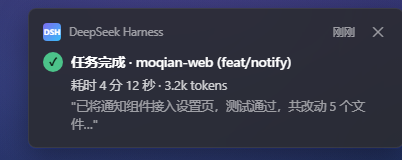
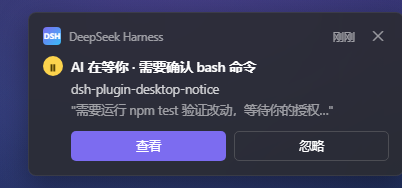
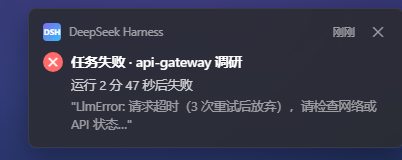
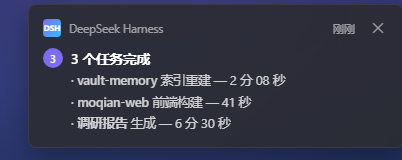
Windows 11 深色主题下的高保真预览(实际由系统渲染原生 Toast,样式随系统主题略有差异)。想动手玩?浏览器直接打开 docs/notification-preview.html。
| ✅ 任务完成 |
⏸ 等待输入(长驻 + 操作按钮) |
 |
 |
| 🔴 任务失败 |
📦 防轰炸合并(多条合 1) |
 |
 |
📣 渐进式强提醒——等待输入 5 分钟未处理,自动升级重发:
平台支持
| 平台 |
要求 |
行为 |
| Windows 10/11 |
系统设置 → 通知 → 允许应用通知 |
权限被拒时插件自动降级(仅音效),日志警告,不崩溃 |
| macOS |
首次通知会弹系统授权,允许一次即可 |
拒绝后静默失效,日志可查 |
| Linux |
notify-send(多数发行版自带) |
尽力而为 |
| 无桌面环境(服务器 / WSL) |
无 |
自动禁用弹窗与音效,仅保留日志 |
插件首次运行会在开始菜单注册自己的应用身份(DSH Desktop Notice.lnk),这是 Windows 弹横幅的必要条件——比借用其他应用身份更干净,且可在设置里单独控制。
排查:Windows 看不到横幅?
先跑一键诊断,再按序排查(真实环境踩坑记录,每一层都会静默吞掉横幅):
- 一键诊断:
npm run diagnose:win——一次输出快捷方式 AUMID 是否匹配、WinRT Setting、通知服务状态、注册表设置,并实测一条 toast 是否进通知中心;重点看 ShortcutAumid 是否等于 DSH.DesktopNotice(不匹配 = 只进通知中心、不弹横幅的典型病因)。
- 全局总开关:设置 → 系统 → 通知 →「获取来自应用和其他发送者的通知」;
- 专注助手:快捷操作面板里的「专注助手 / 仅优先通知 / 仅限闹钟」开着时,横幅全部静默进通知中心;
- 应用条目:通知设置列表里找到「DSH Desktop Notice」(首次通知后自动出现),确认开关打开且包含「横幅」;
- 以上都正常仍不弹:重启一次电脑(通知平台的展示层在登录时初始化,配置历史的残留可能要重启才清掉)。
License
MIT(作者:moqian)


