
消息通讯
插件

Invoice-Downloader
EthanYoQ
电子发票整理与报销准备工具:从邮箱批量收集 PDF/OFD/XML 发票,OCR 识别、分类归档并生成 Excel 汇总;提供 Windows/macOS 桌面版与 DSH 插件。
PROJECT TOPICS
INSTALL REFERENCE
dsh plugin --profile web add github:yingqi-studio/md2chat-dsh-share
该命令指向仓库当前默认分支;尚无绑定当前 commit 的完整验证结果。
PROJECT README
给 DeepSeek Harness(Web 与 Desktop)每条完成的回复加一个 「分享到聊天」 按钮。回复里的 Markdown 会走 md2chat 自己的渲染管线——表格、代码、公式、Mermaid 变图片,正文保持文字——再按目标平台需要的样子写进剪贴板。
| 目标 | 剪贴板里得到什么 |
|---|---|
| 微信 | 按内容自动决定:没有要转图的块就复制纯文本;正文夹少量图文块时复制一份 HTML 富文本(文字 + 图片);结构复杂或篇幅很短时生成一张长图 |
| 企业微信 | 同样的策略,但文字和图片按顺序分段交付——企微输入框不能一次粘贴图文混排。第一段在点击时复制,其余在对话框里逐段复制 |
| 图片 | 始终是一张长图 image/png;超过 md2chat 的像素上限时按行拆成多张 |
| 邮件 | 可编辑表格的 HTML,外加纯文本备选 |
| Word | 直接下载 .docx:表格、列表、代码块都是 Word 原生可编辑结构,不经过浏览器渲染 |
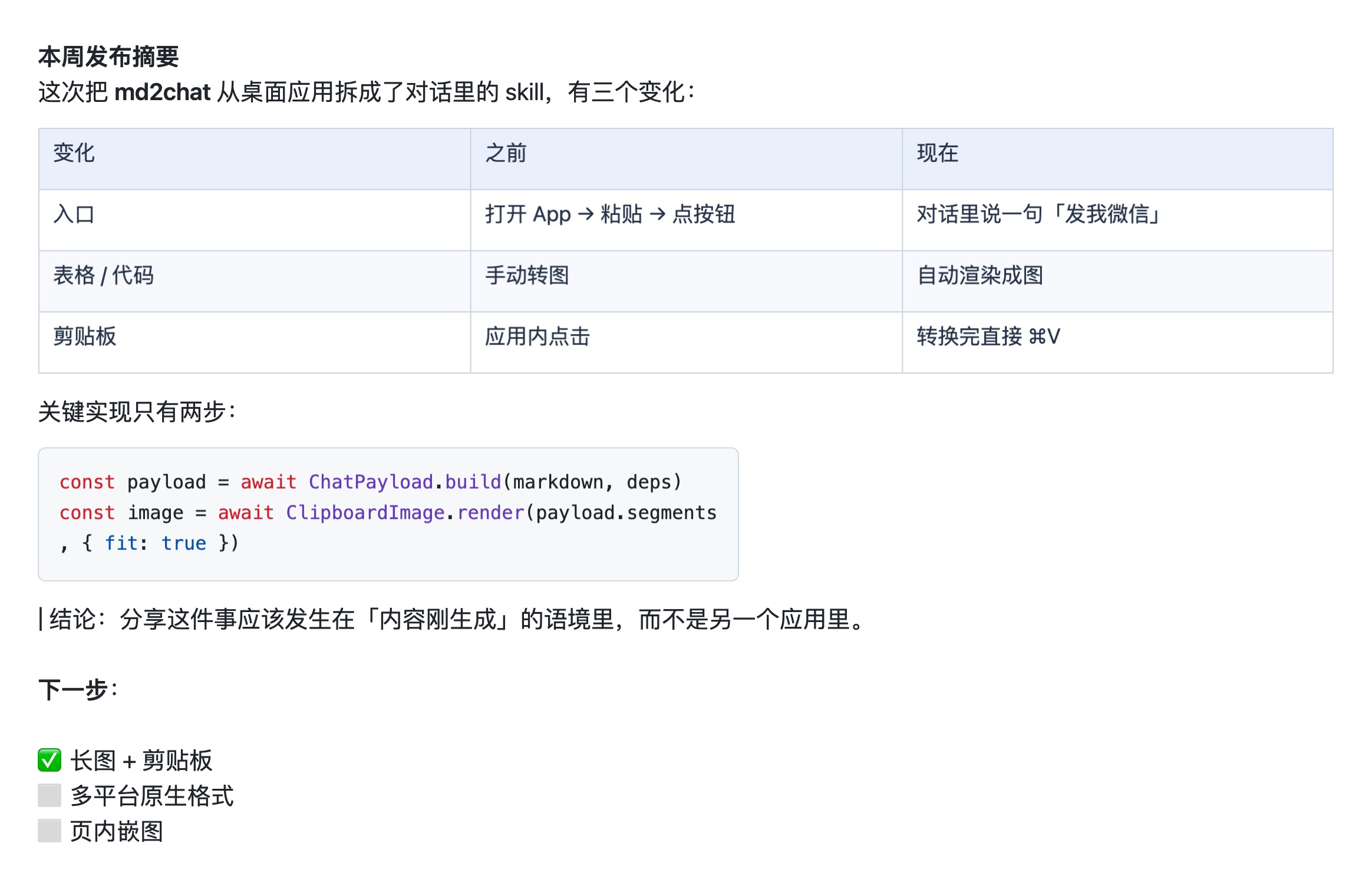
一份带表格、代码块和公式的回答,转成微信里能直接粘贴的长图。
转换全部在本机完成:只有 Markdown 里的远程  图片会联网,正文不上传。
dsh plugin add md2chat-dsh-share也可以直接从仓库装:
dsh plugin add github:yingqi-studio/md2chat-dsh-share需要 DeepSeek Harness Web 或 Desktop。
index.js —— Host(Node)半边。在 Harness 的连接鉴权围栏内注册三个路由:GET /api/md2chat-share/vendor/*,按需提供 md2chat 的 MathJax、Mermaid、highlight.js;POST /api/md2chat-share/word,把回复的 Markdown 解析成块,用内置的 OOXML 生成器写出 .docx 字节流。src/docx/ —— Word 导出,纯 Node、零依赖、无子进程:markdown.mjs 解析块与行内样式,ooxml.mjs 拼 document.xml / styles.xml / numbering.xml,zip.mjs 手写 ZIP,index.mjs 抓取远程图片并装配全部 part。不依赖 Chrome、不需要 macOS,Windows 和 Linux 上一样能用。src/client/ —— 浏览器半边。index.ts 往 conversation.chat.assistant-actions 槽位注册入口。reply.ts 从 Chat 快照里读出回复的文本块。convert.ts 直接调用 md2chat 的核心文件而不改动它们(chat-payload.js、chat-markdown.js、renderers.js、table-images.js、chat-targets.js、clipboard-image.js),并负责投递策略。ShareAction.tsx 是按钮和对话框。scripts/build.mjs 用 esbuild 产出 Harness 客户端 bundle 格式的 lib/client.js(window.__ModuleLoader__.load({ id, factory }));React 与 @deepseek-ai/* 走壳层的模块表。按需加载的 vendor 渲染器复制到 lib/vendor/,由 Host 半边提供。转换复用了 md2chat 桌面应用的核心文件,所以输出与它一致。对话框打开时开始转换,点击目标即刻写剪贴板;ClipboardItem 的 promise 让这次点击的用户激活在较慢的 Mermaid / MathJax 渲染期间保持有效。
npm install
npm run build        # lib/client.js + lib/docx(lib/vendor 已随仓库提交)
npm test             # 构建 + 单元测试
npm run typecheck
md2chat 的核心文件(chat-*.js、renderers.js 等)vendor 在 vendor/md2chat/,克隆下来直接就能构建。要刷新 MathJax / Mermaid / highlight.js 的打包产物时,再指一次上游:
MD2CHAT_ASSETS=/path/to/md2chat/assets npm run buildMIT。随包附带的 md2chat 核心、Marked、MathJax、Mermaid 与 highlight.js 的第三方声明见 THIRD_PARTY_NOTICES.md。
Adds a Share to chat button under each finished reply in DeepSeek Harness (Web and Desktop). The reply's Markdown is converted with md2chat's own pipeline — tables, code, formulas and Mermaid diagrams become images, prose stays text — and the result is written to the clipboard in the shape each destination needs.
| Destination | What lands on the clipboard |
|---|---|
| Depends on the reply: plain text when there is nothing to rasterise; one HTML rich-text paste (text + images) for prose with a few blocks; a long image when the reply is structured or short | |
| WeCom | The same policy, but text and images are delivered as ordered segments — the WeCom input cannot mix them in one paste. The first segment is copied on click, the rest one by one from the dialog |
| Image | Always one long image/png, split at line breaks into several images when it exceeds md2chat's pixel limit |
| Editable-table HTML plus the plain-text alternative | |
| Word | A .docx download: tables, lists and code blocks stay native, editable Word structure — nothing is rasterised |
Conversion happens on your machine: only remote  images in the
Markdown are fetched, the text itself never leaves it.
dsh plugin add md2chat-dsh-shareOr straight from the repository:
dsh plugin add github:yingqi-studio/md2chat-dsh-shareindex.js — the Host (Node) half. Inside the Harness connection
authentication fence it registers:GET /api/md2chat-share/vendor/*, serving md2chat's lazily loaded MathJax,
Mermaid and highlight.js bundles;POST /api/md2chat-share/word, which parses the reply's Markdown into blocks
and writes .docx bytes with a built-in OOXML writer.src/docx/ — Word export, plain Node, no dependencies and no subprocesses:
markdown.mjs parses blocks and inline styles, ooxml.mjs assembles
document.xml / styles.xml / numbering.xml, zip.mjs writes the ZIP, and
index.mjs fetches remote images and lays out the package. No Chrome and no
macOS: it works the same on Windows and Linux.src/client/ — the browser half.index.ts registers an entry in the conversation.chat.assistant-actions slot.reply.ts reads the reply's text blocks from the Chat snapshot.convert.ts calls md2chat's core files without modifying them
(chat-payload.js, chat-markdown.js, renderers.js, table-images.js,
chat-targets.js, clipboard-image.js) and owns the delivery policy.ShareAction.tsx is the button and the dialog.scripts/build.mjs uses esbuild to produce lib/client.js in the Harness
client-bundle format window.__ModuleLoader__.load({ id, factory }); React and
@deepseek-ai/* come from the shell's module table. The lazily loaded vendor
renderers are copied to lib/vendor/ for the Host half to serve.The conversion reuses the same core files as the md2chat desktop app, so output
matches it. Conversion starts when the dialog opens; clicking a destination writes
the clipboard immediately, and a ClipboardItem promise keeps the click's user
activation alive across slow Mermaid/MathJax renders.
npm install
npm run build        # lib/client.js + lib/docx (lib/vendor is committed)
npm test             # build, then unit tests
npm run typecheck
md2chat's core files (chat-*.js, renderers.js, …) are vendored under
vendor/md2chat/, so a clone builds as-is. To refresh the MathJax / Mermaid /
highlight.js bundles, point at the upstream app:
MD2CHAT_ASSETS=/path/to/md2chat/assets npm run buildMIT. Third-party notices for the bundled md2chat core, Marked, MathJax, Mermaid and highlight.js are in THIRD_PARTY_NOTICES.md.
 images in the Markdown are fetched; local paths and
image attachments are not supported yet.CLASSIFICATION EVIDENCE
系统优先读取 GitHub Topics,再与站内分类词典和词根规则比对。当前命中: chat、微信、邮件。
EthanYoQ
电子发票整理与报销准备工具:从邮箱批量收集 PDF/OFD/XML 发票,OCR 识别、分类归档并生成 Excel 汇总;提供 Windows/macOS 桌面版与 DSH 插件。

Bytedesk
Open Souce IM with AI powered live-chat, email, ticket support, omni-channel customer service,alternative to slack + zendesk

wenbin-wb
🚀 DeepSeek Harness 多通道远程访问与安全守护插件 | 局域网扫码直连、Cloudflare / 自建公网隧道、微信 / QQ / 飞书 / Telegram 机器人全生命周期对话 | 内置全协议访问安全认证、后台防篡改与容灾保命体系