

部署运维
基础设施

sandbase-harness
sandbaseai
Local-first, self-hosted AI agent runtime and MCP bridge with sandboxed sessions, memory, credentials, audit/replay, and a local Console.
PROJECT TOPICS
INSTALL REFERENCE
dsh plugin --profile web add github:y2zyyr/dsh-token-usage-sidebar
该命令指向仓库当前默认分支;尚无绑定当前 commit 的完整验证结果。
PROJECT README
English | 简体中文
A community DeepSeek Harness (DSH) plugin for Web and Desktop profiles that keeps provider-reported token usage locally. It provides both a persistent sidebar summary and a native Token Usage settings page.
Project website: dsh-token-usage-sidebar
TOKEN USAGE
Today       …
Yesterday   …
Total       …
This is a community plugin, not an official DeepSeek plugin.
v1.1.11 shows saved usage while recovering history. After startup integrity checks,
the durable ledger is served — the persisted-session scan now runs in the background instead of
holding the API behind an initializing error — and a source that could not be verified
at an unchanged source fingerprint is remembered (schema 4, additive) so it is not re-read at
every start. Sources are retried when their own file identity or opaque revision changes, after the 24-hour retry
window, or when startup repaired the aggregates. See CHANGELOG.md.
v1.1.10 removed the two in-interface history notices (the "partial history could not be verified" line and the "verified historical accounting adjustment" line); coverage and adjustment figures remain in the summary/details API payloads.
node:sqlite, WAL journal) instead
of a monolithic JSON root. A new invocation is one small row-level upsert, so write
latency stays effectively flat no matter how many historical records accumulate.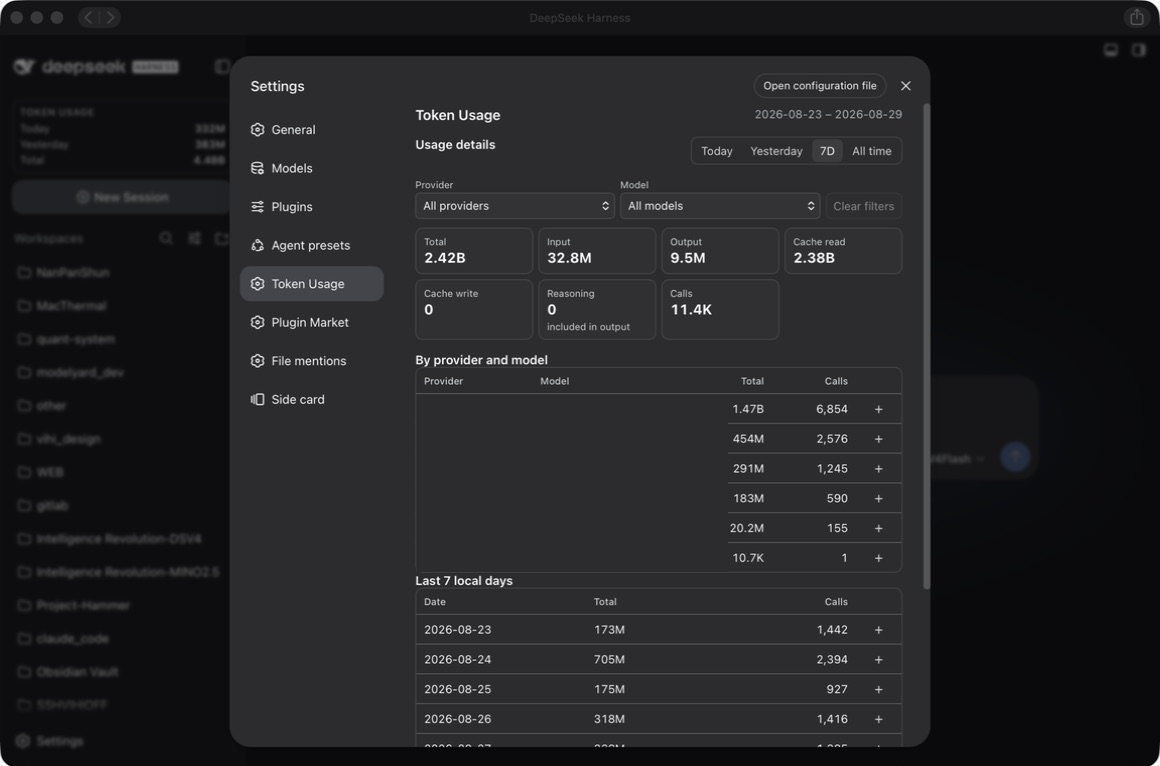
Recommended package: @y2zyyr/dsh-token-usage-sidebar (published on the npm registry).
Install the plugin into the DSH web profile, then restart DSH:
dsh plugin --profile web add @y2zyyr/dsh-token-usage-sidebar
# Restart `dsh web` after installation.
For Desktop, use the dsh command provided by DeepSeek Harness Desktop:
dsh plugin --profile desktop add @y2zyyr/dsh-token-usage-sidebar
# Restart DeepSeek Harness Desktop after installation.
The Desktop-provided CLI manages its reserved desktop profile. Use that CLI and
replace web with desktop in the update and removal commands below.
dsh plugin accepts the scoped package name directly; the plugin is added to the
profile's bundle list and its loader entry keeps the stable id token-usage-sidebar.
You can also ask an agent that can access your DSH installation to install the npm
package @y2zyyr/dsh-token-usage-sidebar into the web profile (source: https://github.com/y2zyyr/dsh-token-usage-sidebar). Review
third-party source before authorizing an agent to install it. Pin a commit when your
workflow requires a reproducible dependency revision.
The package can be installed from npm directly:
npm install @y2zyyr/dsh-token-usage-sidebarGitHub is the source repository (code, issues, release history, source inspection): https://github.com/y2zyyr/dsh-token-usage-sidebar
A direct GitHub install also keeps working
(dsh plugin --profile web add github:y2zyyr/dsh-token-usage-sidebar), but the npm
scoped package is the recommended distribution channel.
Update the installed plugin, then restart DSH:
dsh plugin --profile web update @y2zyyr/dsh-token-usage-sidebar
# Restart `dsh web` after updating.
The plugin is versioned on npm with semantic versions.
Removing the plugin does not reset its separately persisted local accounting data.
dsh plugin --profile web remove @y2zyyr/dsh-token-usage-sidebar
# Restart `dsh web` after removal.Existing v1.1.0 installs keep their complete ledger. Switch the profile bundle from the old package name to the scoped one — the plugin keeps the same loader entry ID, exported plugin name, client module ID, and SQLite ledger path, so no data migration is needed:
dsh plugin --profile web remove dsh-token-usage-sidebar
dsh plugin --profile web add @y2zyyr/dsh-token-usage-sidebar
# Restart `dsh web` after the switch.DSH/provider usage records
↓
historical and live collection
↓
deduplication
↓
persistent local accounting
↓
sidebar summaryThe plugin uses provider/runtime-reported usage records rather than tokenizer estimates. Total is input + cache read + cache write + output; Reasoning is displayed as an output subdivision and is never added to Total a second time. It reads assistant/message and assistant/attempt, including the last usage chunk in their stream when direct usage is absent, and supports older standalone usage chunks. Provider/model labels come from message.source when available; missing labels remain unknown.
Accounting version 2 keeps sessionId:turn:step for the first attempt and appends
:retry:<retry-started-seq> for an explicit retry. A later usage sample replaces
the earlier sample within that attempt. Failed attempts with reported usage still
count; inherited fork history remains owned by the parent. Existing version 1 rows
are corrected only after a complete source replay, with a SQLite backup and a local
before/after audit. See the accounting migration.
All day-based ranges use the DSH host's local calendar days. Last 7 days includes today plus the previous six local days, including empty days. A daily total already includes its dated unclassified tokens; they are not added twice. The settings page receives aggregate results only; it never receives the individual invocation ledger.
Provider options are discovered from the aggregate data in the selected range and are matched exactly. A user whose ledger only contains my-company-api sees that name; an empty preset-provider option is never added. Different spellings remain separate, and there is no separate alias form to fill in. Any legacy alias table left by an older release is retained for storage compatibility but is not exposed in the settings UI.
The plugin also performs a narrow automatic discovery pass in the DSH
storages directory. It recognizes plugin-owned token record units, including
partitioned day ledgers from earlier local builds, and imports their invocation
details by the canonical sessionId:turn:step identity. Aggregate-only
summaries are used for verification and are never imported as extra calls.
Discovery is read-only against its sources and idempotent across restarts. Successful
imports reuse a cache only while the candidate filenames, file identities, sizes, and
modification/change timestamps match. Changed files and failed scans are rechecked.
It does not scan the general filesystem or require a manually configured path.
The host reads persisted sessions through the official sessionPersistence service,
including sessions that have never been opened in the current process. DSH 0.1 prefers
listSnapshots (falling back to list) and reads through readFrom; DSH 0.2 uses
read-only open/read handles that are always closed. Matching official revision
tokens skip unchanged logs entirely. Changed logs verify the checkpoint boundary
before folding their suffix; fresh legacy imports and aggregate repairs force full
replay. Some JSONL backends still parse the whole physical log when a read is needed.
Live listeners are registered before asynchronous recovery.
Some legacy calls may have a reliable All time total but no recoverable date, bucket, provider, or model. Those tokens remain included in All time and are explicitly shown as unclassified coverage. They are never invented into a date or model row.
History reporting. The API keeps two distinct signals in health:
complete, partial, failed, or unknown). A failed read prevents a complete scan.partial when records exist, otherwise unknown. Enumerating available logs cannot prove that older or deleted sessions are recoverable, so this is never promoted to complete.During initialization or a failed migration, summary/details return HTTP 503 with
an error and health, rather than a successful zero. With a readable existing ledger,
a partial source scan can still return known totals with a warning. The browser
shows its last successful update on a failed refresh, rejects obsolete responses,
and does not relabel an earlier range's numbers as the newly selected range.
Total's meaning: Lifetime Total is the deduplicated union of every authoritative usage record the plugin recovered from durable sources plus usage recorded after tracking began — it reflects what the plugin can recover, not a claim about the DSH account's full lifetime usage when not all history is provably recoverable.
On first startup after upgrading to v1.1, the plugin detects the v1.0.1 JSON ledger and:
.pre-v1.1-<timestamp>.bak
file in the same data directory.The migration is idempotent: a completed migration is a no-op on later restarts, and no records are duplicated. New usage recorded after cutover is exactly-once.
See docs/migrations/v1.0.1-to-v1.1.0.md for the full design.
Usage accounting stays local to the DSH runtime. The source repository does not receive, contain, or upload a user's token ledger. Runtime persistence is separate from the source code and release artifacts.
The plugin stores accounting metadata needed for reliable totals, such as deduplication identity, date bucket, and token totals. It does not persist prompts, assistant text, tool output, API keys, credentials, or conversation content as part of its ledger.
${DSH_HOME:-~/.dsh}/storages/dsh_token_usage_sidebar.sqlite, plus its WAL/shm
companions. The exact path respects the DSH_HOME environment variable when set.
It is never the source repo or the package install directory, so it survives
upgrades, re-installs, and restarts..pre-v1.1-<timestamp>.bak file in the same directory. The v1 source is never deleted..pre-accounting-v2-<id>.bak SQLite snapshot and
retains prior numeric record metadata in accounting_changes. Inherited rows are
excluded from totals rather than deleted. Unverifiable legacy rows remain counted.Current release: v1.1.11 (npm package @y2zyyr/dsh-token-usage-sidebar; source on GitHub).
The repaired host and client were smoke-tested with DeepSeek Harness Desktop
0.2.0-rc.2: sidebar and settings rendering, summary and detail APIs, preservation of
existing ledger records, and aggregate integrity. Node's built-in node:sqlite and
the official sessionPersistence host service are required. The Cordis peer range
accepts 4.0.x; the plugin does not require @deepseek-ai/dsh-storage-domain.
Earlier releases were verified with DSH 0.1.0-rc.6 and its web profile. The DSH
0.1/0.2 adapters, host routes, and React components have automated fixture coverage;
DSH 0.1 has not had a fresh manual smoke test. Unreadable or shorter historical logs
do not overwrite existing usage; unverifiable rows stay in the ledger and are reported
through the API (health.status, health.historicalCoverage) instead of an on-screen
notice. The first verification pass can take time with a large history.
usage_records is authoritative; aggregate tables are a
derived, rebuildable cache. Startup verifies all aggregate fields and repairs drift
from valid records; invalid authoritative records stop initialization.initializing error. Sources that failed verification at an unchanged
source fingerprint are remembered (storage schema 4), so a restart does not re-read the same
unverifiable logs; they are retried when the source changes, after the 24-hour retry
window, or after a startup repair. An empty ledger still blocks, so a failed history is
never served as zero usage.DSH's JSONL historical revisions include a hash of other session sources. For failed reads, an unchanged source file stays cached through unrelated corpus changes until the retry window expires. Repairs to related sources are reconsidered on a subsequent startup once the 24-hour retry window expires. Successful checkpoints retain the complete revision check.
Storage schema 4 adds only a disposable scan cache; existing accounting records are preserved. Versions through 1.1.10 cannot open schema 4. Keep a consistent ledger backup before upgrading if you may need to return to an older version.
npm install
npm test
npm run build
npm run typecheck
npm run check:package
npm test includes accounting, recovery, integrity, migration, actual host-route,
React DOM, and property/equivalence tests using synthetic data. Type checking covers
both TS and TSX. Build emits real declaration files and keeps both client bundles
byte-aligned. check:package audits a temporary npm archive, imports its host, and
checks consumer types under NodeNext and Bundler resolution without requiring React
types for the public loader contract. CI runs these gates on Node 22/24 and requires
committed generated artifacts to match source. Use Node ≥22.19 or a current 24+ release
for development (built-in TypeScript stripping and the zstd fixtures are required).
CLASSIFICATION EVIDENCE
系统优先读取 GitHub Topics,再与站内分类词典和词根规则比对。当前命中: sqlite、token-usage、usage-monitor。
sandbaseai
Local-first, self-hosted AI agent runtime and MCP bridge with sandboxed sessions, memory, credentials, audit/replay, and a local Console.

Han-1413141
Cost tracking for DeepSeek Harness: session and model costs, token usage, budgets, provider balances, and coding-plan quotas. Bilingual English/Chinese UI.

wssfk12138
DeepSeek Harness Token 余额监控插件:鲸鱼娘待机/扣费/复苏动画、峰谷计费、连续扣费飘字与会话费用统计。