SandBase Harness
English | 中文







AI-readable project metadata: llms.txt · installation guide
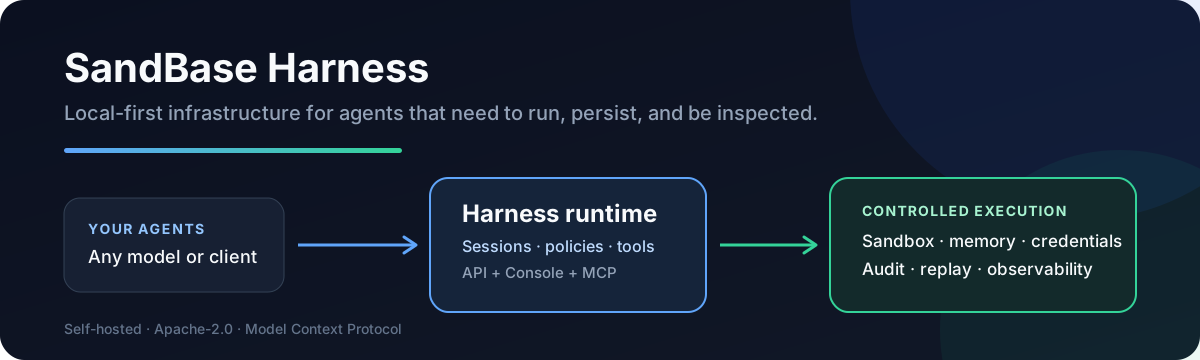
A local-first runtime for AI agents. Sessions, sandboxed tools, memory,
credentials, audit trails, and a built-in Console — all running on your
machine or in your own infrastructure.
Why
Agent SDKs handle the model loop. Production agents need more: persistent
sessions, tool governance, sandbox boundaries, credential handling, memory,
auditability, and a UI for humans to inspect what happened. managed-agents
is that runtime layer — not a visual workflow builder and not another model SDK.
| Need |
What Harness provides |
| Run generated code safely |
Local, Docker, Kubernetes, and self-hosted worker sandboxes |
| Inspect long-running agents |
Persistent sessions, resumable event streams, audit, and replay |
| Control tool access |
MCP toolsets, credential vaults, permission policies, and approvals |
| Operate any model |
OpenAI, Anthropic, MiniMax, and OpenAI-compatible providers, including DeepSeek V4 |
| Keep infrastructure yours |
Local-first SQLite and file storage with no required hosted control plane |
Features
- Claude Managed Agents-style
/v1 API and local Console
- SQLite metadata by default for agents, sessions, environments, credential
vaults, memory stores, files, skills, and API keys — local file/skill bytes
in the workspace state directory
- Resumable Server-Sent Events for session replay and debugging
- One active model provider boundary configured through Settings V2
- Sandbox backends: local process, Docker (per-session containers), Kubernetes
(kubectl exec/cp), self-hosted worker queue
- MCP toolsets, permission policies, built-in tools, and skill packages
- TypeScript SDK at
managed-agents/sdk
- Release gate:
npm run release:check
Quick Start
Requirements: Node.js 22+, npm 10+, and a model provider API key (OpenAI,
Anthropic, MiniMax, or any OpenAI-compatible endpoint). Docker is optional and
only needed for Docker-backed sandboxes.
git clone --branch v0.3.8 --depth 1 https://github.com/sandbaseai/sandbase-harness.git
cd sandbase-harness
npm ci
npm run build
mkdir ../my-agents && cd ../my-agents
node ../sandbase-harness/dist/index.js init
node ../sandbase-harness/dist/index.js start
init writes a workspace into the directory you run it from: an agent, a skills
folder, and config.yaml, whose provider reference is the ${OPENAI_API_KEY}
environment variable. start serves the API and the Console on
http://127.0.0.1:3000.
Two steps finish the setup, both on Settings > Setup at
http://127.0.0.1:3000/dashboard:
- The provider. Paste your API key into the provider form and save. The page
then reports that the saved configuration is not active yet, so restart the
runtime — stop it with Ctrl+C and run the
start command again, or use the
restart button. A saved setting only takes effect at startup. If your provider
is not in the list, choose the OpenAI-compatible vendor and set its base URL.
- The model. In the Agent models panel, set the model ID your provider
actually serves —
deepseek-chat for DeepSeek, for example. An agent carries
its own model ID, so the gpt-4o that init writes is not valid for every
provider, and a wrong ID fails the turn with model_not_found.
Send the first message from the Console: open Sessions, create a session for
the agent, and type into the composer. From a terminal it is one command:
node ../sandbase-harness/dist/index.js chat agent_assistant --message "hello" --tool-approval allow
chat sends that one message and exits once the turn settles; without
--message it keeps the session open and streams until you interrupt it.
--tool-approval allow
preauthorizes the tool calls the agent may make, which the init template
otherwise parks for approval and waits for a person to answer; see CLI.
The unscoped managed-agents name on npm is not this project. Until an
official scoped package is announced in this repository, install only from the
tagged GitHub source release shown above. Do not run npx managed-agents or
npm install managed-agents.
Try it in Codespaces

The included development container installs dependencies and builds the runtime.
When the terminal is ready, start the server on the forwarded port:
node dist/index.js start --host 0.0.0.0
Open the forwarded SandBase Harness Console port, then configure a model in
Settings > Setup. Codespaces usage may be billed by GitHub; the local
quick start above remains free and keeps all runtime data on your machine.
Screenshots
| Console overview |
Settings |
API reference |
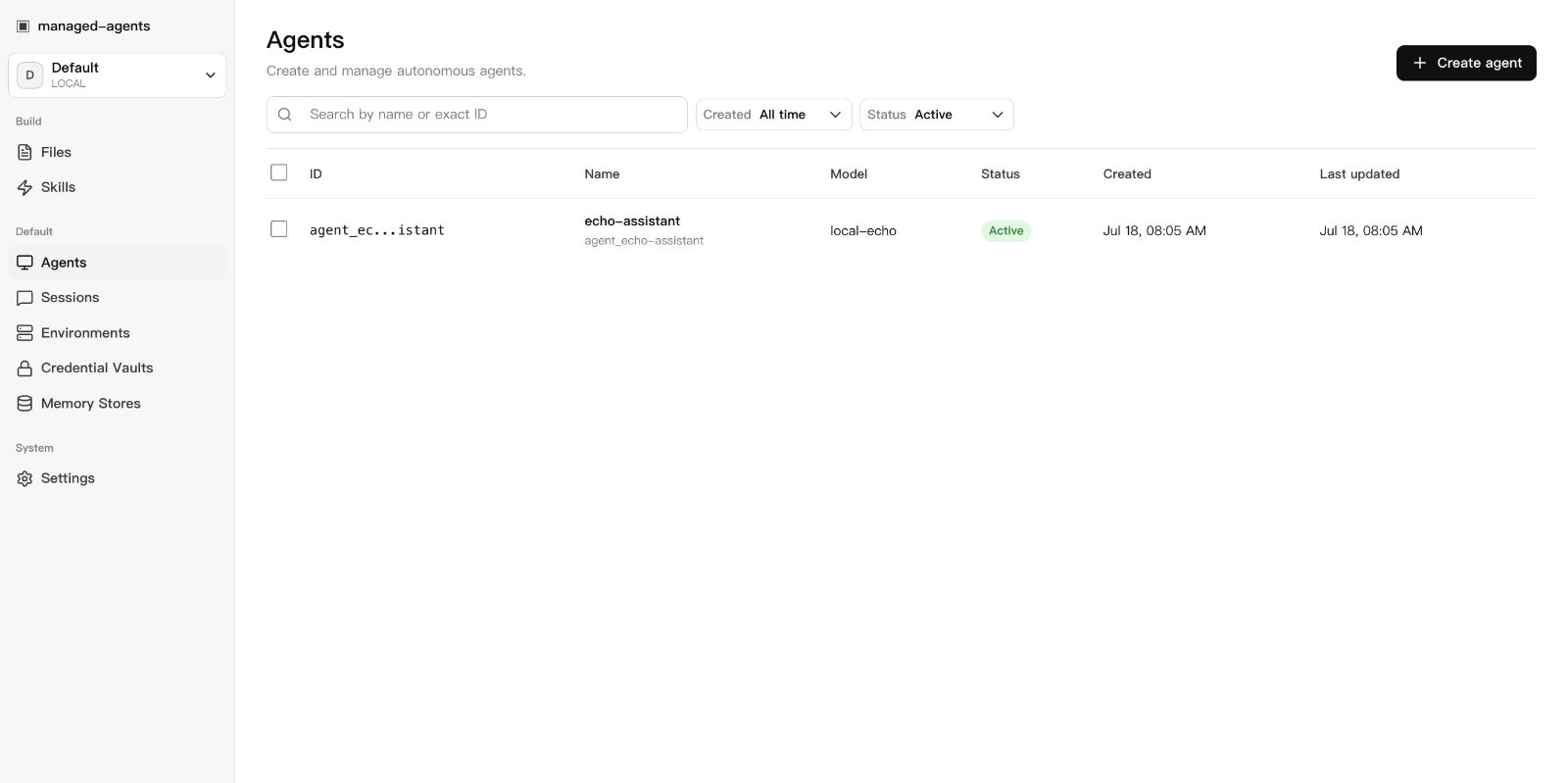 |
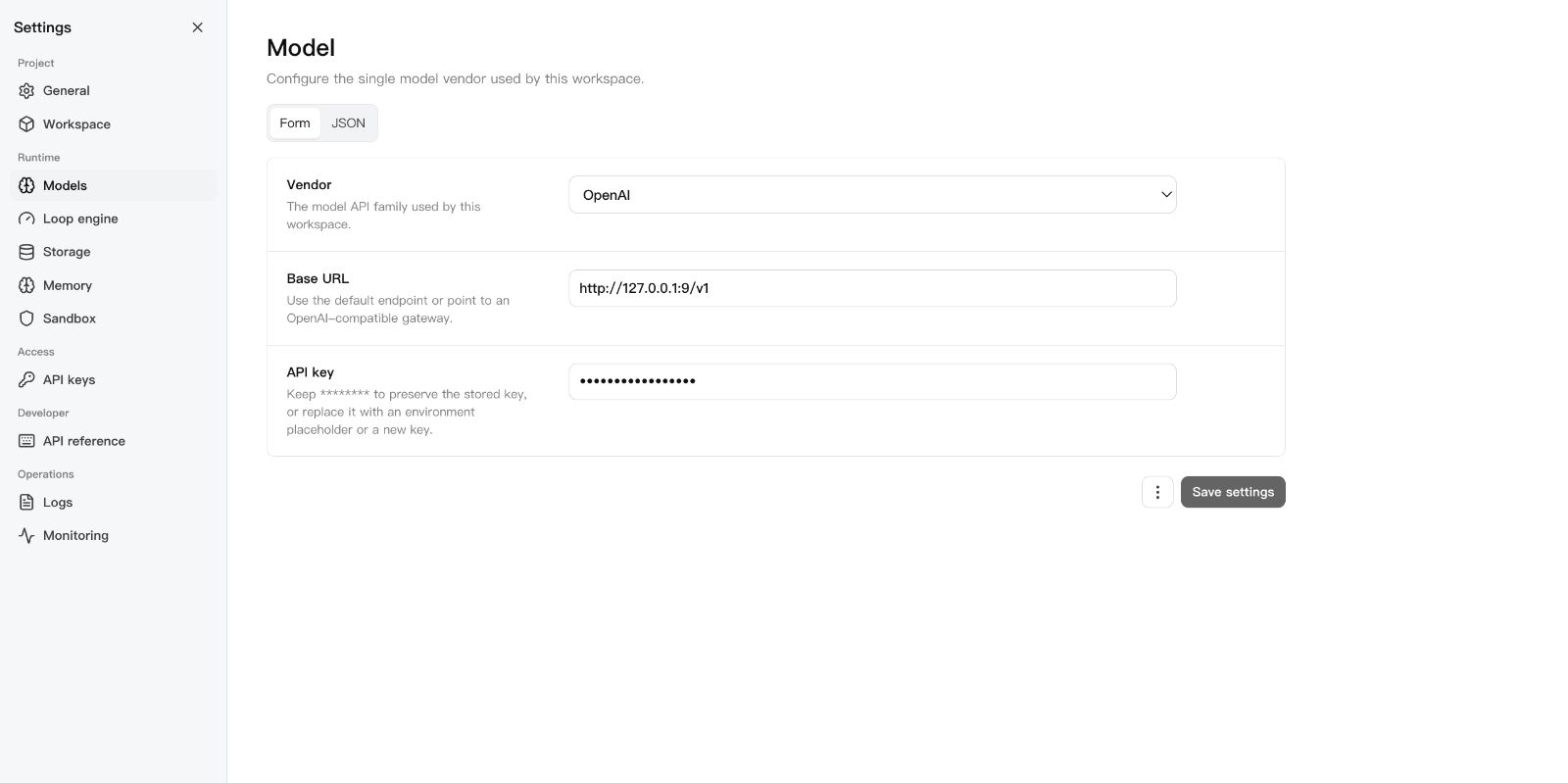 |
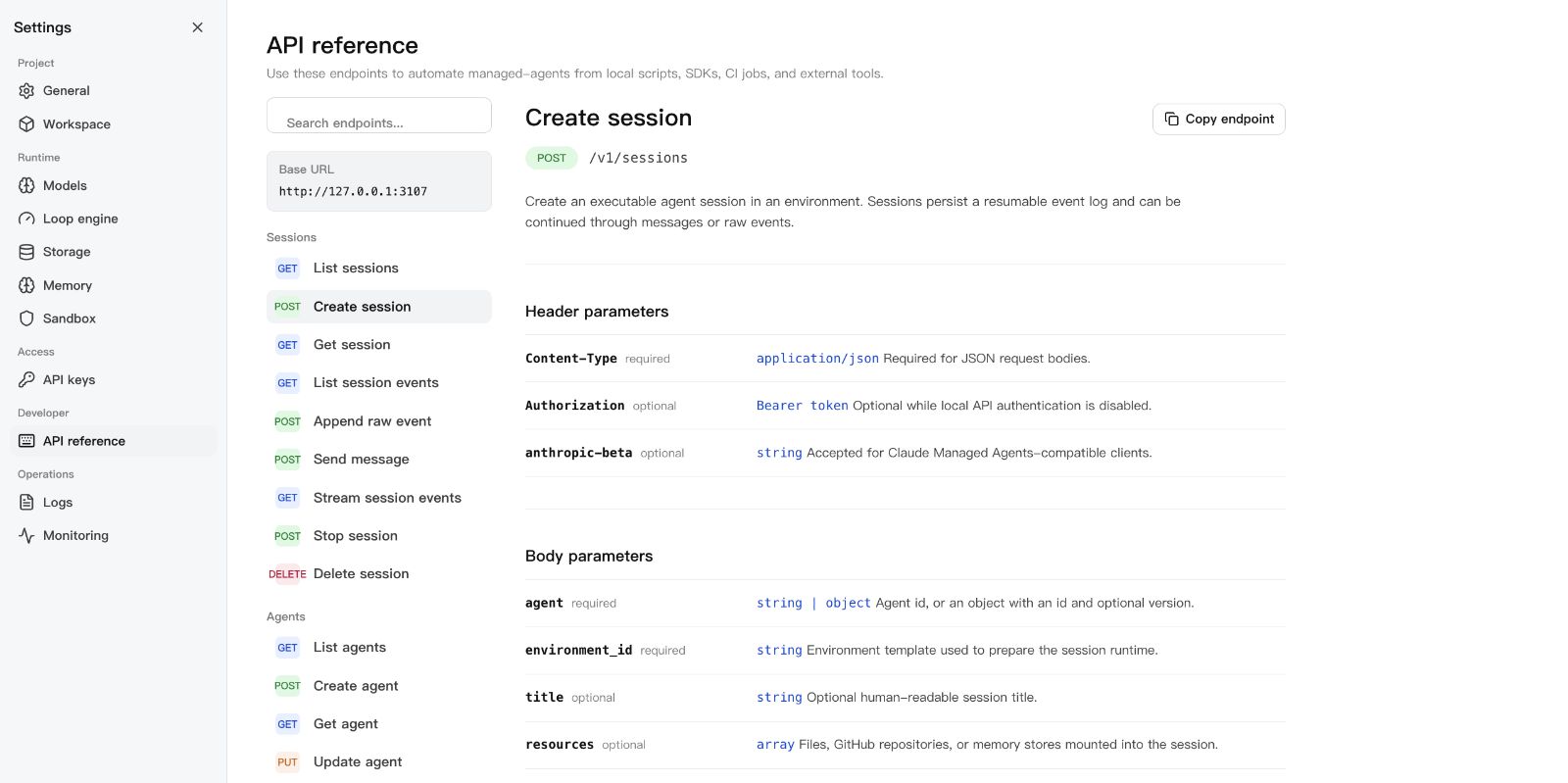 |
Use the Official SDK
The runtime answers its own /v1 API on that same port, and an official
Anthropic TypeScript SDK client drives it unchanged: point the client's
baseURL at the runtime, give it the runtime API key, and the quickstart in
examples/official-sdk runs a whole turn —
message, tool call, tool result, final reply — against it. That example is
executed on every pull request by
tests/conformance/official-sdk-quickstart.test.ts, so the compatibility it
describes is compatibility that is tested rather than claimed.
The same surface is specified in docs/api.md, and this
repository's own TypeScript SDK is documented under SDK below.
CMA compatibility
Coverage of the published Claude Managed Agents contract is declared entry by
entry in src/core/capabilities/matrix.ts:
of the official SDK's route surface, 76 routes are mounted, 29 refuse by name,
and 5 — the multi-agent thread surface — are deferred to a tracked issue.
Partial and Unsupported entries always name their reason.
The table below is generated by npm run docs:compat, and a contract-honesty
test fails when it drifts from the matrix.
Full compatibility table (generated)
| Area |
Official capability |
Status |
Notes |
| headers |
compatibility-header-admission |
Partial |
Version, beta, and mutual-exclusion rules are enforced for any request that carries a compatibility header. A request with no compatibility header is accepted as a local caller, which the published contract does not define; this header-free path is a deliberate local-first extension for a self-hosted single-tenant runtime, recorded as such in the headers contract §4, and it is why this entry stays partial. |
| headers |
extension-namespace-exclusion |
Supported |
|
| pagination |
opaque-cursors |
Partial |
A collection's envelope follows the mount: the operations router serves /v1 with {data, prev_page, next_page} and its /v1/x mirror with the local {data, has_more, first_id, last_id}, chosen through one pager so no handler emits both spellings, and cursors that are readable base64url JSON rather than opaque binary. Every canonical /v1 collection serves the canonical envelope, with no exceptions: the complete-set listings carry {data, prev_page: null, next_page: null} and the windowed ones carry a followable cursor — /v1/sessions pages by number under {order, created_at bounds, page} and rejects a cursor replayed under another ordering or creation window, /v1/sessions/{id}/events carries {order, filter, after_id}, /v1/skills and the credential audit listings use {offset, filter} — so a cut page says so instead of looking complete. The one listing that is neither shape is /v1/environments/{id}/work-items, a windowed extension that adds a counts object and is named in the contract. |
| pagination |
cursor-query-binding |
Supported |
|
| errors |
structured-error-envelope |
Supported |
|
| agents |
agent-crud |
Supported |
|
| agents |
model-object-profile |
Partial |
String and object model forms parse field by field. effort and speed are stored, returned by the read projection (the agent read, the version read, and the session snapshot), and executed on the Anthropic provider under a model capability table — effort becomes output_config.effort, fast becomes speed: "fast" with the fast-mode beta, and adaptive-thinking models receive thinking: {type: "adaptive", display: "omitted"}; a listed model refused a level or speed it cannot take fails admission, an unknown model id or non-Anthropic provider sends nothing, and a deployment's own reasoning_effort model setting is operator-level and separate. inference_geo is refused by name with unsupported_model_field because this runtime has no inference-geography control; and a canonical multiagent roster is refused by name rather than executed. |
| agents |
multiagent-roster |
Unsupported |
A canonical multiagent roster is refused by name on both agent create and agent update, because no thread, coordinator, or advisor surface exists to honour it; accepting it would let a caller believe delegation by roster is in effect. Local delegation is registered separately as an extension. |
| agents |
local-delegation-subagent |
Supported |
|
| sessions |
session-lifecycle |
Supported |
|
| sessions |
initial-events |
Supported |
|
| sessions |
prompt-caching |
Supported |
|
| sessions |
session-update |
Supported |
|
| budget |
session-budget |
Partial |
Consumption is priced in integer microcents from the append-only log, and a session may declare a max_list_cost ceiling at creation. The builtin loop checks the ceiling inside a turn: the step that crossed the cap is the last one, the session idles with stop_reason budget_reached and a session.usage immediately before it, and an accepted budget update or removal resumes the session on its own — a tool call the ceiling stranded is settled so the resumed turn sees a paired transcript. At the ceiling the next work-starting event is refused with budget_reached while events that settle work already in flight are still accepted, so the next model request does not start; a declared outcome's revision loop reads the same spend and stops at the ceiling too, closing the outcome with result budget_reached rather than starting another grading pass or turn, because the loop's turns are internal to an event that was already admitted. Two deviations are deliberate: prices come from an operator-supplied cost profile rather than official list prices, so a session whose model the profile cannot price is refused a budget and usage.list_cost is withheld while any used model is unpriced; and the pause is reported on the session's own status_idle only, because the published thread-level budget_reached signal belongs to the thread surface, which this runtime does not implement. |
| events |
append-only-event-log |
Supported |
|
| events |
processed-at-lifecycle |
Supported |
|
| events |
session-error-structure |
Supported |
|
| events |
error-enum-completeness |
Supported |
|
| events |
model-request-span-pair |
Supported |
|
| streaming |
resumable-sse |
Supported |
|
| streaming |
agent-message-stream-preview |
Supported |
|
| tools |
builtin-tool-execution |
Supported |
|
| tools |
web-fetch-execution |
Partial |
WebFetch executes over HTTP/HTTPS with domain policy, per-redirect revalidation, private-address rejection, timeout and byte caps, HTML text extraction, and a max_content_tokens budget; it converts text-like content only (no image or PDF rendering), the token budget is a character estimate, and TLS hostnames are verified but content is not sandboxed beyond redaction. |
| tools |
web-tool-domain-policy |
Supported |
|
| tools |
tool-output-overflow |
Partial |
Overflow has one unified contract (spill path, preview, marker, retrieval), but the local threshold is 50,000 chars rather than the published 100,000. |
| tools |
mcp-tool-approval-gate |
Supported |
|
| custom-tools |
custom-tool-declaration |
Supported |
|
| system-message |
system-message-events |
Supported |
|
| memory-stores |
memory-crud |
Supported |
|
| memory-stores |
memory-limits-and-preconditions |
Supported |
|
| memory-stores |
memory-version-audit |
Supported |
|
| memory-stores |
memory-multi-mount |
Supported |
|
| github-repository |
github-repository-materialization |
Supported |
|
| github-repository |
github-repository-identity-freeze |
Supported |
|
| files |
file-resources |
Supported |
|
| files |
file-mount-path |
Supported |
|
| credentials |
canonical-credential-wire-profile |
Supported |
|
| credentials |
credential-rotation |
Supported |
|
| credentials |
credential-injection-execution |
Supported |
|
| credentials |
oauth-refresh |
Supported |
|
| operations |
webhook-subscriptions |
Partial |
Locally implemented, but the delivery behaviour is not the published contract. Subscriptions are managed over REST under /v1/webhooks (with the /v1/x mirror) and delivery runs from a bridge the runtime composes at startup: each durable event is projected as it is broadcast and a 60-second tick retries due deliveries and runs due deployments, while POST /v1/webhooks/dispatch and POST /v1/webhooks/retry-due remain for on-demand passes. Every attempt carries the published header names and a Standard Webhooks v1 signature over id.timestamp.body — a retry keeps the event id and signs with its own timestamp, and each subscription holds its own whsec_ secret that is returned once at creation, and a rotation window keeps the previous secret valid in a second webhook-signature entry until it is retired — the payload is the published {type: "event", id, created_at, data: {type, id, organization_id, workspace_id}} reference envelope with webhook-id equal to the event id and local constant org/workspace values, subscriptions may only name events from the official catalog — , prefix., and unknown names are refused at write time — and the session stream reaches subscribers only through the published-name projection (status events mapped, budget_reached deduplicated per session and ceiling, internal events dropped) while resource routes publish the lifecycle events for sessions, agents, environments, vaults and credentials, memory stores, and deployments; the catalog names with no producing surface (session.pending/running/idled/requiresaction, session.thread*, agent.deleted) stay subscribable-but-silent, nothing retires the previous secret automatically, of the three published auto-disable cases all three exist, two unconditionally and one opt-in (an attempt that observes a redirect disables the endpoint with the published disabled_reason and is never retried; an attempt whose host is an internal name or resolves to a private address is refused before any connection with its own published reason but only when the deployment sets MANAGED_AGENTS_WEBHOOK_SCREEN_PRIVATE_ADDRESSES, off by default because loopback is private and a self-hosted receiver normally shares the host; and an endpoint failing without interruption for at least a window is disabled with the published sustained-failure reason, where the contract publishes the trigger shape — duration, not attempt count, with a 2xx resetting it — but no length, so the window is a local parameter: it defaults to 10 minutes, a deployment sets its own with MANAGED_AGENTS_WEBHOOK_SUSTAINED_FAILURE_WINDOW_SECONDS, and the runtime records the window in force at startup because a deployment variable has no write path of its own). Retries follow the published jittered 5-120s exponential backoff: the ceiling doubles from 60s to 120s and each delay is drawn uniformly between 5s and that ceiling. |
| operations |
scheduled-deployment-timers |
Partial |
The published deployment surface end to end: the object answers with type deployment, a depl_ id, a pinned {type, id, version} agent, environment_id, a required non-empty initial_events list (the session admission plus the deployment-only system.message), resources, vault_ids, budget, metadata, and a schedule object with last_run_at and the next three upcoming_runs_at — null for a manual-only deployment, because cron is nullable since M052. Both mount spellings serve create/read/update (POST the published verb, PUT the local one)/archive/pause/unpause/run/run-due from one router, and the local flat aliases (agentid, cron, timezone, payload) remain accepted. Each run creates its session through createWithInitialEvents and records a drun run readable at /v1/deployment_runs (deployment_id, has_error, trigger_type, created_at filters) with trigger_context carrying scheduled_at for a timed run. Failure is asymmetric per the published contract: a missing or archived bound agent archives the deployment with no run, a recoverable session_rate_limited_error records a failed run only, and other classified failures record the run and auto-pause the deployment with paused_reason.error mirroring the run's classified error.type. Manual pause and unpause exist and a paused deployment still accepts a manual run; timed runs publish deployment_run.started/.succeeded/.failed and manual runs publish none, while deployment.created/.updated/.paused/.unpaused/.archived publish on their transitions including the agent-gone cascade, and DELETE removes the deployment and its run records in one transaction then publishes deployment.deleted. The runtime's 60-second tick runs due deployments and startup re-arms their forward schedule without replaying a missed trigger. Remaining gap: mcp_egress_blocked_error has no producing path because MCP egress is not gated. |
| operations |
outcome-grading |
Supported |
|
| operations |
outcome-evaluation |
Supported |
|
| capabilities |
capability-inventory-endpoint |
Supported |
|
| capabilities |
capability-status-truthfulness |
Supported |
|
| environments |
environment-hosting-config |
Supported |
|
| environments |
environment-network-policy |
Partial |
The published config.networking object is accepted in its own vocabulary (limited/unrestricted, allowed_hosts, allow_mcp_servers, allow_package_managers) and normalized into the recorded local config.network spelling by one normalizer, with fail-closed defaults for an unrecognized type and for an unset permission, and a request declaring both spellings inconsistently refused. A limited policy is now applied: every limited sandbox gets a per-session loopback egress proxy that speaks CONNECT and absolute-URI HTTP and admits only the effective allowlist (allowed_hosts plus, when the package-manager flag is set, the curated public registry endpoints). The docker provider attaches the session container to an --internal network whose only permitted peer is a relay sidecar forwarding to the proxy, so the boundary is enforced rather than advisory; the local provider injects the proxy variables into every sandbox subprocess and stdio MCP server, which is advisory by construction — a process that ignores proxy variables egresses freely — and reports best_effort rather than claiming enforcement. The MCP connect boundary refuses a url server whose host the policy does not cover (unless allow_mcp_servers is set), web_fetch intersects the declared allowlist with its existing domain and SSRF guards at every redirect hop, and the Environment read projects networking_enforcement (enforced / best_effort / unsupported / not_applicable) from the effective backend's declared capability. It remains partial because the kubernetes and self-hosted providers install no egress boundary — a limited policy on them is reported as unsupported rather than applied — and because the local provider's enforcement is advisory by nature. |
| routes |
documented-route-surface |
Supported |
|
| unsupported |
dreams |
Unsupported |
Dreams are a memory-consolidation pipeline: they read memory stores and historical sessions and produce new, reorganized stores. This phase deliberately does not implement it; official SDK routes explicitly refuse it with unsupported_capability. Unavailable rather than not_applicable because the feature belongs in a local-first runtime — what it needs is a scheduled background worker and archived-session corpora, not a hosted service. |
| threads |
threads-and-coordinator |
Unsupported |
Not implemented: there is no thread resource, no thread lifecycle or per-thread event isolation, no coordinator or advisor role, no /threads route, and no thread-scoped budget event. A request carrying a multiagent roster is refused by name rather than silently stripped. Delegation exists only as the local single-level delegations / enable_general_subagent extension, which is not this surface. |
| unsupported |
session-budget-alerts |
Unsupported |
(not_applicable) Budget notification is a hosted billing feature: it needs an outbound channel to a party who pays for the account, and SandBase is single-tenant and local, so the operator is already the only party to notify. |
| unsupported |
mcp-tunnel |
Unsupported |
(not_applicable) MCP tunnel is a hosted connectivity feature outside the local-first scope. |
| tools |
web-search-execution |
Supported |
|
CLI
managed-agents init
managed-agents start [--host 127.0.0.1] [--port 3000]
managed-agents list
managed-agents reload
managed-agents chat <agent-id> --message "hello" [--tool-approval ask|allow|deny]
managed-agents template list | install <name> | create <name>
A turn whose tool needs approval parks instead of failing, and chat asks before
running it, then lets the runtime continue the same turn. --tool-approval allow
decides every such call in advance, which is what a script or a CI job uses, and
deny refuses them. With no terminal to prompt, the default ask answers nothing
and exits non-zero with the calls that are waiting named, so a script states its
policy rather than inheriting one. A custom tool is the exception: only your own
client can produce its result, and chat says so and exits non-zero. See
usage.
SDK
import { ManagedAgentsClient } from 'managed-agents/sdk';

const client = new ManagedAgentsClient({
  baseUrl: 'http://127.0.0.1:3000',
});

const session = await client.sessions.create({
  agent: 'agent_...',
  environment_id: 'env_...',
});

for await (const event of client.sessions.chat(session.id, 'Hello')) {
  if (event.type === 'agent.message_chunk') {
    process.stdout.write(event.delta ?? '');
  }
}
The /v1 API follows Claude Managed Agents resource shapes, so you can also
point the Anthropic SDK at the local runtime:
import Anthropic from '@anthropic-ai/sdk';

const client = new Anthropic({
  apiKey: process.env.MANAGED_AGENTS_API_KEY ?? 'local-dev-key',
  baseURL: 'http://127.0.0.1:3000',
});

const session = await client.beta.sessions.create({
  agent: 'agent_...',
  environment_id: 'env_...',
});
Authentication
Open by default. Authentication activates when at least one API key exists:
# Static key via environment
export MANAGED_AGENTS_API_KEY=sk-local-example

# Or create a managed key
curl -X POST http://127.0.0.1:3000/v1/api-keys \
  -H "Content-Type: application/json" \
  -d '{ "name": "Local Console" }'
Clients send Authorization: Bearer <key>.
Integrations and examples
- DeepSeek Harness plugin — run this runtime as a DSH plugin over MCP
stdio: install, preflight, tool list, and troubleshooting live in
examples/deepseek-harness. A DSH
project can also take a portable Skill from GitHub source —
npx --yes github:sandbaseai/sandbase-skills add multi-source-search
installs into .dsh/skills/multi-source-search.
- Agent Plugins 1.0 clients (Copilot CLI, VS Code) and the standalone
MCP bridge container — see
agent-plugin/PLUGIN.md.
- Use cases — the Showcase walks through an auditable
coding agent, DSH as an interactive front end, and controlled code execution
across Local, Docker, Kubernetes, and self-hosted sandboxes.
- Agent configuration — the YAML agent definition,
config.yaml, and the
workspace layout live in the usage guide; curl walkthroughs
for every resource are in docs/api.md.
Documentation
Development
npm ci
npm run typecheck    # src + tests + Console
npm test             # vitest
npm run build        # runtime + console + SDK
npm run release:check  # full local release gate
release:check runs typecheck, tests, both builds, npm pack --dry-run, CLI
init smoke, and examples/basic startup smoke.
Star and share
If this runtime solves a real agent-infrastructure problem for you,
star the repository so other builders can find it.
Ecosystem directories, community guides, and related projects are in
docs/ecosystem.md. Community use-case discussions:
memory migration between Codex, Claude Code, and DSH,
sandbox and filesystem protection for third-party plugins.
License
Apache-2.0


