
消息通讯
插件

Invoice-Downloader
EthanYoQ
电子发票整理与报销准备工具:从邮箱批量收集 PDF/OFD/XML 发票,OCR 识别、分类归档并生成 Excel 汇总;提供 Windows/macOS 桌面版与 DSH 插件。
PROJECT TOPICS
INSTALL REFERENCE
dsh plugin --profile web add github:xiaoweiqianluo/dsh-desktop-notify
该命令指向仓库当前默认分支;尚无绑定当前 commit 的完整验证结果。
PROJECT README
English | 简体中文
DSH 窗口被最小化、被别的窗口盖住、或者你正在别的程序里时,任务结束或需要你介入的那一刻, 屏幕右下角会浮起一张小卡片——就是聊天软件收到消息时的那种提示。
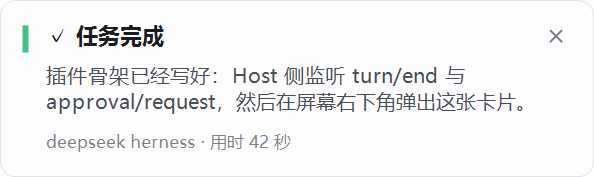
| 时机 | 触发来源 | 卡片 |
|---|---|---|
| 一轮正常结束 | turn/end: completed |
绿色竖条 ·「✓ 任务完成」 |
| 一轮出错 | turn/end: error |
红色竖条 ·「!任务出错」 |
| 输出被截断 / 被阻止 / 会话中断 / 被中止 | 对应的 turn/end 原因 |
灰色竖条 |
| 工具等待你授权 | approval/request |
琥珀竖条 ·「⚠ 需要你的确认」,正文带工具名与原因 |
| Agent 向你提问 | user-questions/request |
琥珀竖条 ·「?需要你回答」,正文带问题 |
完成卡片显示这一轮最后一段回复(截断为一行),出错卡片显示错误码或错误信息, 底部显示会话标题与实际耗时。
user)。enabled 关闭,或当前不是 Windows。animate: false 可变成原地出现。silent: true 可关。在 cordis.patch.yml 里改 desktop-notify 这一行的 config:
| 键 | 默认值 | 说明 |
|---|---|---|
enabled |
true |
总开关 |
notifyOnTurnEnd |
true |
任务完成时提醒 |
notifyOnError |
true |
任务出错时提醒 |
notifyOnApproval |
true |
需要授权时提醒 |
notifyOnQuestion |
true |
需要回答时提醒 |
notifyWhenFocused |
false |
窗口在前台也提醒;仅用于检查卡片长什么样 |
silent |
false |
不播放提示音 |
animate |
true |
从右侧滑入;设为 false 则原地出现 |
cardDurationMs |
12000 |
完成卡片停留时长(毫秒) |
waitingDurationMs |
24000 |
等待你操作的卡片停留时长(毫秒) |
summaryChars |
90 |
正文摘要最大字数 |
appProcessName |
DeepSeek Harness |
判定「窗口在前台」用的进程名 |
language |
zh |
卡片文案语言,zh 或 en |
logFile |
空 | 写入卡片诊断日志的路径,排错时用 |
Windows 的 toast 接口要求调用进程有「程序包身份」,普通桌面进程调用会失败并返回
0x80073D54。所以这里用 PowerShell + WinForms 自己画一张卡片:任何 Windows 10/11 都能显示,
外观也完全可控。代价是通知不会留在通知中心,关掉就没了。
每次调用都会在 %TEMP%\dsh-desktop-notify.log 留一行记录(超过 200 KB 自动重来),用它可以分清三种情况:
invoked ... —— 插件确实触发了;foreground=... name=DeepSeek Harness 加 skipped: harness window is foreground —— 窗口在前台,按设计不打扰;showing card ... painted —— 卡片已经画出来了;raised to top ok=True style=... topmost=True —— 卡片确实在置顶层(topmost=False 说明没进置顶层,会被普通窗口压住);bounds=... above us: [...] —— 卡片位置和压在它上面的窗口,排查遮挡时看这一行。想固定日志位置就把配置里的 logFile 指向一个路径。
A Windows-only DeepSeek Harness plugin: when a turn finishes, fails, or the Harness is waiting for your approval or answer while its window is not in front, a small card slides into the bottom-right corner of the primary screen — the same pattern chat apps use for incoming messages.
In the Web GUI open Plugins → Add plugin, enter the Git address
github:xiaoweiqianluo/dsh-desktop-notify (or clone the repository and give its absolute path),
then enable Desktop popup alerts in the plugin list.
Or from a shell with the dsh CLI available:
dsh plugin --profile desktop add github:xiaoweiqianluo/dsh-desktop-notifyNo dependencies, no build step: the bundle is plain ES module JavaScript plus one PowerShell script. It needs Windows 10/11 with Windows PowerShell 5.1 (installed by default).
| Moment | Source | Card |
|---|---|---|
| A turn completed | turn/end: completed |
Green bar · "✓ Task finished" |
| A turn failed | turn/end: error |
Red bar · "! Task failed" |
| Output truncated / blocked / interrupted / stopped | the matching turn/end reason |
Grey bar |
| A tool waits for authorization | approval/request |
Amber bar · "⚠ Your confirmation is needed" |
| The agent asks a question | user-questions/request |
Amber bar · "? Your answer is needed" |
It stays silent when the foreground window belongs to the Harness (you are already looking at it), for subagent sessions, and for turns you stopped yourself.
animate: false shows it in place.Edit the desktop-notify row in cordis.patch.yml:
| Key | Default | Meaning |
|---|---|---|
enabled |
true |
Master switch |
notifyOnTurnEnd |
true |
Card when a turn completes |
notifyOnError |
true |
Card when a turn fails |
notifyOnApproval |
true |
Card when an authorization is pending |
notifyOnQuestion |
true |
Card when the agent asks a question |
notifyWhenFocused |
false |
Also alert while focused; for inspecting the card |
silent |
false |
No system sound |
animate |
true |
Slide in from the right |
cardDurationMs |
12000 |
Completion card lifetime |
waitingDurationMs |
24000 |
Waiting card lifetime |
summaryChars |
90 |
Maximum preview characters |
appProcessName |
DeepSeek Harness |
Process name treated as "window in front" |
language |
zh |
Card copy language, zh or en |
logFile |
empty | Optional diagnostics log path |
The toast API requires package identity; an ordinary desktop process calling it fails with
0x80073D54. This plugin draws its own card with PowerShell and WinForms instead, which works on
every Windows 10/11 installation and keeps the appearance under control. The trade-off: notifications
are not kept in the Action Center.
CLASSIFICATION EVIDENCE
系统优先读取 GitHub Topics,再与站内分类词典和词根规则比对。当前命中: notification。
EthanYoQ
电子发票整理与报销准备工具:从邮箱批量收集 PDF/OFD/XML 发票,OCR 识别、分类归档并生成 Excel 汇总;提供 Windows/macOS 桌面版与 DSH 插件。

Bytedesk
Open Souce IM with AI powered live-chat, email, ticket support, omni-channel customer service,alternative to slack + zendesk

wenbin-wb
🚀 DeepSeek Harness 多通道远程访问与安全守护插件 | 局域网扫码直连、Cloudflare / 自建公网隧道、微信 / QQ / 飞书 / Telegram 机器人全生命周期对话 | 内置全协议访问安全认证、后台防篡改与容灾保命体系