
其他
完整应用

deepseek-harness
deepseek-ai
DeepSeek Harness: Everything is a Plugin.
PROJECT TOPICS
PROJECT README




Codex 风格左侧消息导航轨道 —— 在 DeepSeek Harness Web UI 的长会话里快速定位历史提问。
Left-side message navigation rail for the DeepSeek Harness Web UI: jump to any past user message in long sessions, Codex-style.
交互灵感来自 Codex 的消息导航栏(inspired by Codex's message rail)。本插件与 OpenAI 无关联。
会话左侧的消息导航轨道(悬停刻度显示预览卡,点击跳转到对应消息):
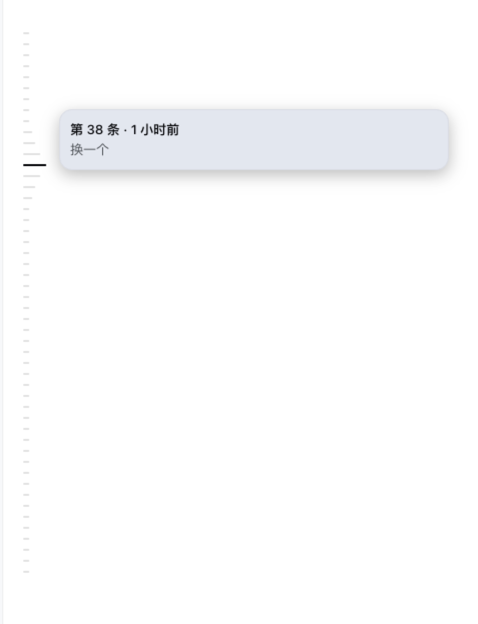
prefers-reduced-motion 降级;键盘可悬停(focus 等价 hover)>=0.1.0-rc.7;manifest 已对官方最新三个发行版逐项声明兼容>=22.13.0web插件通过 DeepSeek Harness 的 dsh 命令安装。下面每个命令都给出两种等价写法:
npm install -g @deepseek-ai/dsh)# dsh 形式
dsh plugin --profile web add dsh-message-rail
# npx 形式(无需安装 dsh)
npx @deepseek-ai/dsh plugin --profile web add dsh-message-rail# dsh 形式
dsh plugin --profile web add github:wx-yss/dsh-message-rail
# npx 形式
npx @deepseek-ai/dsh plugin --profile web add github:wx-yss/dsh-message-railgit clone git@github.com:wx-yss/dsh-message-rail.git
cd dsh-message-rail
pnpm install
npx @deepseek-ai/dsh plugin --profile web add .安装后完整重启 dsh web:
# dsh 形式
dsh web

# npx 形式
npx @deepseek-ai/dsh web打开包含至少两条用户消息的会话,左侧即出现导航轨道:
loadOlder() 仍会把中间页面逐步加入右侧且不会自动卸载;这属于 DSH 聊天列表当前的累积渲染限制kind === 'user' 普通提问 与 kind === 'steering' 运行中插话),不包含助手回复、工具调用、命令与注入上下文(kind === 'context')--dsw-* 设计令牌),不支持独立于 DSH 的配色偏好data-chat-anchor-key / data-conversation-scroll / data-chat-flow / data-time-hover-root / data-slot="conversation.view")为 DSH 内部契约,随 DSH 版本可能变化├── package.json # dsh.client(Web 插件)+ dsh.bundle(profile patch)声明
├── cordis.patch.yml # bundle patch:插入插件行
├── lib/
│ ├── index.js # Host 半部:空 apply 占位
│ └── client.js # Client 半部:独立索引 + 轨道 UI + 按需分页跳转
├── assets/ # README 效果截图
├── LICENSE # MIT
└── README.mdshell.overlay 声明会话级子 seat message-rail.rail(SessionProvider 桥接,每会话一个实例)useSession 的 chat.order + chat.nodes;完整刻度通过 connection.api.sessions.history()(子 Agent 使用 subagents.history())独立建立surfaceOp === 'append' 且 source.kind === 'user' 的 user/message 记录及其 messageId、seq、时间和预览文本;中间分页不进入 React 状态messageId 判断目标是否已进入右侧;未加载时才调用 session.loadOlder(),每页保护可见消息锚点并在命中目标后停止historyPage;结合右侧已加载深度估算剩余页数,预计超过一秒时立即显示,否则实际等待超过一秒再提示;目标组件就绪后立即关闭,下一帧再定位[data-conversation-scroll] + [data-chat-anchor-key] DOM 锚点;目标已可见时只描边闪烁,否则直接写入 scrollTop 瞬时定位,并在两帧内按最新容器几何有界校正floor(scrollTop / 10) - 12 到 ceil((scrollTop + 高度) / 10) + 12,绝对定位刻度MIT
CLASSIFICATION EVIDENCE
系统优先读取 GitHub Topics,再与站内分类词典和词根规则比对。当前命中: 无有效分类标签。
deepseek-ai
DeepSeek Harness: Everything is a Plugin.

anywhere-labs
为 DeepSeek Harness (DSH) 插件生态打造的现代化桌面端解决方案。万物皆「插件」,桌面本身也是「插件」。

walkinglabs
Harness engineering beginner tutorial, from 0 to 1