文件与数据
插件

OpenViking
volcengine
Self-evolving Context Database for AI Agents. Unify Agent Memory, Knowledge RAG and Skills.

wgrbiss-spec/dsh-colar-imagem-deepseek-harness
COLAR IMAGEM DEEPSEEK HARNESS — cola imagens da área de transferência no composer do DSH Desktop pelo menu do botão direito (Colar imagem), anexa ao rascunho e salva cópia em pasted-images/AAAA-MM-DD/. Paste clipboard images with the right-click menu.
PROJECT TOPICS
INSTALL REFERENCE
dsh plugin --profile web add github:wgrbiss-spec/dsh-colar-imagem-deepseek-harness
该命令指向仓库当前默认分支;尚无绑定当前 commit 的完整验证结果。
PROJECT README
Português (BR) | English
Paste clipboard images into the DeepSeek Harness Desktop composer with the right mouse button → Paste. The image is attached to the draft through the native pipeline (thumbnail, upload, limits) and a copy is written under pasted-images/YYYY-MM-DD/ inside the session workspace.
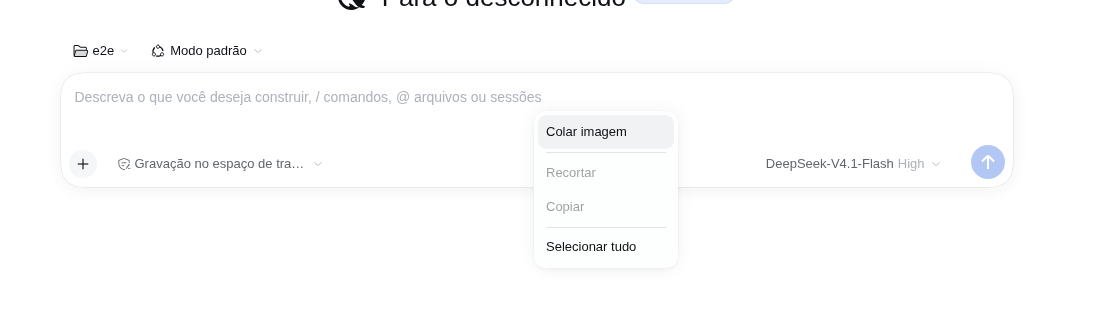
Ctrl+V already works in the Harness composer, but the desktop shell's context menu is English-only and its Paste role does not handle clipboard-only images (screenshots copied from a capture tool). This plugin replaces the composer context menu with the Harness' own localized menu and adds a Colar imagem / Paste image action that reads the system clipboard from the Host and feeds the same native attachment path.
<workspace>/pasted-images/YYYY-MM-DD/colada-YYYY-MM-DD-HH-MM-SS.png (folder and date grouping are configurable). Off by default — the plugin only attaches the image.wl-paste/xclip, pbpaste, PowerShell), so the browser never asks for clipboard-read.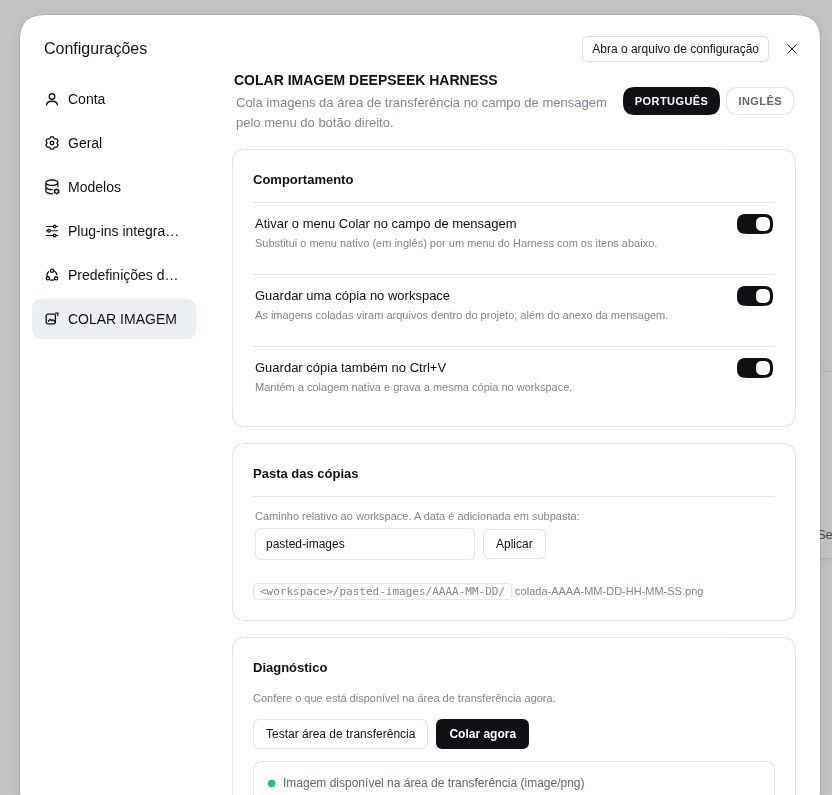
Requires DeepSeek Harness Desktop 0.2.2-rc.1 or newer (<0.3.0).
# Desktop app profile
dsh plugin --profile desktop add dsh-colar-imagem-deepseek-harness
Or install a local tarball:
dsh plugin --profile desktop add ./dsh-colar-imagem-deepseek-harness-0.1.1.tgzThen restart the Desktop app (the Host half registers HTTP routes at startup; reloading the page is not enough). From the GUI you can also use Plug-ins → Adicionar plugin with the package name or a local directory.
The plugin also appears under Settings → COLAR IMAGEM, with:
pasted-images/... next to the message attachment.pasted-images).Everything has a working default. Override fields in the profile's cordis.patch.yml:
- id: colar-imagem-deepseek-harness
  config:
    pastedDir: pasted-images
    dateFolders: true
    saveWorkspaceCopies: false
    saveNativePastes: false
    maxClipboardBytes: 52428800
clipboardTimeoutMs: 5000| Field | Default | Meaning |
|---|---|---|
pastedDir |
pasted-images |
Workspace-relative folder for the copies. Absolute paths and .. fall back to the default. |
dateFolders |
true |
Add a YYYY-MM-DD subfolder per day. |
saveNativePastes |
false |
Default for the “Ctrl+V too” setting (the user setting wins after the first save). |
saveWorkspaceCopies |
false |
Default for “keep a copy in the workspace”; off means paste only attaches the image. |
maxClipboardBytes |
50 MiB |
Largest image accepted from the clipboard. |
clipboardTimeoutMs |
5000 |
Budget for each system clipboard tool invocation. |
The user-facing settings (toggles/folder/language) are stored in the browser's localStorage; the Host configuration above only supplies the defaults.
| System | Image | Text |
|---|---|---|
| Linux / X11 | xclip |
xclip |
| Linux / Wayland | wl-paste (wl-clipboard) |
wl-paste |
| macOS | osascript + pbpaste |
pbpaste |
| Windows | PowerShell + Windows Forms | PowerShell + Windows Forms |
Linux (X11 and Wayland) is the tested target; macOS and Windows paths are implemented as best-effort and have no CI coverage. If no backend is available, the browser clipboard API is used as a fallback (may require the desktop shell to grant clipboard-read).
<session workspace>/
└── pasted-images/
    └── 2026-11-10/
        ├── colada-2026-11-10-00-14-06.png
        └── colada-2026-11-10-00-14-07.png
Existing files are never overwritten: a numeric suffix is added (colada-....-2.png). Identical pastes are kept as separate files (the native attachment store handles deduplication for the model).
/colar-imagem-deepseek-harness/clipboard, /read, /save) only accept requests from the local page: loopback Host, Origin equal to the Host and Sec-Fetch-Site: same-origin|none. Cross-site pages get 403.Ctrl+Z / Ctrl+Shift+Z; the menu offers Paste, Cut, Copy and Select All.text/uri-list) is not turned into an attachment in 0.1.1.wl-clipboard (wl-paste); otherwise use the browser fallback.npm test # unit tests (clipboard parsing, paths, routes helpers)
npm run validate # package/catalog checks (also runs on prepack)
dev/run-e2e.sh # isolated DSH web + Xvfb clipboard + Puppeteer end-to-end
npm pack # produces dsh-colar-imagem-deepseek-harness-<version>.tgzThe end-to-end script starts its own DSH_HOME, Xvfb display, PNG clipboard and dsh web instance, then verifies: menu opens, “Colar imagem” attaches the image, the workspace file is written, the text menu variant works, the Ctrl+V hook writes a copy, and the Settings section renders, reads the clipboard, hides the configuration-file button and flips the new defaults (24 checks).
publish/ contains the community catalog entry, an index reference and a Portuguese walkthrough (PRIMEIRA-PUBLICACAO.md). npm run publish:npm runs tests + validation and publishes to npm. Set the GitHub owner with node scripts/set-owner.mjs <user> if the repository is not under wgrbiss-spec.
MIT © wgrbiss-spec
CLASSIFICATION EVIDENCE
系统优先读取 GitHub Topics,再与站内分类词典和词根规则比对。当前命中: clipboard。
volcengine
Self-evolving Context Database for AI Agents. Unify Agent Memory, Knowledge RAG and Skills.

mindscale-noah
该仓库暂未提供项目说明。

himovo
Turn DeepSeek Harness into a self-hosted enterprise Agent platform with knowledge, deep research, content generation, vibe coding, browser automation, governance, and admin controls.