






简体中文
│
Website
│
API Docs
│
PYPI SDK
│
Deployment Guide
Accurately remember user and task context and reuse it across agents; evolve memory through ongoing interactions, automatically distill Skills, and connect with file-based knowledge systems so experience truly becomes capability.
⭐ Star us on GitHub to automatically upgrade to a Pro quota membership.
📰 News
- 2026-08-18: We released the DeepSeek Harness Plugin, letting DeepSeek Harness (dsh) agents automatically recall and write MindMemOS memories.
- 2026-08-14: We released the MindMemOS 1.0 technical report, MindMemOS: A Portable and Self-Evolving Memory Operating Layer for AI Agents.
- 2026-07-17: MindMemOS integrated with LLM4AD_NEXT, providing searchable long-term memory for algorithm design tasks and enabling the accumulation and reuse of cross-task experience, domain knowledge, and constraints.
- 2026-06-30: MindMemOS was officially released!
🌟 Core Features
- Portable across agents: Persist user profiles, preferences, project facts, tool experience, and skill candidates as reusable assets, allowing OpenClaw, Hermes, Claude Code, OpenHands, and other agents to share or transfer the same long-term memory.
- Self-evolving memory system: Continuously improve memory quality through schema learning, dreaming, and feedback by automatically learning frequent memory patterns, consolidating memories offline, and using interaction corrections to optimize add/search workflows.
- Memory and Skills integration: Experience memories can be distilled into skill candidates, while skill execution results, failure traces, and user feedback flow back into the memory system to drive continuous skill evolution.
- Plugin integrations: Connect MindMemOS to different agents and workflows through plugins that retrieve and inject relevant memories before interactions and automatically write conversations back afterward. The OpenClaw Plugin and DeepSeek Harness Plugin are currently available, with more integrations in progress.
🚀 Quick Start
MindMemOS offers two deployment modes (official cloud service, local self-hosting) and three access methods (HTTP API, Python SDK / CLI, agent plugin). Any combination works — server and client speak the same protocol:
| Access Method |
Use Case |
Cloud base_url |
Local base_url |
| HTTP API |
Call directly from business apps |
https://mindmemos.cn |
http://127.0.0.1:8000 |
| Python SDK / CLI |
Integrate into business apps |
https://mindmemos.cn |
http://127.0.0.1:8000 |
| OpenClaw Plugin |
Agent auto-recalls / writes memory |
https://mindmemos.cn |
http://127.0.0.1:8000 |
| DeepSeek Harness Plugin |
Agent auto-recalls / writes memory (dsh) |
https://mindmemos.cn |
http://127.0.0.1:8000 |
To try it without deploying, use the official cloud service (request an API key on the website); for on-premises or offline use, start with Local Deployment below.
1. Local Deployment
MindMemOS uses uv to manage dependencies and run local commands. For detailed configuration instructions, see docs/deploy/instruction.md.
1.1 Prepare Configuration Files
cp .env.example .env
cp config/mindmemos/dev.example.yaml config/mindmemos/dev.yaml
Before startup, configure at least the following three model routers in config/mindmemos/dev.yaml:
chat_model_router: supports memory extraction, Skill evolution, and other generation tasks.embed_model_router: generates semantic embeddings; make sure its dimensions match the Qdrant dimension configuration.rerank_model_router: optional; reranks memory retrieval results.
The schema memory-extraction flow is versioned: algo_config.add.schema.version defaults to v2 (rule-based graph fusion) and can be pinned to v1 (develop-compatible flow) per project. Storage is compatible in both directions; see the deployment guide for binding and effective timing.
Configure an API key and its bound project_id in config/mindmemos/api_keys.yaml.
1.2 Start the Service
Start the local service:
make dev
make dev starts the full Docker dependency stack before starting FastAPI.
To start only core dependencies:
make dev-core          # Qdrant + Neo4j + Kafka
make db-observability  # Qdrant + Neo4j + Kafka + ClickHouse + OTel + Grafana
The default local service port is 8000:
FastAPI: http://127.0.0.1:8000
Stop the local service:
make dev-down
2. Access Methods
Cloud and local self-hosting use the same access protocol. Local keys come from config/mindmemos/api_keys.yaml; cloud keys are obtained from the website.
2.1 HTTP API
HTTP is the base access method — the SDK and plugins also talk HTTP underneath. Once the service is up, first use curl to verify the endpoints work, then wire up your business logic. Define the address and key before calling (pick local or cloud):
export BASE_URL=http://127.0.0.1:8000   # Local self-host; change to https://mindmemos.cn for cloud
export API_KEY=dev-api-key-001          # Local example key; use a website-issued key for cloud
Add a memory:
curl -sS -X POST "$BASE_URL/v1/memory/add" \
  -H "Authorization: Bearer $API_KEY" \
  -H "Content-Type: application/json" \
  -d '{
    "user_id": "u_123",
    "messages": [{"role": "user", "content": "I like iced Americanos."}]
  }'
Search memories:
curl -sS -X POST "$BASE_URL/v1/memory/search" \
  -H "Authorization: Bearer $API_KEY" \
  -H "Content-Type: application/json" \
  -d '{"query": "What kind of coffee does the user like?", "top_k": 3}'
A code of ok with readable memory content means the access works. curl is just a smoke-test helper; the shown format is for bash. Other environments / languages and the remaining endpoints (get / list / delete / update / feedback / dreaming / skills, etc.) are all covered in the API docs.
2.2 Configure the SDK
Install the Python SDK:
pip install mindmemos-sdk
Run the authentication command and configure the service address, API key, and default user when prompted:
mindmemos auth
| Setting |
Local Service |
Cloud Service |
base_url |
http://127.0.0.1:8000 |
https://mindmemos.cn |
api_key |
An enabled API key from config/mindmemos/api_keys.yaml |
An API key obtained from the MindMemOS website |
user_id |
A stable identifier for the current end user, such as u_123 |
A stable identifier for the current end user, such as u_123 |
The configuration is saved to ~/.mindmemos/settings.json. Check the current configuration with:
mindmemos config show
The local service automatically determines the project_id and memory algorithm from the API key, so SDK calls do not need to pass project_id. The user_id distinguishes users within the same project and can be overridden in an individual add or search call.
If you prefer not to use the local configuration file, pass connection parameters explicitly when creating the client:
from mindmemos_sdk import MindMemOSClient

with MindMemOSClient(
    base_url="http://127.0.0.1:8000",
    api_key="<api_key>",
    user_id="u_123",
) as client:
    ...
Explicit parameters take precedence over values in ~/.mindmemos/settings.json.
2.3 Add and Search Memories with the SDK
After completing the configuration above, MindMemOSClient() automatically reads the service address, API key, and default user_id. The SDK adds the authentication header automatically, so there is no need to construct HTTP requests manually:
from mindmemos_sdk import DialogueMessage, MindMemOSClient

with MindMemOSClient() as client:
    add_result = client.memory.add(
        messages=[
            DialogueMessage(
                role="user",
                content="I like iced Americanos.",
            )
        ],
        mode="sync",
    )

    for item in add_result.memories:
        print(item.operation, item.memory_id, item.content)

    search_result = client.memory.search(
        "What kind of coffee does the user like?",
        top_k=5,
        search_strategy="fast",
        # token_budget=2000,  # optional: strict token budget (enables retention)
    )

    for memory in search_result.memories:
        print(memory.id, memory.memory)
Trigger cloud evolution for a registered Skill:
from mindmemos_sdk import MindMemOSClient

with MindMemOSClient() as client:
    result = client.skills.evolve("my-skill", mode="sync")

    print("evolved:", result.evolved)
    print("pending:", result.pending_count)
    print("threshold:", result.threshold)
    print("new versions:", result.new_version_ids)
Local and cloud services use the same SDK call pattern. To switch between them, reconfigure only the base_url and corresponding API key.
2.4 Use the CLI
After running mindmemos auth, you can also add and search memories directly with the CLI included in the SDK:
mindmemos memory add --content "I like iced Americanos"
mindmemos memory search "coffee preferences" --top-k 5
The memory subcommand also supports get / update / delete / feedback / dreaming, and the skill subcommand supports register / list / evolve / push / pull / history and more. For the full command list, parameter reference, and troubleshooting, see the CLI Guide.
2.5 OpenClaw Plugin
Installing via our mindmemos-cli skill is recommended: deploy skills/mindmemos-cli/ to your agent's skills directory and let the agent follow its instructions. The skill's reference docs cover installation, permissions, and common troubleshooting.
Manual installation (not recommended)
First install the SDK and complete auth configuration (required): the plugin communicates with the local machine through the mindmemos CLI, so you must install the Python SDK first and make sure the mindmemos command is available:
pip install mindmemos-sdk    # or: uv add mindmemos-sdk
mindmemos --version          # confirm the command is available
Then configure base_url, API key, and user_id with mindmemos auth (pointing at either the cloud or a local service):
mindmemos auth
mindmemos config show        # confirm the configuration took effect
Skipping these two steps before installing the plugin causes the logs to error out (mindmemos command not found / auth not configured), and the plugin will not be able to read or write memories properly.
Install and enable the plugin:
openclaw plugins install @mindmemos/openclaw-plugin
openclaw plugins enable mindmemos-memory
(@mindmemos/openclaw-plugin is the npm package name; mindmemos-memory is the plugin id.) Manual installation easily runs into two pitfalls:
Once installed, enabled, and the gateway restarted, the plugin recalls and injects relevant memories before each user turn and writes the conversation back automatically when the turn ends.
Full commands, configuration options, and troubleshooting are in the OpenClaw plugin integration docs.
2.6 DeepSeek Harness Plugin
Installing via our mindmemos-cli skill is recommended: deploy skills/mindmemos-cli/ to your agent's skills directory and let the agent follow its instructions. The skill's reference docs cover installation and common troubleshooting.
Manual installation (not recommended)
First install the SDK and complete auth configuration (required): the plugin communicates with the local machine through the mindmemos CLI, so you must install the Python SDK first and make sure the mindmemos command is available:
pip install mindmemos-sdk    # or: uv add mindmemos-sdk
mindmemos --version          # confirm the command is available
Then configure base_url, API key, and user_id with mindmemos auth (pointing at either the cloud or a local service):
mindmemos auth
mindmemos config show        # confirm the configuration took effect
Skipping these two steps before installing the plugin causes the logs to error out (mindmemos command not found / auth not configured), and the plugin will not be able to read or write memories properly.
Install the plugin into a dsh profile (dsh plugin forwards to pnpm and installs the package into the profile's node_modules):
dsh plugin --profile <name> add @mindmemos/deepseek-harness-plugin
(@mindmemos/deepseek-harness-plugin is the npm package name; mindmemos-memory is the plugin id.) dsh composes plugins through layered cordis.patch.yml files, so register the plugin by adding an insert entry to the profile patch (~/.dsh/profiles/<name>/cordis.patch.yml):
- insert:
    - id: mindmemos-memory
      name: '@mindmemos/deepseek-harness-plugin'
      config:
        userId: alice
        appId: deepseek-harness
Restart dsh with that profile. Once registered, the plugin recalls and injects relevant memories before each user turn and writes the conversation back automatically when the turn ends.
Full commands, configuration options, and troubleshooting are in the DeepSeek Harness plugin integration docs.
📊 Benchmark
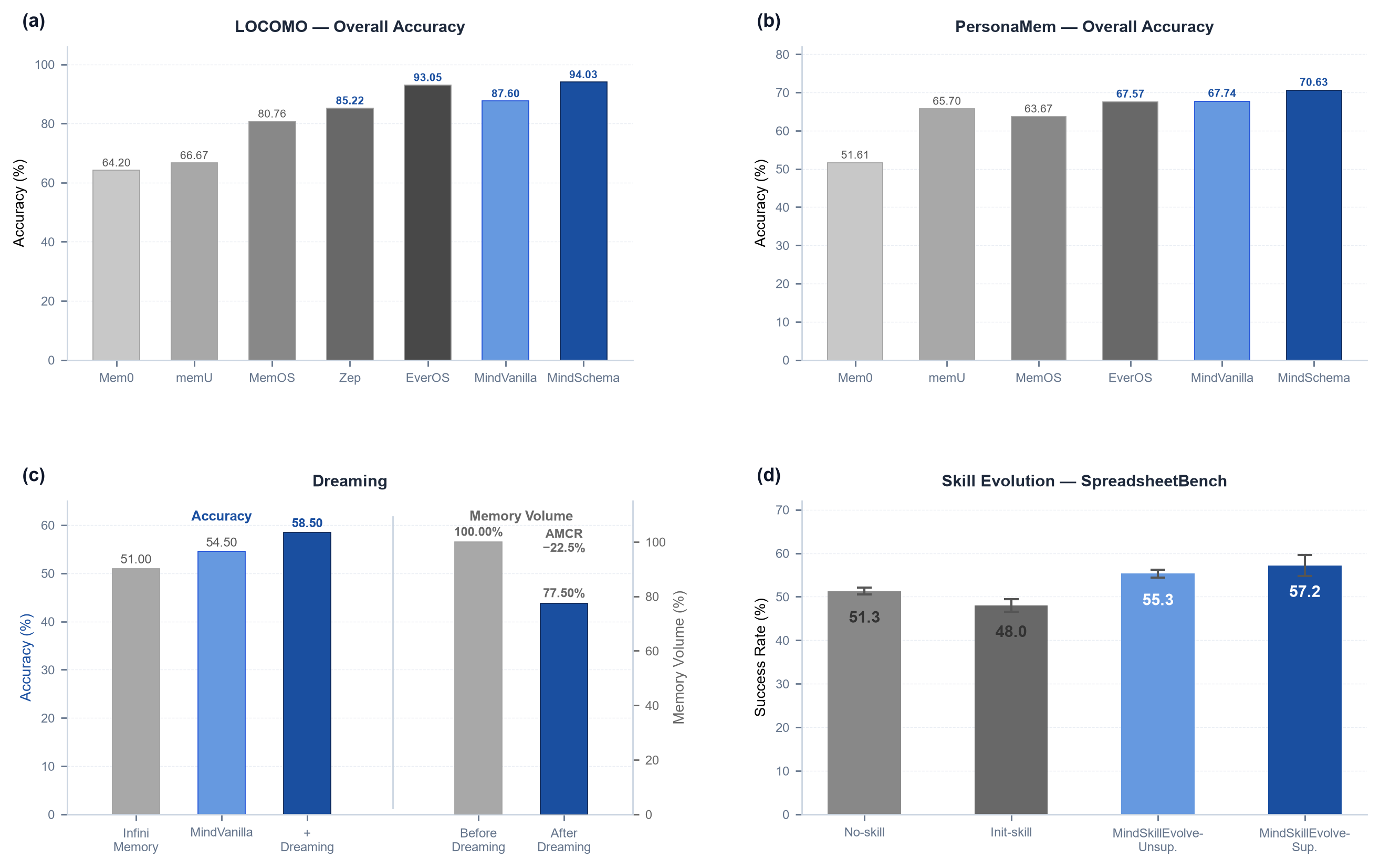
💬 Conversational Memory: LoCoMo
- Benchmark: LoCoMo, a mainstream benchmark for long-conversation memory covering single-hop, multi-hop, temporal, and open-domain question answering.
| Method |
Single-hop |
Multi-hop |
Temporal |
Open-domain |
Overall |
| Mem0 |
68.97 |
61.70 |
58.26 |
50.00 |
64.20 |
| MemU |
74.91 |
72.34 |
43.61 |
54.17 |
66.67 |
| MemOS |
85.37 |
79.43 |
75.08 |
64.58 |
80.76 |
| Zep |
90.84 |
81.91 |
77.26 |
75.00 |
85.22 |
| EverOS |
96.67 |
91.84 |
89.72 |
76.04 |
93.05 |
| MindMemOS-MindVanilla |
92.03 |
85.82 |
83.80 |
66.67 |
87.60 |
| MindMemOS-MindSchema |
96.79 |
93.97 |
90.34 |
82.29 |
94.03 |
👤 User Profile Memory: PersonaMem
- Benchmark: PersonaMem, a memory benchmark centered on user profiles and preference understanding that evaluates recall, tracking, revisiting, suggestion, recommendation, and generalization of user traits.
| Method |
Recall |
Ack. Lat. |
Trk. Evo. |
Revisit |
Suggest |
Recom. |
General. |
Overall |
| Mem0 |
46.51 |
41.18 |
65.47 |
90.91 |
12.90 |
34.55 |
43.86 |
51.61 |
| MemU |
64.34 |
64.71 |
66.20 |
87.88 |
31.18 |
67.27 |
84.21 |
65.70 |
| MemOS |
53.49 |
82.35 |
66.91 |
79.80 |
41.94 |
69.09 |
75.44 |
63.67 |
| EverOS |
74.42 |
64.71 |
64.03 |
85.86 |
35.48 |
65.45 |
84.21 |
67.57 |
| MindMemOS-MindVanilla |
76.74 |
88.24 |
65.47 |
87.88 |
17.20 |
80.00 |
82.46 |
67.74 |
| MindMemOS-MindSchema |
81.40 |
64.71 |
64.75 |
82.83 |
47.31 |
76.36 |
73.68 |
70.63 |
🌙 Memory Consolidation: MemoryAgentBench (FactConsolidation)
- Benchmark: MemoryAgentBench FactConsolidation. Scores in the table are the average Substring Exact Match across four context sizes.
| Method |
SH score |
SH archived |
MH score |
MH archived |
| GPT-4o-mini |
|
|
|
|
| Mem0 |
0.180 |
— |
0.020 |
— |
| MemoRAG |
0.270 |
— |
0.070 |
— |
| HippoRAG-v2 |
0.540 |
— |
0.050 |
— |
| MindMemOS-MindVanilla |
0.635 |
— |
0.118 |
— |
| MindMemOS-MindVanilla + Dreaming |
0.738 |
21.4% |
0.180 |
19.4% |
| GPT-5-mini |
|
|
|
|
| Infini Memory |
0.800 |
— |
0.220 |
— |
| MindMemOS-MindVanilla |
0.900 |
— |
0.190 |
— |
| MindMemOS-MindVanilla + Dreaming |
0.920 |
23.5% |
0.250 |
21.5% |
🧠 Skill Self-Evolution: SpreadsheetBench-Verified
- Benchmark: SpreadsheetBench-Verified, a 400-task verified subset of SpreadsheetBench covering diverse real-world spreadsheet operations.
| Method |
Success Rate |
Time / Task (s) |
Agent Tokens |
Evolve Tokens |
| No-skill |
51.3% ± 0.8% |
11.227 |
10.4M |
- |
| Init-skill |
48.0% ± 1.4% |
15.350 |
16.9M |
- |
| MindMemOS-MindEvolve-Unsup. |
55.3% ± 0.9% |
15.470 |
27.3M |
5.8M |
| MindMemOS-MindEvolve-Sup. |
57.2% ± 2.4% |
15.631 |
25.2M |
5.5M |
🗺️ Coming Features
- Lite mode: Designed around low dependencies, replaceable components, and easy embedding, with database backends, async tasks, and log storage decoupled into flexible lightweight components that support in-memory calls and simplified deployment.
- Skills system: Govern large and redundant skill libraries and distribute them intelligently; continuously evolve and optimize skills based on real usage; automatically synthesize new skills from frequent user scenarios and refine them through offline simulation.
- File system memory: Structure scattered knowledge from local files, documents, project artifacts, and agent outputs into searchable and connected file knowledge objects or knowledge graphs, helping agents complete user tasks more effectively.
- Agent integrations: Continue expanding support for coding agents, OpenClaw, Codex-style workflows, and long-running multi-agent systems.
Contributing
Contributions of all kinds are welcome. Please open pull requests against the develop branch. After review,
accepted changes will be merged into develop; maintainers periodically merge stable develop updates into main
for release.
💬 Community
Join the MindMemOS Feishu group for project updates, usage discussions, and community participation.
📝 Citation
If you find MindMemOS useful in your research, please cite our technical report:
@misc{liang2026mindmemos,
  title        = {MindMemOS: A Portable and Self-Evolving Memory Operating Layer for AI Agents},
  author       = {Liang, Kaichao and Cui, Yuqi and Kong, Hao and Huang, Xinyuan and Hou, Guohaotian and Kang, Qingcan and Chen, Liang and Yin, Yiyang and Ye, Ke and Guo, Jiaquan and Chen, Da and Zeng, Lingan and Peng, Yixing and Yao, Rong and Kai, Shixiong and Yuan, Mingxuan},
  year         = {2026},
  eprint       = {2608.12428},
  archivePrefix= {arXiv},
  primaryClass = {cs.AI},
  url          = {https://arxiv.org/abs/2608.12428},
}
📄 License
This project is open source under the MIT License.


