
消息通讯
插件

Invoice-Downloader
EthanYoQ
电子发票整理与报销准备工具:从邮箱批量收集 PDF/OFD/XML 发票,OCR 识别、分类归档并生成 Excel 汇总;提供 Windows/macOS 桌面版与 DSH 插件。

tommy00748-tech/dsh-native-notifications
Native desktop notifications for DeepSeek Harness: approval, question, completion, error and sign-in banners attributed to the DSH app, with a selectable and customisable synthesised chime.
PROJECT TOPICS
INSTALL REFERENCE
dsh plugin --profile web add github:tommy00748-tech/dsh-native-notifications
该命令指向仓库当前默认分支;尚无绑定当前 commit 的完整验证结果。
PROJECT README
Native desktop notifications for DeepSeek Harness (dsh) — the app itself shows a banner when DSH needs you (approval, question, sign-in) or finishes work, with a chime you can choose or compose. Clicking the banner focuses DSH and opens the conversation.


<会话名称>                                    ← banner title (conversation name)
任务完成 · 用时 5 分 43 秒,可以回来查看结果了。     ← banner body
Unlike helper-process notifications, these banners are produced by the DSH page itself, so the operating system attributes them to DeepSeek Harness (name and icon) instead of a script runner, and clicking one lands back in the app.
| Harness event | Banner | Default |
|---|---|---|
agent/status → idle after a turn (root session) |
任务完成 · 用时 … | on |
approval/request still pending after approvalDelayMs |
需要你确认权限 · tool · reason | on |
user-questions/request still pending |
正在等待你的选择 · question | on |
agent/error |
执行出错 · message | on |
deepseek-account/model-sign-in-required / session-expired |
需要登录 / 登录已过期 | on |
subagent/end, workflow/end |
child agent / workflow finished | off |
Noise guards that matter in practice:
running quickly; completion only fires after the session stays
idle for idleGraceMs.onlyRootSessions, so a long multi-agent run
rings once — when the root session is actually done.The chime is synthesised by the plugin with Web Audio — no audio file, no operating-system default sound, and no double ring (the OS sound is suppressed). Every preset reuses the same motifs, so meaning stays recognisable: completion is a rising do-mi-so, "needs you" is a double high boop, errors fall.
Open Settings → General → Notification sound:
| preset | timbre |
|---|---|
| Playful bubbles (default) | triangle body with a small upward glide and a high twinkle |
| Soft bell | sine body with a quiet octave overtone |
| Bright pluck | short triangle pluck without the glide |
| Custom | your own note sequence, played with the playful timbre |
| Muted | no chime |
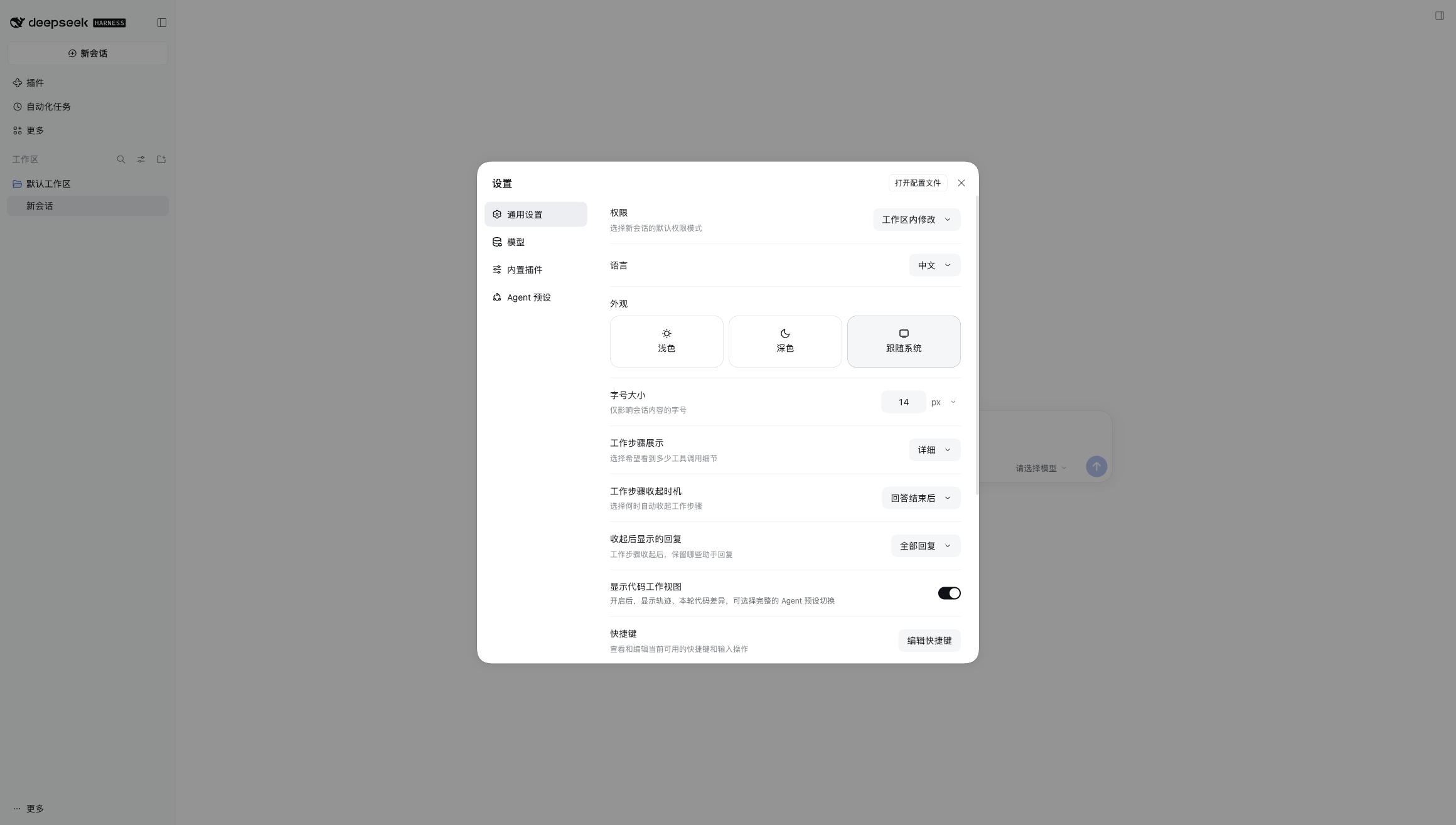
The row has a Preview button and, for custom, a text field that accepts up to eight space/comma
separated notes — note names (C6 E6 G#6, Bb5) or raw frequencies (1046.5 1318.5):
C6 E6 G6          ← do-mi-so
G6 G6             ← double boop
1046.5 1318.5     ← the same notes as frequencies
The preference lives in the page's localStorage (dsh-native-notifications:sound), so it is per
device/browser profile and applies to the next banner without a Host round trip.
# from GitHub (available now)
dsh plugin --profile web add github:tommy00748-tech/dsh-native-notifications
dsh plugin --profile desktop add github:tommy00748-tech/dsh-native-notifications

# from npm (once the npm release is published)
dsh plugin --profile web add dsh-native-notifications

# from a local checkout
dsh plugin --profile desktop add link:/absolute/path/to/dsh-native-notifications
Then confirm the desktop-notifications row is enabled in Settings → Plugins (the bundle patch inserts
it enabled). No build step, no dependencies, no native module: plain ESM for the Host half and a plain-JS
bundle for the Client half.
Requirements:
desktop or web profile);Every switch lives on the row config, documented beside its default in
cordis.patch.yml. Override it from your profile patch — a patch replaces the whole
config, so restate every field you want to keep:
- id: desktop-notifications
  config:
    notifyComplete: true
    notifyQuestion: false      # do not ring for questions
    idleGraceMs: 2000
    onlyRootSessions: true
    delivery: client           # client | osascript | both
Useful fields: notifyComplete, notifyApproval, notifyQuestion, notifyError, notifyAccount,
onlyWhenUnfocused, silent, idleGraceMs, errorSuppressMs, approvalDelayMs, onlyRootSessions,
notifyOnMount, logPath.
delivery: osascript is a legacy fallback for hosts whose page cannot show Web notifications; macOS
attributes those banners to Script Editor, so it is off by default.
Every banner and every client report is appended to an audit log (default
~/.dsh/dsh-native-notifications.log, override with logPath):
2026-11-05T08:58:26.102Z mounted :: pid=9027 :: delivery=client :: epoch=... :: platform=darwin
2026-11-05T08:58:26.105Z routes registered :: GET /native-notifications/events :: POST /native-notifications/report
2026-11-05T08:58:26.178Z client :: boot :: permission=granted protocol=dsh-app: path=/ visibility=hidden sound=cute chime=v5-robust
2026-11-05T08:59:47.177Z banner :: 能不能做个DSH原生的通知插件 :: 任务完成 · 用时 5 分 43 秒,可以回来查看结果了。
2026-11-05T08:59:47.186Z client :: shown :: kind=complete permission=granted
2026-11-05T08:59:47.188Z client :: sound :: kind=complete preset=cute
That answers "why did no banner appear?":
client :: boot → the Client half is not loaded (reload the window);client :: permission :: denied → the OS/browser refuses notifications;client :: suppressed → onlyWhenUnfocused skipped a focused window;banner :: without client :: shown → the page never polled (see poll-failed / unauthorized);client :: shown without client :: sound → the chime could not ring (audio still locked, or muted).Send a banner through the optional osascript lane directly:
node scripts/notify-test.mjs "title" "body"One bundle, two halves:
index.js) watches the events above and keeps a small ring buffer of banner
events. It serves two same-origin routes on ctx.webServer — /native-notifications/events (long poll)
and /native-notifications/report (client diagnostics) — gated by ctx.connection.requestRejection
exactly like other Host-owned Web routes, so only the authenticated page can read them.client.js, renderless and always mounted) long-polls those routes, shows each
event through the platform notification API (new Notification(...)), and on click focuses DSH and calls
uiWorkspace.openSession(sessionId). The cursor plus the Host epoch live in localStorage, so a reload
never replays old banners and a Host restart starts from "now".The long poll aborts after wait + 10s and retries, so a Host remount during a pending request cannot
wedge the client. No session events are appended and no Harness Client package is imported; the plugin
contributes one bundle row and one Settings row.
engines.dsh field (>=0.2.1-rc.5 <0.3.0); dsh 0.2.2 ignores a
dsh.engines declaration, which is why 1.1.0 moved it.dsh.client web half; macOS, Windows and Linux, as long as the DSH page can
show platform notifications.Verified against 0.2.2-rc.1 in a clean profile: the Host half mounts, both authenticated
routes register, the Client half boots, the settings row renders, and the optional
subagent banner uses the parent conversation title from the new subagent/end payload.
DSH 原生桌面通知插件:任务完成、需要你确认权限或作答、执行出错、需要登录时,由 DSH 应用本身弹出系统通知 横幅(归属 DeepSeek Harness,点一下回到 DSH 并打开会话)。提示音是插件自己合成的,可在 设置 → 通用 → 通知音效里选预设或自定义音高序列,不使用系统默认音、也不会双响。
安装:dsh plugin --profile desktop add dsh-native-notifications,然后在插件页确认
desktop-notifications 行已启用。
CLASSIFICATION EVIDENCE
系统优先读取 GitHub Topics,再与站内分类词典和词根规则比对。当前命中: notification。
EthanYoQ
电子发票整理与报销准备工具:从邮箱批量收集 PDF/OFD/XML 发票,OCR 识别、分类归档并生成 Excel 汇总;提供 Windows/macOS 桌面版与 DSH 插件。

Bytedesk
Open Souce IM with AI powered live-chat, email, ticket support, omni-channel customer service,alternative to slack + zendesk

wenbin-wb
🚀 DeepSeek Harness 多通道远程访问与安全守护插件 | 局域网扫码直连、Cloudflare / 自建公网隧道、微信 / QQ / 飞书 / Telegram 机器人全生命周期对话 | 内置全协议访问安全认证、后台防篡改与容灾保命体系