
文件与数据
插件

OpenViking
volcengine
Self-evolving Context Database for AI Agents. Unify Agent Memory, Knowledge RAG and Skills.
PROJECT TOPICS
INSTALL REFERENCE
dsh plugin --profile web add github:tindoreal/dsh-auto-export-intel
该命令指向仓库当前默认分支;尚无绑定当前 commit 的完整验证结果。
PROJECT README
一个整页的 DeepSeek Harness(DSH)Web 插件:把「政策 → 数据 → 工厂 → 新车 → 内容 → 运营」这条汽车出口情报链装进一块屏幕。




出口业务里最难的不是「查一条政策」,而是每天要知道哪几条变化会影响手上这票货:目的国又加税了没有、国内出口许可和退税改没改、这个月出口结构怎么变、哪家车企又在海外投产、下一波新车什么时候发、同一条情报怎么变成 X/公众号/小红书三套文案、发出去之后数据怎么样。
这个插件把这条链路做成 10 个页面,共用一份本地数据,能离线用、能导入真实数据、能一键生成三平台文案,并且明确标注哪些是快照、哪些是实时、哪些是演示结构。
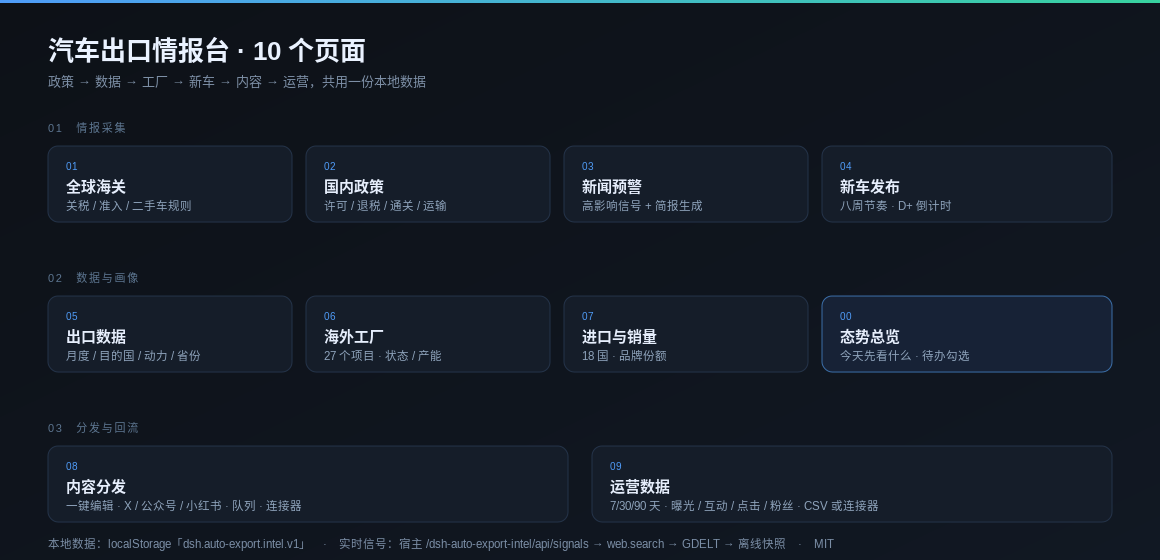
| 页面 | 解决的问题 | 关键交互 |
|---|---|---|
| 态势总览 | 今天先看什么 | 高影响变化、出口脉搏、发布倒计时、区域风险、实时信号轮播、待办勾选 |
| 全球海关 | 各国关税 / 准入 / 二手车规则怎么变 | 区域、类型、影响三档筛选,卡片 / 时间线双视图,详情抽屉,来源与置信度 |
| 国内政策 | 这票货能不能出、要补什么 | 政策时间线、四类卡点(许可 / 退税 / 通关 / 运输)、目的国合规清单与勾选进度 |
| 出口数据 | 出口了多少、去了哪里 | 月度曲线、目的国结构、动力类型、省份、二手车,CSV 导入 / 导出 |
| 海外工厂 | 谁在哪儿建厂、进度如何 | 中国车企 / 特斯拉 / 其他车企分组,状态(规划 / 在建 / 投产 / 扩产)、产能、SOP、产品 |
| 进口与销量 | 目标市场到底有多大 | 分国进口量(新车 / 二手车)、销量、同比、品牌份额榜 |
| 新闻预警 | 今天有什么必须知道的 | 按影响等级过滤、24 小时内新信号、一键生成简报、分享到社媒 |
| 新车发布 | 国内 / 全球下一波发什么 | 八周发布节奏、D+ 倒计时、参数卡、一键写前瞻 |
| 内容分发 | 一条情报怎么变成三平台内容 | 一键编辑、X / 公众号 / 小红书三套版本、复制 / 打开 / 接口发布、发布队列、连接器 |
| 运营数据 | X / 公众号 / 小红书跑得怎么样 | 7/30/90 天窗口、曝光 / 互动 / 点击 / 粉丝、漏斗、内容榜、活跃时段 |
顶部常驻全局搜索(⌘K / Ctrl+K 位置提示,回车直接跳详情)与「同步」按钮;左侧导航带每个页面的条数徽标。
dsh web),已能打开 http://127.0.0.1:8308npm install,不需要联网# 在本仓库根目录执行;默认装到 desktop profile
powershell -ExecutionPolicy Bypass -File scripts\install.ps1脚本做三件事:在 ~/.dsh/profiles/<profile>/node_modules/@local/auto-export-intel 建目录联接 → 往 cordis.patch.yml 追加一条 insert → 打印下一步。加 -Profile web 可指定其它 profile,-DryRun 只打印不落盘。
卸载:
powershell -ExecutionPolicy Bypass -File scripts\uninstall.ps1~/plugins/dsh-auto-export-intel# Windows
cmd /c mklink /J "%USERPROFILE%\.dsh\profiles\desktop\node_modules\@local\auto-export-intel" "C:\path\to\dsh-auto-export-intel"# macOS / Linux
ln -s /path/to/dsh-auto-export-intel ~/.dsh/profiles/desktop/node_modules/@local/auto-export-intel~/.dsh/profiles/desktop/cordis.patch.yml 末尾追加:- insert:
- id: auto-export-intel
name: '@local/auto-export-intel'只改
client.js时刷新页面即可;改index.js必须重启。
dsh plugin --profile desktop add file:C:\path\to\dsh-auto-export-intel这台机器访问不到 npm registry,本仓库因此把安装压到了「一个联接 + 两行 YAML」,不依赖包管理器。
插件内置了一份可用的初始快照,避免打开就是空白表格:
| 数据 | 条数 | 口径 |
|---|---|---|
| 全球海关 / 准入规则 | 20 条,覆盖 19 个市场 | 内置快照,标来源与置信度 |
| 国内出口政策 | 10 条 | 内置快照,含执行节点与卡点分类 |
| 海外工厂 | 27 个项目 | 内置快照,含状态 / 产能 / SOP / 产品 |
| 进口与销量 | 18 个国家 | 内置快照,数值为估算中值,页面上写明 |
| 新车 / 车展 | 10 条 | 内置快照,含倒计时 |
| 公开总量 | 2026 年 1–9 月出口 863 万辆、9 月 118.2 万辆、新能源累计 407 万辆、二手车 1–8 月 45 万辆+ | 乘联分会 / 中汽协 / 流通协会口径,页面上写明来源 |
| 月度拆分 / 目的国结构 | 9 个月 × 10 个目的国 | 标注为结构化示例,导入海关 CSV 后替换 |
| 运营数据 | 90 天 × 3 平台 | 演示数据,接连接器或导 CSV 后覆盖 |
三条原则写死在界面里:
点击「同步」
   │
   ├─ ① 宿主服务端:POST /dsh-auto-export-intel/api/signals
   │     └─ 用 DSH 自带的 web.search 检索 → 去重 → 120s TTL 缓存
   │        (不受浏览器 CORS 限制;宿主没重启时返回 404,自动跳过)
   │
   ├─ ② 公开通道:GDELT DOC 2.0 API(最近一周,每词 8 条)
   │     └─ 直连失败 → 你填的代理前缀(支持 {url} 占位)→ allorigins 兜底
   │
   └─ ③ 都失败:保留内置快照,状态显示「离线快照」,右上角写明原因
自测宿主通道(不用开界面):
curl.exe -s "http://127.0.0.1:8308/dsh-auto-export-intel/api/health"
curl.exe -s -X POST "http://127.0.0.1:8308/dsh-auto-export-intel/api/signals" -H "content-type: application/json" -d "{\"queries\":[\"EU tariff Chinese EV\"]}"
curl.exe -s "http://127.0.0.1:8308/dsh-auto-export-intel/api/signals?q=墨西哥,巴西"
返回:
{
  "ok": true,
  "queries": ["EU tariff Chinese EV"],
  "results": [
    { "title": "…", "url": "https://…", "snippet": "…", "source": "reuters.com", "query": "EU tariff Chinese EV", "time": "2026-11-13T06:20:00.000Z" }
  ],
  "errors": [],
  "cached": false
}
路由约束:只接受 GET / POST;跨站 Origin 一律 403;单次最多 6 个关键词、最多 48 条结果;不接受任意 URL 代理,不会变成开放代理。
一键编辑:任何政策、信号、新车或数据快讯都能打开同一个编辑器——左边是原始素材,右边是 X / 微信公众号 / 小红书三套可编辑文案。
三种发布方式,从保守到自动化:
{
  "type": "publish",
  "platform": "x | wechat | xhs",
  "account": "@handle",
  "title": "...",
  "content": "...",
  "url": "https://source",
  "tags": ["..."]
}POST /x/metrics 的地址填进连接器即可。为什么不直连平台? X 官方 API 要 OAuth 2.0 用户授权;公众号要 AppID/AppSecret、IP 白名单和草稿箱权限;小红书没有公开的第三方发布 API。插件不绕过平台授权,统一走你控制的中继,避免把 token 塞进浏览器或要求扫码登录。
两种接法:
{ "type": "metrics", "platform": "x" },返回{ "metrics": { "reach": 6200, "engagement": 320, "clicks": 104, "followers": 22840 } }日期,平台,曝光,互动,点击,粉丝
2026-11-12,X,6200,320,104,22840
2026-11-12,wechat,4100,180,66,9120
2026-11-12,xhs,8800,540,210,15300平台列支持 X / x / twitter、微信公众号 / wechat、小红书 / xhs。导入后 7/30/90 天窗口、漏斗、内容榜、活跃时段会一起重算。
localStorage,键 dsh.auto-export.intel.v1(键名与「汽车出口工作台」里的同名面板一致,两边数据可互通)不需要 DSH 在跑,也不联网:
node selftest/intel-render.mjs   # 61 项:10 个页面 + 9 个弹窗 + 文案 + 实时解析 + 注册
node selftest/host-routes.mjs    # 30 项:路由 + 去重 + 缓存 + 405/400/403/501 + 诊断
npm test                         # 两套一起跑(91 项)
渲染自检用的是仓库自带的一个迷你 React 渲染器(selftest/mini-react.mjs),只跑函数组件与 hook 的首次渲染,足够抓出「某个页面一打开就抛错」这类问题,也保证 CI 不依赖浏览器。
CI:.github/workflows/ci.yml 在 Ubuntu + Node 20/22 上跑 npm test。
dsh-auto-export-intel/
├─ client.js              # 面板本体:10 个页面 + 数据层 + 文案生成 + 本地存储(单文件,约 9k 行)
├─ index.js               # 宿主:/signals /health /diagnostics 三条路由
├─ cordis.patch.yml       # 插件装载补丁
├─ package.json           # DSH 插件元数据(dsh.bundle / dsh.meta / dsh.client)
├─ locale/{zh,en}.json    # 中英标题与描述
├─ icon.svg               # 侧栏图标
├─ scripts/install.ps1    # 安装(目录联接 + 补丁)
├─ scripts/uninstall.ps1  # 卸载
├─ scripts/publish.mjs    # 无 git 也能发 GitHub(REST API:blob → tree → commit → ref)
├─ scripts/publish.ps1    # 上面那个的 Windows 封装
├─ selftest/              # 两套自检 + 迷你 React
├─ docs/                  # 结构图
└─ LICENSE # MIT运行时零依赖:client.js 只用宿主注入的 react,index.js 只用 Node 内置模块。
Auto Export Intelligence is a full-page DSH web plugin for automotive export teams: 10 tabs covering global customs rules, China export policy, customs data, overseas plants, import & sales, news alerts, launches, cross-platform copywriting, and social analytics.
POST /dsh-auto-export-intel/api/signals → web.search), then the public GDELT API, then fall back to the offline snapshot — it never pretends a failed sync succeeded.~/.dsh/profiles/<profile>/node_modules/@local/auto-export-intel + one insert entry in cordis.patch.yml, then restart DSH. scripts/install.ps1 does it for you on Windows.npm test (91 checks, no network, no browser).MIT © 2026 tindoreal
政策、关税、认证等情报仅供参考,不构成法律或报关建议;以官方最新公告为准。
CLASSIFICATION EVIDENCE
系统优先读取 GitHub Topics,再与站内分类词典和词根规则比对。当前命中: export。
volcengine
Self-evolving Context Database for AI Agents. Unify Agent Memory, Knowledge RAG and Skills.

mindscale-noah
该仓库暂未提供项目说明。

himovo
Turn DeepSeek Harness into a self-hosted enterprise Agent platform with knowledge, deep research, content generation, vibe coding, browser automation, governance, and admin controls.