
文件与数据
渠道适配

WeKnora
Tencent
Open-source LLM knowledge platform: turn raw documents into a queryable RAG, an autonomous reasoning agent, and a self-maintaining Wiki.
PROJECT TOPICS
INSTALL REFERENCE
dsh plugin --profile web add github:tianleyitian/dsh-file-drop
该命令指向仓库当前默认分支;尚无绑定当前 commit 的完整验证结果。
PROJECT README
把文件/文件夹拖到 DSH 窗口任意位置,真实磁盘路径瞬间写入对话输入框——零内容传输,与文件大小无关。
+(命令)菜单新增 pick-file——点击即弹出系统原生文件选择框(无多余步骤),支持多选,选中后把真实路径填入输入框CF_HDROP).dsh-file-drop/)插件已发布到 npm,一条命令装齐(需先安装 pnpm:npm install -g pnpm):
dsh plugin --profile web add dsh-file-drop装完重启 dsh web 即可使用。--profile 换成你的 profile 名(默认 web)。
插件已在 npm 发布,仓库安装仅供开发调试(需要 Node.js 与 pnpm):
# 1. 克隆仓库
git clone https://github.com/tianleyitian/dsh-file-drop.git
cd dsh-file-drop

# 2. 安装依赖并构建
npm install
bash scripts/build.sh

# 3. 把包链接进 web profile
dsh plugin --profile web add link:$(pwd)

# 4. 重启 dsh web
dsh webdev_build_plugin {"dir": "D:/.../dsh-file-drop"}
dev_install_package {"dir": "D:/.../dsh-file-drop"} # 写入 profile,重启后自动装配
# 或仅运行时注入:dev_inject_plugin {"dir": "D:/.../dsh-file-drop"}或通过命令菜单选择文件:点输入框左下角 +,在菜单中选 pick-file,用系统原生文件选择框选取(可多选),路径自动填入输入框:
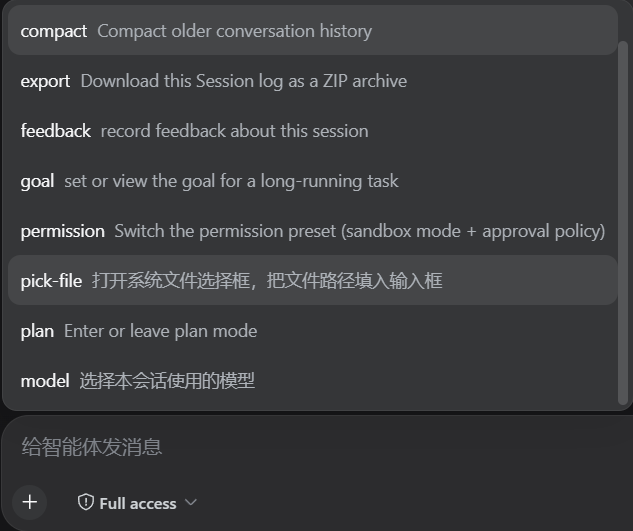
图片拖拽仍走应用原生附加;未打开会话时拖入会提示先打开会话。
拖拽进入浏览器窗口 (dragenter)
  → 显示等待提示层 + 通知宿主显示透明小窗(跟随光标)
    → OLE 拖放命中测试把 drop 交给小窗
      → 从 FileDrop 读出真实路径(CF_HDROP)
→ stdout 上报宿主 → 客户端轮询取回 → 写入输入框POST /file-drop/api/{arm|take|disarm|ingest}(webServer 路由 + 同源围栏)<工作区>/.dsh-file-drop/bash scripts/build.sh # tsc(host)+ tsdown(client bundle)
# 依赖自动从已安装的 dsh npm 包链接;typescript/tsdown/@types 缺失时自动 npm installdev_uninject_plugin dsh-file-drop # 卸载并清理 profile 条目<harness 根>/.dsh-file-drop/.helper/diag.log<harness 根>/.dsh-file-drop/.helper/helper.logBSD-3-Clause
CLASSIFICATION EVIDENCE
系统优先读取 GitHub Topics,再与站内分类词典和词根规则比对。当前命中: drag-drop、file-path。
Tencent
Open-source LLM knowledge platform: turn raw documents into a queryable RAG, an autonomous reasoning agent, and a self-maintaining Wiki.

liustack
The first vision plugin for DeepSeek Harness, and the vision bridge for every text-only coding agent. Paste an image, get structured JSON evidence (OCR, layout, semantics). | 全网最强 DeepSeek Harness 外挂视觉插件,为 DeepSeek、GLM 等纯文本模型外挂视觉能力,粘贴图片即得结构化 JSON 证据(OCR、版面、语义)。

dream-num
An open-source Office workspace where people and AI agents create, collaborate, and review together.