⚡ dsh-overdrive
The OpenClaw of DeepSeek Harness — turn DSH into the chat agent you can see thinking, ready in one command.
English | 中文
dsh-overdrive is the Hermes Agent / OpenClaw alternative built on DeepSeek Harness — bridging into WhatsApp · Telegram · Discord · Slack · 飞书 · 钉钉 · 企业微信, with the difference they don't have: every thought and tool call is visible inside the chat, and dangerous operations always wait for your tap.






Why not just OpenClaw?
Hermes / OpenClaw give you a terminal agent behind 20+ chat channels — but it's a black box. You see the answer, not the work.
DSH's append-only session log is the one thing they can't copy. dsh-overdrive makes that power chat-native:
- 🧠 See it think —
/trace replays the agent's full reasoning & tool-call trajectory as a summary card, right in the chat
- 🤖 Command a team —
/task spawns parallel subagents, /cron 0 9 * * * … schedules recurring jobs on a built-in scheduler
- 🔒 You approve the dangerous stuff — a risky tool call pauses until you tap ✅ Approve / 🚫 Reject (native buttons on Telegram / Discord / Slack / WhatsApp)
- 🚀 One command to deploy —
docker compose up, scan a QR, start chatting. No public URL needed for most platforms.
What it looks like
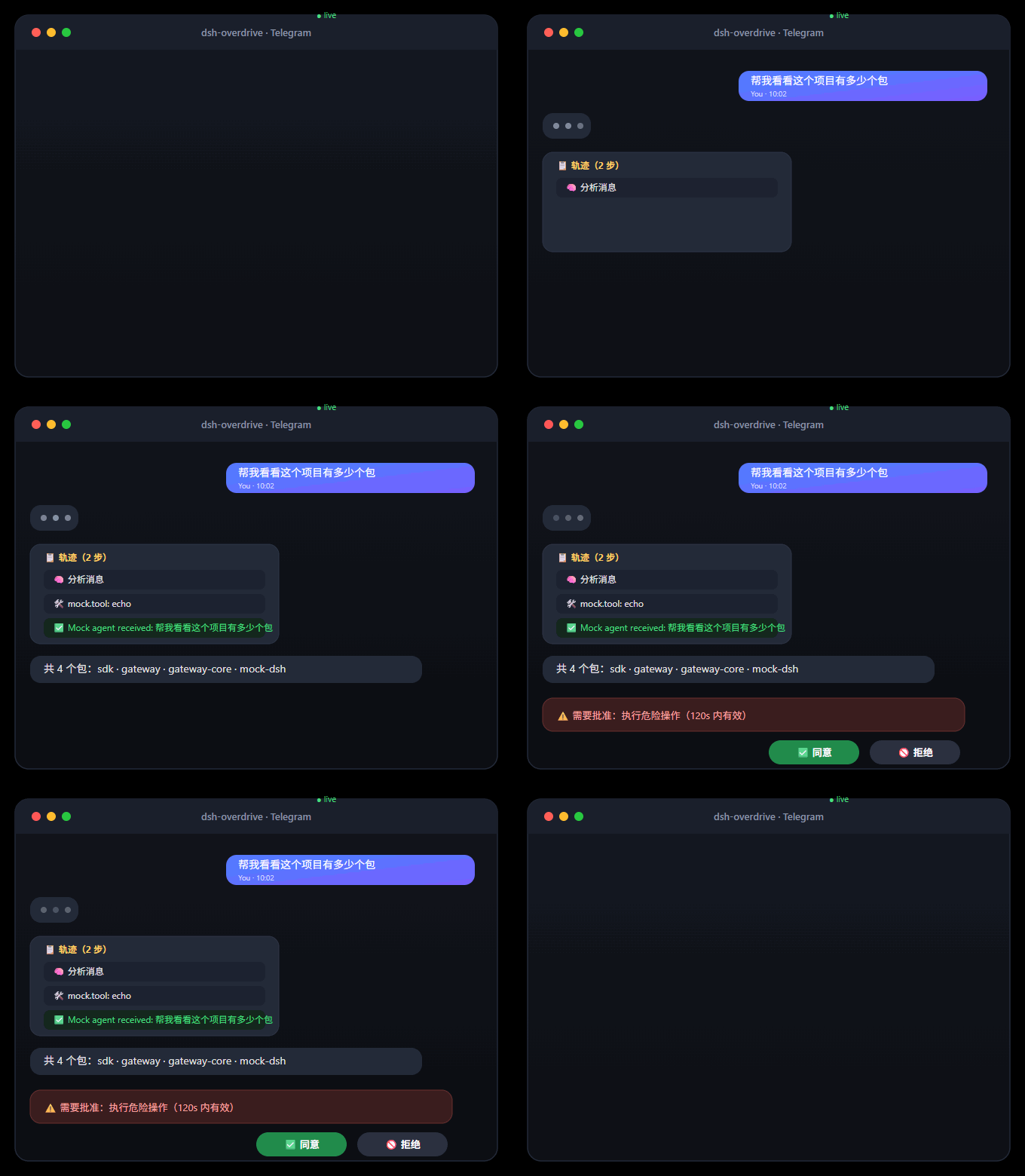
As plain text / 纯文本版
You:  帮我看看这个项目有多少个包
Agent:
       📋 Trajectory (2 steps)
       🧠 Analyzing message
       🛠️ mock.tool: echo
       ✅ Mock agent received: 帮我看看这个项目有多少个包

You:  /task 写一句营销口号
Agent:
       🤖 Subagent spawned
       ✅ Task done 5c399346…

You:  /cron 0 9 * * * 每天给我一条技术新闻
Agent:
       ⏰ Cron job registered

You:  dangerous rm -rf /
Agent:
       ⚠️ Approval required: run dangerous operation (valid 120s)
       [✅ Approve] [🚫 Reject]   ← one tap, the agent continues or stops
🎬 Full demo script → docs/demo.md
Follow the 3-minute script in docs/demo.md: chat → /trace replay → /task subagent → /cron schedule → approval tap → wrap-up.
Supported platforms
| Platform |
Integration |
Status |
| Telegram |
Bot API (long-polling) |
✅ verified on real DSH (2026-08-16) |
| WhatsApp |
Baileys + QR pairing, native interactive buttons |
✅ |
| Discord |
Bot token, native buttons |
✅ |
| Slack |
Socket Mode (no public URL) |
✅ |
| 飞书 Feishu |
Official SDK, WS long-connection |
✅ |
| 钉钉 DingTalk |
Stream mode (WebSocket, no public URL) |
✅ |
| 企业微信 WeCom |
Callback API (AES) |
✅ |
| WeChat (personal) |
iLink / ClawBot protocol (experimental, v0.2b) |
🧪 已实现,需真实设备验证 |
| CLI |
stdin/stdout (dev & E2E) |
✅ |
Quick start
Docker — one command (recommended):
git clone https://github.com/temotee2103/dsh-overdrive && cd dsh-overdrive
cp deploy/.env.example .env        # fill DEEPSEEK_API_KEY + TELEGRAM_BOT_TOKEN
docker compose -f deploy/docker-compose.yml up -d --build
# Console http://localhost:3190/   DSH Web UI http://localhost:3080/
Already running DSH? One line:
npx dsh-overdrive-setup        # guided setup: API key + platform tokens (verified live)
dsh plugin --profile web add @dsh-overdrive/gateway-core   # plugin
npx dsh-overdrive-gateway                                   # gateway
gateway-core 的 token 配置:
- 图形界面(推荐给非技术用户):装好插件后,在 DSH Web 设置 → Plugins → overdrive 里填 Telegram Bot Token(保存后重启
dsh web 生效)。
- 进程内原生模式:设置环境变量
DSH_TELEGRAM_TOKEN=<bot token>(@BotFather 创建)后重启 dsh web,直接在 DSH 里聊 Telegram。
- 旧外部 gateway 模式:设置
DSH_OVERDRIVE_TOKEN=<token>(DSH 与 gateway 进程共用),或
- 在 profile 的
cordis.patch.yml 覆盖条目:- update: [{ id: overdrive-gateway-core, config: { token: <token> } }]
- 未配置任何 token 时插件以禁用态加载(打印告警、桥接不启动),不会阻塞
dsh 启动,可随时补配后重启。
First message to your bot? Run /help inside the chat. Full options: docs/quickstart.md
Don't code? Do this.
No terminal skills needed. dsh-overdrive is designed to be installed by one person, used by everyone.
-
Ask a tech-savvy friend for 10 minutes
-
Send them this:
macOS / Linux:
curl -fsSL https://raw.githubusercontent.com/temotee2103/dsh-overdrive/main/install.sh | bash
Windows: download install.ps1, right-click → "Run with PowerShell" (or double-click)
-
The installer asks 3 questions (API key → platform → bot token) and starts everything for you
-
From then on you just chat: send messages, /help for commands, tap ✅ Approve / 🚫 Reject for dangerous actions
中文:不需要会写代码。找懂行的朋友花 10 分钟装好,之后你只需要聊天:发消息、/help、危险操作点【同意/拒绝】。
Chat commands
| Command |
What it does |
/help |
List commands |
/trace |
Replay the latest turn's trajectory (thoughts + tool calls) |
/task <prompt> |
Spawn a subagent |
/cron <min hour dom mon dow> <prompt> [--tz <IANA>] |
Schedule a recurring job (optional timezone) |
/crons |
List scheduled cron jobs (with next run time) |
/cronrm <task-id> |
Delete a scheduled cron job |
/remind in 10 分钟 <text> |
One-shot reminder (at HH:MM also works) |
/context <topic> |
Bind a topic to this conversation (off clears, no arg shows) |
/remember <fact> |
Remember something about the user (long-term memory) |
/recall <query> |
Recall relevant memories |
/forget <memory-id> |
Delete a memory |
/send <path> |
Send a local file/image into this chat |
/status |
Adapter / memory / cron status overview |
/digest · /digest daily 09:00 |
Instant or scheduled daily summary |
/feed add <rss-url> · /feed list · /feed rm <id> |
RSS subscriptions pushed into the chat |
/agents |
Subagent status (simplified) |
/new |
Reset the conversation |
Agent-produced files (images/docs) are auto-sent to the chat at the end of each turn (scan the agent workspace, base64 over the protocol).
Group chats: with GROUP_MENTION=1, the agent only responds in groups when mentioned / replied (private chats always respond). Long replies are auto-chunked with (i/n) markers; approvals accept keywords too (批准 / 拒绝 / yes / no).
Architecture
flowchart LR
    subgraph PLAT["Your chat apps"]
      WA[WhatsApp] & TG[Telegram] & DC[Discord] & SL[Slack]
      FS[飞书] & DT[钉钉] & WM[企业微信]
    end
    subgraph GW["dsh-overdrive gateway (Node process)"]
      AD[Platform Adapters] --> CORE[Session Map · Allowlist · Commands · Trajectory Cards]
    end
    subgraph DSH["DeepSeek Harness (docker)"]
      PLUGIN[gateway-core plugin] --> AG[DSH Agent]
      AG --> LLM[DeepSeek / any model]
      AG --> TOOLS[Tools · Sandbox]
    end
    PLAT <-->|Remote Session Driver / HTTP+WS+token| GW
    GW <-->|protocol| PLUGIN
    AG -. session/event .-> PLUGIN
packages/gateway-core is a DSH plugin (dsh.bundle.patch ready) exposing a Remote Session Driver API; packages/gateway is a standalone multi-platform gateway. The "soul" — trajectory, approval, multi-agent — lives in the plugin, so the narrative survives plugin-API churn.
Development
npm install
npm run build
npx vitest run     # 128+ unit tests
npm run e2e        # full-stack mock E2E (message / approval / allowlist)
Docs
Roadmap
- [x] M1–M2b: protocol, real DSH bridge, international platforms
- [x] M3: 飞书 / 钉钉 / 企业微信
- [x] M4: trajectory cards,
/task /cron, streaming typing, media, WhatsApp native buttons
- [x] M5: docker-compose, web console, MIT + CI, npm distribution
- [x] v0.2a: ASR voice transcription (OpenAI-compatible endpoint,
ASR_API_KEY), Feishu interactive approval cards, DingTalk actionCard approval
- [x] v0.2b: personal WeChat via official iLink / ClawBot protocol (experimental — implemented, needs real-device verification)
📚 Listings
Listed in community indexes and curated lists:
License
MIT © dsh-overdrive contributors


