
文件与数据
插件

OpenViking
volcengine
Self-evolving Context Database for AI Agents. Unify Agent Memory, Knowledge RAG and Skills.
PROJECT TOPICS
INSTALL REFERENCE
dsh plugin --profile web add github:superchen061220/dsh-storage-insight
该命令指向仓库当前默认分支;尚无绑定当前 commit 的完整验证结果。
PROJECT README
Storage Insight for DeepSeek Harness — 看一眼 dsh 到底在你机器上占了多少空间,然后只清理可以重建的缓存。
A settings page that answers three questions: how much does dsh use, where does it go, and what can I safely reclaim.
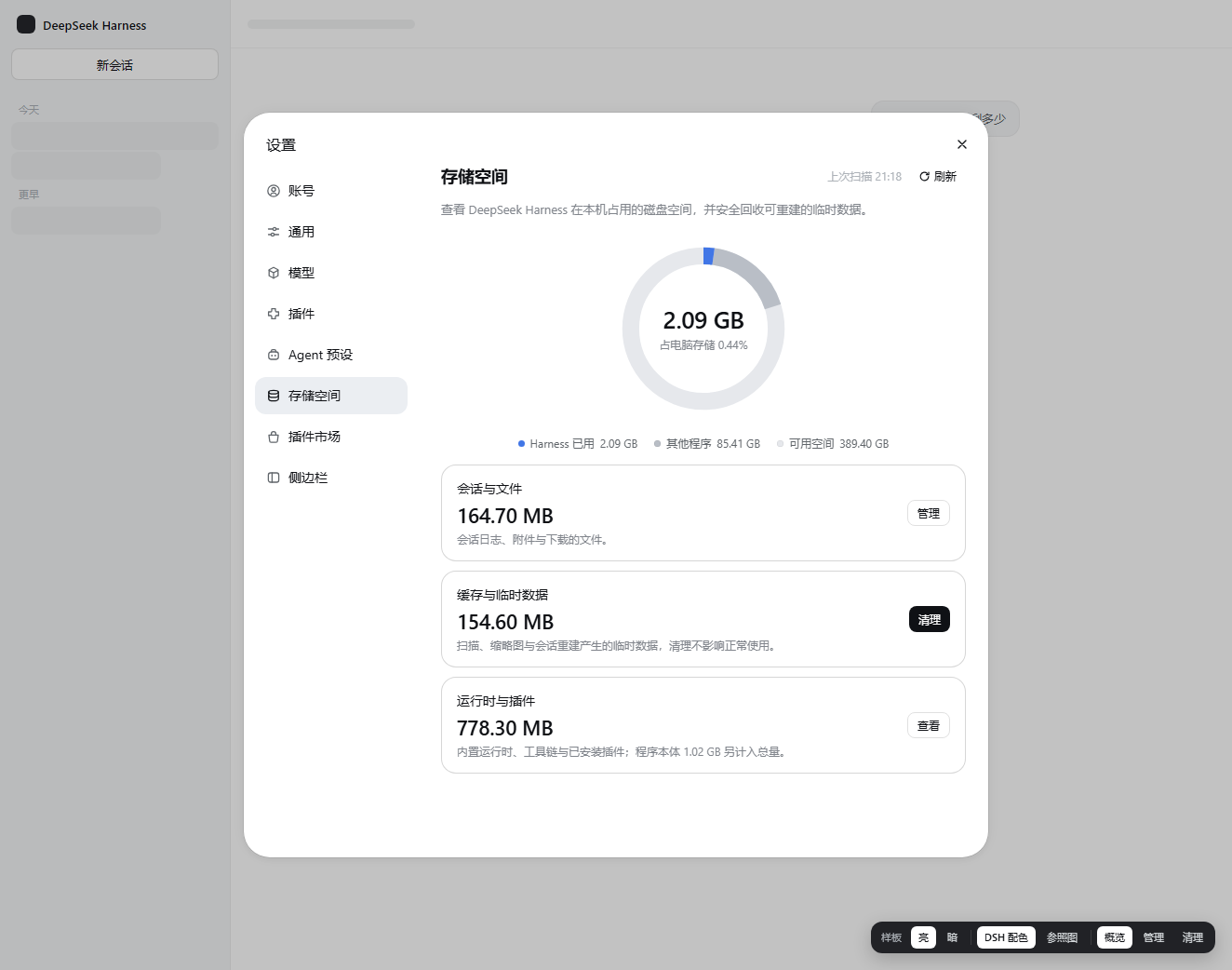
推荐:在 dsh 的 插件 页搜索 dsh-storage-insight 安装并启用(插件管理器会同时处理依赖和启用状态)。
命令行(profile 名通常是 web;桌面版是 desktop):
dsh plugin --profile web add dsh-storage-insight          # npm(推荐,快)
dsh plugin --profile web add github:superchen061220/dsh-storage-insight   # GitHub 源(备选)
⚠️ 在已存在的 profile 里,
dsh plugin add只安装依赖,不会把插件登记进dsh.profile.bundles; 装完还需要在 插件 页把它启用(或让插件管理器执行一次启用)。全新 profile 首次安装时会自动登记。 这是 dsh 自身的行为(bundles是加载清单),不是本插件的问题。
装完重启 dsh,打开 设置 → 存储空间。
npm 源需要能访问 registry.npmjs.org;GitHub 源需要能访问 github.com。 两者都不通时,可以下载仓库后本地安装:
dsh plugin --profile web add "C:\path\to\dsh-storage-insight"。
总量        1.95 GB      安装 1.02 GB · 临时 0.14 GB
会话与文件   166 MB       会话日志 + 附件
缓存与临时   155 MB       投影缓存、缩略图、临时目录
运行时插件   1.78 GB      内置运行时、工具链、插件依赖、程序本体
占用比例 0.45% 相对整块磁盘| 会清理 | 条件 |
|---|---|
%TEMP%\dsh-acl-skill-*、dsh-plugin-* |
24 小时内没改动 |
<.dsh>\cache(缩略图/派生图) |
可再生,删除后自动重建 |
<.dsh>\logs |
仅 7 天前的文件 |
| 明确不碰 | 原因 |
|---|---|
sessions/、attachments/ |
你的数据,只能通过「管理」里逐条删除已归档会话 |
dsh-spill-*、dsh-subprocess-* |
旧会话里"完整输出见 <路径>"的引用会失效 |
dsh-workspace-changes-* |
旧会话的变更差异会失效(dsh 自己会回收) |
| 运行时、工具链、插件依赖、程序本体 | 运行必需,删除会直接坏掉 |
删除会话走系统回收站(Windows),可从回收站还原;系统回收站不可用时落到 <.dsh>\.trash\sessions。
DSH_HOME、安装目录、系统临时目录;不联网x-storage-insight: 1 请求头,挡住跨站表单伪造(CSRF)workspace.json 前自动备份到 <.dsh>\.storage-insight\backup\storage-insight/api/*),无外部字体、图片或埋点session/title 事件解析/storage-insight/api/* 只接受回环地址(127.0.0.1 / ::1)的连接。dsh 若被绑定到 0.0.0.0 或放在反向代理后,这些接口直接返回 403 loopback-only,避免别人读到你的绝对路径与会话标题workspace.json(写前自动备份到 .dsh\.storage-insight\backup\)与回收站/.trash;不碰凭据、不碰配置settings.section 槽位DSH_HOME → 安装目录 → 系统临时目录),不写死任何绝对路径<.dsh>\.trash\sessions,界面文案会相应变化workspace.json 结构(archivedSessionIds / tables.workspaces[].sessionIds)。dsh 改结构时,归档列表会退化为"只按磁盘目录列出",不会崩node test-host.mjs # host 逻辑(假 ctx 驱动真实扫描)
node test-client.mjs # client 冒烟(伪造 module loader + React)
node test-render.mjs # 用真实快照渲染组件(需要 dsh 在跑)Install from npm: dsh plugin --profile web add dsh-storage-insight (or from GitHub: github:superchen061220/dsh-storage-insight).
Storage Insight adds a Settings → Storage page to DeepSeek Harness: a donut of disk usage, three categories (conversations & files, cache & temp, runtime & plugins), a drill-down that lists archived sessions you can delete, and a clean action that only touches rebuildable caches.
Nothing leaves your machine; the plugin scans only $DSH_HOME, the dsh install directory and the system temp folder.
MIT
CLASSIFICATION EVIDENCE
系统优先读取 GitHub Topics,再与站内分类词典和词根规则比对。当前命中: storage。
volcengine
Self-evolving Context Database for AI Agents. Unify Agent Memory, Knowledge RAG and Skills.

mindscale-noah
该仓库暂未提供项目说明。

himovo
Turn DeepSeek Harness into a self-hosted enterprise Agent platform with knowledge, deep research, content generation, vibe coding, browser automation, governance, and admin controls.