
文件与数据
插件

OpenViking
volcengine
Self-evolving Context Database for AI Agents. Unify Agent Memory, Knowledge RAG and Skills.
PROJECT TOPICS
PROJECT README
A sticky-note wall for DeepSeek Harness (DSH) Web and Desktop: a sidebar entry, a masonry wall of notes, pasted images and text, due reminders, done state, keyboard shortcuts, a pin-on-top floating window, appearance skins, and an optional native always-on-top Windows desktop window.
Ctrl/Cmd+Enter, and the new note is pinned immediately. Pinned cards support inline editing, done toggles, due chips and image thumbnails.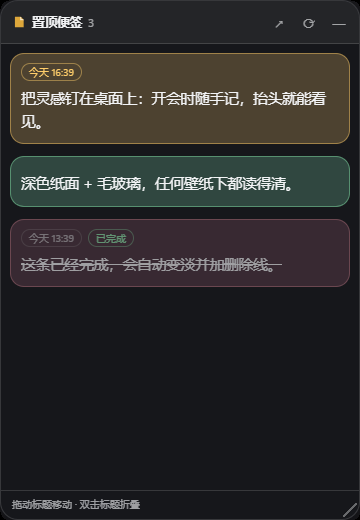
Ctrl/Cmd+V, drop files, or pick images in the wall, the editor and the floating window. Images are stored under the plugin data directory and referenced by file name.HKCU\Software\Microsoft\Windows\CurrentVersion\Run so the notes are available right after sign-in.| Shortcut | Action |
|---|---|
Ctrl/Cmd + Shift + N |
Open the wall and start a new note from anywhere |
Ctrl/Cmd + Shift + P |
Show or hide the floating window |
N |
New note inside the wall |
Ctrl/Cmd + Enter |
Save (editor, quick capture, inline float edit) |
/ |
Focus search |
? |
Shortcut sheet |
Esc |
Close the editor, cancel an inline edit, or close the image preview |
From the marketplace listing (recommended):
dsh plugin --profile web add github:skyline66/dsh-sticky-notes-wallFrom a local checkout while developing:
// profile package.json
"dsh-sticky-notes-wall": "link:C:/Users/you/plugins/dsh-plugins/sticky-notes"
then refresh the page. The sidebar icon appears in the left rail; the plugin also adds a Sticky Notes page under Settings.
After updating the host half (index.js), restart Harness once so the new JavaScript generation loads; the browser half reloads through the client bundle watcher.
Settings → Sticky Notes collects every appearance and desktop option:
csc.exe, included in Windows 10/11) and the WebView2 runtime.~/.dsh/sticky-notes/
wall.json notes, done state and reminder stamps
prefs.json appearance, floating window and ordering preferences
attachments/ pasted images
desktop/ compiled desktop helper, widget files, payload
desktop-data/ desktop window bounds, WebView2 profile, native.logThe floating window's own visibility, position and pin list are browser UI state in localStorage; appearance preferences are cached there as well and mirrored to prefs.json.
npm test              # CSS, host API + preference clamping, client registrations, encoding
npm run test:desktop # compiles and launches the native window, then stops it (Windows)index.js Host half: note store, prefs, autostart, desktop helper, /sticky-notes/api/*
client.js Client half: sidebar entry, wall panel, floating window, settings section
native/StickyWidget.cs always-on-top WebView2 window
native/widget/ the desktop window's HTML/CSS/JS
native/sdk/ WebView2 SDK DLLs (Microsoft, see LICENSE.txt / NOTICE.txt)MIT for this plugin. The bundled WebView2 SDK binaries are Microsoft's, redistributed under their license in native/sdk/LICENSE.txt and native/sdk/NOTICE.txt.
CLASSIFICATION EVIDENCE
系统优先读取 GitHub Topics,再与站内分类词典和词根规则比对。当前命中: notes。
volcengine
Self-evolving Context Database for AI Agents. Unify Agent Memory, Knowledge RAG and Skills.

mindscale-noah
该仓库暂未提供项目说明。

himovo
Turn DeepSeek Harness into a self-hosted enterprise Agent platform with knowledge, deep research, content generation, vibe coding, browser automation, governance, and admin controls.