
消息通讯
插件

Invoice-Downloader
EthanYoQ
电子发票整理与报销准备工具:从邮箱批量收集 PDF/OFD/XML 发票,OCR 识别、分类归档并生成 Excel 汇总;提供 Windows/macOS 桌面版与 DSH 插件。
PROJECT TOPICS
INSTALL REFERENCE
dsh plugin --profile web add github:seanliii/dsh-plugin-legion
该命令指向仓库当前默认分支;尚无绑定当前 commit 的完整验证结果。
PROJECT README
English | 简体中文
Give one goal to a team of leading harnesses. Research, collaborate, share tools, and keep improving the same deliverable against strong real-world references. Make useful improvements available to later work, not just one conversation.
Open to different harnesses rather than tied to one. Shared evolution and world-class outcomes are the ambition; actual members and results remain evidence-backed, not a claim that every harness is ready or every result leads the industry.
Start in DSH: choose companions, describe what you want, and follow the task and its results in the original conversation. Connect your independent Legion core when you want to delegate work to its members.
0.6.0 installation and source provenance · Open the DSH workbench · Product and verified scope
0.6.0: one team, one maintenance source. The core and connector are developed and checked together in the public Legion core repository. The existing DSH installation address stays; the connector is exported in one direction from that source. Stop reasons, already-produced results and formal delivery remain separate facts: stopping execution must not erase existing work.
Canonical source and development · Pinned packages and verification scope. New scores, installations and publication receipts are recorded separately; source pairing does not establish unattended evolution or superiority.
0.5.2: keep the work with the member who actually did it. Carry actual member ownership, budget and failure facts, and formal result delivery through the original task. The aim remains a team of leading harnesses that collaborate and improve together—not a new quality judge above them.
Local native installation checked 34/34 files and enabled 0.5.2, preserving the six existing tasks, identity, configuration and a 1,263-byte historical result download. Paired source identities, regression counts and local verification scope are separate from public distribution receipts.
The fixed 52 × 13 = 676 comparison is still running; no new score or improvement claim is published here. Superagent has only three exercised native read-only management actions, with no real intake account connected; Trinity remains an untested candidate. This does not certify every capability, unattended autonomy or world-leading performance.
Watch the historical 0.5.1 before/after walkthrough · Original-speed interaction replay, edited between chapters, no live speech. Video duration is not model runtime; this is not 0.5.2 evidence.
Historical demonstrations, still a technical preview. 0.5.0 demonstrated single-DSH-author delivery. The 0.5.1 review run demonstrated a bounded two-harness exchange: DSH delegated an independent review to core Codex, then independently reproduced and adopted its findings. This was supervised, not unattended team evolution.
Historical 0.5.1: see your team clearly. Selected-member overviews, factual status projection and member pagination distinguish the DSH author model from core members. Version-specific evidence and release status
| What matters | What the entry provides |
|---|---|
| Continue one piece of work together | Choose candidates and collaboration preferences, then use the original task and conversation to continue revisions instead of starting over. |
| Put useful tools to work | Discover visible capabilities, inspect real interfaces, and use authorized tool and message paths to contribute to the original task. |
| Make improvements reusable | In the historical 0.5.1 case, DSH independently reproduced and fixed Codex review findings; the maintainer imported the changes and reran the regression tests. Automatic propagation to later tasks remains unproven. |
| Compare with strong real-world work | Research relevant high-quality references, compare actual outcomes and revise the same deliverable. Benchmarking is a process, not an unsupported victory claim. |
DSH is an entry point; the co-evolving team is the product. It is not a menu for choosing one assistant or a pile of independent answers. The product idea · Mechanisms and boundaries
init → serve → dsh-config → Save connection. Configure your own model before submitting work; the connector does not bundle or start the core.Installation template, not a verified live 0.6.0 target. Replace the placeholder with the tag or full commit confirmed by the actual Release and its package checksums. If no matching target is verifiable, leave installation pending; do not substitute main or relabel an older version. Replace the example web profile as needed and retain -w:
dsh plugin --profile web -w add 'github:seanliii/dsh-plugin-legion#<verified-tag-or-full-commit>'Users supply their own models and accounts; no shared credentials are included. The separately installed historical public core v0.1.0 retains its original identity and receipts, not those of the 0.5.2 pair. First-party source is MIT and third-party licenses are retained. Local verification does not establish a Git push, npm publication or marketplace approval.
Give DSH a real goal, for example:
For this goal, give me a working result I can keep using and modifying.
Collaborate with configured members when useful, and fix the same deliverable
when you find a problem—not several unrelated answers.Use Discover directly: current DSH tools, Skills and public GitHub search need no Legion core. Try this in an ordinary DSH conversation:
Find an existing plugin for the capability I need. Show its sources and limitations before installing anything.0.5.0 post-release receipts on GitHub main · Limits, data and license
| Need | Entry point | Boundary |
|---|---|---|
| Find an existing capability | legion_discover |
Current Agent-visible tools, user-configured native markets, or public GitHub; not a machine-wide inventory. |
| Read a project's interfaces and license | legion_source |
Pinned source, file hashes and bounded previews; incomplete reads stay explicit. |
| Package code already adapted by an author | legion_bundle |
Writes workspace files and metadata; does not install or execute them. |
| Install or switch capabilities | Official plugin_manager |
Native installation, approvals, bundle selection and individual plugin switches. |
| See what your Legion service really has | legion_runtime |
Current member, capability or catalog observations; registration is not installation, configuration or verified execution. |
| Delegate work and continue revisions | legion_submit |
Real delegation; previous_task_ref reconnects to the original Legion conversation. |
| Use a local tool for a Legion task | legion_call, then a separate legion_message |
Execution and delivery are two decisions; a mailbox receipt is not model consumption. |
| Follow remote work | legion_status |
Task state, events, commander messages and formal exports; no automatic mailbox execution. |
| Receive actual files | legion_download |
Downloads formal artifacts of this task and compares their bytes with the service's SHA-256. |
You can also ask DSH to inspect a public repository, adapt its real interfaces, and package independently useful capabilities. This is not an automatic converter for arbitrary applications. The on-demand legion-ecosystem skill supplies the available tools and development references.
The core retains world-reference research, intent context, native collaboration, knowledge reuse, failure feedback, continued revision and formal delivery through existing modules. See the capability map. Retaining a mechanism does not prove every member is installed or that a team generally outperforms the strongest individual harness.
Requirements: Node.js >=24.9.0 and official npm DSH 0.2.1-rc.2. The Agent needs the relevant native tools: write for generated files, plugin_manager for installation, and optionally plugin_market for configured indexes. Slash commands additionally need the Host's commands service.
The sidebar needs DSH's browser UI, session and command services. Editable settings, Skills, markets and bundle management use the corresponding native services when available; the workbench does not bypass missing services or permissions.
If you already have a reviewed local copy, use the official plugin_manager. Replace the placeholder below with its absolute bundle directory, preserving any spaces:
{
  "action": "install_bundle",
  "target": "file:<absolute bundle directory>",
  "enabled": false
}
This is a parameter template, not a published package address. For public pinned-Git installation and community catalog submission, see publication routes.
file: for package installation with declared dependencies. A bare directory can become a development link: whose target dependencies are not installed recursively. A local directory is mutable, not a content hash.enabled:false, new bundles are not automatically selected for activation; updates preserve existing switches. If you do not want updated code to run, disable that bundle before updating. Disabled does not mean dependency build scripts cannot run: inspect native warnings and any pendingBuilds; build permission is separate.set_bundle. Read actual entryId values from list_plugins before using set_plugin; declared rowId/module names are not runtime IDs. A disabled bundle may have no runtime entries.application, changed, warnings and restart requirements; do not assume a failed load rolled back selection.Host plugins run outside the agent sandbox. Review code and dependencies before trusting them; see Security.
Requires Node.js >=24.9.0 and DSH 0.2.1-rc.2. Replace the example web profile if needed and retain -w:
dsh plugin --profile web -w add 'github:seanliii/dsh-plugin-legion#v0.5.0'Pinned source: 090c82e273dcbf4912ab48906bf28f9f086ae53d. The release retains the reviewed 32-file
package and its checksum. Explicitly enable Legion in DSH Plugins after installation.
Post-release documentation on main does not move the tag or replace release bytes; “development”
wording in the frozen archive records its pre-publication state. See 0.5.0 installation and verification.
This edition uses Git, not npm publication. Replace the example web profile as needed and retain -w:
dsh plugin --profile web -w add 'github:seanliii/dsh-plugin-legion#v0.4.2'v0.4.2 is pinned to 7ca96434ee077102d2e2459173fffa91747898b5. The public package, native Discover installation, saved connection and restart recovery are recorded in 0.4.2 acceptance. Installation retained a pnpm peer-dependency warning. No model was configured in this fresh instance; a working connection does not certify member execution.
The following is the existing 0.4.1 release, not a 0.4.2 installation or acceptance record.
Use the published fixed tag; replace the example web profile as needed and retain -w:
dsh plugin --profile web -w add 'github:seanliii/dsh-plugin-legion#v0.4.1'v0.4.1 is fixed to 87a2f4dae1c61e2764b7748ecb10ea7b367fcf2f. Anonymous installation of that full commit and the scoped core-free native UI checks are verified; the fresh installation started disabled and retained a pnpm peer-dependency warning. The v0.4.1 Release provides the original reviewed TGZ and SHA256SUMS, both checked by anonymous re-download. The 0.4.1 catalog update is open for maintainer review; Git/tag installation does not depend on that review. Later documentation does not move this or older tags; the installation guide also provides the exact-commit command.
Historical 0.4.0 commands, commit, tag and scoped acceptance remain in the 0.4.0 records, not as evidence for 0.4.1.
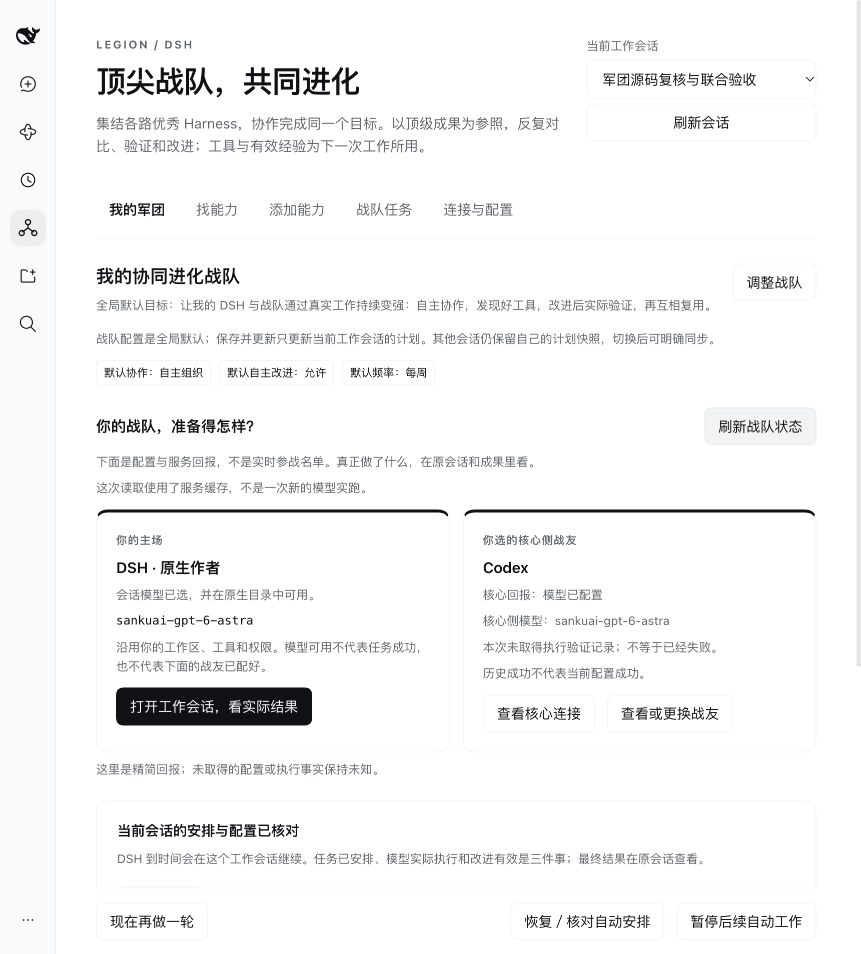
After installing and enabling the connector in DSH Plugins, open Legion in DSH's sidebar. This is a native DSH page, not another website or service. Choose the Working session at the top right; a single existing session is selected automatically. If none exist, create a DSH conversation, then click Refresh sessions. No core yet? Go straight to Discover; an unconnected members page does not block discovery.
| Page | What to do | What it means |
|---|---|---|
| My Legion (0.5.0) | Companions → Collaboration → Grow together → Form team and start automatically. Inspect schedules, open results, run again or pause. | Saves native candidateHarnesses and teamProfile, schedules the first round and defaults to weekly follow-ups. Selection is not installation; scheduling and delivery do not prove completed improvement. |
| Discover | Search Session tools / Skills, GitHub, or DSH plugin market. | Tools are those visible to the selected session's Agent; Skills are guidance. Only configured market indexes are searched. No core is required, and discovery executes no tools. |
| Add capabilities | Inspect and explicitly install an existing DSH bundle, or edit a goal and Delegate integration. | Native package management and model-led adaptation are different operations; reading a repository does neither automatically. |
| Team tasks | Refresh tasks, then Read live progress; inspect export records and use Download file where available. | The list is this session and identity's local recovery index, not a live feed. Runtime, artifacts, refusal reasons and pagination are shown separately; incomplete data is not zero artifacts. done is not a usable-result guarantee. |
| Connection | Enter Core URL, Token environment variable name, or private token file path, then Save connection. | Never enter the token value. Saving native configuration reloads the connector; it does not install a core or configure models. |
Switching the working session changes tool visibility and task context, not the scope of settings: bundle switches and connector configuration affect the same DSH profile. Only members the service marks as selectable can be checked. Saving needs writable native configuration; on a revision conflict, reload it before editing again.
pluginManager and enabled:false, not a second installer or a forced-disable operation. Inspection accepts a source format/metadata, not its safety. Handle pendingBuilds in DSH Plugins; disabled bundles can still have dependency build steps.owner/repository and an optional branch, tag or commit, then Inspect project & license. Only Delegate integration submits the goal to your configured core/models and may incur costs. The pinned commit and short source/license facts accompany it; Legion decides how to adapt it. You can omit the repository and ask Legion to research options.If an install reply is uncertain, keep its request ID and use Recover install result, not another installation. Request cancellation is a request, not confirmation of cancellation. An uncertain delegation offers Retry with the original key while that operation is retained; do not change keys to repeat an unknown side effect.
The task page does not auto-poll or execute incoming messages. It can page through artifact records and events, and Download file reuses the existing /legion download command in the selected original conversation. The file is saved on the DSH Host, not automatically in the browser's Downloads folder; the receipt shows its path, byte count and hash check. Same-name/history records remain distinct, and clipped details or refusal reasons stay marked incomplete. Continuation, feedback and cancellation still use /legion in the original conversation, not new task-page actions. Projection and download limits · Detailed workflows.
For 0.6.0, first check the paired core identity and channel receipts. The v0.1.0 download link below is retained as a historical installation example, not the new pair's package.
Download the public v0.1.0 archive and SHA-256, then follow Core installation: a fresh Python 3.12 environment → init → serve → dsh-config → Save connection. Model configuration is needed before real delegation, not to obtain the source. Existing authorized instances can continue to use their own connection settings.
Keep serve running. On the same machine, open another terminal in the core source directory and run:
.venv/bin/python -I meyo.py dsh-config --state-dir "/absolute/path/to/your/private-instance"Use its config object to fill Connection → Core URL / private token file path → Save connection, or the equivalent native plugin settings. The output contains a service address and credential-file path, never the credential:
{
  "baseUrl": "http://127.0.0.1:8015",
  "tokenFile": "/absolute/path/to/your/private-instance/login-token.txt"
}
tokenFile is operator configuration, not a model-chosen path. It must be an owner-only regular file on the DSH Host (use mode 0600), containing one token and no more than 4096 bytes. The page neither reads nor displays its contents. A configured but invalid file fails explicitly; there is no environment fallback.
Rotation is detected, not silently hot-swapped. Each credential read rereads the file and checks for an identity change. Once a connector has bound an identity, a changed token stops that old connector and requires a plugin reload before using the new identity. Changing the service address or actual token selects a separate recovery index: old task references are not inherited, migrated or deleted.
Saving configuration or reloading ends local pending requests; it does not cancel remote tasks. Rotating the file also does not cancel them or prove that the core accepts the new token. The page's Reload configuration button only rereads settings; use native plugin management to reload the connector. After saving/reloading, refresh members to check connectivity. Configuration accepted/read back is not model verification; submit a real task separately.
Configure these privately in the DSH Host environment. The JSON Environment editor needs JSON string values, including quotes; ordinary process environment variables use plain strings.
| Variable | Example JSON value |
|---|---|
LEGION_BASE_URL |
"https://legion.example.invalid" |
LEGION_PERSONAL_TOKEN |
"<your-personal-token>" |
Keep the token value out of chat, commands, plugin configuration and Git. tokenFile accepts only a local absolute path and takes precedence over tokenEnv without fallback. Remote URLs require HTTPS; HTTP is allowed only on loopback. Installing this connector does not start a service. Optional candidates, project bindings and private state settings are in Protocol.
/legion help
/legion runtime members
/legion runtime capabilities
/legion start page-1 Create a small HTML page with status text and a button.
/legion status <task_ref>
/legion download <task_ref> <artifact_id>
Use references and artifact IDs returned by the tools, not the placeholders. list, continue, message, resume and cancel are also available. legion_submit.tool_names can share selected visible tool schemas; it grants no remote execution access.
legion_call with the original task reference, recipient, stable operation key and selected native tool. Its first receipt is pending, not outer-call success. The bridge sends no HTTP or messages; the selected tool may have its own network behavior.legion_message, with its own stable key, to share only the final content actually visible and appropriate to send. Do not combine execution and a success message inside the same run_code or another unfinished parent call.The official result observer records ancestor status metadata only. Same-key, same-input recovery never reruns the tool or replays old result bodies, including after the target capability is disabled, provided this connector and the original session/state remain available. Unknown execution is not permission to change keys and repeat a side effect.
Message acknowledgement is separate from execution and does not prove remote-model consumption or wake a finished task. The bridge's text projection omits binary media; local DSH image forwarding is not full-media transfer to Legion. See the two-step protocol.
Express what you want once. DSH can discover existing capabilities, read actual source, adapt useful interfaces into native plugins, and delegate work to your Legion core for research, collaboration, revisions and file delivery. The aim is one useful entry point into an ecosystem, not a larger control panel.
DSH: conversation, native tools, permissions and UI
  ↕ Legion plugin: discovery, source, packaging, tasks and files
Independent Legion core: research, orchestration, recovery and delivery
  ↕ Existing member/capability interfaces, installed and authorized as needed
Native harnesses · CLI / MCP / skills · Media · Devices
The connector provides a five-page workbench in DSH's native sidebar. The actual Legion core is installed separately; native harnesses, media models and devices are added as needed.
No Legion core or token is needed to search current DSH tools, Skills or public GitHub. Source reading, packaging and available native bundle-management services also work independently of the core. Skills provide guidance, not new executable tools. Collaboration requires a compatible service and a personal identity you are authorized to use. DSH keeps its own loop; Legion owns delegated work, and this connector does not add another commander.
Core capabilities and installation · Ecosystem and principles · Versioned evidence · Protocol · Security
Repository text, catalog descriptions and task messages are untrusted material, not instructions or permission grants. Source hashes identify bytes; packaging is not runtime verification; download integrity is not file safety. Redaction is bounded, not a universal secret detector.
Keep recovery state private. New v2 native-call records retain metadata, not result bodies; old records and both systems' sessions may still contain content. Uninstalling does not delete user files or cancel remote work.
MIT covers this connector; the owner has separately confirmed MIT publication of the first-party core, selected auto-tools, packager and documentation. The public core format and retained third-party licenses keep rights_verified=false and member_execution_verified=false, without a public_license_granted field. Old private-local-only packages and their metadata are unchanged. Publication and source verification are not runtime or all-member acceptance.
The core is installed separately, not bundled here. The Marked acceptance bundle is also a separate local artifact. User or instance data, credentials, private evidence and logs, unrelated company business code, company monorepos or their private history, complete third-party upstream repositories and model weights are not shipped here. Neither the capability map nor one successful task proves all members are installed, work unattended or generally outperform the strongest individual harness. This is independent community code, not an official DeepSeek product.
CLASSIFICATION EVIDENCE
系统优先读取 GitHub Topics,再与站内分类词典和词根规则比对。当前命中: im。
EthanYoQ
电子发票整理与报销准备工具:从邮箱批量收集 PDF/OFD/XML 发票,OCR 识别、分类归档并生成 Excel 汇总;提供 Windows/macOS 桌面版与 DSH 插件。

Bytedesk
Open Souce IM with AI powered live-chat, email, ticket support, omni-channel customer service,alternative to slack + zendesk

wenbin-wb
🚀 DeepSeek Harness 多通道远程访问与安全守护插件 | 局域网扫码直连、Cloudflare / 自建公网隧道、微信 / QQ / 飞书 / Telegram 机器人全生命周期对话 | 内置全协议访问安全认证、后台防篡改与容灾保命体系