
文件与数据
插件

OpenViking
volcengine
Self-evolving Context Database for AI Agents. Unify Agent Memory, Knowledge RAG and Skills.

revive123456/dsh-obsidian-notes
Obsidian-style notes panel for the DSH Web right sidebar: local vault tree, line-numbered Markdown preview/edit, callouts and tables, screenshot paste into the vault, note-to-chat handoff, and batch session/workspace archive and delete.
PROJECT TOPICS
INSTALL REFERENCE
dsh plugin --profile web add github:revive123456/dsh-obsidian-notes
该命令指向仓库当前默认分支;尚无绑定当前 commit 的完整验证结果。
PROJECT README
A local Obsidian-style notes pane for the DeepSeek Harness web UI. Point it at a folder of Markdown files, then read, edit, search and cite them next to the conversation — without opening Obsidian, without importing anything, and without your notes leaving the machine.



English | 中文
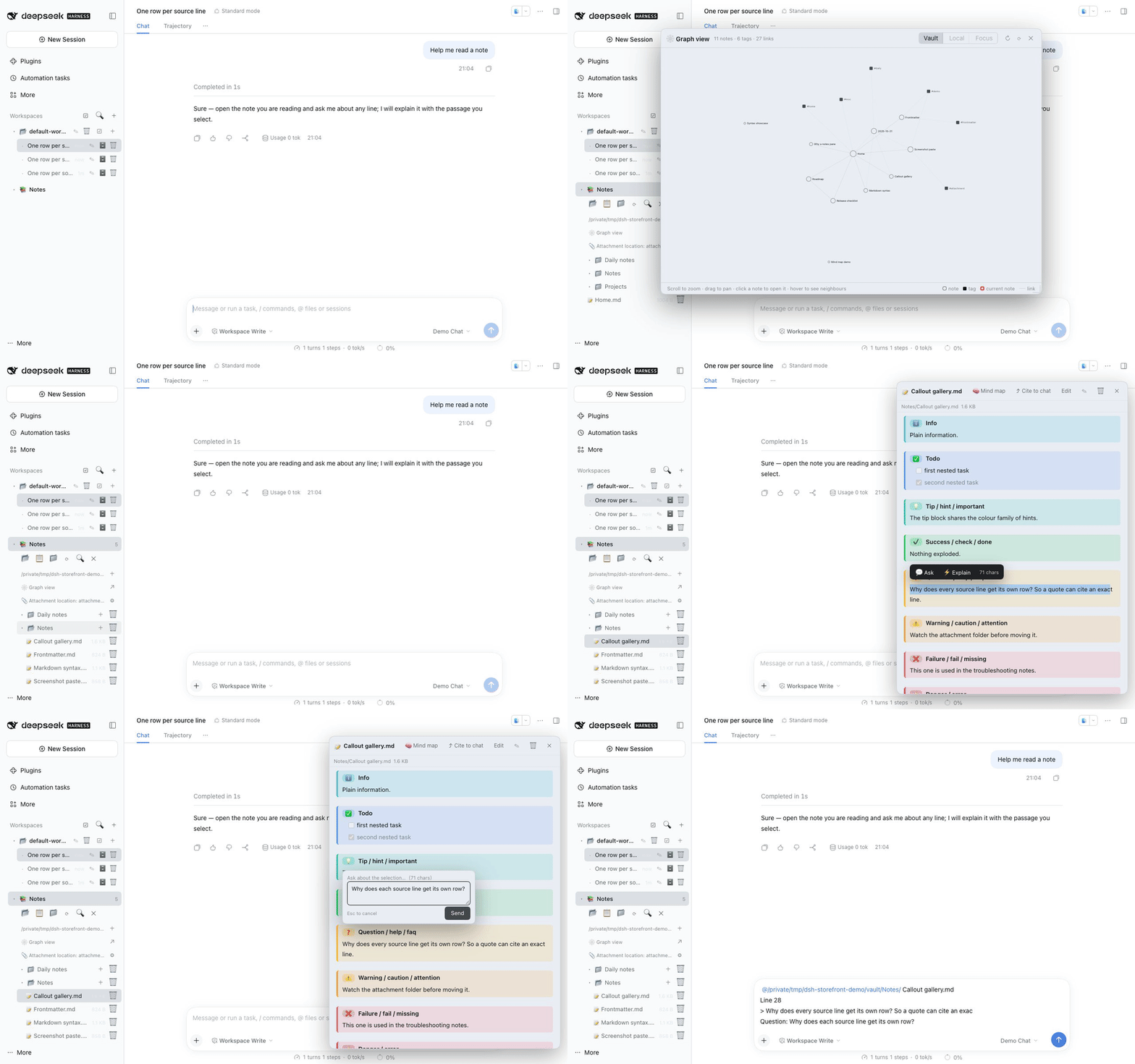
A local-first Markdown notes panel that sits in the DSH sidebar and hands notes to the chat without copy-paste:
@path mention, or
select a passage and press Ask — the prompt in the composer carries the
absolute path, the line range and the quoted text, so the model can refer to
exactly what you read.![[Pasted image …]] embed; moving that folder later rewrites the embeds.[[links]] and #tags — vault-wide, locally around the open
note with 1–5 hops, or focused: the whole graph with the camera framed on the
open note and its neighbours.Everything runs on your machine: the plugin reads and writes only the folder you choose, and the client talks to the host over its own loopback routes.
Requirements: DeepSeek Harness 0.2.1 or newer (web UI or desktop app).
The CLI install also needs pnpm (npm i -g pnpm, or corepack enable) and a
Node.js ^22.19 || >=24 runtime for DSH.
A plugin that ships a bundle layer is only composed at startup, so restart the DSH host after installing (desktop: quit and reopen). Refreshing the page is not enough.
Replacing the package and refreshing the page is enough for new UI features: the
client asks the host which capabilities it has (/obsidian/root → features)
and, when the running host is still the previous version, builds data it needs
from the existing routes instead of erroring. The relation graph, for example,
falls back to walking the vault with the old tree/note endpoints — no restart
and no "version mismatch" dialog. Restart the host when you want the faster
host-side route.
dsh-obsidian-notes and install it.This path requires the package to be published on npm. If search shows nothing, use one of the two paths below.
npm i -g pnpm                                   # `dsh plugin` forwards to pnpm
dsh plugin --profile web add dsh-obsidian-notes
# restart the host, then start it again
dsh webgit clone https://github.com/revive123456/dsh-obsidian-notes.git
cd dsh-obsidian-notes
npm i # runs build.mjs via prepare → lib/client.js
dsh plugin --profile web add "$(pwd)" # PowerShell: "$PWD"
# restart `dsh web`dsh plugin add records the package as a bundle in
$DSH_HOME/profiles/web/package.json; the profile patch is applied on the next
boot.
Avoid installing this repository with a bare
github:spec: pnpm ≥ 10 blocks lifecycle (prepare) scripts by default, so the build step that produceslib/client.jswould be skipped. Clone +npm i+ install the local path instead.
Uninstall: dsh plugin --profile web remove dsh-obsidian-notes, then restart.
If you installed it the old way (manual cordis.patch.yml row), see
docs/legacy-install.md.
Open the 📚 Notes row at the bottom of the sidebar. If no vault is configured, choose one:
The default vault is $DSH_WORKSPACE/obsidian_vault, falling back to
./obsidian_vault under the directory you started dsh web from.
[[wikilinks]] (aliases and #sections included). Inline
Obsidian styles render too: ==highlight==, ~~strikethrough~~, backslash
escapes, hidden %%comments%%, and <https://…> / bare URLs as links.[[links]]
and #tags (no graph file, no export step: it is computed from your Markdown on
the fly, like Obsidian's own graph). A vault-level entry above the note tree
opens it as its own view; scroll to zoom, drag to pan, hover to highlight
neighbours, click a note to open it in the dock. Local shows the
neighbourhood of the note that is currently open; the depth is adjustable
from 1 to 5 hops (same range as Obsidian's local graph depth slider, default
1). Focus keeps the whole graph but frames the open note and its
neighbours — click it again to re-centre.> [!type] title blocks render with type colours, icons and
badges. 13 canonical types (note, abstract, info, todo, tip,
success, question, warning, failure, danger, bug, example,
quote) plus 15 Obsidian aliases (summary, tldr, hint, important,
check, done, help, faq, caution, attention, fail, missing,
error, cite, none).![[Pasted image <timestamp>.png]] embed (20 MB per image). Files written this
way keep working in real Obsidian.⤴ Cite to chat inserts @/abs/path/to/note.md into the
composer (falling back to the clipboard if the composer cannot be reached).
Select text in the preview or editor to get the 💬 Ask / ⚡ Explain bar: the
prompt contains the absolute path, the line range, the quoted passage (up to
1500 characters) and your question.The UI is bilingual (English / Chinese) and uses DSH theme tokens, so it follows the app's light and dark themes.
Everything lives inside the notes pane; there is no YAML to edit.
📂 (pick a directory) or 📋 (paste an absolute path) in the notes toolbar.
The picker and the pasted path are validated: the vault must exist and be a
directory. Switching the vault clears the currently open note.
The 📎 Attachment location row in the tree controls where pasted images go:
| Mode | Behaviour |
|---|---|
| Vault root | The image lands in the vault root. |
| Fixed folder | The image lands in the configured folder (default attachments). |
| Same folder as note | The image lands next to the note it was pasted into. |
| Subfolder under note | The image lands in <note dir>/<subfolder>. |
Defaults: fixed folder attachments, image-only folders hidden from the tree,
automatic orphan deletion off (files are never deleted implicitly). When
automatic cleanup is enabled, saving a note deletes an attachment only if the
embed was removed and no other note references the file.
Settings are persisted in $DSH_HOME/dsh-obsidian-vault.json
($DSH_HOME defaults to ~/.dsh).
/obsidian/* routes. It makes no outbound network requests and contains
no analytics. (Links you click in a note are ordinary links; the plugin does
not fetch them.)x-dsh-obsidian: 1 header;
image requests are exempt only because <img> tags cannot set headers (they
are still behind the app's auth)..., backslashes and drive letters are
rejected) and then re-checked with realpath against the resolved vault root,
so symlinks cannot escape either. Setting the attachment folder outside the
vault is rejected with 403.$DSH_HOME/sessions and its projection cache under $DSH_HOME/storages;
running sessions (including running subagents) are refused, and symlinked
directories are skipped. Archiving is one-way: the log stays on disk.^22.19 || >=24 (needed only when running the host from source).$DSH_HOME. The GIF above was recorded on macOS.^id), callout
folding/unknown types/nested callouts, and some inline emphasis edge cases
(***bold italic***, nested emphasis, _ next to text).npm i # installs dev deps and builds lib/client.js via prepare
npm test # node --test test/*.mjs — offline, no network, no API keys
npm run build # rebuild lib/client.js from src/
npm run check:bundle # bundle manifest consistency (patch file, module id, files)Repository layout:
| Path | Purpose |
|---|---|
src/index.js |
Host half: /obsidian/* routes, path containment, attachment migration |
src/client.js |
Browser half: sidebar, notes tree, preview dock, session/workspace UI |
src/markdown.js |
Zero-dependency Markdown renderer (one row per source line) |
src/vault-store.js |
Vault + attachment settings persistence |
src/session-store.js |
Session log discovery and deletion |
lib/client.js |
Build artifact (gitignored; produced by npm run build) |
cordis.patch.yml |
The bundle layer inserted by dsh plugin add |
tools/demo/ |
Isolated demo environment + headless-Chrome asset pipeline (see tools/demo/README.md) |
docs/assets/ |
The GIF (and the screenshots used by the plugin listings) |
The plugin never modifies the DSH installation: it only contributes a bundle layer plus host/client plugin modules.
Contributions are welcome through pull requests — main is protected and only
the maintainer can push to it. See CONTRIBUTING.md.
MIT. See README.zh.md for the Chinese version and docs/troubleshooting.md for troubleshooting.
CLASSIFICATION EVIDENCE
系统优先读取 GitHub Topics,再与站内分类词典和词根规则比对。当前命中: knowledge-base、notes。
volcengine
Self-evolving Context Database for AI Agents. Unify Agent Memory, Knowledge RAG and Skills.

mindscale-noah
该仓库暂未提供项目说明。

himovo
Turn DeepSeek Harness into a self-hosted enterprise Agent platform with knowledge, deep research, content generation, vibe coding, browser automation, governance, and admin controls.