
消息通讯
插件

Invoice-Downloader
EthanYoQ
电子发票整理与报销准备工具:从邮箱批量收集 PDF/OFD/XML 发票,OCR 识别、分类归档并生成 Excel 汇总;提供 Windows/macOS 桌面版与 DSH 插件。
PROJECT TOPICS
INSTALL REFERENCE
dsh plugin --profile web add github:prog656/dsh-one-click-new-session
该命令指向仓库当前默认分支;尚无绑定当前 commit 的完整验证结果。
PROJECT README
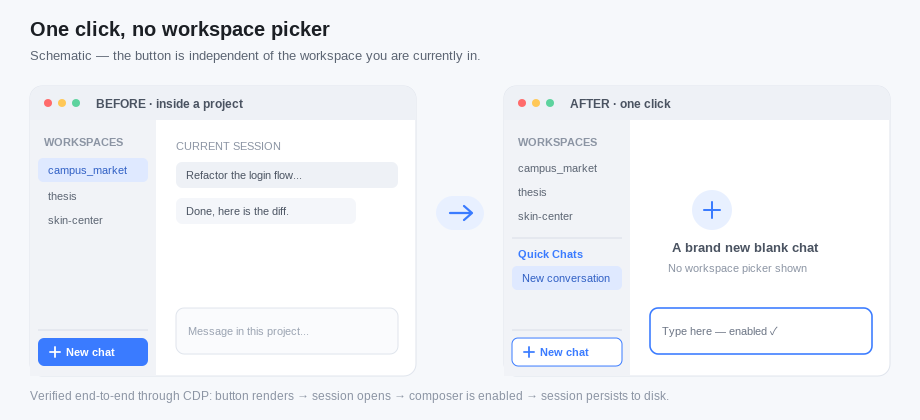
One click → a blank, ready-to-type chat in DeepSeek Harness. No workspace picker, no context switching. 中文文档





install.bat (Windows) or run node install.mjs.Needs Node.js 18+. No Node yet? Install the LTS build from nodejs.org first, then repeat step 2.
Listed in the awesome-dsh-plugin community catalog under UI Enhancements.
In the DSH desktop UI, "New session" is tied to the currently selected workspace. If you are inside a project and just want to ask a quick question, you either pollute that project with a throwaway session, or go build/select a folder first.
Worse: a blank session with no workspace at all is inert. The conversation view disables the composer via
const inert = sessionId === undefined || (hero && chipTitle === undefined);A blank session (hero === true) without a workspace has no chipTitle, so the input is disabled and the placeholder becomes "select a workspace". Creating a workspace-free session through the API alone therefore produces a chat you can look at but not use.
This plugin fixes both halves: an entry point that is independent of the selected workspace, and a session that is actually typeable.
sidebar.footer.action slot — a list slot that is always appended and never stolen by another plugin. It renders regardless of which workspace is selected.workspaces.create is idempotent by path), then calls the official uiWorkspace.openWorkspace() path, which reuses an existing blank session. Clicking twice does not pile up empty chats.sessions.create({ workspaceId }) + uiWorkspace.openSession() if the official path throws.Requires Node.js 18+ (DSH already depends on Node). Windows / macOS / Linux.
Option A — zip installer (this is the path for the desktop app):
# download dsh-one-click-new-session-vX.Y.Z.zip from Releases, unzip it, then inside:
node install.mjs            # English UI
node install.mjs --lang zh  # Chinese UI
On Windows you can simply double-click install.bat (Chinese UI).
The installer auto-detects your DSH profile, creates ~/dsh-blank-sessions, writes the four plugin files into node_modules/dsh-one-click-new-session, and registers the bundle in the profile's package.json.
node install.mjs --dry-run                  # preview, writes nothing
node install.mjs --profile /path/to/profile
node install.mjs --dir /path/to/scratch
node install.mjs --uninstall
Option B — plugin manager (only if your setup ships the dsh CLI; the desktop app does not):
dsh plugin --profile desktop add dsh-one-click-new-sessionUse --profile web instead of desktop when you run the Web UI.
Option C — manual: see docs/INSTALL.md.
Then fully quit and restart DSH. See docs/INSTALL.md for troubleshooting.
Every new chat lands in the same Quick Chats workspace; sessions themselves are fully independent (own history, title, context). Clicking again while the current chat is still blank reuses it.
The scratch folder defaults to ~/dsh-blank-sessions. The host half resolves it at startup and writes it into the client bundle, so you never edit a path by hand; set the DSH_BLANK_SESSION_DIR environment variable to use a different folder.
lib/client.js still carries the UI strings, which install.mjs --lang localises:
| Setting | Meaning | Default |
|---|---|---|
DSH_BLANK_SESSION_DIR (env) |
Folder used for workspace-free chats | ~/dsh-blank-sessions |
SCRATCH_TITLE |
Workspace group name in the sidebar | Quick Chats / 临时对话 |
LABEL, HINT, FAIL_LABEL |
Button text | localised by --lang |
The technical write-up — the inert root cause, why host-side inline-script injection fails, the slot registry, and the client service call chain — is in docs/HOW-IT-WORKS.md.
| DSH | >= 0.1.7-rc.1 (developed against 0.2.x) |
| Runtime | Node.js 18+, browser renderer |
| Platforms | Windows (verified), macOS / Linux (installer is cross-platform) |
Issues and PRs are welcome — read CONTRIBUTING.md first. To report a security issue privately, see SECURITY.md.
MIT — do whatever you want, just keep the notice.
This is an unofficial community plugin. It is not affiliated with, endorsed by, or published by DeepSeek. "DeepSeek Harness" is a trademark of its respective owner. This repository contains only the four files written for this plugin — no DSH source code, no app.asar contents, no credentials.
CLASSIFICATION EVIDENCE
系统优先读取 GitHub Topics,再与站内分类词典和词根规则比对。当前命中: chat。
EthanYoQ
电子发票整理与报销准备工具:从邮箱批量收集 PDF/OFD/XML 发票,OCR 识别、分类归档并生成 Excel 汇总;提供 Windows/macOS 桌面版与 DSH 插件。

Bytedesk
Open Souce IM with AI powered live-chat, email, ticket support, omni-channel customer service,alternative to slack + zendesk

wenbin-wb
🚀 DeepSeek Harness 多通道远程访问与安全守护插件 | 局域网扫码直连、Cloudflare / 自建公网隧道、微信 / QQ / 飞书 / Telegram 机器人全生命周期对话 | 内置全协议访问安全认证、后台防篡改与容灾保命体系