dsh-video-preview




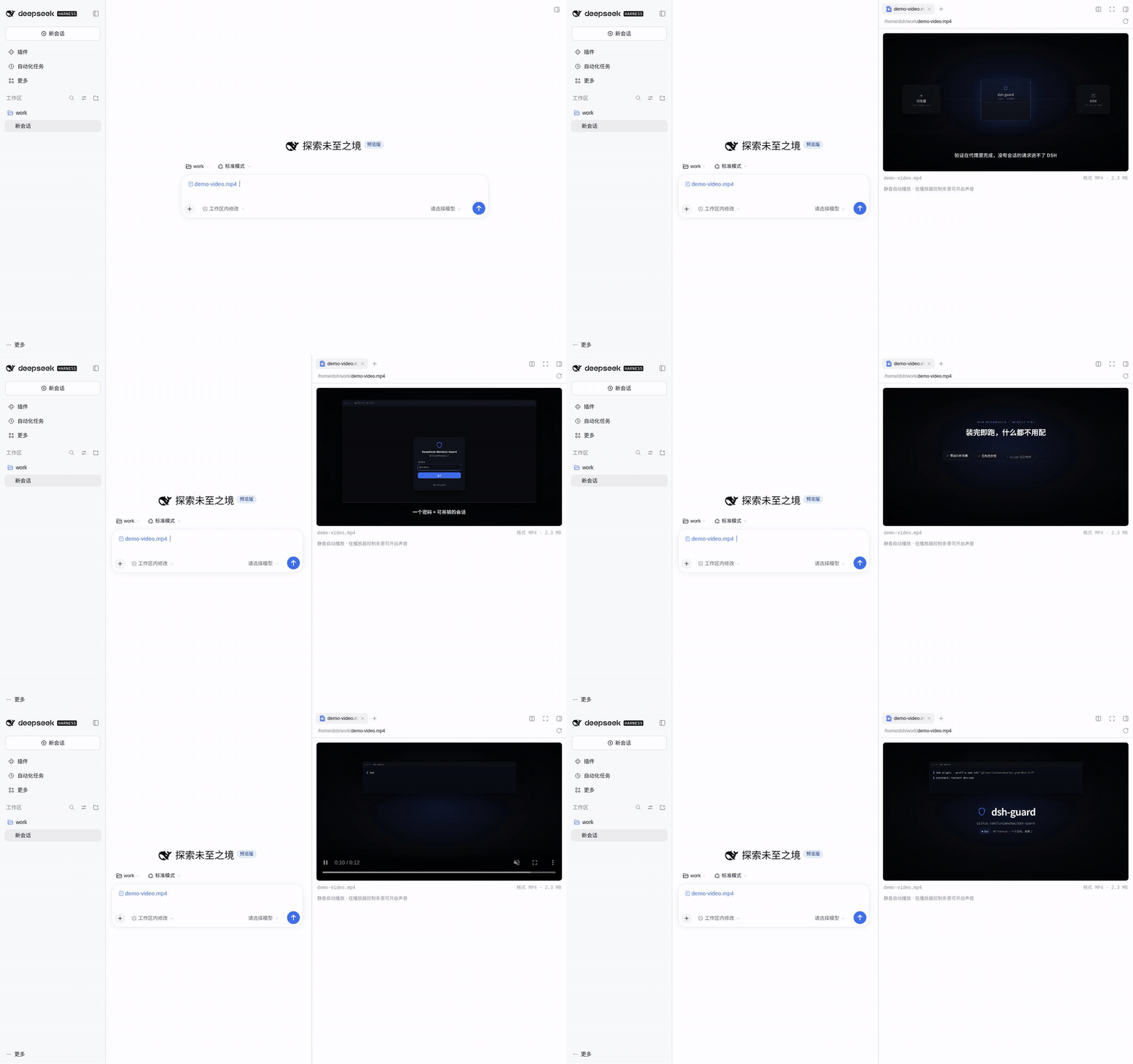
A video preview for the DeepSeek Harness (DSH) Web UI sidebar. Click an .mp4, .webm or .mov in the file tree, an @ reference, or the workspace-changes list, and it plays in place — instead of "preview is not available for this file type yet".
DSH's built-in document preview registers text, PDF, Excel and images. Video is not one of them. This plugin adds that renderer: mp4 / m4v / webm / ogv / ogg / mov.
中文说明:README.zh.md
Features
- Click and play — suffix-matched renderer that streams the file from an authenticated host route.
- True streaming — the
<video> element talks to a byte-range route (206 Partial Content), so seeking is instant and file size has no complete-read cap: a 5 GB video costs only the bytes you actually watch.
- Muted autoplay — browsers refuse audible autoplay, so the preview starts silently; the native controls unmute in one click.
- Useful metadata — filename, container format, size (from a stat route).
- Readable failures — an unsupported codec or container says so instead of showing a blank player.
- Zero runtime dependencies — React comes from the host; everything else is standard Node/browser API. No build step: the browser half is a hand-written
__ModuleLoader__ module.
- No host coupling — the browser half registers through the public
documentPreviews / slots / locale services; the host half through connection.fetch routes inside the same browser-auth fence as every other /api route.
Install
# npm
dsh plugin --profile web add @lvxianchao/dsh-video-preview

# from GitHub
dsh plugin --profile web add "github:lvxianchao/dsh-video-preview"

# from a local checkout
dsh plugin --profile web add /path/to/dsh-video-preview
main only ever carries released code, so both remote forms install the latest stable release. Then restart dsh (the Web UI reloads its frontend modules on boot):
sudo systemctl restart dsh-web # adapt to your deployment
The package declares dsh.bundle, so installing it appends the package to the profile's bundle list and mounts the row automatically — no cordis.patch.yml edit needed.
To try it without touching a profile, use an overlay:
dsh --profile web --patch ./dev.yml --host 127.0.0.1 --port 3099 --no-open
# dev.yml
- insert:
    - id: video-preview
      name: '/absolute/path/to/dsh-video-preview/lib/index.js'
Use
- Type
@ in the composer and pick a video file (or open one from the workspace changes).
- Click the file reference; the right sidebar opens a player and starts muted playback.
- Drag, unmute, go fullscreen with the native controls. Seeking fetches only the bytes around the new position.
Configuration
| Key |
Default |
Meaning |
rangeBytes |
2097152 (2 MiB) |
Byte window served per stream request. The browser issues consecutive ranges as it plays, so this is a latency/throughput knob, not a size limit. |
# ~/.dsh/profiles/web/cordis.patch.yml
- id: video-preview
  config:
    rangeBytes: 4194304   # 4 MiB windows
Limitations
| Limit |
Cause |
Workaround |
No mkv |
Chrome cannot decode Matroska |
Remux to mp4/webm |
| Codec-dependent |
The browser only plays what the platform decodes; HEVC/AV1 vary |
H.264/AAC mp4 is the safe choice |
| Session must resolve |
The stream route resolves the file through the session named in the file address |
Previewing files from a live session always resolves; a vanished session 404s |
| Authenticated browsers only |
Routes live behind the same auth fence as the rest of /api |
That is the point — no unauthenticated file serving |
How it works
| Half |
File |
Role |
| Host |
lib/index.js |
Registers GET/HEAD /api/video-preview.stream (byte ranges via workspaceFiles.readBytes(range), 206 + Content-Range) and GET /api/video-preview.stat (size/version/type) on connection.fetch |
| Browser |
lib/client.js |
Registers the renderer metadata (loading: "renderer") and the keyed document body; renders <video src=…> pointed at the stream route and reports its loaded version |
The renderer uses loading: "renderer", so the preview framework never performs a complete-byte read for video files — that is what removes the platform's 32 MB complete-file cap from the video path.
The browser half needs no build step — it is a module in the host loader's own format:
window.__ModuleLoader__.load({ id: "@lvxianchao/dsh-video-preview", factory: (require) => { /* … */ } });
Related
dsh-web-guard — the same author's password login for the DSH Web UI, so it can be exposed on the internet: sign in from anywhere instead of chasing one-off tokens, with reverse-proxy quirks handled. This plugin only changes how files preview, not who can open them: if the UI is reachable beyond loopback, put dsh-web-guard in front of it.
dsh plugin --profile web add @lvxianchao/dsh-web-guard
Development
main is the release branch: it only carries code that has been released and tagged. Day-to-day work happens on dev and lands on main when a release is cut.
git checkout dev
# … change, commit, test …
git checkout main && git merge --ff-only dev
git tag -a vX.Y.Z && git push origin main --tags
Shadow instance (isolated DSH_HOME, never touches a live profile or its data):
DSH_HOME=/tmp/dsh-test-home dsh --profile web \
  --patch ./test/shadow.patch.yml --host 127.0.0.1 --port 3199 --no-open
test/shadow.patch.yml mounts the plugin by path. test/e2e.mjs drives headless Chrome through "@ reference → click → assert the <video> plays, serves 206 ranges, and can seek near the end of a file bigger than the old 32 MB cap". test/record-demo.mjs records docs/demo.gif from the same flow (needs puppeteer-core and a Chrome binary).
To verify the streaming path through the auth gate — the production topology — install dsh-web-guard into the same shadow profile, boot it with test/guard.patch.yml, and run test/e2e-guard.mjs: it signs in, opens a video, and asserts 206 + Content-Range still arrive through the proxy.
Sponsor
If this plugin saved you some time, a coffee is welcome:
- ☕ Afdian — mainland China, WeChat / Alipay
- 🌍 Ko-fi — international, PayPal
WeChat tip QR

Changelog
- 1.0.0 — first stable release: streaming byte-range host routes, renderer-owned loading, no complete-file size cap,
rangeBytes config.
- 0.1.0 — preview: Blob-based playback of complete bytes (32 MB platform cap applied).
License
MIT


