

文件与数据
插件

OpenViking
volcengine
Self-evolving Context Database for AI Agents. Unify Agent Memory, Knowledge RAG and Skills.
PROJECT TOPICS
INSTALL REFERENCE
dsh plugin --profile web add github:l741589/dsh-main-file-tabs
该命令指向仓库当前默认分支;尚无绑定当前 commit 的完整验证结果。
PROJECT README
在 DSH 主工作区里继续编辑右侧边栏的文件:页签、实时双向同步、边编辑边预览。




DSH Main File Tabs 是一个面向 DeepSeek Harness (DSH) 的客户端插件。它把右侧边栏里正在预览的文件以页签形式打开到主工作区,并复用侧边栏同一个 TextEditor,因此语法高亮、Markdown 预览、Mermaid、图片解析等都与侧边栏一致。
插件通过 DSH 的 Conversation View 承载文件工作区,而不是替换整个会话:会话标题、右侧边栏、侧边栏展开按钮都会保留。
English summary: Continue editing the file already open in DSH's right Sidebar from a tabbed main workspace, with live two-way text sync and split edit/preview. Reuses the Sidebar's own
TextEditorrather than reimplementing highlighting or Markdown rendering.
DSH 的右侧边栏适合快速浏览文件,但编辑长文档、宽表格或复杂代码时空间有限;而主工作区通常被会话占用。
这个插件把侧边栏文件“抬”到主工作区,同时保持两边是同一份文档:
view.dispatch,约 45ms 内同步到另一侧。TextEditor,保留语法高亮、Markdown 预览、Mermaid、TOC、图片解析等能力。mainFileTabs 服务允许其他插件打开文件、监听编辑、读取打开列表。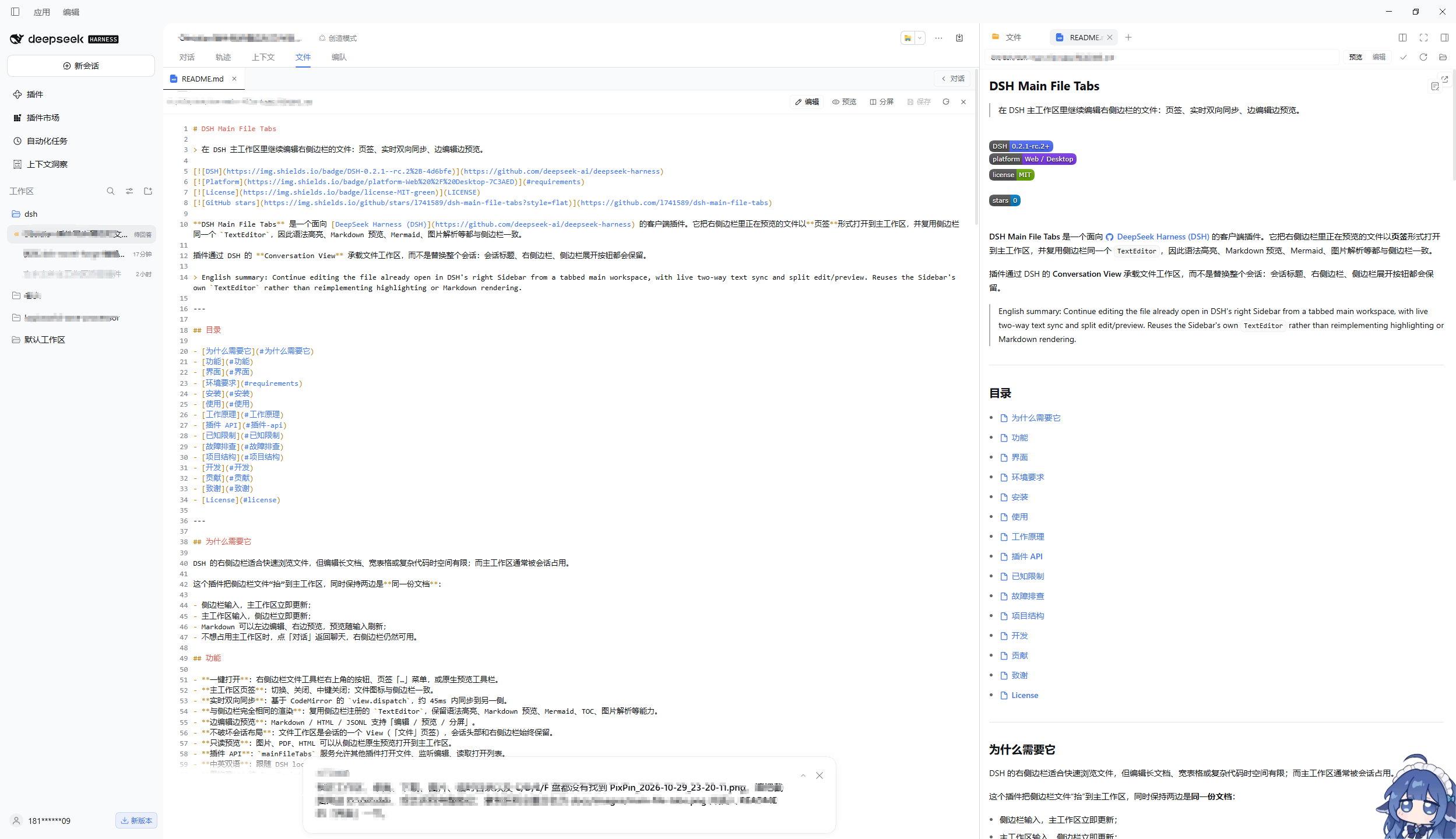
打开文件后,会话头部的 View 页签会新增 「文件」。文件工作区在这个 View 内渲染,所以右侧边栏不会消失。
0.2.1-rc.2 或更高版本,且 profile 带有 Web UI(例如 desktop profile)。0.28.x(插件复用它的 TextEditor 和 viewer 注册表)。插件目标不是替代 DSH 的文件树或编辑器,而是把侧边栏文件工作区延伸到主区域。
dsh plugin --profile desktop add dsh-main-file-tabs把 desktop 换成你的 profile 名称。安装完成后完全退出并重新打开 DSH;桌面版如果缩小到托盘,请从托盘退出。重新打开后按 Ctrl+R / Cmd+R 刷新页面。
安装不会执行构建脚本,通常不会出现
approve-builds提示。
dsh plugin --profile desktop add github:l741589/dsh-main-file-tabs适合想固定到某个 commit、或还没有 npm 发布版本的场景。
git clone https://github.com/l741589/dsh-main-file-tabs.git
dsh plugin --profile desktop add ./dsh-main-file-tabs
本地安装会以链接方式挂载目录,修改 client.js 后刷新页面即可看到变化;Host 半端是空实现,一般不需要重启 Host 进程。
重启后打开右侧边栏,打开一个 .md 文件,工具栏右上角应出现 「在主工作区打开」 按钮。
如果按钮没有出现:
dsh-better-sidebar 已安装并在当前 profile 中启用;F12 或 Ctrl+Shift+I)Console 中是否有 [dsh-main-file-tabs] 开头的日志。.md / .txt / 代码文件等)。插件不复制侧边栏的编辑器实现,而是复用 dsh-better-sidebar 注册的同一个 TextEditor 组件和同一个 Markdown 预览渲染器。
view.dispatch 在它们之间转发文本变化。TextEditor 的 Markdown 预览读的是内部 draft state;插件在远程文本更新时同步这个 state,所以编辑→预览也能实时刷新,且不会重挂编辑器。conversation.view,不是全局 main panel,因此不会替换会话头部和右侧边栏。flowchart LR
A[Sidebar TextEditor<br/>CodeMirror] -->|文本变更| B[Main workspace tab<br/>CodeMirror]
B -->|文本变更| A
B --> C[Markdown preview<br/>draft state]
C --> D[Conversation View: 文件]
D -. 保留会话头部与侧边栏 .-> E[Session header + Right Sidebar]插件在 Client 端提供 mainFileTabs 服务。其他 Client 插件可以:
const api = ctx.get('mainFileTabs')或在模块声明中注入:
export const inject = ['mainFileTabs']

export function apply(ctx) {
  const api = ctx.mainFileTabs
  const off = api.onDidChange((event) => {
    console.log(event.path, event.text)
  })
  ctx.effect(() => off)
}openFile(input)const handle = ctx.get('mainFileTabs').openFile({
sessionId: 'session-id', // 可省略:取当前右栏挂载的会话
cwd: '/workspace', // 可省略:从会话列表读取
path: 'docs/design.md', // 绝对路径,或相对 cwd
line: 12, // 可选,1-based;会定位到该行
viewerId: 'markdown', // 可选;默认按扩展名匹配
readOnly: true, // 可选;只读打开,禁止编辑并拦截保存
text: undefined, // 可选:直接提供初始文本
mtimeMs: undefined, // 可选:与 text 配套的保存基线
size: undefined, // 可选:与 text 配套的大小
})
await handle.ready
// { sessionId, path, tabId, title, viewerId, line, readOnly }如果文件已经在侧边栏打开且有未保存文本,API 会优先采用侧边栏的实时文本,而不是磁盘旧内容。
| 字段 | 类型 | 说明 |
|---|---|---|
sessionId |
string? |
目标会话;省略时取当前右栏挂载的会话。指定非当前会话时页签存入该会话,但不自动切换会话 |
cwd |
string? |
相对路径的基准;省略时从会话列表读取 |
path |
string |
文件路径(绝对或相对 cwd),必填 |
line |
number? |
打开后定位到的 1-based 行号 |
viewerId |
string? |
强制使用某个 viewer id;默认按扩展名 |
readOnly |
boolean? |
只读打开;禁止编辑输入并拦截保存(含 Ctrl/Cmd+S 与工具栏保存) |
text |
string? |
直接提供初始文本,不再从磁盘读取 |
mtimeMs |
number? |
与 text 配套的保存基线 |
size |
number? |
与 text 配套的文件大小 |
返回值是同步的 handle,handle.ready 是一个 Promise,在文件读取/页签就绪后解析为同一个 handle。
| 方法 | 触发时机 | 事件字段 |
|---|---|---|
onDidChange(listener) |
主工作区或侧边栏的文本文档发生变化(约 45ms 节流) | sessionId, path, tabId, title, text, source: 'main' \| 'sidebar' |
onDidOpen(listener) |
打开的文件读取完成、页签就绪 | sessionId, path, tabId, title, viewerId, kind, readOnly, text? |
onDidClose(listener) |
页签关闭 | sessionId, path, tabId, title |
onDidChangeActiveTab(listener) |
活跃页签切换、打开新页签,或关闭活跃页签导致自动切换;关闭非活跃页签不触发 | sessionId, tabId, path, title, previousTabId, previousPath, reason: 'activate' \| 'open' \| 'close' |
这些方法都返回 disposer:
const off = api.onDidChange(handler)
// 清理
off()api.getOpenFiles(sessionId?) // 打开列表:sessionId/path/tabId/title/viewerId/kind/line/mtimeMs/readOnly/dirty/text?
api.getText({ sessionId, cwd, path }) // 返回主工作区内存中的当前文本;不存在返回 undefinedapi.version // '1.1.0'
api.features // ['openFile','onDidChange','onDidOpen','onDidClose','onDidChangeActiveTab','getOpenFiles','getText']
mainFileTabs是 Client 服务,不是 Host 工具;只能在浏览器端插件中使用。
fsRead 文本格式提供可编辑页签;图片、PDF、HTML 在主工作区是只读预览,Office 文档请在侧边栏预览。TextEditor 的保存逻辑;如果先在主工作区保存、再在侧边栏保存同一文件,侧边栏的 mtime 基线可能过期并提示保存冲突。遇到冲突时在侧边栏点「重新加载」。dsh-better-sidebar 内部结构:同步依赖它的 CodeMirror 视图和 TextEditor 的 draft state。如果侧边栏插件大版本改版,实时同步可能退化为「只在主工作区打开」,但不会影响侧边栏原有功能。sessionId 打开文件时,页签存入该会话的工作区,但不会自动切换会话。dsh-better-sidebar 的 HTML 预览显示的是已保存文件,不展示未保存草稿;Markdown / JSONL 会实时刷新。| 现象 | 处理 |
|---|---|
| 文件工具栏没有「在主工作区打开」按钮 | 确认安装了 dsh-better-sidebar@0.28.x;或使用页签「…」菜单 |
| 点了没反应 | 查看 DevTools Console 的 [dsh-main-file-tabs] 日志;确认当前会话有 View 页签 |
| 会话头部没有「文件」View | 重启 DSH;确认插件已启用并加载(Console 应有 active 日志) |
| 右侧边栏在打开文件后消失 | 这是旧版全局主面板的问题;当前版本使用会话 View,应保留侧边栏。若仍出现,请提交 issue 并附 DSH 版本 |
| 编辑→预览不同步 | 更新到最新版本;Console 搜索 preview draft sync failed |
| 保存时提示冲突 | 在侧边栏点「重新加载」,再保存 |
提交 issue 时请附上:
dsh-better-sidebar 版本、操作系统;[dsh-main-file-tabs] 开头的日志。.
├── client.js # 全部 Client UI / 同步 / API
├── index.js # Host 半端(空实现)
├── cordis.patch.yml # 插入 main-file-tabs 插件行
├── package.json # dsh bundle + client 元数据
├── locale/
│ ├── zh.json
│ └── en.json
├── docs/
│ └── images/
│ └── main-file-tabs.png
├── assets/
│ └── icon-180.png
├── screenshots.json
├── icon.svg
├── LICENSE
└── README.mdclient.js:注册侧边栏 viewer 桥、主工作区「文件」View、页签、同步桥、API。index.js:Host 侧不需要逻辑;整个功能在浏览器端。cordis.patch.yml:把 main-file-tabs 行插入 DSH profile。docs/images/main-file-tabs.png:README 中的实际界面截图。assets/icon-180.png:插件市场的 180×180 位图图标(icon.svg 不能直接作为市场图标)。screenshots.json:市场详情页的截图清单。git clone https://github.com/l741589/dsh-main-file-tabs.git
cd dsh-main-file-tabs
dsh plugin --profile desktop add .然后完整重启 DSH 并刷新页面。
由于没有构建步骤,修改 client.js 后可先尝试刷新页面;如果 DSH 的客户端 HMR 没有接管,重新加载应用即可。
基础检查:
node --check client.js
node --check index.js
开发时建议在 DevTools Console 观察:
[dsh-main-file-tabs] active { textExtensions: 85, viewer: '...', api: 'mainFileTabs@1.0.0' }1.1.0。api.features 加法式暴露;已有方法签名尽量保持向后兼容。TextEditor、viewer 注册表和侧边栏文件能力。MIT © 2026 l741589
CLASSIFICATION EVIDENCE
系统优先读取 GitHub Topics,再与站内分类词典和词根规则比对。当前命中: file、files、sync、文件、同步。
volcengine
Self-evolving Context Database for AI Agents. Unify Agent Memory, Knowledge RAG and Skills.

mindscale-noah
该仓库暂未提供项目说明。

himovo
Turn DeepSeek Harness into a self-hosted enterprise Agent platform with knowledge, deep research, content generation, vibe coding, browser automation, governance, and admin controls.