

a resident Rust sidecar for DeepSeek Harness





把 DSH 里「真正动手」的那部分交给一个常驻的 Rust worker:命令执行、带 sha256 校验的文件读写、代码索引与检索、会话日志投影、资源采样都在 Rust 侧完成;DSH 宿主只做 JSON-RPC 管道、lane 调度与路由注册,浏览器侧只做叠加式展示。
- 11 个工具:10 个
rust_* 加 native_help(5 个常驻、6 个按需激活)
- 8 条 HTTP 路由:
/api/dsh-rust-exec/*
- 三处界面:固定头部的会话投影视图、Grafana 风格监控器、输入框下沿的
dsh-rust-exec 资源状态条
为什么值得装:
- 每次工具调用都新起进程太贵。 DSH 每调一次
pwsh 要付一次 PowerShell 冷启动(本机 2.4–4.4 s,低完整性沙箱下更慢)。这里改成常驻 worker + 常驻 shell server,同一 lane 上后续命令是毫秒级。
- 大输出、大文件、大日志把上下文吃光。 读文件按行区间、搜索按字节预算裁剪、会话日志先解码当前页——同召回下返回体积约降 80%。
- 看不见运行状态。 worker 重启次数、队列堵没堵、RSS 涨到哪、哪个会话在跑,全部进
/metrics、rust_health 和监控器。
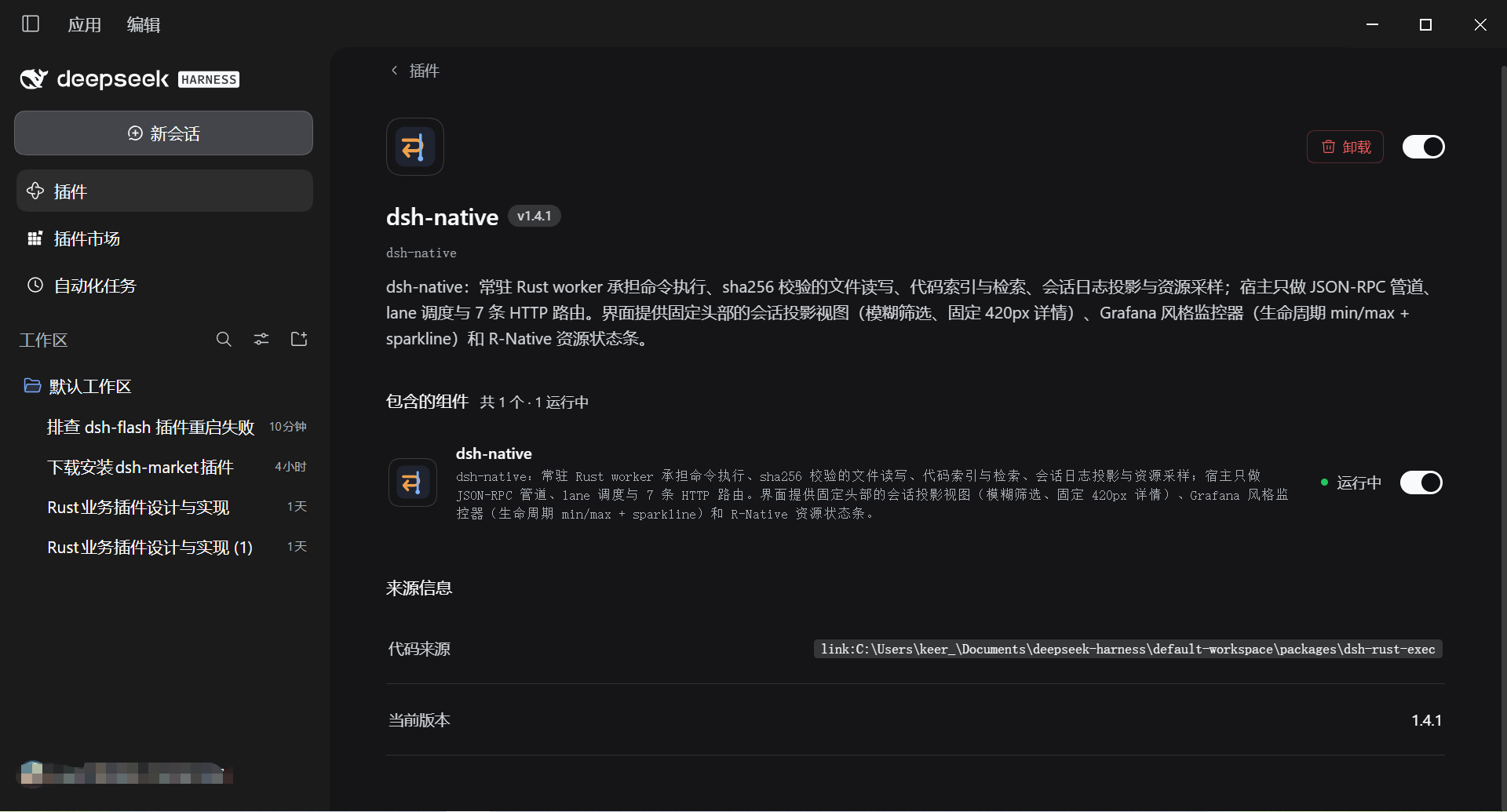
① 介绍 — 设置页里的插件条目、版本与资源监控入口
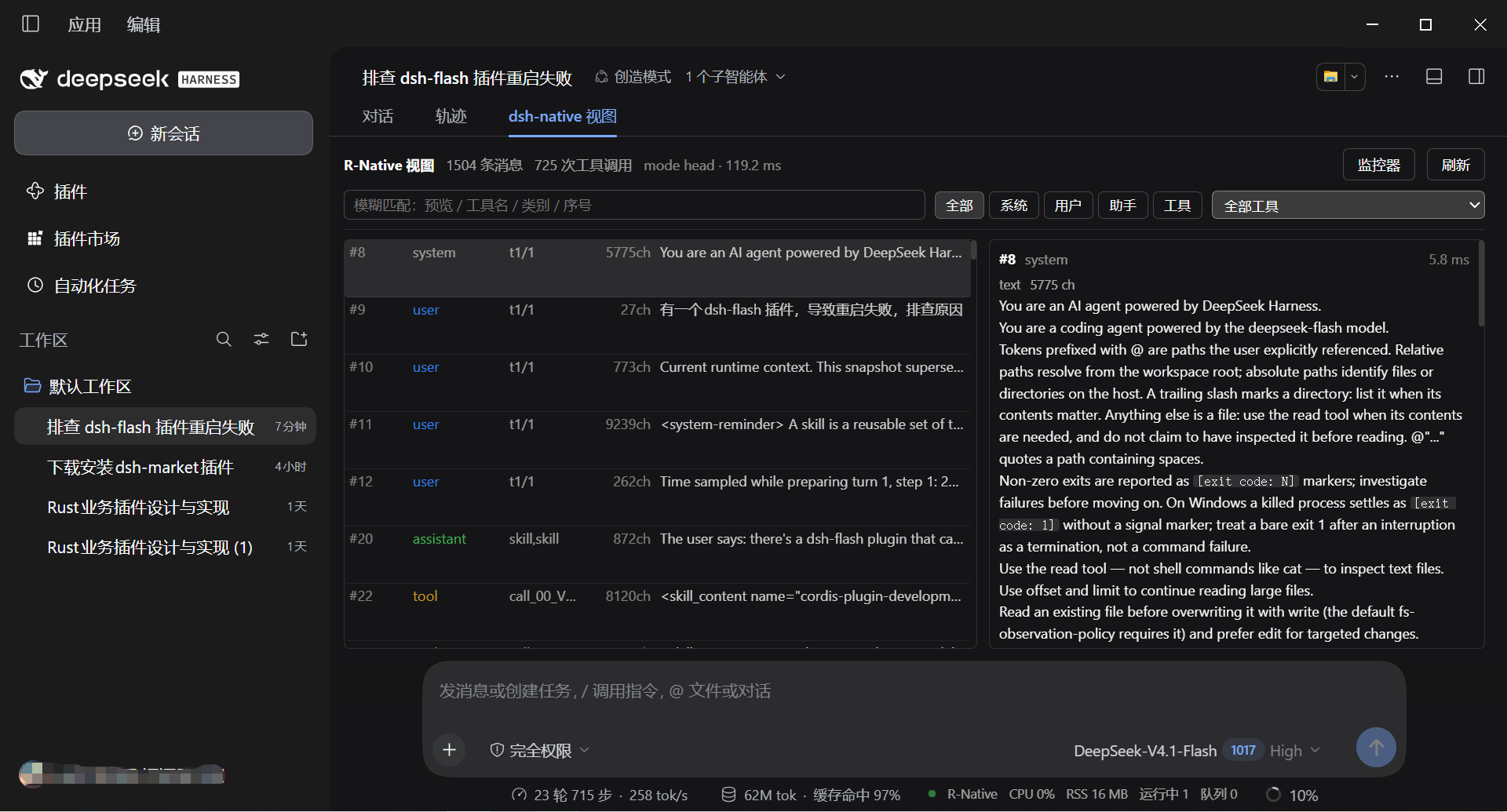
② 视图页 — 固定头部(计数、模糊筛选、类别下拉、监控器/刷新)+ 左侧消息列表 + 固定 420 px 详情
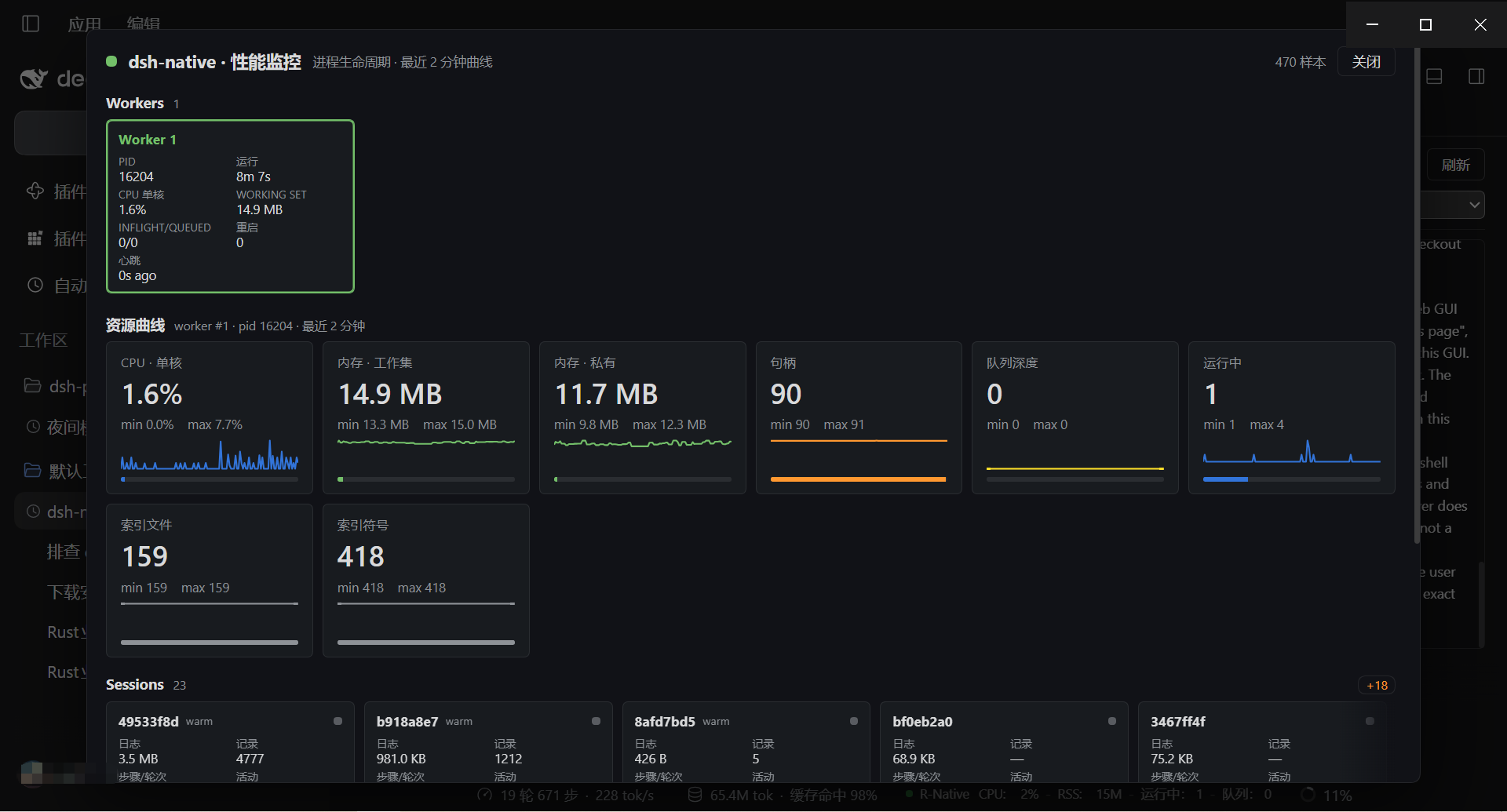
③ 监控页 — 三行卡片(Workers / Sessions / Cache)+ 跟随选中 worker 的曲线组 + 节省报表
安装
从 npm(推荐)
# 1) 装进 DSH profile
pnpm add dsh-rust-exec     # 或 npm i dsh-rust-exec

# 2) 挂载 bundle —— 编辑 <DSH_HOME>\profiles\<profile>\package.json
#    "dsh": { "profile": { "bundles": [
#        "@deepseek-ai/dsh-base", "@deepseek-ai/dsh-web-app", "dsh-rust-exec" ] } }

# 3) 重启 DSH,然后验收
curl http://127.0.0.1:<port>/api/dsh-rust-exec/health
ok: true、worker pid、routes: 8 都在,就算装好了。随后设置页 → 插件 → dsh-rust-exec 会出现「监控器」按钮,对话页顶部会多出 dsh-rust-exec 页签。
1.7.6 起包名是 dsh-rust-exec(1.7.0–1.7.5 叫 dsh-native,更早是 @keer1024/dsh-native)。升级时 dependencies 的键与 dsh.profile.bundles 里的旧名要一起改,再 pnpm install + 重启;细节见 包名迁移 与 1.7.6 任务单。
从 tarball(离线 / 内网)
仓库根目录的 bin/ 里始终放着当前版本的安装包(随仓库提交,带 .sha256):
# 先校验(可选但推荐)
Get-FileHash .\bin\dsh-rust-exec-1.7.8.tgz -Algorithm SHA256
# 与 bin\dsh-rust-exec-1.7.8.tgz.sha256 里的摘要比对

npm i .\bin\dsh-rust-exec-1.7.8.tgz
目标机要求、profile 两处改动、SmartScreen 与常见失败见 分发与跨机安装。
从 GitHub 源码(不发 npm 时的备选)
dsh plugin --profile web add github:keer1024/dsh-native#path:/packages/dsh-rust-exec
子包没有构建脚本,也不需要 allowBuilds 授权;代价是首次要拉整个仓库,比 npm / tarball 慢。
升级与卸载
- 升级:
pnpm add dsh-rust-exec@latest → 重启 DSH。
- 卸载:在 DSH 插件管理里移除,或从
dsh.profile.bundles 删掉该条目 → 重启 DSH;投影缓存可整体删除,不残留状态。
装好后 host 侧(工具、路由)热生效;客户端叠加物需要刷新一次页面。
工具(11 个)
| 工具 |
作用 |
主要参数 |
rust_exec |
在常驻 PowerShell lane 上执行命令;返回 exitCode/stdout/stderr/ms/shellMs/queueMs/lane/reused |
command(必填)、cwd(持久化到后续调用)、timeoutMs、queueTimeoutMs(默认 30000) |
rust_read |
读文件,按行区间取,返回 sha256 与总行数;同一文件同一区间的重复读会去重 |
path、offset(1 起)、limit、refresh |
rust_write |
原子写(临时文件 + rename),可选版本守卫 |
path、content、expectedHash(sha256 或 absent) |
rust_edit |
精确文本替换,锚点有歧义时失败且不改文件 |
path、oldString、newString、replaceAll |
rust_stat |
原生 stat:大小、时间、类型;paths 形态一次往返探测多个路径 |
path 或 paths: string[](≤256) |
rust_ls |
目录列举,可限条数;sizes:false 省掉逐条 metadata |
path、limit、sizes |
rust_search |
常驻索引上的文本/正则检索,按字节预算与相关度裁剪 |
query、glob、regex、symbolsOnly、contextLines(0–2)、maxHits(默认 24)、maxBytes(默认 6000)、refresh |
rust_symbols |
符号检索(fn/class/struct/trait…),返回定义位置 |
query、path、kind、limit(默认 40)、maxBytes、refresh |
rust_session_open |
直接解 session.v*.jsonl.zstd,游标分页,首屏只解码当前页 |
path、limit(1–500,默认 50)、cursor、refresh |
rust_health |
worker 存活、心跳间隙 p50/p99、重启次数、最后退出码、索引规模、路由挂载 |
无 |
native_help |
渐进披露入口:列出尚未激活的工具,并在同一会话内激活它们 |
tools?: string[] |
默认只常驻 rust_exec / rust_read / rust_search / rust_health / native_help 五个,其余 6 个由 native_help 按需激活(progressiveDisclosure: false 可恢复 11 个全常驻)。
统一截断契约:被裁剪的结果在 footer 带 truncated by lines|bytes · omitted N · complete=false,完整结果显示 complete,便于模型判断要不要续读。
HTTP 路由(8 条)
前缀 /api/dsh-rust-exec,挂载失败会退避重试,挂载结果见 /health 的 routes.registered。
| 路由 |
返回 |
GET /metrics |
采样(1 s 一点)、pool、sessions、config、readiness、workers[]、cache、savings、extremes |
GET /cache |
读缓存与索引视图(entries/hits/bytes/ttl、files/symbols/buildMs) |
GET /health |
hostPid、worker pid/版本/协议、重启次数、routes.registered、锁文件路径 |
GET /events |
近期事件环形缓冲(重启、软限、路由重挂等) |
GET /sessions |
可投影的会话列表(≤50,按 mtime 倒序) |
GET /session?id=&limit=&cursor= |
单个会话的分页投影(mode=append/warm/head、耗时分解) |
GET /session/body?id=&seqs=&maxChars= |
指定 seq 的消息正文(最多 40 个 seq,缺 seqs → 400) |
POST /config |
热改配置:6 个池键(maxWorkers/maxShells/maxInFlightPerSession/idleReapMs/rssSoftLimitMb/cpuSoftLimitPct)+ 5 个功能开关(progressiveDisclosure/compactReads/prewarmIndex/deferStart/startDelayMs)+ tools 逐工具开关;返回 applied/switches/requiresReload/tools |
浏览器带会话凭据,Node 侧直接 fetch 会拿到 401。
配置
Loader 行的 config 由 Config['~standard'].validate 校验,非法值直接拒绝挂载;POST /config 可热改一部分。设置页覆盖下表标 ✔ 的 11 个键:点 Apply 后立即写进 %LOCALAPPDATA%\dsh-rust-exec\settings.json(原子写,temp + rename),重启时自动读回;loader 里显式写了同一个键时以 loader 为准,所以想在机器上锁死某项,就写在 loader 行而不是设置页。
| 键 |
范围 / 默认 |
设置页 |
生效 |
说明 |
workerPath |
默认包内 bin/dsh-rust-worker.exe |
— |
重启 |
跨机部署路径不同时必须显式配 |
defaultTimeoutMs |
>0,默认 60000 |
— |
重启 |
单次调用默认超时 |
lanes |
1–16,默认 min(4, cores/2) |
— |
重启 |
每个 worker 的并行 shell 数 |
maxQueueDepth |
1–4096,默认 64 |
— |
重启 |
队列闸门;满了返回可重试的拒绝 |
metricsIntervalMs |
≥250,默认 1000 |
— |
重启 |
采样周期 |
maxWorkers |
1–8,默认 1 |
✔ |
立即 |
多进程是隔离手段,不是吞吐手段 |
maxShells |
1–64,默认 8 |
✔ |
立即 |
worker 侧 shell 硬上限 |
maxInFlightPerSession |
1–64,默认 = lanes |
✔ |
立即 |
同会话并发闸门 |
idleReapMs |
≥10000,默认 300000 |
✔ |
立即 |
空闲回收 |
rssSoftLimitMb |
64–65536,默认 512 |
✔ |
立即 |
软限:超限先丢索引,不杀进程 |
cpuSoftLimitPct |
10–100,默认 70 |
✔ |
立即 |
持续超限时暂停派发 |
deferStart |
布尔,默认 true |
✔ |
重启 |
异步启动:挂载后等 startDelayMs 再拉起 worker |
startDelayMs |
0–30000,默认 1200 |
✔ |
重启 |
延迟启动时长;工具先被调用会立刻结束等待 |
prewarmIndex |
布尔,默认 true |
✔ |
重启 |
worker 启动时预热索引与 lane |
progressiveDisclosure |
布尔,默认 true |
✔ |
重启 |
5 常驻 + 6 按需;false 恢复 11 个全常驻 |
compactReads |
布尔,默认 false |
✔ |
立即 |
rust_read 默认压缩(去注释、折叠缩进,行号仍有效) |
逐工具开关(1.7.7 起):按工具列出全部 11 个开关,位置在监控弹窗里——点会话输入框底部那条资源摘要打开弹窗,开关就在标题下面、曲线上面(1.7.8 前只在设置页的插件分页里,藏得太深,等于没有)。关掉一个就当场从注册表移除(ctx.tools.register 返回的正是精确 disposer),打开即重新注册,不用重载插件;状态存 settings.json 的 tools 对象,loader 里显式写了 tools 仍以 loader 为准。这样原生同名工具才有机会接管——插件本身不做 unregister。开关旁的三态文案要分开看:已注册(在注册表里)、已关闭(你关的,config.tools 记着)、未加载 · 用到时才注册(progressive disclosure 的懒加载,不是被关掉)。
环境变量:DSH_HOME、DSH_PROFILE、DSH_RUST_WORKER_CWD、DSH_RUST_DEBUG、DSH_RUST_PREWARM、DSH_VERSION。锁文件 <DSH_HOME>/run/dsh-rust-worker-<profile>.lock 由宿主写,回收前核对进程镜像名,不按 pid 盲杀。
诊断日志:%LOCALAPPDATA%\dsh-rust-exec\logs\rust-exec-<宿主 pid>.log(JSONL,2 MB 轮转)。
排障
| 症状 |
原因 |
处理 |
重启后报 web boot: 1 entry did not activate / duplicate factory registration |
package.json 的 name、client.js 注册 id、cordis.patch.yml 不一致 |
node tools\check_client_identity.mjs 定位;三处必须同名 |
工具列表里没有 rust_* |
profile 的 dsh.profile.bundles 缺 dsh-rust-exec |
补 bundles + pnpm install + 重启 |
| 面板 401 / 404 |
浏览器没带凭据,或路由没挂上 |
看 /health 的 routes.registered |
写 %TEMP% / ~/.dsh 报 拒绝访问 (os error 5) |
worker 以低完整性运行 |
1.6.1 起镜像已搬到 %LOCALAPPDATA%\dsh-rust-exec\bin 再启动;仍失败看 rust_health.logPath |
首次 exec 3–20 s |
该 lane 的 PowerShell 冷启动 |
正常;后续同 lane 毫秒级 |
| 监控器一直显示「启动中…」 |
readiness.phase 停在 pending/starting,或 worker 拉起失败 |
看 /health 的 phase 与 readiness.error |
强杀 worker 后残留 powershell.exe |
Windows 不杀进程树 |
kill() 用 taskkill /T,新 worker 启动时再扫一遍 |
兼容性与限制
- 平台:仅 Windows 10/11 x64。macOS/Linux 需要另出二进制。
- DSH:实测 0.2.1-rc.2 / Electron 44 / Node 24;DSH 仍在 rc,插件契约可能变。
- Node:host 插件只用
node: 内置模块,≥22 即可。
- 只读投影:真相源仍是 DSH 会话日志,插件不写回;投影可丢弃可重建。
- 分发状态:包名
dsh-rust-exec(npm 上尚未注册;dsh-native 上的 0.0.0-stage 是旧占位,不要装)。1.7.8 的安装包以 dsh-rust-exec-1.7.8.tgz 同时发布在 GitHub Release v1.7.7 与仓库根 bin/,也可走 GitHub 源码或目录 link,步骤见 DISTRIBUTION.md。
维护者
node tools\build_plugin.mjs                 # 全量:cargo 编译 + 换装 + npm pack + 分发
node tools\build_plugin.mjs --skip-rust     # 跳过 cargo 与换装,用现有二进制直接打包
node tools\build_plugin.mjs --no-archive    # 只更新 bin/,不碰 dist/
约定:版本号唯一事实源是 packages/dsh-rust-exec/package.json;脚本不碰 git(不 commit、不打 tag);产物只留当前版本——bin/ 与 dist/ 各一份,旧 worker 镜像在构建后自动清理,规则见 DISTRIBUTION.md §6。
发版门禁:node tools\release_check.mjs(任务单、CHANGELOG、README 版本号、安装包 sha256、工作区与 tag 共 11 项)。
文档与许可
English
dsh-rust-exec is a resident Rust sidecar for DeepSeek Harness. Command execution, sha256-guarded file IO, code indexing/search, session-log projection and resource sampling all run in a long-lived Rust worker; the host stays a thin JSON-RPC / lane-scheduling / route layer.
- 11 tools — 10
rust_* tools plus native_help (5 resident, 6 activated on demand)
- 8 routes —
/api/dsh-rust-exec/{metrics,cache,health,events,sessions,session,session/body,config}
- UI — pinned-header projection view, Grafana-style monitor,
dsh-rust-exec resource strip
- Async start — DSH boots first; the worker starts 1.2 s later and the UI back-fills data the moment
readiness turns ready
- Install —
pnpm add dsh-rust-exec, add dsh-rust-exec to dsh.profile.bundles, restart DSH; or npm i ./bin/dsh-rust-exec-1.7.5.tgz
- Source install —
dsh plugin --profile web add github:keer1024/dsh-native#path:/packages/dsh-rust-exec
- Requires — Windows 10/11 x64 · DSH desktop · PowerShell 5.1 (no Node.js on the target machine)
See the Chinese sections above for the full manual, or read CHANGELOG.md.


