dsh-3d-plugin-graph
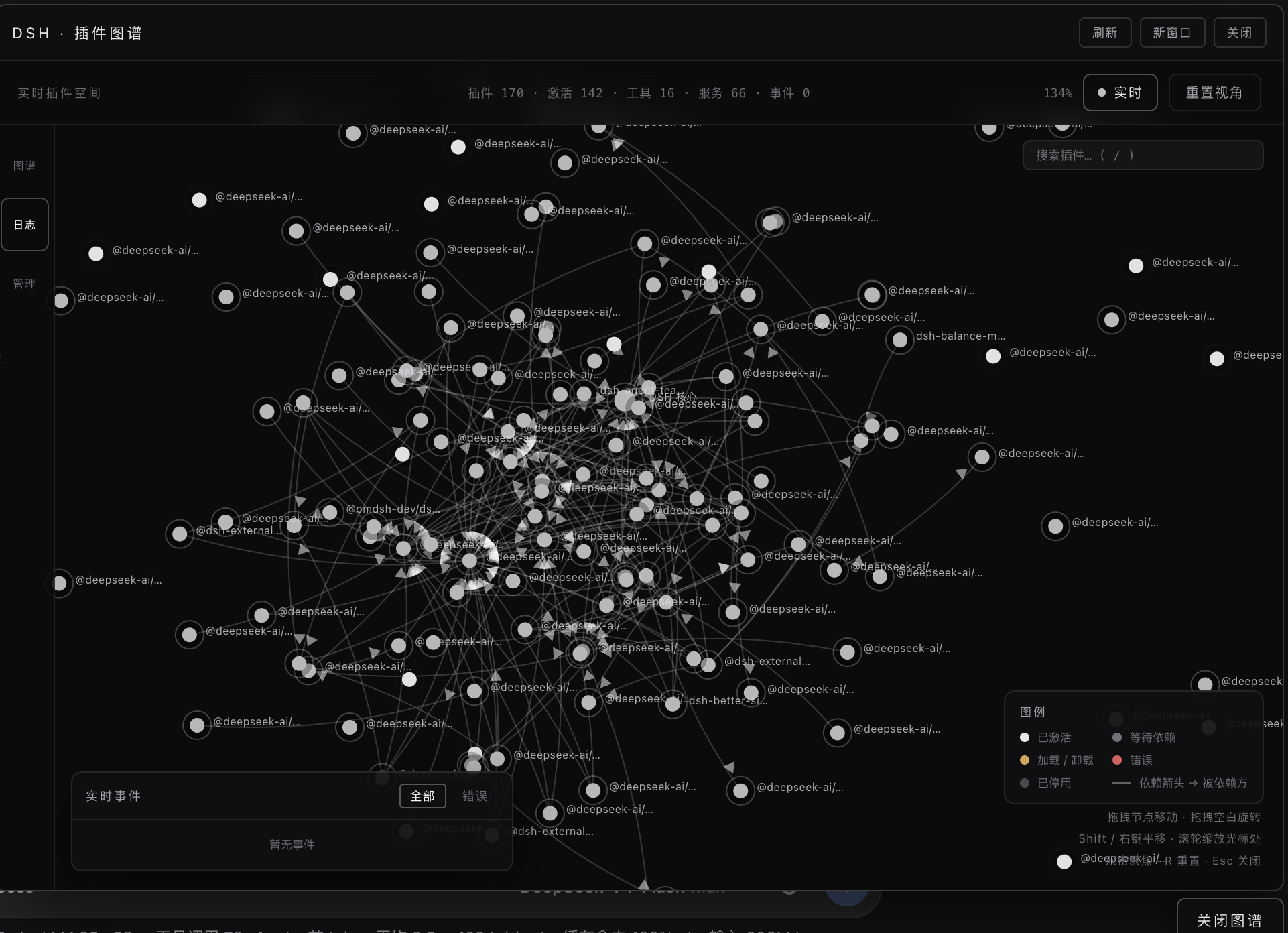
A live 3D visualization of the DSH plugin ecosystem. Every node, edge and state you see is the real Cordis runtime — nothing is mocked.
简体中文 README



What is it?
DSH (DeepSeek Harness) is itself an ecosystem of 170+ Cordis plugins. This plugin opens a window into that ecosystem: it reads the running Cordis runtime and renders the live plugin topology as an interactive 3D graph you can orbit, zoom, drag and operate.
- Nodes are real runtime plugins (loader entries / registry fibers).
- Edges are real dependency relations (service providers from the reflect store × inject declarations on each fiber; the arrow points at the dependency).
- States are the real fiber state machine (active / pending / loading / error / disabled / unloading), refreshed every 2 s — drag a node around and watch its neighbours follow; unplug a plugin from the graph itself and see the whole neighbourhood react.
- Activity streams from real
tools/result events — when a tool runs, white light motes travel along the affected edges in real time.
Features
Real runtime data
- Nodes / edges / services / tool surface all come from the live runtime (
ctx.loader.entries(), ctx.reflect.store, ctx.tools.schemas(), tools/result events); the UI merges state polls without ever moving your dragged nodes.
- Graceful degradation: with no reachable source it falls back to an offline demo so the UI is never a blank page.
Interaction
- Orbit / pan / zoom: drag empty space to orbit (bounded pitch), Shift / right-drag to pan, wheel to zoom anchored at the node under the cursor (it stays glued to the cursor), double-click a node to focus,
R to reset, Esc to close.
- Node dragging with physics: nodes are solid bodies — dragging one pushes others out of the way (velocity-impulse collision), and spring edges pull connected nodes along. Release and the graph settles back into balance.
- Label LOD: far away only the core label shows; labels fade in as you zoom; occluded labels hide automatically (8px type, occlusion-aware).
Operations & safety
- Unplug requires double confirmation: arming it shows the cascade impact count, the list of affected dependents, and a dedicated warning when the plugin is part of a dependency cycle — because unplugging a mutual dependency can destabilise the harness itself.
- No auto re-insertion: unplug is a real
entry.update({disabled:true}); nothing silently re-inserts a plugin later.
- Server-side guards: core infrastructure (loader / include / isolate), the graph plugin itself, and any operation whose cascade would hit the graph are refused server-side, not just hidden in the UI.
- Re-plug is one click (re-enabling is safe), with live state flip on the next poll.
Activity & status
- Live tool-execution log (all / errors only) with connection-state pill.
- Runtime flow effects: white motes on active edges, red motes for failed calls; pulse animation when a plugin's state changes.
UI / UX / performance
- Single-file UI (
assets/index.html), zero external dependencies, no CDN, no build step.
- 170-node synthetic load (state churn + event stream + drag): mean frame gap ≈ 17 ms in the automated perf test — no long hitches.
- Accessibility:
prefers-reduced-motion support, focus-visible outlines, aria-live announcements, color-scheme: dark.
- Dark, restrained visual language: white node surfaces, state-only accent colours, deep background.
Security posture
- CSP meta tag (
default-src 'self'), X-Content-Type-Options: nosniff, esc() on every server-originated string that touches innerHTML.
- Adversarial test suite: XSS payloads through popup / confirm / panel / search, prototype-pollution keys, malformed state payloads — all asserted inert.
Installation
Requires a DSH installation with a web profile.
dsh plugin --profile web add https://github.com/jelly-000/dsh-3d-plugin-graph
Then restart the web profile (or let HMR pick it up). For local development you can point add at a directory instead of a URL.
Usage
Once installed, open the DSH web UI — a floating 「插件图谱」 entry appears bottom-right. Or access directly:
| What |
URL |
| The graph UI |
http://127.0.0.1:3080/plugins/dsh-3d-plugin-graph/ |
| Live state JSON |
http://127.0.0.1:3080/plugins/dsh-3d-plugin-graph/state |
| Enable / disable a plugin |
POST /plugins/dsh-3d-plugin-graph/action with {"action":"plug"|"unplug","id":"plugin-xxx"} |
Controls
| Input |
Action |
| Drag empty space |
Orbit camera |
| Shift / right drag |
Pan |
| Wheel |
Zoom, anchored at cursor |
| Drag a node |
Move it (physics: collision + springs) |
| Click a node |
Select → detail card |
| Double-click a node |
Focus it (camera converges) |
| Double-click empty space |
Reset view |
R |
Reset view |
Esc |
Close popup / confirmation |
| Search box (top right) |
Fuzzy plugin search, arrows + Enter to focus |
How it works
flowchart LR
  A[ctx.loader.entries] --> B[Plugin nodes]
  C[ctx.reflect.store] --> D[Service providers]
  E[fiber.inject] --> F[Dependency edges]
  G[ctx.tools.schemas] --> H[Tool surface]
  I[tools/result events] --> J[Activity stream]
  B --> K[/state snapshot/]
  D --> K
  F --> K
  H --> K
  J --> K
  K --> L[3D UI - 2s poll merge]
Full details in docs/ARCHITECTURE.md — key decisions:
- Drag resolves by id, not by closure: event handlers look the node up at event time, so 2 s state merges can never leave the pointer holding a ghost object.
- Drag is isolated from physics: the dragged node is excluded from collision, springs and drift while held; it stops exactly where you drop it.
- Real state only: the graph never invents data; every status, edge and service is read from the runtime.
- Schema contract: the
dsh_plugin_graph_status tool output schema declares every top-level key, so bind failures are impossible.
Development & testing
npm install        # no runtime deps; scripts need none either
npm run verify     # offline harness simulation: states, edges, guards, schema, adversarial HTTP
npm run test:ui    # headless Chrome + CDP: real pointer drag / orbit / zoom / unplug flows (77 checks)
npm run test:security  # XSS / prototype-pollution / malformed-data adversarial checks
npm run test:perf  # 170-node synthetic load, asserts mean frame gap < 25 ms
All suites run against mock servers and real headless Chrome — no live DSH instance needed.
Repository layout
lib/index.js        Host plugin: /state, /action (guarded), /, /client.js, tool dsh_plugin_graph_status
lib/client.js       Browser client launcher (ModuleLoader protocol), floating entry + panel
assets/index.html   Single-file 3D UI (no external dependencies)
docs/               Architecture notes, screenshot, demo video
scripts/            verify / ui / security / perf test suites
License
MIT


