

部署运维
基础设施

sandbase-harness
sandbaseai
Local-first, self-hosted AI agent runtime and MCP bridge with sandboxed sessions, memory, credentials, audit/replay, and a local Console.
PROJECT TOPICS
PROJECT README
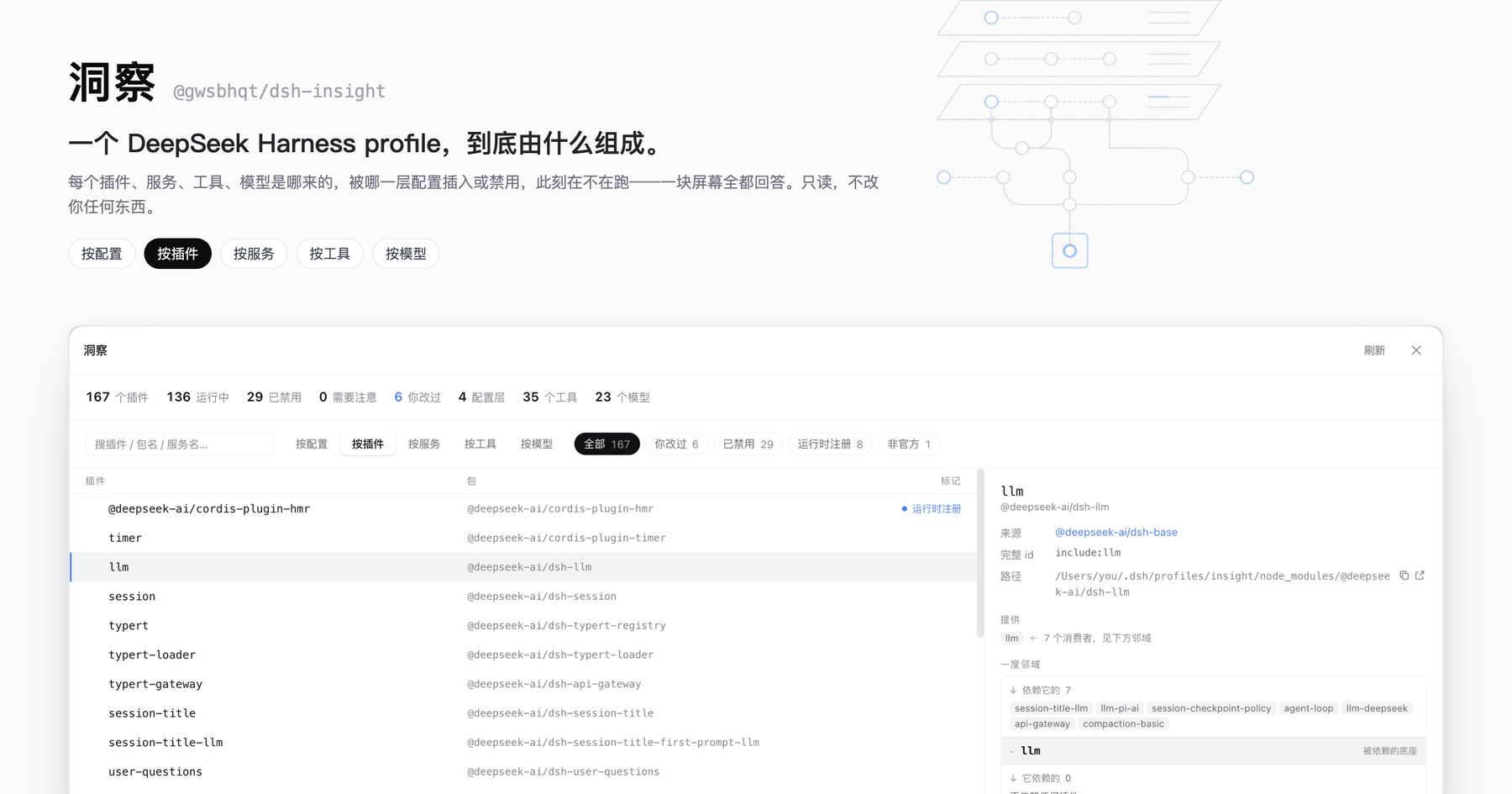
One screen that answers what a DeepSeek Harness profile is actually made of.
Every plugin, service, tool and model — where it came from, which config layer inserted or disabled it, and whether it is running right now. Read-only.




Install · The five axes · Why it refuses to guess · Read-only by design · 简体中文
dsh plugin --profile web add @gwsbhqt/dsh-insightUpdate:
dsh plugin --profile web update @gwsbhqt/dsh-insight@latestThen open Settings → 洞察 / Insight. No build step, no restart. The panel ships both halves: a host plugin that collects the data and a browser plugin that draws it.
A running dsh profile is assembled from layers you never see side by side:
cordis.patch.yml (@deepseek-ai/dsh-base, market packages, your own plugins)$DSH_HOME/profiles/<name>/cordis.patch.yml$DSH_HOME/settings.yaml — model providers, the default model, permission presets$DSH_HOME/.credentials.yaml and environment variablesWhich of it survives is decided by patch semantics (insert / update / disable, by id) and by what the cordis loader actually managed to start. No single file tells you the answer, so "why isn't this plugin running" and "where did this model come from" turn into a hunt across four files and a runtime you cannot see.
洞察 does that derivation for you, live, and shows its work.
One dataset, six ways to sort it. The first five are causal: config produces plugins, plugins provide services, services register tools and models. By preset comes last — it is not about what already runs in this process but about a second configuration: the agent-plane one, mounted only when a session starts. Switching axes never clears your selection.
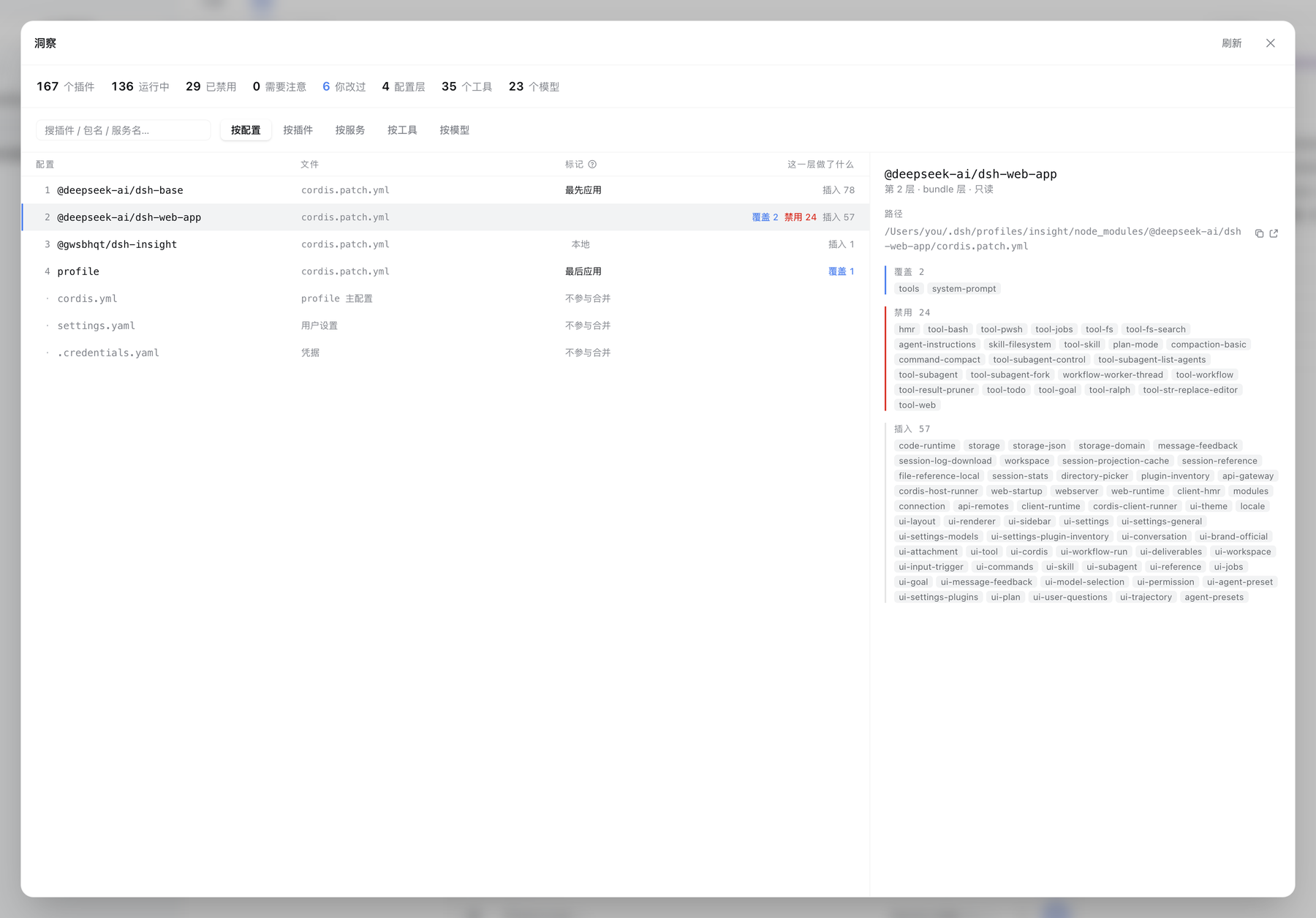
Every config layer in application order, with what it did to the tree — inserted 78, overrode 2, disabled 24. The first and last layers are marked, because a number alone never says which direction wins. Config files that take no part in the merge (the profile's cordis.yml, settings.yaml, .credentials.yaml) are listed in the same table, marked as such — you usually want them for their paths.
Pick a layer and the right pane names every entry it touched, each one a link into the plugin axis.
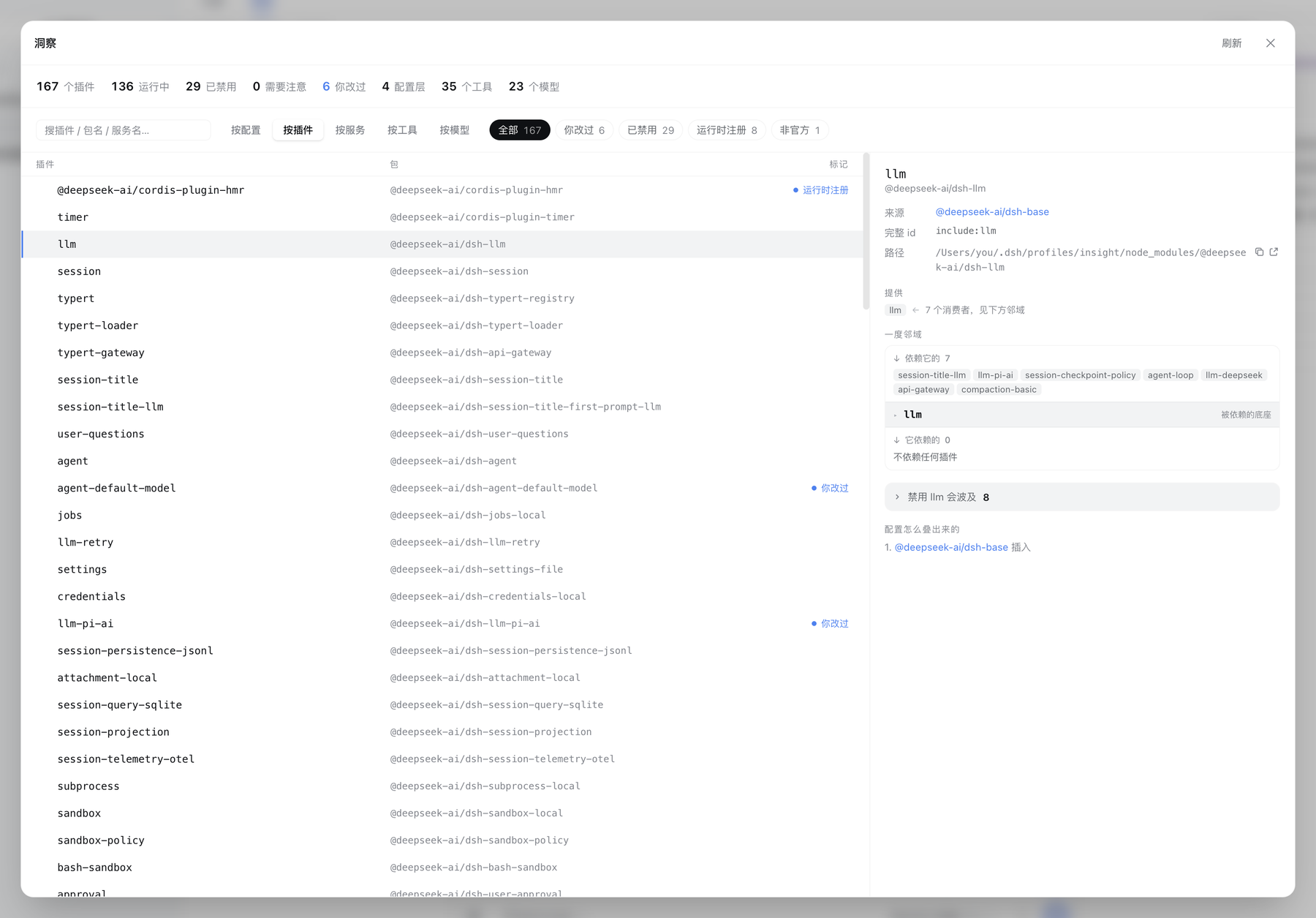
The live loader tree — containers, nested realms, disabled entries folded away at the end of the level they belong to. Select one and get its whole dossier:
Filter chips narrow the same list: needs attention, you changed it, disabled, runtime-registered, not official.
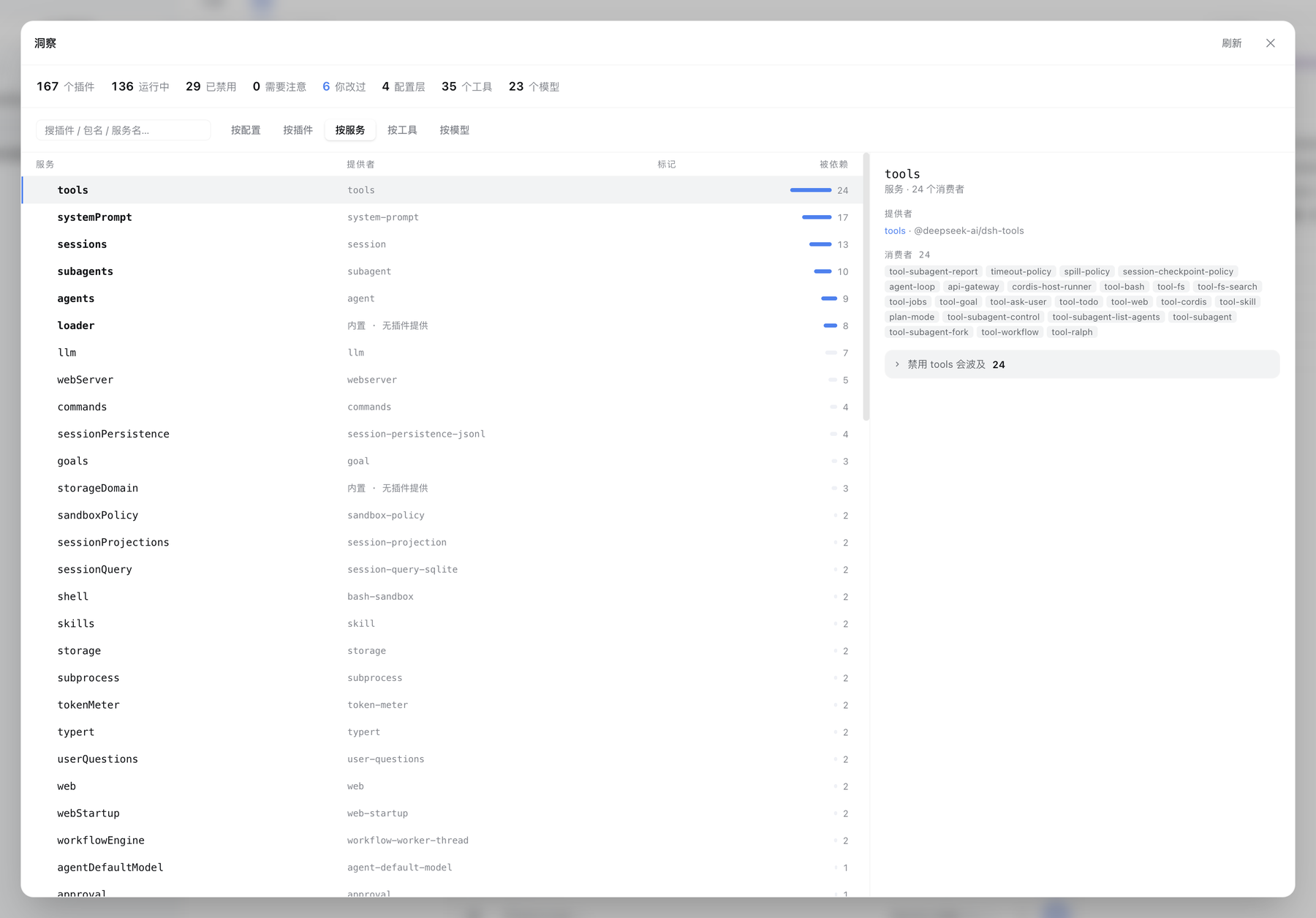
Services are the real edges between plugins, so they get their own axis: who provides each one, how many consume it, and — for a hub — the full impact list. This is a table and not a canvas on purpose: the dependency graph of a real profile is star-shaped, and a hub's edges cross the whole canvas no matter which layout you pick.
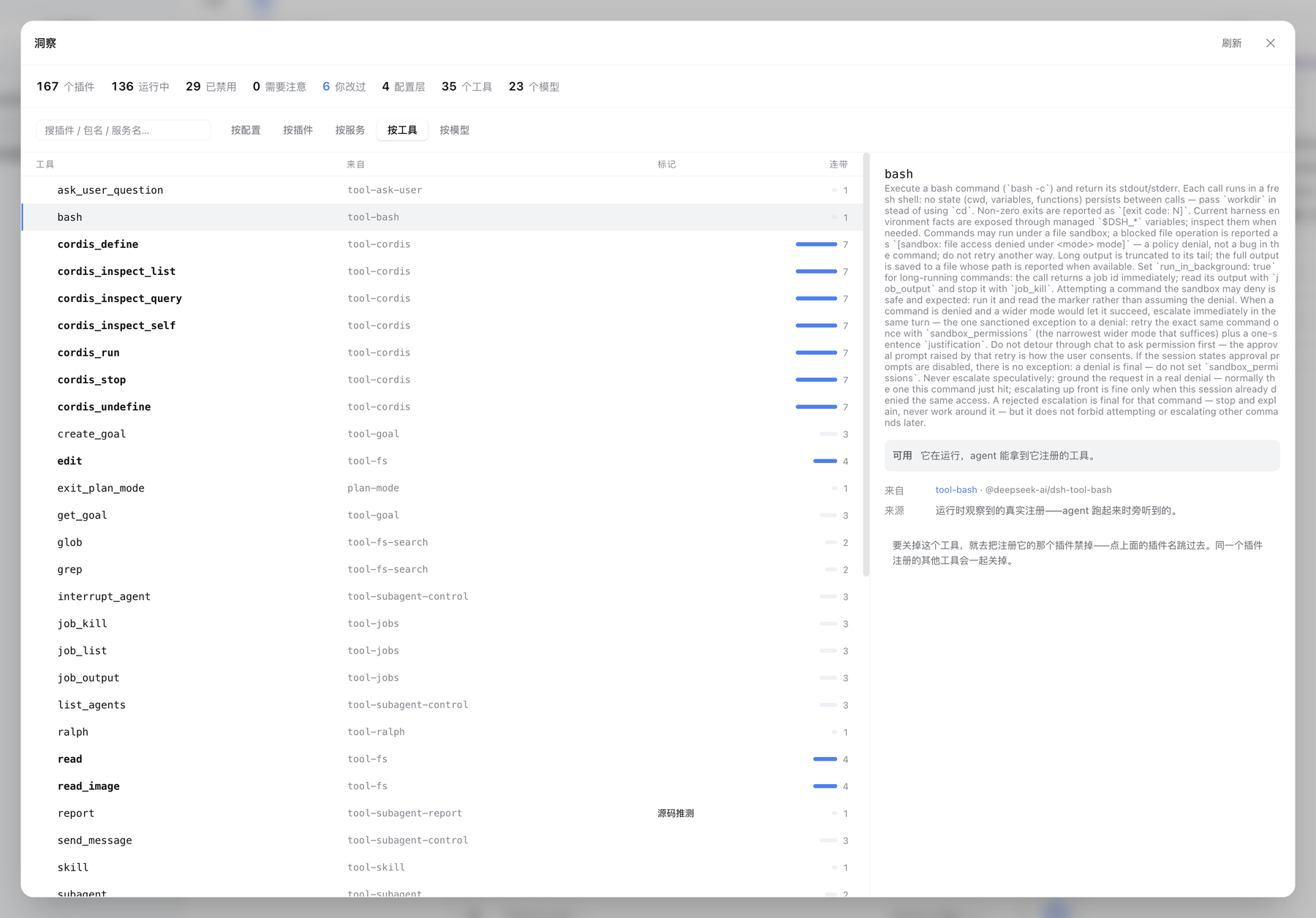
One row per tool name — bash, read, exit_plan_mode — not per plugin. Each one carries the package that registered it, its description, and how many sibling tools would disappear with it, because turning a tool off means disabling the plugin that registers it.
Upstream records no registrant on a tool definition, and tools are not registered until an agent is constructed. So this axis is assembled two ways and says which one it used: observed at runtime (the panel listens in as registration happens and attributes it by call stack) or inferred from source (a scan of the plugin's build output, marked as such — it can miss a name computed at runtime). A request is open upstream for the field that would make the second path unnecessary.
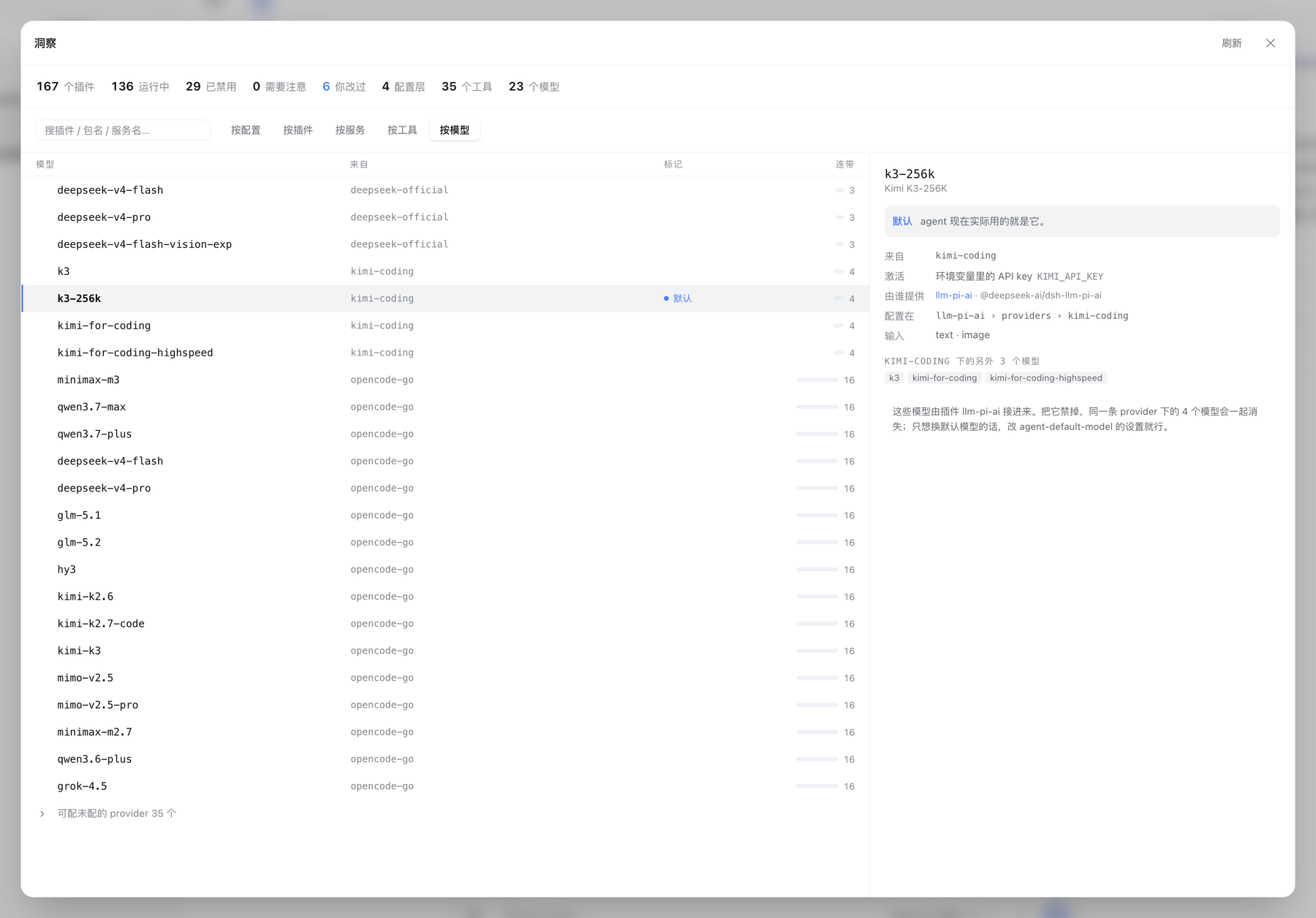
One row per model, with the provider route it belongs to and the plugin that brought that route in. The detail pane names the exact settings path its configuration lives at, and how the route is activated — an API key from an environment variable, a stored API key, or an OAuth grant. Provider routes that upstream declares as configurable but you have not set up are folded away at the end.
Nothing here touches the network: the panel reads the llm service's own read-only faces, never the model-discovery endpoint that would call your providers.
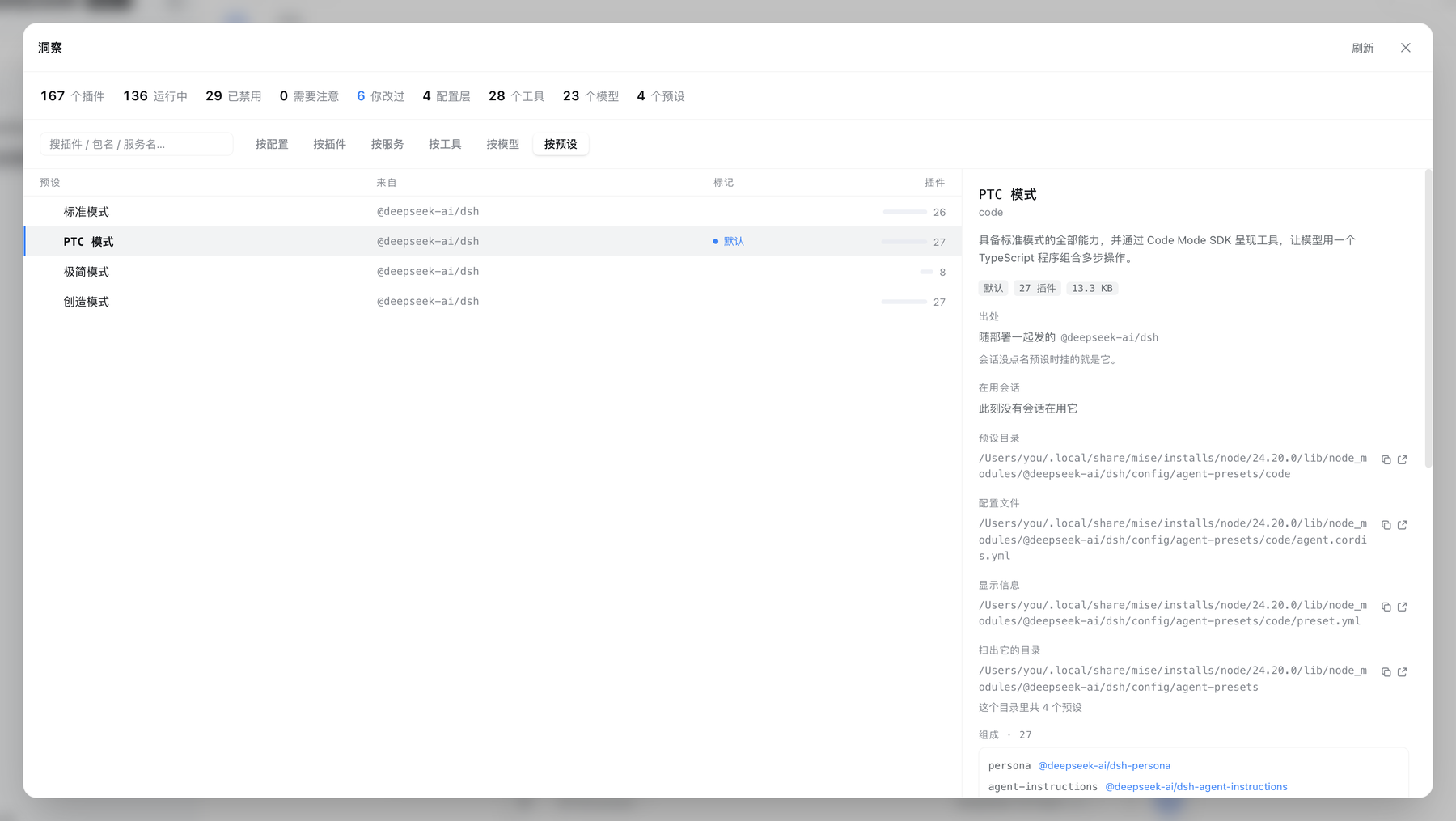
A preset is one agent-plane plugin composition. A session picks one when it starts, and that decides which tools it holds and which prompt sections it sees. One row per preset, answering four things:
resolveSessionPreset rule: the creation header names the starting preset, every later switch is a logged event, and the last one wins — reading the header alone would count a switched session under the preset it was created with. When live session data is unavailable the panel says so rather than reporting "nobody".system (shipped with the deployment) and user (authored locally), which cannot separate "brought in by a third-party plugin". This axis classifies again by where the root directory sits on disk — the same rule every other axis uses — and names which package supplied it. A locally authored preset carries the same trust as shell access: it decides what tools the model holds.agent.cordis.yml) is listed row by row: private realms on container rows, explicitly disabled rows, and rows whose switch is a !!js expression are all marked. Expressions are never evaluated: the panel knows an expression exists and refuses to claim the row is on or off. Both files open for reading.A broken preset stays on the roster with its reason: hiding it would leave its directory occupying the id with nothing to see or delete.
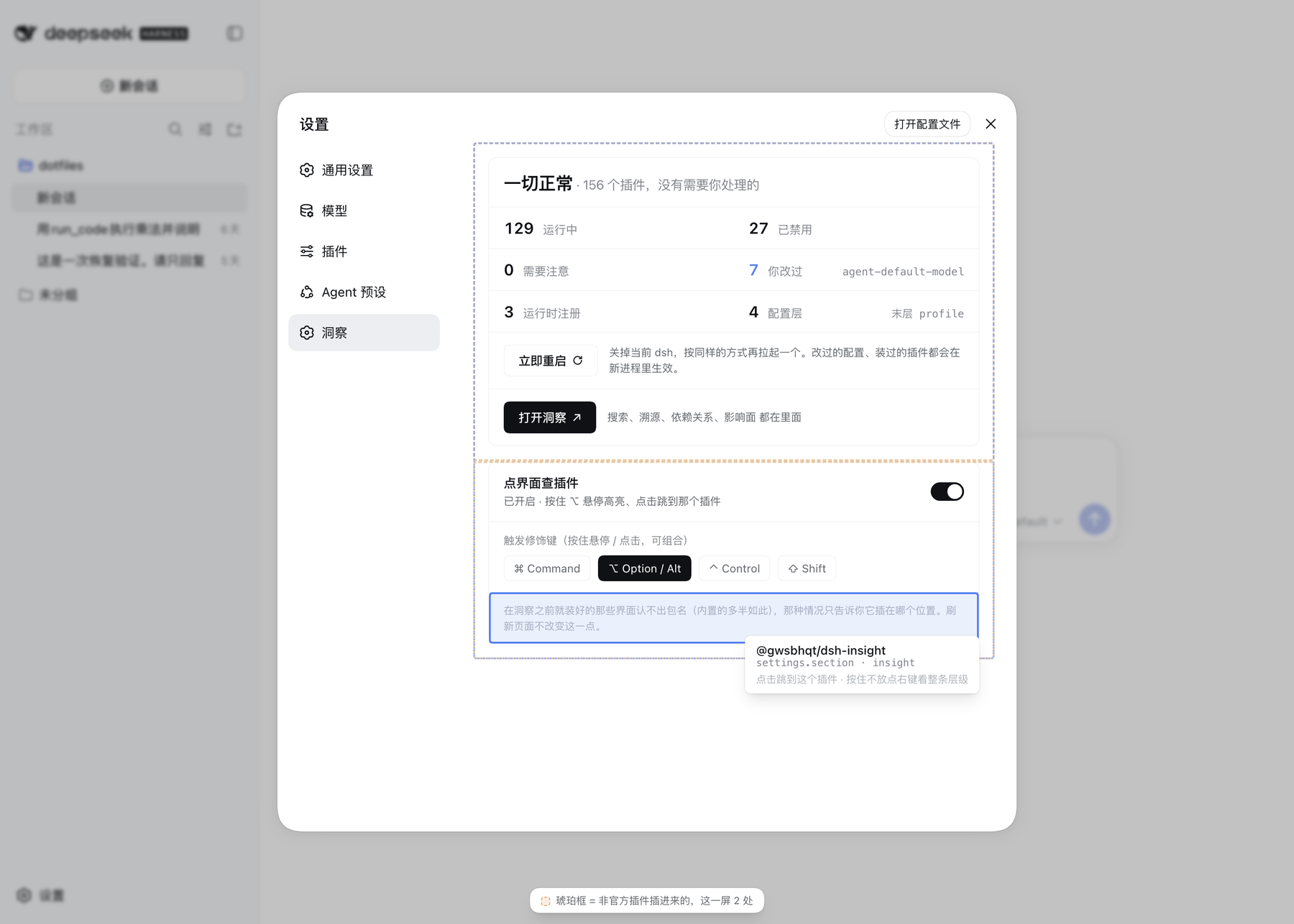
The switch lives in the Insight section of Settings. Once on, hold the modifier (⌥ by default, any combination works):
here → root chain, from the innermost piece of UI out to the shell; pick any level to jump to the plugin that filled it.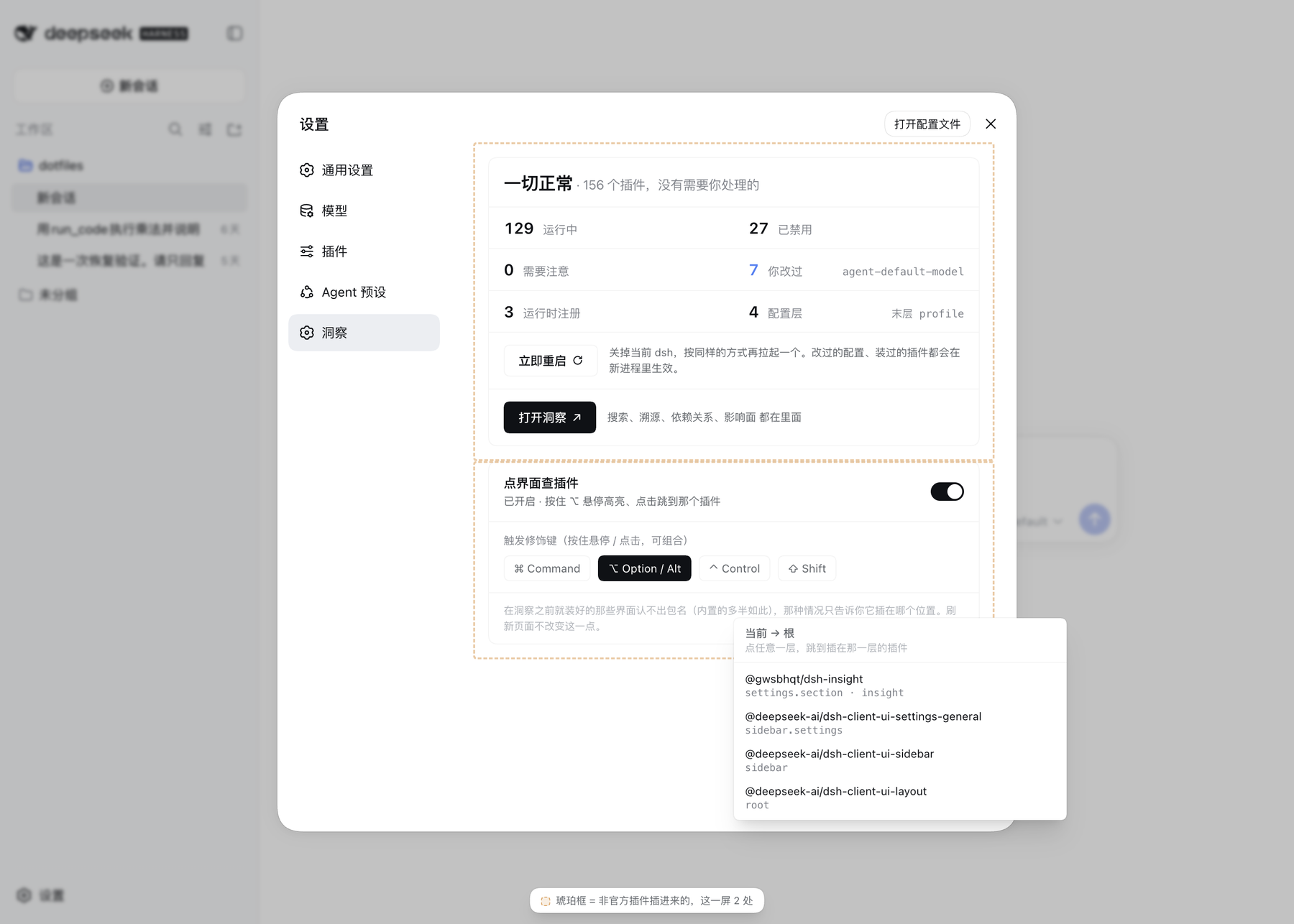
The moment you hold it, every piece of UI on this screen contributed by a non-official plugin is outlined in amber — third-party and local (your own packages linked in) alike. The test is the same one the By plugin axis uses: a resolved path outside node_modules means local, the @deepseek-ai scope means official, everything else is third-party — no allowlist anywhere. So "what on this screen did not ship with dsh" is one glance rather than a hunt.
Only what is genuinely visible gets marked: off-screen, self-hidden (visibility: hidden, transparent), and fully covered elements (the ones behind the settings dialog, rows scrolled out of their container) are skipped — otherwise the screen fills with outlines over nothing. The two colors have fixed jobs: amber means this did not ship with dsh, blue means you are pointing at this. Sharing one color would waste both.
How it knows: every piece of UI in the dsh web client is a plugin registering into a slot. Each slot outlet leaves a data-slot anchor in the DOM, and on the React tree every entry is wrapped by its own registration record. Attribution walks that chain upward from whatever the cursor hit.
When it cannot tell, it says so. The registrant name carried in the registration record is a minified class name in production builds, and those collide across packages — on a live client, dsh-api-gateway, ui-open-in-app, api-workspace-files and client-modules all report Z8. So the package name is never derived from it; it is taken from the registrant at the moment registration happens. Anything registered before Insight loaded cannot be named, and those levels report only where they sit rather than guessing from a minified name. In practice almost all of the page resolves: slot registration usually waits for the parent to declare the seat, so it actually lands during the first render — after every plugin has loaded.
Most of the work in this plugin is in the cases where the honest answer is "I don't know", and saying so instead of showing a plausible number:
include:tool-bash and include:agent-presets:tool-bash). When a short id is not unique on both sides, the layer that inserted it is left blank rather than guessed.false. !!js expressions in config survive replay as an opaque marker; they are excluded from the drift report instead of being coerced to a boolean. Coercing them produced 22 false "this plugin was disabled" reports before this was fixed.inferred; one observed at registration is not.$DSH_HOME/profiles/<name>/cordis.patch.yml) — and the target must resolve inside $DSH_HOME and outside node_modules. Bundle layers belong to the package manager and the home layer is shared across profiles; neither is touched.[] behind rather than a file of bare comments. A file that already fails to parse, or one written in […] flow style that line-by-line editing cannot reach, is refused with the reason spelled out instead of being written over..credentials.yaml is listed for its path and size and is excluded from the preview allowlist. Activation methods are read through the credential service's enumeration face, whose contract is "every stored record, values excluded" — the panel learns that a record is an API key or an OAuth grant, never what it contains.files/read and files/open accept only paths the host itself discovered, validated after resolution.DSH_INSIGHT_ALLOW_RESTART=0 turns it off for good, =1 forces it on. Inside an Electron app (DSH Desktop and the like) it is always off and =1 does not override it: there the host is the app's own process, so the final SIGTERM would shut the whole app down — use the app's own restart. The button depends on no other plugin. It sits both on the summary card and in the workbench header — the toggles live in the workbench, and the workbench covers the page, so the card's copy would be out of reach — sharing one state and one set of guards.tools.register in memory only. It writes no files, and touches neither node_modules nor the harness installation.register to record which package contributed which piece of UI. The original method runs untouched; one WeakMap write happens after it. The patch is owned by the plugin's lifecycle and unwinds on unload — the same shape as the tool observer.pnpm install
pnpm check # typecheck + build + 208 tests
dsh plugin --profile <name> add /path/to/dsh-insight # install the working copy
dsh --profile <name>pnpm watch rebuilds on change; the harness picks up the new bundle on page reload.
CLASSIFICATION EVIDENCE
系统优先读取 GitHub Topics,再与站内分类词典和词根规则比对。当前命中: observability、devtools。
sandbaseai
Local-first, self-hosted AI agent runtime and MCP bridge with sandboxed sessions, memory, credentials, audit/replay, and a local Console.

Han-1413141
DeepSeek Harness session cost meter plugin: session/daily cost, budget, history, OpenCode Go quota, official & custom-provider balance, Codex-like token heatmap, peak/off-peak pricing with pre-switch popup & system-notification alerts, official price sync, 90+ model pricing catalog, Coding Plan quota queries (7 vendors), bilingual zh/en UI

zh667
Relay-site attributed token usage for DeepSeek Harness — zero config, no credentials