🍅 Pomodoro Pet (番茄精灵)
A focus companion for DSH Web / Desktop: a pomodoro timer, four-quadrant tasks, and a pet that grows along with your focus.
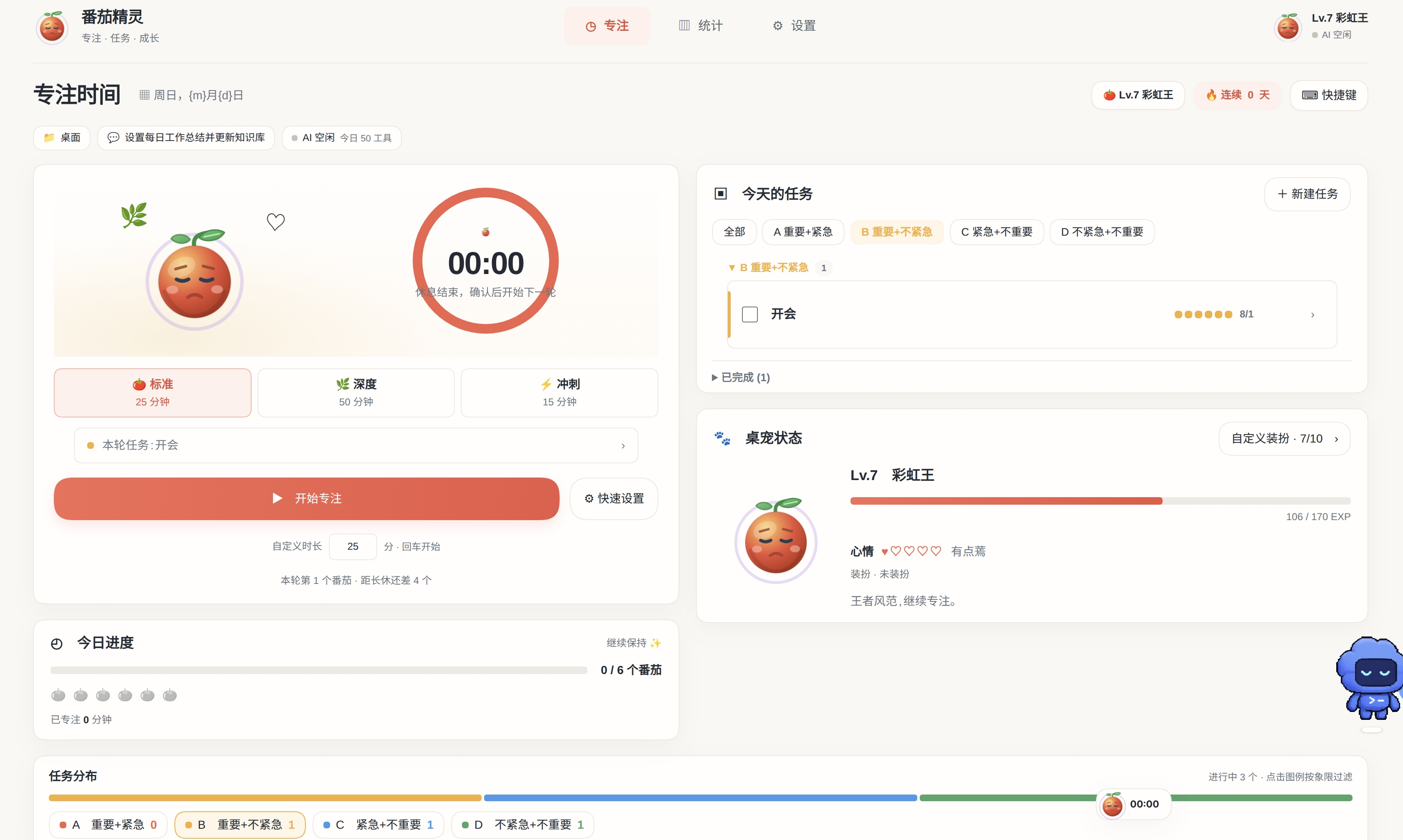
Version 0.10.0 · Requires DSH Web / Desktop 0.2.1-rc.2+ · Zero npm dependencies · Data stays on your machine
English | 中文
In one sentence
Open 🍅 in the DSH sidebar and start a focus round. When it ends, your pet gains EXP and the stats are recorded. Sort work with four-quadrant tasks, and let the agent start timers or create tasks for you — it always asks before changing anything.
After installing you get:
- A 🍅 Pomodoro Pet entry in the sidebar
- A draggable pet capsule in the bottom-right corner of the chat page, with the remaining time always in view
- Focus, Stats, and Settings tabs; theme and language follow DSH automatically
Features
⏱ Focus timer
- Three modes: Standard 25 min / Deep 50 min / Sprint 15 min
- Or set any custom length between 5 and 120 minutes
- Start, pause, resume, stop; focus rounds flow into automatic short and long breaks
- A round is restored from its deadline after a DSH restart, and missed settlements are reconciled
- Chime and desktop notifications, so you still hear about it when the tab is in the background
| Mode |
Default length |
Best for |
| Standard |
25 min |
Daily tasks and routine work |
| Deep |
50 min |
Coding, writing, anything that needs immersion |
| Sprint |
15 min |
Getting started, or clearing small items |
✅ Four-quadrant tasks
- Sort tasks into A urgent & important / B important & not urgent / C urgent & not important / D other
- Estimate a task in pomodoros and bind focus rounds to it; EXP follows the task's quadrant
- Drag tasks between quadrants, complete or reopen them, filter by quadrant
- Group related tasks together
🐣 A pet that grows
- Every completed focus round grants EXP; evolve through Sprout → Red fruit → Glowing fruit → Rainbow king
- Mood reacts to focus, breaks, abandonment, and level-ups; you can feed and greet it
- 18 achievements reward outfit fragments; 10 fragments redeem one of 4 outfits
- Resize the pet, drag it anywhere, or tuck it into a compact capsule
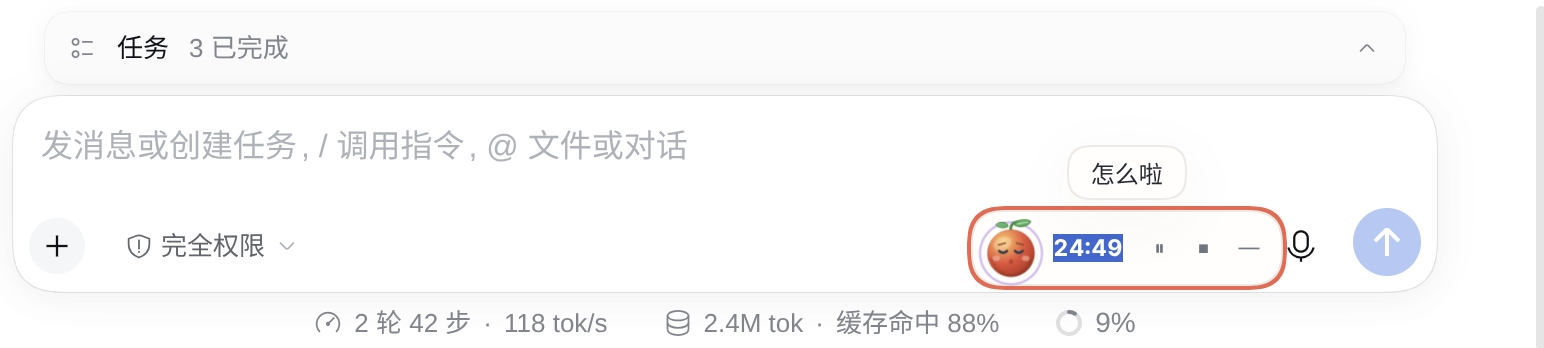
When you are busy, tuck the pet into the capsule at the bottom-right of the chat page: the countdown, pause, and stop controls stay within reach.
📊 Stats you can actually use
- A focus heatmap for the last six months or the full year, so you can see how much you focused each day
- Weekly focus time, time-of-day buckets (morning / afternoon / evening / late night), and quadrant distribution
- Attribution by session and workspace, so you can see which project got your time
- Weekly and monthly reports, portrait and landscape share cards (PNG), and JSON backup
- Agent activity: whether DSH is running, tools used today, and step counts
🤖 Focus together with the agent
The plugin exposes a pomodoro_pet tool to the agent:
- Start, pause, or stop the timer, or ask for the current focus status
- Read recent stats and list tasks
- Propose new tasks or edits — nothing is written until you confirm in the UI
- Build a read-only focus plan from the current session, tasks, and available skills
The pet is also a read-only status board for DSH sessions:
- When another session is waiting for your approval or answer, a flashing speech bubble pops up above the pet capsule (the pet wags with a ❗ badge); there is also a panel chip, a "needs you" card, and an optional desktop notification
- Click the bubble/chip/card/notification to jump straight to that session
- This is observation only: the plugin never answers for you, never changes the agent's prompt, tools, or workflow, and never writes to a session
Just ask in a DSH conversation:
- "Start a 25-minute focus round"
- "Show me today's focus stats"
- "Add 'write weekly report' to quadrant B with an estimate of 2 pomodoros"
🔒 Data stays on your machine
- No uploads, no telemetry, no remote calls
- Session names, workspace paths, and task titles are shown locally only; task titles are hidden by default
- Agent context never appears in exported files
- Waiting alerts are observed locally from DSH session/approval events and only rendered in this browser; they are never sent to the model and cannot change an agent's behaviour
- Data lives in
$DSH_HOME/storages/pomodoro_pet/ (one JSON document per record); copy that folder to migrate. Upgrading from 0.9.4 or earlier migrates the old single pomodoro_pet.json automatically on first start and keeps it as a backup
Installation
Before you start: DSH Web or DSH Desktop (0.2.1-rc.2 or newer). The plugin has zero npm dependencies and needs no build step.
Web and Desktop are separate profiles: Web uses ~/.dsh/profiles/web, Desktop exclusively owns ~/.dsh/profiles/desktop. Installing on one does not make the plugin appear on the other; the focus data ($DSH_HOME/storages/pomodoro_pet/) is shared.
Option 1: Install from the Plugins page (Web and Desktop)
The plugin is published on npm as dsh-pomodoro-pet.
Web: open Plugins → Installed → Add plugin, enter dsh-pomodoro-pet, and click Install; then restart dsh web and refresh the browser. This path is not delayed by the plugin-market index cache.
Desktop: open Plugins → Add plugin in the desktop app, enter dsh-pomodoro-pet → Install → Enable now. It normally applies live; if a restart is requested, quit the app completely and reopen it.
From a shell (do not mix the two profiles):
# Web profile (any npm-installed dsh)
dsh plugin add dsh-pomodoro-pet

# Desktop profile: use the desktop app's own dsh command (app menu → Manage dsh Command… → Install)
# and fully quit the app before running it
dsh plugin --profile desktop add dsh-pomodoro-pet
An npm-installed dsh cannot modify the Desktop profile, and the Desktop app does not load plugins installed into profiles/web.
Option 2: Install from the plugin market
-
Open Plugins in DSH, enable the experimental Custom plugin indexes bundle, and go to Discover
-
Choose Add index source and paste:
https://cdn.jsdelivr.net/gh/gitByteFree/dsh-pomodoro-pet@main/market/index.json
-
Find Pomodoro Pet and install it
-
Restart dsh web and refresh the browser (Desktop: enable the experimental plugin market, add the same index under Discover, then click Enable now after installing)
The index is served through jsDelivr because the marketplace requires a direct 200 without redirects. A new release may take up to 12 hours to appear because of edge caching. Where GitHub is reachable, https://raw.githubusercontent.com/gitByteFree/dsh-pomodoro-pet/main/market/index.json serves the same file.
Option 3: One-click script
tar -xzf dsh-pomodoro-pet-0.10.0.tar.gz
cd dsh-pomodoro-pet
./install.sh                # installs to ~/dsh-plugins, profile "web"
The script is for the Web profile only: it copies the plugin, registers it in the profile, and creates the node_modules symlink. The plugin's own cordis.patch.yml is applied automatically, so it does not touch the profile patch. It is idempotent and refuses the reserved desktop profile. For Desktop use Option 1. Then restart DSH:
# Press Ctrl+C in the terminal running dsh web, then start it again
dsh web
Custom location or profile:
./install.sh --dest ~/my-plugins --profile web
./install.sh --home /path/to/.dsh --profile web
Option 4: Manual installation
Expand the manual steps (for people who want to see exactly what happens)
-
Copy the plugin to a stable location, e.g. ~/dsh-plugins/dsh-pomodoro-pet
-
Edit ~/.dsh/profiles/web/package.json:
- Add
"dsh-pomodoro-pet": "link:/home/<you>/dsh-plugins/dsh-pomodoro-pet" to dependencies
- Add
"dsh-pomodoro-pet" to the end of dsh.profile.bundles
-
Create the symlink:
mkdir -p ~/.dsh/profiles/web/node_modules
ln -sfn ~/dsh-plugins/dsh-pomodoro-pet ~/.dsh/profiles/web/node_modules/dsh-pomodoro-pet
-
Restart dsh web and refresh the browser
Since DSH 0.2.1-rc.2 the plugin's own cordis.patch.yml (dsh.bundle.patch) is applied automatically, so the manual insert row is no longer needed. If an older guide added it, you can remove it; a duplicate row id is de-duplicated by the Loader (last one wins) but adds no value.
For a detailed walkthrough, see INSTALL.md (Chinese).
Verify the install
Web:
curl -s -o /dev/null -w "%{http_code}\n" http://127.0.0.1:3080/dsh-pomodoro/state
A 200 means the Host half loaded. 3080 is dsh web's default port; if you started it with --port (for example 8080), use that port instead.
Desktop: the Host port is OS-assigned and requests need the cookie the app injects, so a direct curl returns 401 — that is the plugin's trust fence working, not a broken install. Confirm in the UI instead.
In the GUI you should see:
- 🍅 Pomodoro Pet in the sidebar
- A draggable pet capsule in the bottom-right corner
- Version
0.10.0 under Settings → About
Quick start
Shortcuts
Available while the panel is open:
| Key |
Action |
Space |
Start / pause / resume |
S |
Stop the current round (during a break: skip it) |
1 / 2 / 3 |
Switch Standard / Deep / Sprint |
? |
Toggle the shortcuts overlay |
Esc |
Close a dialog / leave an input |
Shortcuts only work while the Pomodoro Pet panel is open; inside an input or dialog only Esc is handled. Stopping a focus round counts as abandonment: no EXP, mood −1, round streak reset. Stopping a break has no penalty.
Three tabs
- Focus: timer, current task, today's progress, pet status, task distribution
- Stats: heatmap, trends, time-of-day and quadrant distributions, reports, share cards
- Settings: durations, alerts, pet size, stats time zone, data export
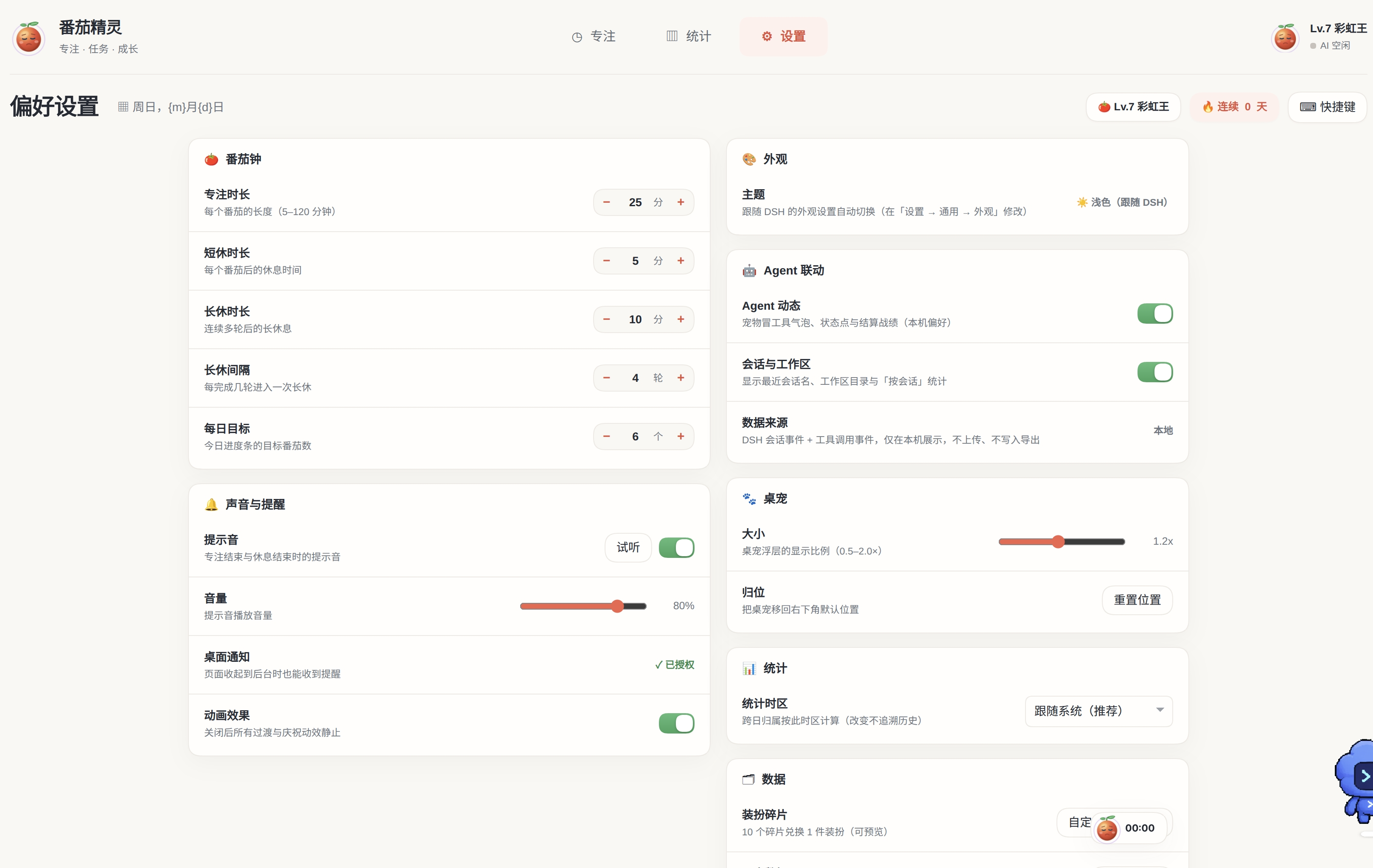
Settings: timer, sound and alerts, appearance, agent integration, pet, stats, and data — all on one page.
FAQ
Expand troubleshooting
- No sidebar icon / blank panel: check the startup log for
pomodoro-pet errors, then verify the bundle is in dsh.profile.bundles and cordis.patch.yml is intact
- The Desktop app does not list the plugin: Web and Desktop are separate profiles; install it again in Desktop (Option 1)
/dsh-pomodoro/state returns 404 (Web only): the Host half did not load. Check the symlink and bundle list, and confirm you restarted dsh webCannot find module 'dsh-pomodoro-pet': the symlink or link: path is wrong; inspect ~/.dsh/profiles/web/node_modules/- Changes to
client.js do not appear: the client bundle is cached; hard-refresh. Host-side changes always need a restart (dsh web, or quit and reopen Desktop)
- No desktop notification: Web needs browser permission, and background tabs also depend on browser policy; Desktop grants permission automatically, but OS toast delivery depends on macOS signing / the Windows AUMID / a Linux notification daemon, so dev builds may stay silent (the chime still plays)
- Does the timer keep running after I close the Desktop window?: Yes. Closing hides the window and the Host keeps running, settling by deadline; fully quitting loses that round's reminder, but settlement is reconciled on the next launch
- Theme / language does not follow DSH: the plugin follows DSH's Settings → General → Appearance / Language; restart DSH after changing them
Data and uninstall
- Data folder:
$DSH_HOME/storages/pomodoro_pet/ (the pre-0.9.5 single file pomodoro_pet.json is auto-migrated once and kept as a backup). Web and Desktop share this data, but do not run both Hosts at the same time
- Device preferences (pet position / collapsed state / seen settlement) live in browser
localStorage, isolated per page origin: Web is http://127.0.0.1:<port>, Desktop is dsh-app://app; they do not sync
- Migration: stop DSH, copy that folder to the same path on the new machine, start DSH
- Uninstall (Web): use the Plugins page, or remove
dsh-pomodoro-pet from ~/.dsh/profiles/web/package.json and dsh.profile.bundles, then restart dsh web
- Uninstall (Desktop): use Plugins → Installed in the app, or fully quit it and run
dsh plugin --profile desktop remove dsh-pomodoro-pet
- Uninstalling keeps your data; delete the data folder above to reset everything
Development
-
No build step: client.js is a browser-ready bundle
-
The English dictionary lives inline in client.js; node scripts/sync-i18n.mjs regenerates the readable i18n-en.mjs copy and the tests fail if it is stale
-
Agent tool parameters, HTTP API, file map, and storage tables: see DEVELOPMENT.md
-
Run the unit tests:
node --test
# 129 tests, all passing
License
MIT © 2026 chris. See LICENSE.


