

文件与数据
插件

OpenViking
volcengine
Self-evolving Context Database for AI Agents. Unify Agent Memory, Knowledge RAG and Skills.
PROJECT TOPICS
INSTALL REFERENCE
dsh plugin --profile web add github:etShaw-zh/dsh-db-studio
该命令指向仓库当前默认分支;尚无绑定当前 commit 的完整验证结果。
PROJECT README
简体中文 | English


在 DeepSeek Harness(DSH)里连接数据库,直接在对话中查数据、改数据。
/db 指令:输入 /,在指令列表里选择「数据库」,直接打开数据库面板。从 npm 安装:
# macOS 桌面端
DSH_CLI="/Applications/DeepSeek Harness.app/Contents/Resources/runtime/cli/bin/dsh"
"$DSH_CLI" plugin --profile desktop add dsh-db-studio@1.0.3
也可以直接从 GitHub 安装:
"$DSH_CLI" plugin --profile desktop add github:etShaw-zh/dsh-db-studio安装后重启 DeepSeek Harness。稳定版见 Releases。Windows / Linux 使用本机对应的 dsh 路径即可。
从源码安装:
git clone https://github.com/etShaw-zh/dsh-db-studio.git
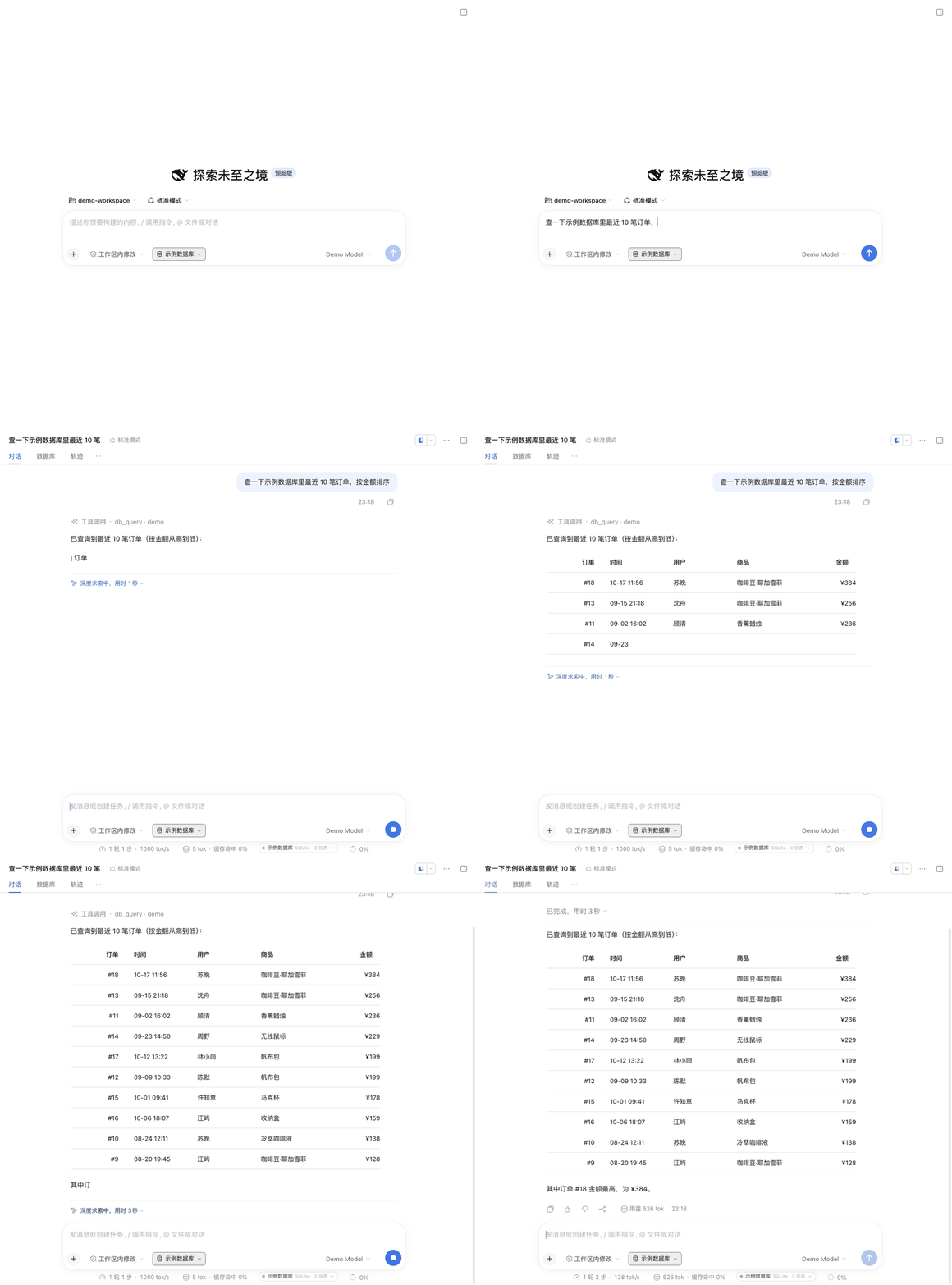
"$DSH_CLI" plugin --profile desktop add "$PWD/dsh-db-studio"查一下示例数据库里最近 10 笔订单,按金额排序
把 users 表里杭州的用户城市改成「杭州·西湖区」
给 orders 表加一个备注字段
助手只能访问当前对话选中的数据库;没选数据库时会先提示你选择。
插件配置写在 profile 的 cordis.patch.yml,常用项:
| 配置 | 默认 | 说明 |
|---|---|---|
demo |
true |
没有连接时自动创建示例数据库 |
allowWrite |
true |
是否允许写操作 |
agentTools |
true |
是否注册对话工具 |
maxRows |
200 |
查询最多返回行数 |
~/.dsh/dsh-db-studio/connections.json,文件权限为 0600。allowWrite: false。npm install
npm test欢迎提交 Issue 或 PR:https://github.com/etShaw-zh/dsh-db-studio
MIT
CLASSIFICATION EVIDENCE
系统优先读取 GitHub Topics,再与站内分类词典和词根规则比对。当前命中: database。
volcengine
Self-evolving Context Database for AI Agents. Unify Agent Memory, Knowledge RAG and Skills.

mindscale-noah
该仓库暂未提供项目说明。

himovo
Turn DeepSeek Harness into a self-hosted enterprise Agent platform with knowledge, deep research, content generation, vibe coding, browser automation, governance, and admin controls.