

消息通讯
插件

Invoice-Downloader
EthanYoQ
电子发票整理与报销准备工具:从邮箱批量收集 PDF/OFD/XML 发票,OCR 识别、分类归档并生成 Excel 汇总;提供 Windows/macOS 桌面版与 DSH 插件。
PROJECT TOPICS
INSTALL REFERENCE
dsh plugin --profile web add github:contraliz/dsh-occlick
该命令指向仓库当前默认分支;尚无绑定当前 commit 的完整验证结果。
PROJECT README
Plays OpenCode notification sounds in DeepSeek Harness — one clip when a turn finishes, one when the agent asks for permission, and one when a turn fails, each with its own picker from the whole OpenCode sound library.



OpenCode ships a small library of notification clips for its desktop app. This plugin brings that library to DSH and plays one when a turn finishes, when the agent asks for permission, and when a turn fails, so you can look away while a long task runs and hear when the agent needs you.
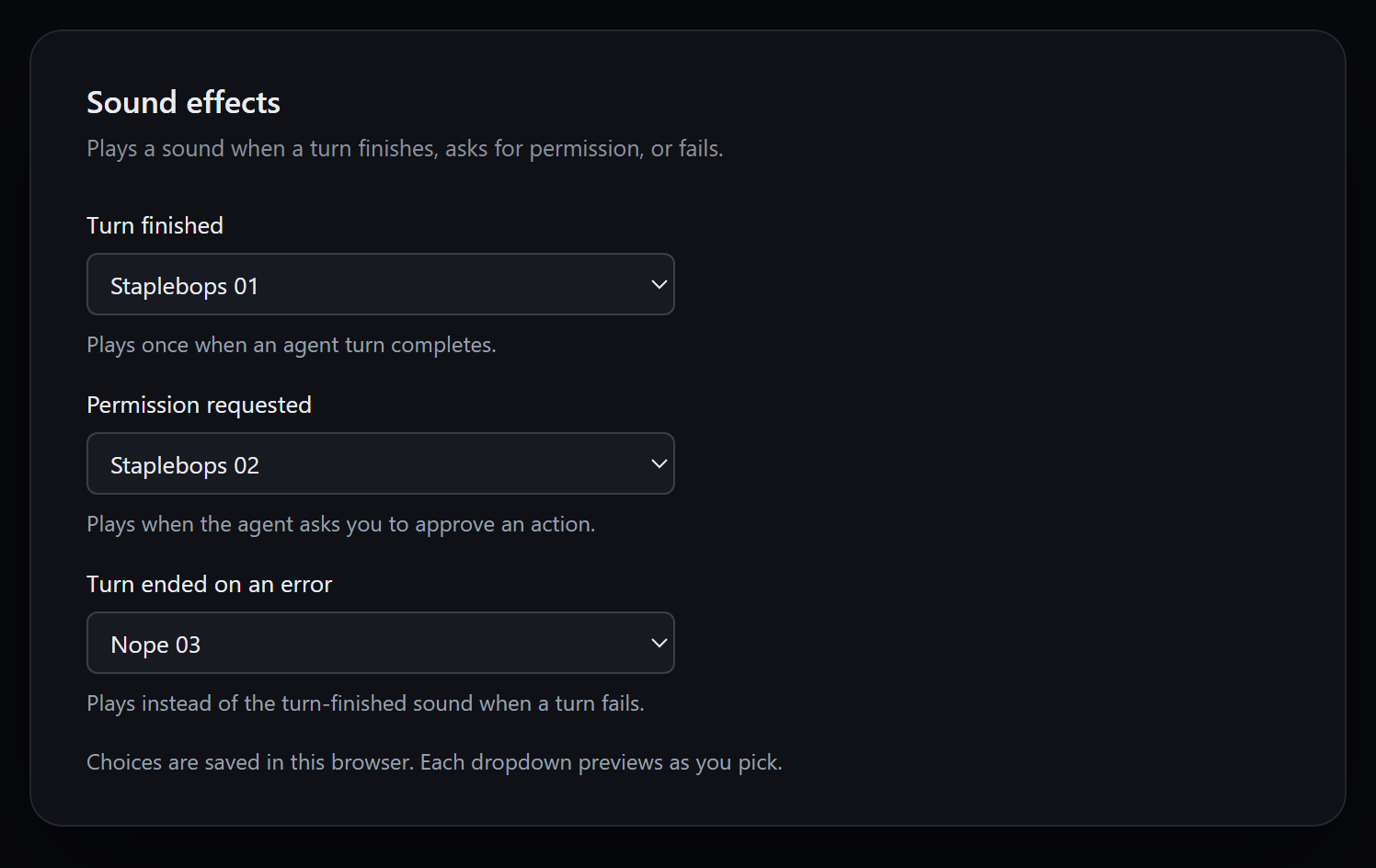
Settings → Sound effects: one picker per event, all 45 OpenCode clips, plus Off (silent). Choosing a clip auditions it immediately.
| Event | Source | Behaviour |
|---|---|---|
| Turn finished | Session running: true → false |
Plays the turn clip once |
| Permission requested | approval/request |
Plays the permission clip, then passes the request to the approval UI |
| Turn ended on an error | api-session/error |
Plays the error clip; the following turn end stays silent |
| User stops the turn | Stop button or Esc Esc |
Silent; a stopped turn did not finish |
| Flicker at boot or reconnect | true → false within ~250 ms |
Silent |
| A run already going at page load | running: true on the first snapshot |
Sounds only after ~2 s of observed running |
| Repeated idle refresh | false → false |
Silent |
| Subagent Session | origin: subagent |
Silent |
| Mounted over an idle list | — | Silent (no history replay) |
Because DSH publishes running state per Session, a turn that ends while you are looking elsewhere still makes the sound. An error is remembered per Session for 15 seconds, so the failed turn does not also play the turn-finished clip. Approval requests are coalesced within 1.5 seconds, so a burst sounds once.
Requires DSH 0.2.0 or later and the Web client (the desktop app, or dsh web). The plugin is a Cordis client bundle; it needs a page to render settings into and an audio output.
Open Plugins → Add plugin.
Paste the repository address:
https://github.com/contraliz/dsh-occlickClick Install, then Enable now.
Open Settings → Sound effects and pick a clip.
Copy the line for the profile that matches how you run DSH:
# DSH desktop app
dsh plugin --profile desktop add github:contraliz/dsh-occlick
# dsh web
dsh plugin --profile web add github:contraliz/dsh-occlickRestart DSH after a command-line install: bundle entries are composed at startup. To uninstall, use the same command with remove dsh-occlick.
git clone https://github.com/contraliz/dsh-occlick
cd dsh-occlick
dsh plugin --profile web add .Open Settings → Sound effects, or Plugins → dsh-occlick → Configure. Both show the same three selectors, each listing every clip and labelled the way OpenCode labels them.
Every channel also offers Off (silent), so one event can be muted while the others keep sounding.
The defaults are the clips OpenCode's own desktop app uses for the same events:
| Channel | Default | OpenCode equivalent |
|---|---|---|
| Turn finished | staplebops-01 |
Agent complete |
| Permission requested | staplebops-02 |
Permission required |
| Turn ended on an error | nope-03 |
Error |
Choosing a sound saves it and plays it immediately, so you can audition without waiting for an event.
| Family | Count | Library names |
|---|---|---|
| Alert | 10 | alert-01 … alert-10 |
| Bip-bop | 10 | bip-bop-01 … bip-bop-10 |
| Nope | 12 | nope-01 … nope-12 |
| Staplebops | 7 | staplebops-01 … staplebops-07 |
| Yup | 6 | yup-01 … yup-06 |
The choices are stored in the browser under dsh-occlick.turn, dsh-occlick.permission, and dsh-occlick.error, so they are per browser rather than per profile. A turn sound saved by version 0.2.x (dsh-occlick.sound) is carried over. Clearing site data restores the defaults.
Integrations & Connections — the plugin turns DSH's existing turn, approval, and error signals into a local notification channel. It connects no external service, adds no model, tool, or skill, and changes no conversation content.
Suggested tags: notifications, sound, audio, accessibility, opencode.
dsh-occlick is a client-side Cordis bundle with an empty host half. It requests no DSH permission, no tool, no shell command, no filesystem path, and no credential.
| Surface | What the plugin does |
|---|---|
| Client services | Reads sessions.list (the running bit) and registers three slot entries (settings.section, plugins.row.config, and a pass-through conversation.composer selector) plus its locale dictionary |
| Remote events | Observes approval/request (then calls the next handler, so the approval UI still wins) and api-session/error |
| Browser storage | Reads and writes only the dsh-occlick.* keys listed above |
| Network | None at runtime — the clips are embedded in the bundle and no request is made |
| Audio | Plays one reused HTMLAudioElement from local data: URIs |
| Files, shell, MCP, subagents | None |
Esc Esc shortcut, keeps the turn-finished sound quiet.| Requirement | Notes |
|---|---|
| DSH 0.2.0+ | Uses client slots, sessions.list, remote.$on, and ctx.locale; the package declares engines.dsh |
| Web client | Desktop app or dsh web. Headless/TUI profiles have no settings page and no audio output, so the plugin is inert there |
| Chromium/Electron WebView | Needs HTMLAudioElement, localStorage, and CSS custom properties |
| Node.js 22+ | Development only (build and tests); the installed plugin does not run Node |
| Browser storage enabled | Choices fall back to defaults when storage is blocked |
Tested on the DSH desktop app 0.2.1 on Windows 11. If the pickers do not appear on another DSH version, the client slot API changed; please open an issue with the DSH version.
0.4.0 had an audible warm-up; update to 0.4.1 or later.cordis.patch.yml, so DSH lists it under Plugins with its row and a Configure page rather than as a loose Loader row.HTMLAudioElement. It opens no system notification, registers no service, and adds no toolbar button.lib/index.js exports an empty apply, so the server half loads nothing and keeps no state.npm run fetch:sounds # download the OpenCode clips into assets/audio (needs network)
npm run build # regenerate lib/client.js from src/client.js + assets/audio
npm test # offline checks for the generated bundlelib/client.js is generated and committed, because DSH serves exactly one script per plugin row: every clip is embedded in it as a data URI. Edit src/client.js and rebuild; do not edit lib/client.js.
The source layout:
| Path | Role |
|---|---|
src/client.js |
Browser half: event detection, playback, and the settings pickers |
lib/client.js |
Generated browser bundle (committed so the package loads as installed) |
lib/index.js |
Host half: an empty apply that gives the Loader a row |
assets/audio |
The OpenCode clips, as downloaded |
scripts/build.mjs |
Embeds assets/audio into lib/client.js |
scripts/fetch-sounds.mjs |
Maintainer tool that refreshes assets/audio from OpenCode |
test/client.test.mjs |
Offline checks for the generated bundle |
The sound library comes from the OpenCode desktop app (packages/ui/src/assets/audio) and is MIT-licensed. See THIRD_PARTY_NOTICES.md.
MIT. See LICENSE.
CLASSIFICATION EVIDENCE
系统优先读取 GitHub Topics,再与站内分类词典和词根规则比对。当前命中: notifications。
EthanYoQ
电子发票整理与报销准备工具:从邮箱批量收集 PDF/OFD/XML 发票,OCR 识别、分类归档并生成 Excel 汇总;提供 Windows/macOS 桌面版与 DSH 插件。

Bytedesk
Open Souce IM with AI powered live-chat, email, ticket support, omni-channel customer service,alternative to slack + zendesk

wenbin-wb
🚀 DeepSeek Harness 多通道远程访问与安全守护插件 | 局域网扫码直连、Cloudflare / 自建公网隧道、微信 / QQ / 飞书 / Telegram 机器人全生命周期对话 | 内置全协议访问安全认证、后台防篡改与容灾保命体系