

文件与数据
插件

OpenViking
volcengine
Self-evolving Context Database for AI Agents. Unify Agent Memory, Knowledge RAG and Skills.
PROJECT TOPICS
INSTALL REFERENCE
dsh plugin --profile web add github:code4lala/dsh-plugin-workspace-path
该命令指向仓库当前默认分支;尚无绑定当前 commit 的完整验证结果。
PROJECT README

A DeepSeek Harness (dsh) client plugin that displays the full directory path below each workspace title in the web sidebar, with line wrapping.
侧边栏的每个工作区标题下方显示完整的目录路径,自动换行。
📦 npm 包主页 / npm package: https://www.npmjs.com/package/@code4lala/dsh-plugin-workspace-path
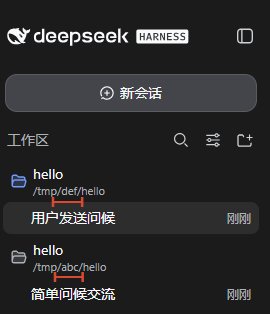
Install into your web profile:
dsh plugin --profile web add @code4lala/dsh-plugin-workspace-pathThe plugin declares a dsh.bundle patch that inserts itself into the web
plugin roster, so it activates on the next dsh web boot. To activate it in an
already-running server without restarting, append to
~/.dsh/profiles/web/cordis.patch.yml:
- insert:
    - id: workspace-path
      name: '@code4lala/dsh-plugin-workspace-path'
The running dsh web server watches this file and hot-loads the plugin.
lib/index.js): no behavior — everything happens in the browser.lib/client.js): reads the workspace list from the
workspaces client service and injects a wkpath-subtitle element with
each workspace's path below its sidebar title, kept in sync through a
MutationObserver plus a subscription to the workspace list. Rows are
matched to workspaces positionally (sidebar order equals the workspace
list's stable order), so workspaces with identical titles each show their
own path — never a collision.screenshot.png into the package and reference it via the
unpkg CDN so the README renders with the screenshot on npmjs.com; add the npm
package link and version badge.MIT © code4lala
CLASSIFICATION EVIDENCE
系统优先读取 GitHub Topics,再与站内分类词典和词根规则比对。当前命中: file、同步。
volcengine
Self-evolving Context Database for AI Agents. Unify Agent Memory, Knowledge RAG and Skills.

mindscale-noah
该仓库暂未提供项目说明。

himovo
Turn DeepSeek Harness into a self-hosted enterprise Agent platform with knowledge, deep research, content generation, vibe coding, browser automation, governance, and admin controls.