dsh-download-progress
DeepSeek Harness (DSH) 的常驻下载管理器。右下角有个小面板,实时显示每个下载任务的进度:文件名、百分比、速度、剩余时间。支持多任务、历史记录、拖动和缩放。
Always-on download manager for DeepSeek Harness: floating panel showing every download's realtime progress (file name / percent / speed / ETA), with multi-task support, history, drag & resize.
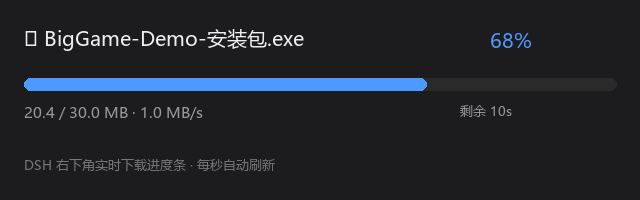
功能
- 右下角常驻面板,没任务时显示「待命」,不会自己消失
- 每个下载任务一行:文件名、百分比、速度、剩余时间
- 多任务并发,每个任务独立进度条
- 历史记录:已完成/失败的任务留在列表里(带完成时间),最多 20 条
- 点「打开」按钮,在文件资源管理器里定位已完成/失败的文件
- 标题栏 ▾/▸ 按钮收起/展开任务列表,收起时只留一行
- 面板可以拖动(标题栏)和缩放(右下角手柄)
- 下载工具支持断点续传、HTTP 重定向跟随、GitHub 镜像加速
组成
| 文件 |
说明 |
download.cjs |
下载工具(Node.js,每个任务写状态到 ~/.dsh/downloads/tasks/<任务>.json,完成后保留=历史) |
plugin-definition.json |
DSH 动态 Cordis 插件定义(常驻下载管理面板 UI) |
@local/dl-manager/ |
固化版插件包(v2):装进 ~/.dsh/profiles/web/node_modules/@local/,重启自动加载,不用每次 cordis_define |
安装
1. 下载工具
# 放到 DSH 脚本目录
cp download.cjs ~/.dsh/scripts/download.cjs
2. 进度条插件(两种方式任选其一)
方式 A:动态插件(临时,重启即失)
在 DSH 会话中通过动态插件加载(cordis_define / cordis_run),定义内容见 plugin-definition.json:
- Host 端:注册
dl-tasks RPC,读取 ~/.dsh/downloads/tasks/ 目录(v2 改为按任务文件读,支持多任务)
- Client 端:注册
shell.overlay 悬浮层,每秒 host.call('dl-tasks') 轮询刷新
如果进度条一直显示「待命」,可能是 fs.resolve('~/.dsh/...') 没展开 ~。把 Host 代码里的路径改成绝对路径(如 C:/Users/<你>/.dsh/downloads/tasks)。
方式 B:固化插件(推荐,重启自动加载)
# 1. 复制包到 profile 的 @local 目录
cp -r @local/dl-manager ~/.dsh/profiles/web/node_modules/@local/dl-manager

# 2. 在 profiles/web/cordis.patch.yml 末尾加(照 voice-core 的 insert 模式):
# - insert:
#     - id: dl-manager
#       name: '@local/dl-manager'

# 3. 重启 dsh web,刷新浏览器,右下角出现「⬇ 下载」面板
固化版 host 半用 ctx.webServer.register 注册 /api/dl-manager/tasks 和 /api/dl-manager/open 两个 HTTP 端点,client 半用 fetch 轮询。不要用动态插件专属的 harness.handle(见踩坑记录)。
3. 多线程下载(可选,大文件加速)
# aria2c 16 连接并发,进度同样写入 tasks/ 目录驱动面板
node ~/.dsh/scripts/aria2-dl.cjs <URL> <输出路径> [--mirror=前缀]
使用
# 基础下载(自动显示进度条)
node ~/.dsh/scripts/download.cjs <URL> <输出路径>

# GitHub 大文件国内加速(镜像)
node ~/.dsh/scripts/download.cjs <URL> <输出路径> --mirror=https://gh-proxy.com/

# 大文件多线程下载(>50MB 推荐)
node ~/.dsh/scripts/aria2-dl.cjs <URL> <输出路径> --mirror=https://gh-proxy.com/
下载一开始,右下角自动弹出进度条;全部结束后回到「待命」状态。
国内下载加速
GitHub 大文件国内直连经常超时。推荐镜像(响应快,但偶发不稳定):
https://gh-proxy.com/https://ghfast.top/https://ghproxy.net/
踩坑记录
- drain 恢复作用域:下载工具的
res.on('drain') 恢复必须在 res 回调作用域内注册,否则报 ReferenceError: res is not defined
- 动态 client 无 setInterval:DSH 动态客户端没有浏览器定时器全局,必须用
timer 服务的 ctx.interval,且插件需 inject: ['timer']
- 限速无效:
pause/resume 节流对 Node 大缓冲无效,已移除限速功能
- 固化版不能用
harness.handle(v1 崩溃教训):动态插件跑在 vm 沙箱里,harness 是沙箱注入的全局。固化包(@local/ 常规 cordis 插件)作用域没有这个全局,把动态插件的 host 代码直接抄进固化包会抛 ReferenceError: harness is not defined,启动即崩 web。固化版 host 必须改用 ctx.webServer.register 注册 HTTP 端点(和 dsh-usage-stats 同模式),client 端用 fetch 替代 host.call
- aria2 RPC 必须带
Content-Length:http.request 不设这个头会走 chunked 传输,aria2 的 RPC 服务器拒绝,报 Parse error 500,进度永远 0%。加 'Content-Length': Buffer.byteLength(body) 解决
- aria2 RPC 模式不自动退出:下载完成后进程不退出,需要轮询
tellStopped 收尾写 done 状态,再 aria2.shutdown
License
MIT


