Dsh-Microsoft-ToDo
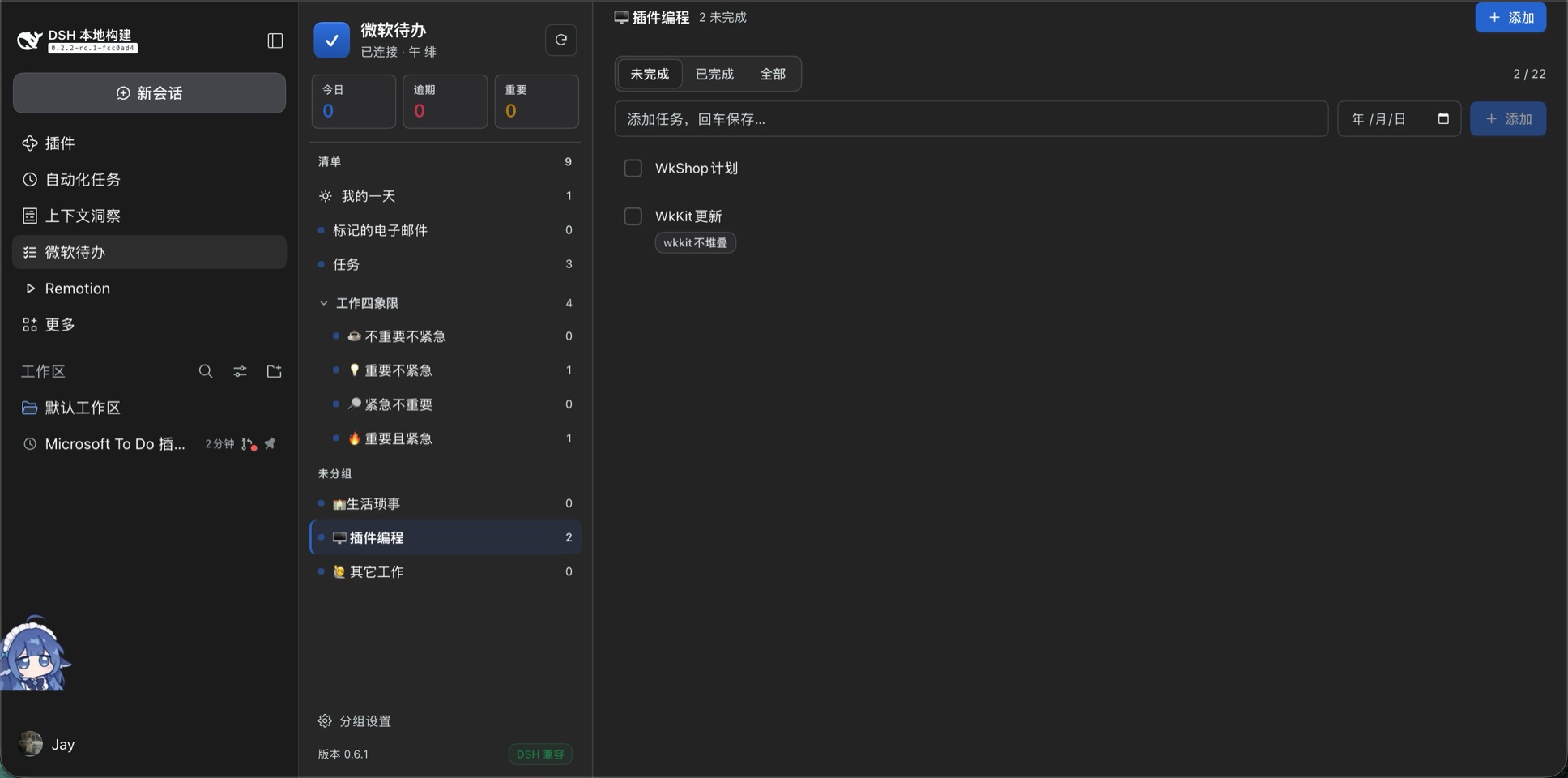
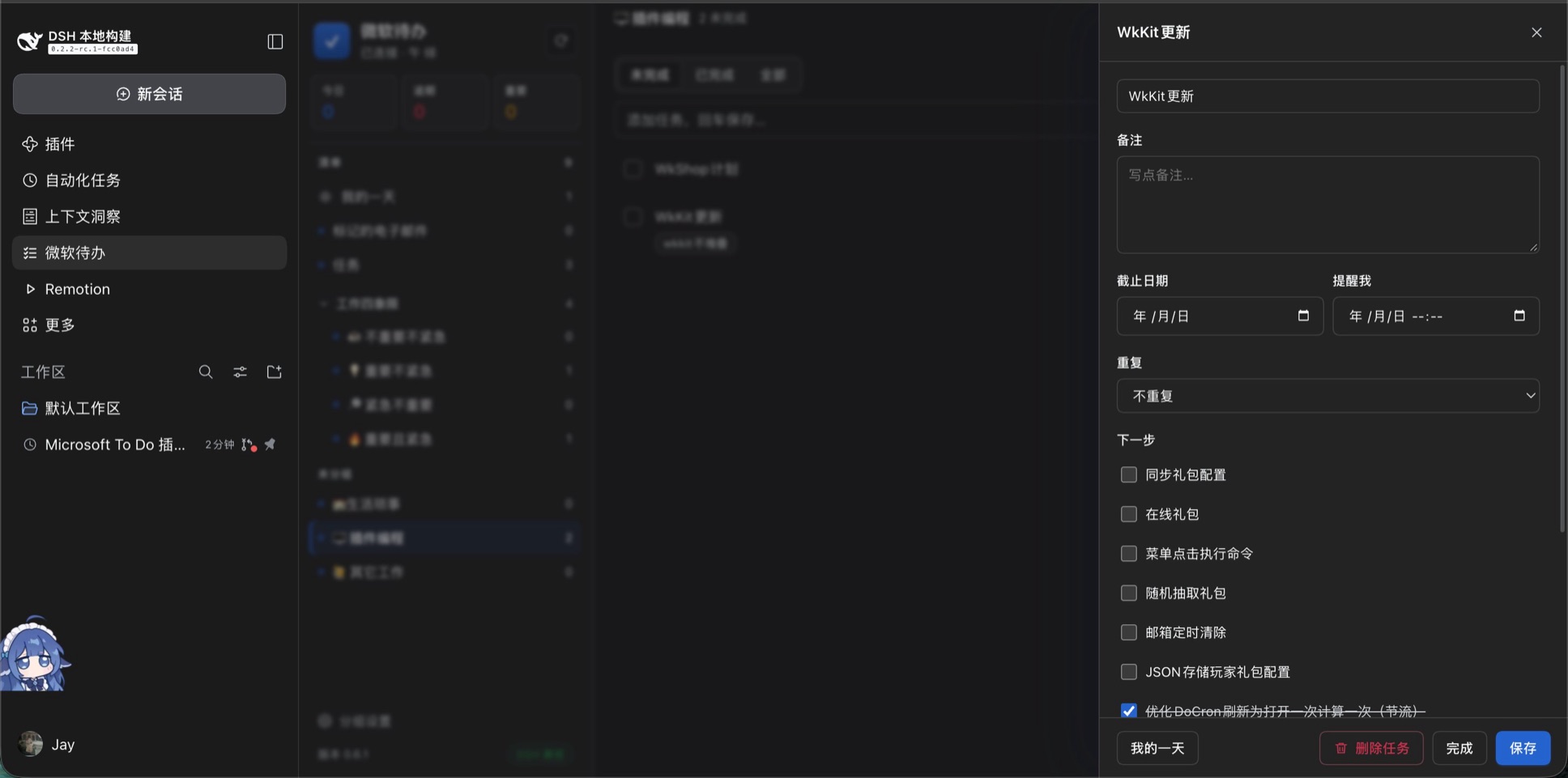
Microsoft To Do 面板插件,为 DeepSeek Harness 的 Web 界面加一个「微软待办」面板:左侧一列放品牌、今日/逾期/重要统计与清单导航(支持本地分组),右侧是任务区(新增 / 完成 / 重开 / 标星 / 删除),任务详情与分组设置都从右侧抽屉打开。
A Microsoft To Do panel for DeepSeek Harness: a left rail with the brand, today/overdue/starred counters and list navigation (local groups included), and a task area on the right (add / complete / reopen / star / delete). Task details and group settings slide in from the right.


预览 / Preview
| 面板 / Board |
任务详情 / Task details |
 |
 |
功能 / Features
| 中文 |
English |
| 清单浏览、任务增删改、完成与重开 |
Browse lists; create, update, complete, reopen, delete tasks |
| 今日 / 逾期 / 重要统计 |
Today / overdue / starred counters |
| 分组:侧栏按组收纳清单,本机保存 |
Groups: collect lists in the sidebar, stored locally |
| 我的一天:每天挑一批任务先做,次日自动清空 |
My Day: pick a few tasks for today, resets each day |
| 任务详情:备注、截止日期、提醒、重复、下一步、附件 |
Task details: notes, due date, reminder, recurrence, steps, attachments |
| 设备码登录,令牌由上游 MCP 服务缓存 |
Device-code sign-in; the token cache lives in the upstream MCP server |
| 左右分栏界面:左侧品牌/计数/清单导航,右侧任务区;详情与分组设置都从右侧抽屉打开 |
Split layout: brand, counters and list navigation on the left rail; tasks on the right. Details and group settings slide in from the right |
| 中英双语界面 |
Chinese and English UI |
安装 / Install
插件是一个标准的 DSH bundle(package.json 里的 dsh.bundle + dsh.client)。两种装法:
-
从本地目录安装(开发用):
plugin_manager: action=install_bundle, target=<本仓库绝对路径>
已装过时先 remove_bundle target=dsh-microsoft-todo,DSH 不会热重载宿主模块。
-
从插件市场安装:在 DSH 的设置 → 插件市场里添加本仓库的索引地址 https://wekyjay.github.io/Dsh-Microsoft-ToDo/market/index.json,然后在 Discover 里搜索「微软待办」安装。
版本兼容 / Compatibility
| 项目 |
值 |
| 插件版本 |
0.6.3 |
| 支持的 DSH |
>=0.2.0(package.json 的 engines.dsh,DSH 在安装/启用时强制校验) |
| 实测环境 |
DSH 0.2.2-rc.1 · macOS(Apple Silicon)· Node 25 |
面板左下角显示插件版本和兼容状态:
- 绿色「DSH 兼容」:当前运行版本满足
engines.dsh。
- 红色「DSH 版本过低」:面板顶部同时给出提示,升级 DSH(
dsh update)后刷新页面即可。
- 灰色「DSH 版本未知」:运行在无法读取版本的环境(例如打包二进制),插件照常工作,只是不做断言。
engines.dsh 不满足时 DSH 会在安装或启用阶段直接拒绝该版本;确需强装可用
dsh plugin --profile <p> allow-version dsh-microsoft-todo@<版本> --dsh-version <运行版本> --accept-risk 显式豁免(可能崩溃或丢数据)。
前置要求 / Prerequisites
- Node.js 与 npm:插件用
npx 拉起上游 MCP 服务,运行 DSH 的那台机器必须有可用的 Node.js 和 npm。
- 能访问 npm registry:首次启动(或 npm 缓存被清空后)需要下载上游服务,之后启动直接命中缓存。完全离线的机器上,面板会显示上游启动失败。
- 时区:日界线(今日 / 逾期 / 我的一天)与新写入的截止日期、提醒,都按本机系统时区计算(
Intl.DateTimeFormat().resolvedOptions().timeZone)。容器或 CI 里系统时区常被报成 UTC,需要时用 DSH_TODO_TZONE=Asia/Shanghai 覆盖,TZ 也认。升级自 0.6.2 及更早版本的用户注意:那些版本把东八区写死,之前的日界线是按 UTC+8 判的。
首次使用 / First run
面板第一次打开会显示登录页:点「开始登录」,复制设备代码,在浏览器打开 https://microsoft.com/devicelogin 输入并同意授权。之后令牌由 microsoft-todo-mcp 子进程缓存在 ~/.config/microsoft-todo-mcp/token-cache.json(权限 0600),访问令牌过期时自动用刷新令牌续期,无需重复登录。
数据与本机文件 / Local state
| 文件 |
内容 |
是否入库提交 |
groups.json |
清单分组(微软 Graph 没有分组资源,只能本机保存) |
否 |
myday.json |
「我的一天」当天选中的任务 id |
否 |
~/.config/microsoft-todo-mcp/token-cache.json |
MSAL 令牌缓存(上游服务写入) |
否,且不要提交 |
.gitignore 已排除以上个人数据;分组和「我的一天」都不会同步到其他设备或微软 To Do 客户端。
已知限制 / Known limitations
- 微软 Graph 的 To Do API 没有分组,也没有 My Day 资源(Planner 有
myDayTasks,To Do 没有)。因此本插件的分组与「我的一天」是本机实现。
- 每个清单最多读取 200 条任务(
list_tasks 的 maxResults 上限内),超出的任务不会出现在面板里。
- 任务排序沿用 Graph 返回的顺序(To Do 客户端的自定义排序不在 API 里)。
依赖 / Dependencies
- 上游 MCP 服务
microsoft-todo-mcp(npx -y microsoft-todo-mcp@0.2.0,版本写死在 index.js 的 MCP_PKG),由本插件的宿主半边常驻拉起,走 MCP stdio。子进程只拿到一份白名单环境变量(PATH HOME 临时目录、locale 与代理),不会拿到宿主自己的密钥。
- 该服务默认使用微软公共客户端 id(Microsoft Graph Command Line Tools),只需
Tasks.ReadWrite 委托权限,无需自建 Entra 应用。
卸载 / Uninstall
plugin_manager: action=remove_bundle, target=dsh-microsoft-todo
删除后 groups.json / myday.json 仍留在插件目录;令牌缓存需手动删除 ~/.config/microsoft-todo-mcp/。
发版 / Releasing
市场索引按 commit 固定版本,所以顺序是「先提交插件改动,再生成索引」:
# 1. 改 package.json 的 version,提交并推送
git add -A && git commit -m "feat: ..." && git push

# 2. 用新 commit 重新生成索引(会自动复制 icon.svg 到 market/)
node scripts/make-index.mjs
git add market && git commit -m "build: publish market index" && git push
GitHub Pages 会把 market/index.json 发布到
https://wekyjay.github.io/Dsh-Microsoft-ToDo/market/index.json。
License
MIT


