
消息通讯
插件

Invoice-Downloader
EthanYoQ
电子发票整理与报销准备工具:从邮箱批量收集 PDF/OFD/XML 发票,OCR 识别、分类归档并生成 Excel 汇总;提供 Windows/macOS 桌面版与 DSH 插件。
PROJECT TOPICS
INSTALL REFERENCE
dsh plugin --profile web add github:WangShuangTong/dsh-notify
该命令指向仓库当前默认分支;尚无绑定当前 commit 的完整验证结果。
PROJECT README

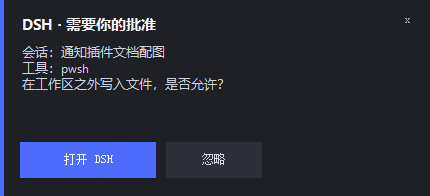
Desktop notifications for DeepSeek Harness (dsh).
When DSH needs your approval or answer, finishes a turn, or fails while you are
working in another application (IDEA, WeChat, a meeting…), a topmost card appears
at the bottom-right of the screen. Clicking Open DSH brings DSH to the
foreground and switches to the related session.
English | 中文
Early preview. Tested with DSH Desktop
0.2.2-alpha.2on Windows 11. The card channel is Windows-only; the Web client falls back to the browser Notification API.
Requirements: DSH Desktop on Windows 10/11. lib/ is committed, so a GitHub
install needs no build step.
In DSH Desktop open Settings → Plugins → Add plugin.
Enter the GitHub spec:
github:WangShuangTong/dsh-notifyA local checkout also works (absolute path): C:\path\to\dsh-notify, or the
packed dsh-notify-0.1.0.tgz.
Install, enable the bundle, and restart DSH Desktop when prompted.
After restart a self-test card appears in the bottom-right corner. Click it to verify focus handling.
A self-contained tarball is attached to each release for offline or local-path installation.
Configuration lives in the profile's cordis.patch.yml; the defaults are listed
below. The notification card stays for 60 s for questions and 15 s for completed
turns (configurable, 0 keeps it until dismissed).
In the tested developer Desktop, Electron page notifications were displayed by Windows but their click activation never reached the app, SnoreToast 0.7.0 click callbacks were unreliable, and Windows PowerShell 5.1 cannot subscribe to WinRT toast activation. The self-drawn topmost card is the only channel where display, click handling, and window focus all worked. Trade-off: the card does not appear in the Windows notification center.
Repository topic: dsh-plugin (used by the DSH plugin ecosystem for discovery).
The npm package name
dsh-notifyis already used by an unrelated package. Install this plugin from GitHub or from a local path/tarball, not from npm.
当你切到 IDEA、微信等其它程序时,DSH 需要你处理(提问 / 审批 / 计划确认)、一轮任务完成或 Agent 报错,会在屏幕右下角弹出一个置顶通知卡;点击「打开 DSH」会把 DSH 窗口带到前台,并切到对应会话。
在当前实测环境(源码启动的 DSH Desktop,Windows 11)里:
自绘置顶窗(Host 侧 PowerShell WinForms)的显示、点击、聚焦链路均已实测通过,因此作为默认通道。代价是它不会进入 Windows 通知中心。
方式一:GitHub 安装(推荐,不需要本地构建)
DSH Desktop → 设置 → 插件 → Add plugin;
填入:
github:WangShuangTong/dsh-notifyInstall → 安装完成后启用组合包(Enable);
若提示需要重启,从托盘退出 Desktop 后重新启动。
每个 Release 都附带自包含 tarball,可离线安装或用 Add plugin 选择本地 tarball。
lib/ 是构建产物且已提交,所以 GitHub 安装不需要 pnpm install/构建步骤。
方式二:本地目录 / tarball
git clone https://github.com/WangShuangTong/dsh-notify.git
cd dsh-notify
pnpm install
pnpm run build
pnpm pack        # 可选:生成自包含 tarball dsh-notify-0.1.0.tgz
在 Add plugin 中填绝对路径:目录(安装成 link:,改动即时生效)或 tarball
(自包含快照,改代码后需重新打包并重装)。
方式三:手工等价安装(desktop profile 被应用独占时的兜底)
编辑 %USERPROFILE%\.dsh\profiles\desktop\package.json:
dependencies 增加 "dsh-notify": "link:C:/path/to/dsh-notify"(或 tarball 的 file: 路径);dsh.profile.bundles 追加 "dsh-notify";然后在 profile 目录执行 pnpm install --ignore-scripts,并重启 Desktop。
安装前建议备份 profile manifest。
desktopprofile 由 Electron 应用独占管理, 命令行dsh plugin --profile desktop add会被拒绝;请优先使用插件管理页。
默认值写在 cordis.patch.yml。可在 profile 的 cordis.patch.yml 中按 id: dsh-notify 覆盖(patch 会整体替换 config,需写全要保留的键):
- id: dsh-notify
  config:
    notifyOnAsk: true
    notifyOnDone: true
    notifyOnError: true
    sound: true
    onlyWhenUnfocused: true
    announce: true
    askAutoCloseMs: 60000
    doneAutoCloseMs: 15000
    transport: auto
debug: false| 键 | 默认 | 说明 |
|---|---|---|
notifyOnAsk |
true |
提问 / 审批 / 计划确认提醒 |
notifyOnDone |
true |
一轮任务完成提醒 |
notifyOnError |
true |
Agent 报错提醒 |
sound |
true |
弹窗出现时播放系统提示音 |
onlyWhenUnfocused |
true |
仅 DSH 不在前台时提醒 |
announce |
true |
首次加载弹自检通知(每个版本一次) |
askAutoCloseMs |
60000 |
提问类弹窗停留时长,0 = 直到点击/忽略 |
doneAutoCloseMs |
15000 |
完成/错误弹窗停留时长 |
transport |
auto |
auto / popup / browser;Windows Desktop 自动用 popup |
debug |
false |
暴露 globalThis.__DSH_NOTIFY_DEBUG__ 调试钩子 |
[dsh-notify];启动终端里应有 [dsh-notify] host ready。globalThis.__DSH_NOTIFY_LOADED__ 表示客户端插件已加载。debug: true 时可用 __DSH_NOTIFY_DEBUG__.simulate('ask' | 'done' | 'error' | 'self-test', { sessionId, title, question }) 手动触发弹窗。document.hasFocus() 为 false),并查看 Host 日志。pnpm install
pnpm run typecheck
pnpm run test
pnpm run buildsrc/index.ts:Host 半(配置注入、路由、弹窗进程管理、激活记录)。src/client/:Client 半(状态检测、门控、文案、传输、激活轮询)。src/popup.ps1:通知卡 sidecar(Windows PowerShell 5.1,纯 ASCII,文本经 Base64 传入)。lib/:构建产物;需要提交,GitHub 安装依赖它。src/popup.ps1 支持 -CapturePath <png>,在卡片绘制完成后把自身渲染成图片并退出(仅文档/测试用,正常通知不传该参数)。MIT
CLASSIFICATION EVIDENCE
系统优先读取 GitHub Topics,再与站内分类词典和词根规则比对。当前命中: notifications。
EthanYoQ
电子发票整理与报销准备工具:从邮箱批量收集 PDF/OFD/XML 发票,OCR 识别、分类归档并生成 Excel 汇总;提供 Windows/macOS 桌面版与 DSH 插件。

Bytedesk
Open Souce IM with AI powered live-chat, email, ticket support, omni-channel customer service,alternative to slack + zendesk

wenbin-wb
🚀 DeepSeek Harness 多通道远程访问与安全守护插件 | 局域网扫码直连、Cloudflare / 自建公网隧道、微信 / QQ / 飞书 / Telegram 机器人全生命周期对话 | 内置全协议访问安全认证、后台防篡改与容灾保命体系