
消息通讯
插件

Invoice-Downloader
EthanYoQ
电子发票整理与报销准备工具:从邮箱批量收集 PDF/OFD/XML 发票,OCR 识别、分类归档并生成 Excel 汇总;提供 Windows/macOS 桌面版与 DSH 插件。
PROJECT TOPICS
INSTALL REFERENCE
dsh plugin --profile web add github:Timur-Ziyangareev/find-in-chat
该命令指向仓库当前默认分支;尚无绑定当前 commit 的完整验证结果。
PROJECT README
A search control in the conversation header. It searches the whole open session, not just the part of the transcript Chat has already loaded, and lists every match from the newest to the oldest. Picking a result pages the history to that Turn, scrolls to the message, and marks the exact text.
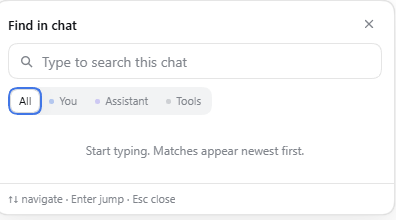
lu box finds lu\nbox.↑ / ↓ move through the list, Enter opens the active match, a click opens any row.Esc, the close button, or a click outside. The panel follows the header when the window is resized.Search covers the visible text of the whole open Session:
user/message entries (You);assistant/message answers (Assistant);tool/call names and arguments plus tool/result output and errors (Tools).Injected context, system prompts, and compaction checkpoints are not searched. A match inside a collapsed step still appears in the list; opening it scrolls to that step and the panel explains that the step must be expanded to see the highlight. Compacted messages stay searchable too: the result list marks them Hidden, and clicking one opens its full text from the log in a reader.
The Host reads the complete live log through ctx.sessionQuery.readSession() and asks listEvents() which records were removed by a positional replacement. Removed records stay searchable and are marked Hidden; the others, including log-only records embedded in a step, can be opened in Chat. One parsed document list is cached per Session and rebuilt when the live log grows.
The plugin is a normal DeepSeek Harness bundle with a Host half and a browser half.
~/.dsh/profiles/desktop/node_modules/@local/find-in-chat/."@local/find-in-chat": "1.0.0" to the profile package.json dependencies."@local/find-in-chat" to dsh.profile.bundles in the same file.cordis.patch.yml inserts the find-in-chat row; nothing else needs enabling.With the plugin manager available, install this folder as a bundle instead of steps 1–3.
| File | Role |
|---|---|
index.js |
Host plugin: registers GET /find-in-chat/search and GET /find-in-chat/status, projects the Session surface into searchable documents, and caches them. |
lib/search.js |
Pure extraction and match logic, shared by the Host route and the tests. |
client.js |
Browser plugin: the header control, the result panel, history loading, scroll, highlighting, and copy. |
cordis.patch.yml |
Inserts the bundle row. |
locale/*.json |
Plugin Manager title, description, and the icon metadata. |
The browser calls the Host route with the current Session id. The Host returns hits with their seq, Turn, and step. The browser asks the Session controller for loadThrough(seq), finds the rendered row by its conversation key (input-message + message id, or assistant-step + <turn>:<step>), and falls back to a Turn and text lookup if the key shape changes.
Everything stays local. The browser talks only to the DSH Host on the same origin, and the Host reads only the Sessions the DSH profile already owns. There is no telemetry, no external request, and no network dependency.
MIT
Кнопка поиска в шапке чата. Ищет по всей открытой сессии, а не только по той части переписки, которая уже загружена в Chat, и показывает все совпадения от новых к старым. По нажатию на результат чат догружает нужный участок истории, прокручивается к сообщению и подсвечивает точное место.
lu box находит lu\nbox.↑ / ↓ листают список, Enter открывает выбранное совпадение, клик открывает любую строку.Esc, кнопке закрытия или клику вне панели. Панель следует за шапкой при изменении размера окна.Поиск идёт по видимому тексту всей открытой сессии:
user/message, Вы);assistant/message, Ассистент);tool/call), вывод и ошибки инструментов (tool/result) — Инструменты.Внедрённый контекст, системные промпты и точки компакции не ищутся. Совпадение внутри свёрнутого шага всё равно попадает в список; при открытии чат прокручивается к шагу, а панель поясняет, что шаг нужно раскрыть для подсветки. Сжатые сообщения тоже ищутся: они помечаются как Скрыто, и по клику открывается полный текст из журнала.
Host читает полный живой журнал через ctx.sessionQuery.readSession() и запрашивает у listEvents(), какие записи были удалены позиционной заменой. Удалённые записи остаются в поиске и помечаются как скрытые; остальные, включая log-only записи внутри шага, можно открыть в чате. Разобранный список документов кэшируется на сессию и перестраивается, когда журнал растёт.
Плагин — обычный бандл DeepSeek Harness с Host- и браузерной половинами.
~/.dsh/profiles/desktop/node_modules/@local/find-in-chat/."@local/find-in-chat": "1.0.0" в dependencies файла package.json профиля."@local/find-in-chat" в dsh.profile.bundles там же.cordis.patch.yml бандла вставит строку find-in-chat; больше ничего включать не нужно.Если доступен plugin manager, установите эту папку как бандл вместо шагов 1–3.
| Файл | Назначение |
|---|---|
index.js |
Host-плагин: маршруты GET /find-in-chat/search и GET /find-in-chat/status, разбор поверхности сессии и кэш. |
lib/search.js |
Чистая логика извлечения текста и поиска; используется маршрутом и тестами. |
client.js |
Браузерный плагин: кнопка, панель, догрузка истории, прокрутка, подсветка, тексты. |
cordis.patch.yml |
Вставляет строку бандла. |
locale/*.json |
Название и описание в Plugin Manager, метаданные иконки. |
Браузер передаёт Host-маршруту id текущей сессии. Host возвращает совпадения с seq, номером хода и шага. Браузер просит Session controller выполнить loadThrough(seq), находит отрисованную строку по ключу разговора (input-message + id сообщения либо assistant-step + <ход>:<шаг>) и откатывается к поиску по ходу и тексту, если формат ключа изменится.
Всё остаётся локально. Браузер обращается только к DSH Host на том же origin, а Host читает только те сессии, которыми уже владеет профиль DSH. Никакой телеметрии, внешних запросов и сетевых зависимостей.
MIT
聊天标题栏中的搜索按钮。它搜索整个打开的会话,而不只是 Chat 已经加载的那一段,并按从新到旧列出所有匹配项。点击结果后,Chat 会加载缺失的历史、滚动到该消息并标出准确位置。
lu box 能找到 lu\nbox。↑ / ↓ 在列表中移动,Enter 打开当前匹配项,点击任意行也可以打开。Esc、关闭按钮和点击面板外关闭。窗口尺寸变化时面板跟随标题栏。搜索覆盖整个打开会话中可见的文本:
user/message 消息(你);assistant/message 回答(助手);tool/call 的名称与参数,以及 tool/result 的输出和错误(工具)。注入的上下文、系统提示和压缩检查点不参与搜索。位于折叠步骤中的匹配仍会出现在列表里;打开时会滚动到该步骤,面板会提示需要展开步骤才能看到高亮。已压缩的消息同样可以搜索:列表会将它们标记为 已隐藏,点击即可在阅读器中打开日志里的完整文本。
Host 通过 ctx.sessionQuery.readSession() 读取完整的实时日志,并用 listEvents() 确认哪些记录被位置替换删除。被删除的记录仍可搜索并标记为已隐藏;其余记录(包括步骤内的 log-only 记录)可以在聊天中打开。每个会话缓存一份解析后的文档列表,日志增长时重建。
插件是普通的 DeepSeek Harness bundle,包含 Host 和浏览器两部分。
~/.dsh/profiles/desktop/node_modules/@local/find-in-chat/。package.json 的 dependencies 中加入 "@local/find-in-chat": "1.0.0"。dsh.profile.bundles 中加入 "@local/find-in-chat"。cordis.patch.yml 会插入 find-in-chat 行,不需要再启用其他内容。如果可以使用 plugin manager,请直接把该目录作为 bundle 安装,跳过第 1–3 步。
| 文件 | 作用 |
|---|---|
index.js |
Host 插件:注册 GET /find-in-chat/search 和 GET /find-in-chat/status,把会话表面投影为可搜索文档并缓存。 |
lib/search.js |
纯文本提取与匹配逻辑,供 Host 路由和测试共用。 |
client.js |
浏览器插件:标题栏按钮、结果面板、历史加载、滚动、高亮和文案。 |
cordis.patch.yml |
插入 bundle 行。 |
locale/*.json |
Plugin Manager 中的标题、描述和图标元数据。 |
浏览器把当前会话 id 传给 Host 路由。Host 返回带有 seq、轮次和步骤的匹配项。浏览器通过 Session controller 调用 loadThrough(seq),按对话键(input-message + 消息 id,或 assistant-step + <轮次>:<步骤>)找到已渲染的行;如果键格式变化,则回退到按轮次和文本查找。
所有内容都留在本地。浏览器只访问同源的 DSH Host,Host 只读取 DSH 配置文件已经拥有的会话。没有遥测、外部请求或网络依赖。
MIT
CLASSIFICATION EVIDENCE
系统优先读取 GitHub Topics,再与站内分类词典和词根规则比对。当前命中: chat。
EthanYoQ
电子发票整理与报销准备工具:从邮箱批量收集 PDF/OFD/XML 发票,OCR 识别、分类归档并生成 Excel 汇总;提供 Windows/macOS 桌面版与 DSH 插件。

Bytedesk
Open Souce IM with AI powered live-chat, email, ticket support, omni-channel customer service,alternative to slack + zendesk

wenbin-wb
🚀 DeepSeek Harness 多通道远程访问与安全守护插件 | 局域网扫码直连、Cloudflare / 自建公网隧道、微信 / QQ / 飞书 / Telegram 机器人全生命周期对话 | 内置全协议访问安全认证、后台防篡改与容灾保命体系