

消息通讯
插件

Invoice-Downloader
EthanYoQ
电子发票整理与报销准备工具:从邮箱批量收集 PDF/OFD/XML 发票,OCR 识别、分类归档并生成 Excel 汇总;提供 Windows/macOS 桌面版与 DSH 插件。
PROJECT TOPICS
INSTALL REFERENCE
dsh plugin --profile web add github:Stijnus/dsh-workspace-status
该命令指向仓库当前默认分支;尚无绑定当前 commit 的完整验证结果。
PROJECT README



Sidebar upgrades for DeepSeek Harness:
Harness draws a status dot on every conversation row, but nothing on the workspace row above it. Collapse a group, or scroll it out of view, and the folder cannot tell you that an agent inside is stuck waiting for an approval or still working. This plugin gives the folder row the same kind of mark.
| Mark | Meaning | Color |
|---|---|---|
| solid dot | at least one session is waiting for you — approval, plan review, or an answer | amber (--dsw-alias-state-warn-primary) |
| stroked ring, spinning | at least one session is running, including a running subagent | blue (--dsw-static-deepseek-450) |
| solid dot | at least one session finished recently and has not been opened since | green (--dsw-alias-state-success-primary) |
The mark sits in the empty right-hand end of the workspace row — the same place a session row puts its timestamp — and does not displace the title. It appears for expanded and collapsed groups alike, and its state is described to screen-reader users in a hidden sentence ("Workspace activity: 2 running, 1 waiting for you — api, web").
Pinning is the shipped Harness action (row hover button or the row … menu). Once a conversation is pinned:
pinnedSessionIds feed, persisted by the
Host in the profile workspace registry — after relaunch the same pins come
back and the section renders again;The pinned rows are hidden from the regular tree with generated
display:none rules. The workspace header itself stays (so its New session
action remains reachable), which means a workspace whose sessions are all
pinned may read as an empty group under Workspaces while its sessions sit in
the Pinned section.
The bell in the Pinned header (next to the count) controls notifications; the speaker enables an optional two-note chime. Both preferences persist in browser storage and default to notifications on, sound off.
What fires an event:
Only transitions fire, only for pinned conversations. The first observation of a session after mount is silent, so reloading the app does not replay old events; repeated renders of the same waiting state are quiet, while a change of reason (approval → question) is a new event. Finished fires once per run.
Delivery:
The first click on the bell requests notification permission and shows a one-off test notice. If the OS denies or blocks notifications, the plugin falls back to the in-app notices and the bell tooltip says so. Notifications are client-side only: they fire while the app is running and are not external push (no email, IM or web push), and sessions outside the pin set never trigger them.
dsh plugin --profile web add dsh-workspace-statusRestart the Harness (or refresh the Web UI). Workspace rows gain a colored status mark; pin a conversation to see the Pinned section and its bell/speaker controls.
More from this suite: Moodboard · Composer Predictions · Move to Workspace · Workspace Status · Prompt Rewrite
⭐ If this saves you a step, a star helps the next DSH user find it.
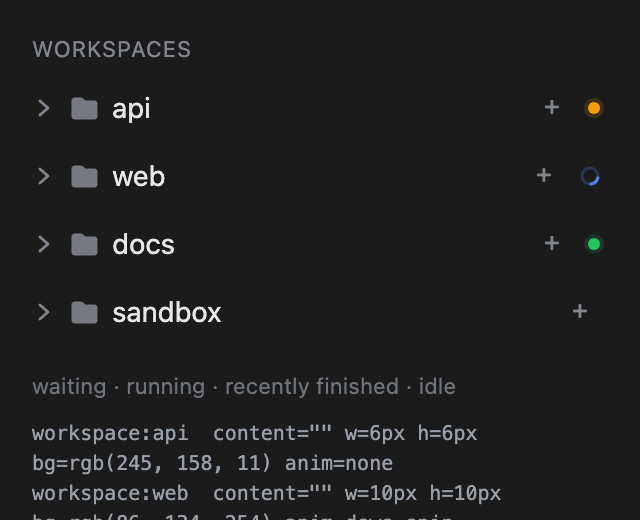
This is the plugin's own stylesheet rendered over a local reproduction of the sidebar row DOM and theme tokens — a design preview, not a live screenshot. The shipped app draws the same marks on the real rows.
The active workspace (the one containing the open conversation) is already marked natively: Harness paints the folder icon of the active chain blue. The Pinned section mirrors that color on the group header that contains the current conversation.
From npm:
dsh plugin --profile <profile> add dsh-workspace-statusFrom a local checkout (development):
dsh plugin --profile desktop add /absolute/path/to/dsh-workspace-statusdsh plugin add links the checkout and appends this package to
dsh.profile.bundles because it declares dsh.bundle. Use the profile that
runs your client — desktop for the macOS/Windows app, web for dsh web.
Or use sidebar → Plugins → Add plugin and pass the absolute path to this
directory. The host half contributes nothing, but the profile composition still
changes, so restart the profile's Host (quit and reopen the desktop app, or
restart dsh web) after installing. Then reload the page if the client half
does not appear.
Manual mount without the CLI: copy the package into the profile's
node_modules, add "dsh-workspace-status" to dsh.profile.bundles in the
profile's package.json, and insert the row from cordis.patch.yml into the
profile's patch layer.
Workspace marks:
Pinned section:
Pinned notifications:
If the plugin is missing, check the browser console for a failed client bundle load first; nothing else in the sidebar is affected.
sidebar.footer.action seat. It
publishes a stylesheet, a visually hidden activity description, and a portal
anchor; it adds no control of its own at the foot.useWorkspaces
(items, archivedSessionIds, pinnedSessionIds), useSessions (byId) and
useSessionStatus (running, pendingInteraction, completionUnread).[data-row-key="workspace:<id>"]::after.regionArea element. The official
browser is not replaced: search, menus, drag ordering, dialogs and directory
picking stay native.[data-row-key="session:<id>"] rows
with generated CSS (display:none!important); search-result rows carry no
data-row-key, so they remain visible.ctx.workspaces.unpinSession(id); opening a pinned row calls
ctx.uiWorkspace.openSession(id). The pin set itself comes from the
Workspace snapshot, so both the official tree and this section stay in sync.localStorage; no plugin settings are written. Notification delivery uses the
renderer's standard Notification API (and Web Audio for the optional chime);
the plugin does not add a host service.Two details belong to @deepseek-ai/dsh-client-ui-workspace / ui-sidebar
rather than a public slot contract:
data-row-key="workspace:<id>" / session:<id> for row targeting;…_regionArea class token for the portal insertion point.A future Harness release could rename either; the failure modes are
deliberately "no mark / no section", not "broken sidebar": the plugin never
replaces the browser and its DOM writes are limited to one inserted container.
react-dom is a shared client platform module (the same baseline the shell
seeds for every bundle), used only for the portal.
>=0.2.1-rc.2 <0.3.0-0 (developed and verified against
0.2.1-rc.3); Web and Desktop clients.>=22.18.0 for the build-free package and its tests.npm testThe suite loads the classic-script client envelope in a sandbox, drives the slot component with fake standard hooks, and asserts the emitted stylesheet and hidden description across waiting/running/finished, subagent, archived, ungrouped, expiry, pinned grouping (workspace order, ungrouped bucket, archived / blank / subagent exclusion), hide rules, pin precedence and selector escaping cases. A manifest test checks the bundle patch, export map, locale parity and the loader envelope.
There is no build step: index.js and client.js are the published artifacts.
dsh plugin --profile <profile> remove dsh-workspace-statusRestart the Host. The sidebar returns to stock; the inserted section container is removed with the plugin, and pins remain the shipped workspace registry state (unpin them through the normal pin action).
MIT
CLASSIFICATION EVIDENCE
系统优先读取 GitHub Topics,再与站内分类词典和词根规则比对。当前命中: notification、notifications。
EthanYoQ
电子发票整理与报销准备工具:从邮箱批量收集 PDF/OFD/XML 发票,OCR 识别、分类归档并生成 Excel 汇总;提供 Windows/macOS 桌面版与 DSH 插件。

Bytedesk
Open Souce IM with AI powered live-chat, email, ticket support, omni-channel customer service,alternative to slack + zendesk

wenbin-wb
🚀 DeepSeek Harness 多通道远程访问与安全守护插件 | 局域网扫码直连、Cloudflare / 自建公网隧道、微信 / QQ / 飞书 / Telegram 机器人全生命周期对话 | 内置全协议访问安全认证、后台防篡改与容灾保命体系