文件与数据
插件

OpenViking
volcengine
Self-evolving Context Database for AI Agents. Unify Agent Memory, Knowledge RAG and Skills.

SJcun/dsh-right-click-menu
Right-click menu for the DSH (DeepSeek Harness) Web GUI: open a workspace project or file reference in the file manager, and a link in the external browser. | 为 DSH(DeepSeek Harness)Web GUI 补上右键菜单:工作区项目与文件引用在资源管理器中打开,链接在外部浏览器中打开。
PROJECT TOPICS
INSTALL REFERENCE
dsh plugin --profile web add github:SJcun/dsh-right-click-menu
该命令指向仓库当前默认分支;尚无绑定当前 commit 的完整验证结果。
PROJECT README
English | 中文
Right-click support for the DSH Web GUI. Right-clicking a file reference reveals it in the file manager; right-clicking a link opens it in the external browser; right-clicking a workspace project in the left sidebar opens that directory.
The desktop shell builds its right-click menu in the Electron main process
(lib/main.js), and only for two cases:
window.webContents.on("context-menu", (_event, { isEditable, selectionText, editFlags }) => {
  const items = [];
  if (isEditable) items.push(/* undo, redo, cut, copy, paste, select all */);
  else if (selectionText.length > 0) items.push({ role: "copy" });
  if (items.length > 0) Menu.buildFromTemplate(/* … */).popup({ window });
});
An empty items array means no menu is shown at all. So right-clicking a Markdown link,
an @ file reference, a delivery card, or a right-Sidebar file-tree row currently does
nothing. This plugin claims those right-clicks in the page and offers the two actions the
product already knows how to perform.
| Right-clicked element | Menu rows |
|---|---|
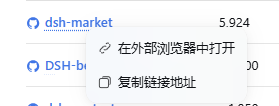
| HTTP(S) link — Chat/assistant Markdown, inline-code URLs | Open in external browser · Copy link address |
File reference — Markdown file link, @path chip, delivery card, file-tree row, document path label |
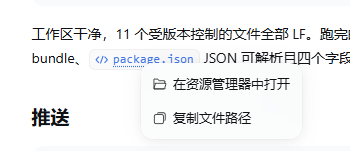
Show in File Explorer · Copy file path |
Directory — left-sidebar workspace project, @folder/ chip, file-tree directory row, file-tree header |
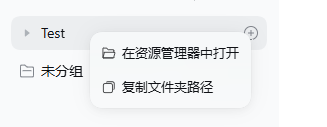
Show in File Explorer · Copy folder path |
Labels follow the active UI language. The plugin registers a Simplified Chinese dictionary
(在外部浏览器中打开, 在资源管理器中打开, 复制文件路径, 复制文件夹路径) beside the English one, so it
reads correctly under either locale.
Every other right-click is left exactly as it was: editable fields keep the native
undo/cut/copy menu, and a text selection keeps the native copy menu. The menu is the
shared Menu primitive, so ordering, keyboard navigation (arrows, Tab, Escape), focus
return, outside-click dismissal, and theme integration are the product's own.
Captured in the Chinese UI; the labels follow whichever language is active.
| Link | File reference | Workspace project |
|---|---|---|
 |
 |
 |
Open in external browser reuses the product's own external-navigation carrier:
window.open(url, "_blank", "noopener,noreferrer"). The Electron main process
intercepts _blank window opens and hands the URL to shell.openExternal, so this is
the same path a plain Chat link click takes.
Open in the file manager uses the Session Remote session.openWorkspacePath, and
the request depends on what was clicked — the same split the product's own directory
and file controls make:
{ path }, no action), so a
workspace project browses to its contents rather than being highlighted inside its
parent;{ path, action: "reveal" }), because
"open in the file manager" must not mean "launch this file's own application".Either way the Host re-verifies the path through the composed filesystem before asking the desktop, so the plugin never touches the filesystem itself and cannot escape the Session's access.
The second row names what the target actually is — Copy file path for a file and
Copy folder path for a directory (复制文件路径 / 复制文件夹路径 in Chinese). Which row set a
target gets comes from the pure menuRowsFor(target, t), so that wording is asserted
without a renderer.
The Session Remote resolves a relative path against the Host process directory, so the
plugin makes the path absolute first — from the left sidebar's Workspace list (the
project row carries only the Workspace id), from the file tree's own data-files-root,
or from the retained main-view Session's cwd for workspace-relative Markdown links.
package.json             bundle + plugin declaration (`dsh.bundle`, `dsh.client`)
cordis.patch.yml         the one Loader row this bundle inserts
lib/index.js             host half — empty `apply`, this is a pure UI plugin
lib/client.js            browser half — the whole feature
test/detection.test.mjs  dependency-free tests
scripts/live-bundle.mjs  live check against a running Host
lib/client.js is authored directly in the module system's factory-CJS form
(window.__ModuleLoader__.load({ id, factory })), exactly as a built client bundle is, so
the package needs no build step. Its only module requests are react,
react/jsx-runtime, and @deepseek-ai/dsh-client-ui-primitives — all three are part of
the shell's frozen platform module table.
No build step, no dependencies, no test framework:
npm test              # node test/detection.test.mjs
npm run check:live    # node scripts/live-bundle.mjs [baseUrl]
npm test loads lib/client.js the way the module system does (stubbed platform
modules), asserts the factory face and the slot/dictionary registrations, then extracts
the bundle's own pure sections out of the shipped source and exercises them against a
simulated DOM built from the markup each DSH surface really renders — so the tests cannot
drift from a copy of the code.
npm run check:live reproduces the Host's artifactRevision (framedHash over
mtimeMs/ctimeMs/size), requests the combo route
/plugins/??<name>/client.js&rev=<rev>, and asserts the response starts with the bytes on
disk. It defaults to $DSH_WEB_URL or http://127.0.0.1:19387; the plugin name and bundle
path come from this package's own package.json.
Editing lib/client.js needs no rebuild: the Host derives bundle revisions from file
metadata, so a saved file reaches an open page through client HMR.
Built and verified against DSH 0.2.0-rc.2 (desktop runtime, Electron web GUI).
This is a Web-surface plugin. It needs the Web composition — a page to attach a document listener to. Under the headless or SDK profiles there is no browser half at all, so the plugin is inert rather than broken.
The plugin deliberately relies on public plugin surfaces — ctx.slots, ctx.locale, the
Session Remote session.openWorkspacePath, the client Workspace list, and the
dsh-client-ui-primitives exports Menu/Toast/icons. It has no private copy of any of
them.
Detection, however, reads markup that DSH does not publish as an API. These are the
fragile points, all in one place (filePathOf in lib/client.js) and all covered by
tests, but they can move with a DSH release. A right-click is claimed by the first signal
found walking outward from the pointer, so a nested icon or label reaches its own control:
| # | Signal | Resolves to |
|---|---|---|
| 1 | <a href="http(s)://…"> |
URL |
| 2 | data-row-key="workspace:<id>" — left sidebar project row |
directory, from ctx.workspaces.list |
| 3 | data-files-path / data-files-root / data-files-entry — right Sidebar file tree |
file or directory |
| 4 | data-ref-chip = file/folder, a Markdown file-link class, or a button/link tooltip naming an absolute path |
file or directory |
The package also declares @deepseek-ai/dsh* peers for the runtime it targets, so DSH
refuses it on an unverified version rather than loading a menu that no longer matches the
DOM. If an upgrade does stop the menu appearing, npm test narrows it down: the failing
case names the surface, and the fix is a row in that table.
Install the package into the profile that serves the GUI. The supported route is the
plugin manager, which adds the dependency and appends the bundle to the profile's
dsh.profile.bundles:
plugin_manager install_bundle target: <spec>Or by hand, from the profile directory:
pnpm add <spec>then append the name to dsh.profile.bundles in the profile's package.json.
<spec> is whatever your package manager accepts for a bundle: a registry name
(dsh-right-click-menu), a Git address (github:owner/repo), a tarball, or an absolute
path for a local checkout. Installation adds the dependency and selects the bundle;
installing by hand means doing both.
The Host half loads on the next Host start, or immediately when config HMR is enabled. The
browser half loads with the next page load. In either case verify it with
npm run check:live rather than guessing.
Set disabled: true on the right-click-menu entry in the profile's
cordis.patch.yml, or remove the bundle from dsh.profile.bundles. Removing the bundle
removes the listener and the menu in one step — there is no second copy of any behavior.
在外部浏览器中打开) appears and opens the system browser.@-referenced file in a message, a delivery card, or a right-Sidebar
file-tree row → "Show in File Explorer" (在资源管理器中打开) appears and highlights the
file in File Explorer.在资源管理器中打开) appears and opens that directory in File Explorer.title (its tooltip is
the image preview), so it is only detected when its own label spells the path.workspaceId; the sidebar's shared Ungrouped bucket carries an empty id and
intentionally offers no menu.Distributed from its repository rather than npm, so package.json carries no private
guard and a Git or tarball install needs no edit. repository, bugs, homepage, and
author are filled in; a fork should point them at its own URL.
CLASSIFICATION EVIDENCE
系统优先读取 GitHub Topics,再与站内分类词典和词根规则比对。当前命中: file、文件。
volcengine
Self-evolving Context Database for AI Agents. Unify Agent Memory, Knowledge RAG and Skills.

mindscale-noah
该仓库暂未提供项目说明。

himovo
Turn DeepSeek Harness into a self-hosted enterprise Agent platform with knowledge, deep research, content generation, vibe coding, browser automation, governance, and admin controls.