
文件与数据
插件

OpenViking
volcengine
Self-evolving Context Database for AI Agents. Unify Agent Memory, Knowledge RAG and Skills.
PROJECT TOPICS
INSTALL REFERENCE
dsh plugin --profile web add github:Panther-w/dsh-inline-attachments
该命令指向仓库当前默认分支;尚无绑定当前 commit 的完整验证结果。
PROJECT README
在输入框里把图/文件放在哪里,模型就在哪个位置读到它——不用再写“如图 1、图 2 等等”。
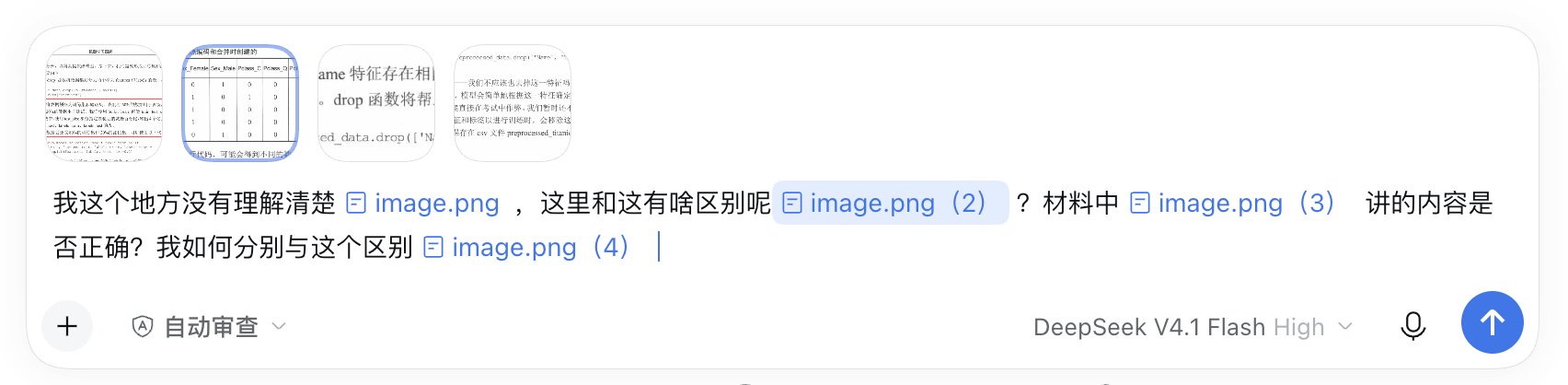
在输入框里粘贴、拖入或点 + 选择图片/文件,它会自动变成一个带文件名的小标签(不是链接);发送时模型就在这个位置读它。
删掉正文小标签会一起删附件;点图片标签看大图,点文件标签打开/下载。鼠标放在标签上,上方对应缩略图会描边。重开 DSH 后,草稿里的图需要重新贴一次。
在 DSH Desktop 打开「插件 → 添加插件」,输入 dsh-inline-attachments;或:
dsh plugin --profile desktop add dsh-inline-attachments市场收录后也可以搜「行内附件」。
从源码开发/安装:见 PUBLISHING.md。
在 DSH 的插件页卸载(或禁用)dsh-inline-attachments,重启 DSH 即恢复原样。
# Node 22+
node --test test/host.test.mjs test/client-load.test.mjs test/host-wiring.test.mjs test/client-flow.test.mjs
# 或 npm test
27 个自动测试 + 多轮人工测试(粘贴/拖入、删图/撤销、焦点、悬浮描边、文件标签、亮/暗主题)。
0.1.1。早期版本,依赖 DSH 输入框的内部接口,DSH 以后升级可能需要跟着改。
亮/暗主题跟随 DSH;Windows 没有平台相关代码,但没有在 Windows 真机实测。
Put images/files where you mean them — the model reads them in that exact position. No more “see image 1 / image 2”.
Paste, drop, or upload an image/file; it becomes a small label in the composer. On send, the model reads each file where you put it. Version 0.1.0 relies on composer internals. Light/dark themes follow DSH; Windows is untested.
MIT · repo Panther-w/dsh-inline-attachments · 27 automated tests + manual testing.
CLASSIFICATION EVIDENCE
系统优先读取 GitHub Topics,再与站内分类词典和词根规则比对。当前命中: 文件。
volcengine
Self-evolving Context Database for AI Agents. Unify Agent Memory, Knowledge RAG and Skills.

mindscale-noah
该仓库暂未提供项目说明。

himovo
Turn DeepSeek Harness into a self-hosted enterprise Agent platform with knowledge, deep research, content generation, vibe coding, browser automation, governance, and admin controls.