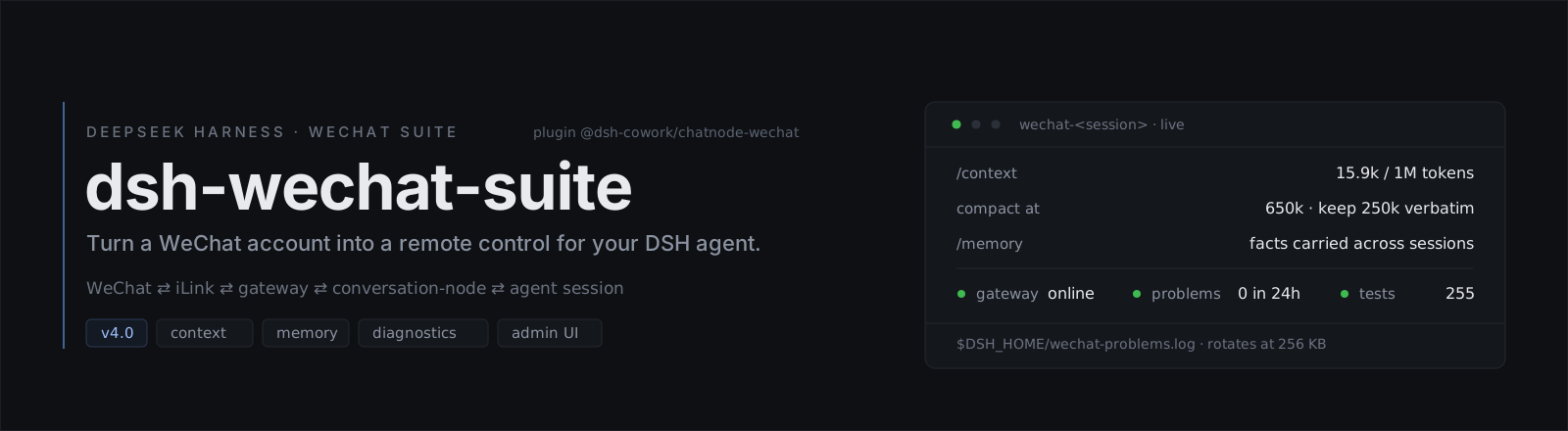
🧭 What it is
A DeepSeek Harness bundle that connects a
DSH profile to a WeChat personal account over Tencent's clawbot iLink gateway
(ilinkai.weixin.qq.com) — the protocol behind Tencent's own WeChat bot clients, driven here
against a personal account with no official support.
you (WeChat) ⇄ iLink ⇄ wechat-gateway ⇄ wechat-conversation-node ⇄ DSH agent session
| Plugin |
Role |
wechat-gateway (WechatGateway) |
iLink service (ctx.wechat): QR login, authenticated long-poll, reconnect/backoff, send retry + rate-limit circuit, typing indicator, encrypted CDN media download/upload, inbound dedup |
wechat-conversation-node |
WeChat ⇄ DSH bridge: allowlist gate, session targeting, commands, context rotation, multimodal media (OCR/STT/TTS/image-gen/file/video), reminders & morning weather, digest outbound, approvals, light control |
⚡ 60-second setup
Prerequisites: Node ≥ 22, pnpm, a dedicated WeChat account, and a DSH profile.
dsh plugin --profile <your-profile> add github:PRTS168/dsh-wechat-suite  # 1 install into the profile
pnpm login                                                             # 2 scan the QR, store credentials
pnpm setup                                                             # 3 fill in the allowlist and the rest
Restart dsh web, send the bot a WeChat message, and you should get a reply. Other install
paths (Release tarball, build from a checkout) and the step-by-step version live in
Quickstart; if something is off, the admin console
health report names what is missing.
[!WARNING]
One poller per account. iLink allows exactly ONE authenticated poller per bot token.
Running a second instance of this bridge — or any other iLink client — against the same
WeChat account causes HTTP 403 and dropped messages. Use a dedicated WeChat account,
and treat the account as disposable: Tencent may restrict it at any time.
[!IMPORTANT]
Two things must be filled in. An allowFrom allowlist entry, and the WEIXIN_BOT_TOKEN /
WEIXIN_ACCOUNT_ID / WEIXIN_BASE_URL credentials. Without them the bridge stays safely
idle — it never feeds a non-allowlisted message to the model. Everything that looks like
<...> is a placeholder you must fill in, and persona presets are not shipped: point
agentPreset at a preset of your own under $DSH_HOME/.agent-presets/<name>/.
✨ v5.0 highlights
- QQ is a second platform, not a fork — the bridge now speaks both WeChat and QQ. The platform
seam (
src/platform/index.ts) is the only place that knows which channel a session belongs to, and
each platform keeps its own allowlist, memory file, problem ledger and session namespace. Two
conversations on two channels never share a context, and nothing is mirrored between them.
- One console, both platforms — the admin console serves several profiles under one URL
(
--profiles wechat,qq) with a platform switcher. Every path the console looks at is derived from
the platform id, so a profile named web that serves WeChat finds wechat-memory/MEMORY.md
and wechat-* sessions instead of rendering empty pages over data that is right there.
- The console can no longer be walked out of its directory —
?platform= used to reach the path
builder unchecked, so a crafted name read and wrote cordis.patch.yml files outside profiles/.
It is now validated at one choke point, with regression tests that assert the refusal.
- Front-end edits land immediately —
admin/index.html is read per request, so a change shows up
on refresh instead of hiding until the next console restart.
- A save can no longer break a profile — YAML scalars are quoted by field kind: a QQ AppID like
"1234567890" stays a string instead of being written as a number and rejected by the schema on the
next load.
The previous release's headline work (gateway transport self-healing, long-poll window cap, earlier
long-turn progress) is in the v4.1 release notes. Every change:
CHANGELOG.md · older: releases/
🚀 Quickstart
Prerequisites — Node ≥ 22, pnpm, a dedicated WeChat account, a DSH profile.
One-command install
dsh plugin … add runs one pnpm add inside your profile, so any pnpm target
works — a git repository, a release tarball, an npm package name, or a local path:
# straight from the repository (no registry needed)
dsh plugin --profile <your-profile> add github:PRTS168/dsh-wechat-suite

# from a release tarball
dsh plugin --profile <your-profile> add \
  https://github.com/PRTS168/dsh-wechat-suite/releases/download/v4.0/dsh-cowork-chatnode-wechat-4.0.0.tgz

# from an npm registry, once published
dsh plugin --profile <your-profile> add <package-name>
Then jump to Pair the WeChat account below. Building from a checkout works the
same way:
# 1. install from a checkout
git clone https://github.com/PRTS168/dsh-wechat-suite.git
cd dsh-wechat-suite
pnpm install && pnpm build
dsh plugin --profile <your-profile> add .

# 2. pair the WeChat account once (prints a QR URL to scan)
pnpm login            # → WEIXIN_BOT_TOKEN / WEIXIN_ACCOUNT_ID / WEIXIN_BASE_URL

# 3. fill the remaining placeholders (backup first, then patch the profile)
pnpm setup            # interactive
# or non-interactive; siliconflowKey fills OCR / image-gen / STT / TTS at once
pnpm setup --yes --set allowFrom=<your-wechat-id>@im.wechat --set siliconflowKey=sk-...
Then restart dsh web and send the bot a WeChat message. To bring up the console too:
node admin/server.ts          # or admin/start-admin.bat on Windows
# → http://127.0.0.1:8790/    (token minted into admin/.admin-token)
🎯 Features
| Area |
What you get |
| Messages |
Two-way text (replies re-formatted for WeChat: headings → 【】, fences stripped + indented, tables de-lined); inbound messages fenced with a timestamp so the model can tell a real user turn from its own output |
| Vision |
Inbound images as a real image block for multimodal routes, or DeepSeek-OCR text + path for text-only routes; imageInput: auto\|native\|ocr and /识图 at runtime; generate_image (Kwai-Kolors) outbound |
| Voice |
Inbound voice transcribed (XingChenASR or WeChat's own transcript); the agent replies with speak (CosyVoice2 clone voice) as an mp3 attachment |
| Files & video |
Inbound documents/videos decrypted to mediaDir with the original file name; wechat_send_file / wechat_send_video send them back (playable mp4/mov attachment — iLink has no native video bubble) |
| Sessions |
/sessions /use /new /stop /status, auto-resume of the newest wechat- session, hard isolation from Web-GUI sessions via the wechat- prefix |
| Context |
contextPolicy rotation on turns / context pressure / token budget / idle time, with a free handoff note; switch schemes from the console |
| Control |
/model and /perm two-step menus; /yes /no (or bare 1 / 2) approvals; /开灯 /关灯 or /gear /off /low /mid /high light control (control_esp32_light) |
| Proactive |
set_reminder (per-peer, persistent, catch-up after downtime) and the daily /早安 weather digest (Open-Meteo, zero LLM cost) |
| Email |
send_email over a configured implicit-TLS SMTP account |
| Noise control |
Digest-style outbound: on a long turn the first heartbeat line lands after ~20s and then every digestIntervalSec; replies are chunked to maxMessageChars with throttling, and end-of-turn notices appear only for error / abort / truncation |
[!TIP]
/早安 test answering fetch failed? That is almost always a local or system proxy
swallowing api.open-meteo.com. The request is retried directly (bypassing the proxy), and
when both attempts fail the error names the real cause (ENOTFOUND, ECONNREFUSED, TLS).
🧠 Long-term memory
A cross-session facts file at ${DSH_HOME}/wechat-memory/MEMORY.md, with five sections plus a
retired-facts ledger:
## 关于主人
- 主人有两个邮箱:主 primary@example.com、副 secondary@example.com

## 偏好与习惯
## 常用设备与环境
## 待办与承诺
## 重要决定
## 已过期
- 主人在 Example City(已作废)
- How facts get in: ① the model calls
remember_fact when the owner says "记一下…", which
writes immediately; ② a scheduled consolidation (04:30 by default) folds that day's owner
utterances in. Both paths use the same writer: atomic replace + backup first + a 4000-character
cap + one audit line per change (memory-log.md).
- How it comes out: injected as background, placed outside the user-message fence —
the persona's hard rule is that only fenced content is the owner speaking, so memory can never
be mistaken for a command. A file with no facts is not injected at all.
- It is not forgotten: it survives session switches, restarts and compaction; after a
compaction the bridge re-injects it on the next message.
- The owner can read and edit it any time:
/memory prints it, and the file is plain
Markdown — edit it in Notepad and the next injection picks it up.
[!NOTE]
Writes are bounded: only facts the owner stated himself and that stay true over time (name,
city, schedule, habits, devices and paths, promises, decisions). Passwords / tokens / API keys,
one-off arrangements, small talk and the model's own words are never written. One fact is capped
at 300 characters (a longer one is truncated, and the receipt says so) and the whole
file at 4000 (past that the write is refused outright rather than silently dropped).
⚙️ Configuration
# profile patch (cordis.patch.yml)
plugins:
  dsh-chatnode-wechat:
    allowFrom: ["<your-wechat-id>@im.wechat"] # hard allowlist, REQUIRED, no default
    digestIntervalSec: 300            # heartbeat spacing; the first line lands after ~20s, then this interval
    approvalTimeoutSec: 600           # approval timeout -> default deny
    maxMessageChars: 2000             # WeChat bubble cap (protocol limit)
    sendChunkDelayMs: 1500            # throttle between outbound bubbles
    imageInput: auto                  # auto | native | ocr
    contextPolicy: '{"scheme":"manual"}'   # see releases/v0.3.0-release-notes.md
    # imageInputModel: amd/DeepSeek-V4-Flash-Vision-Exp  # vision route for pictures only
    # agentPreset: wechat             # optional persona preset (lives outside this repo)
    # agentProvider / agentModel: ... # model route for the WeChat agent
    # esp32BaseUrl: http://<esp32-ip>:80   # light control (optional; no built-in default, fill it in to use it)

    # ---- media helpers (all optional; each capability degrades gracefully) ----
    # ocrApiKey / ocrModel: deepseek-ai/DeepSeek-OCR / ocrBaseUrl
    # imageGenApiKey / imageGenModel: Kwai-Kolors/Kolors / imageGenDir
    # sttApiKey / sttModel: XingChenAGI/XingChenASR-V3.2-Ultra
    # ttsApiKey / ttsModel: FunAudioLLM/CosyVoice2-0.5B / ttsVoice: speech:<voice-uri>
    # mediaDir: <dir>     # inbound media (default $DSH_HOME/attachments/wechat)
    # reminderFile / morningFile: <paths, default under $DSH_HOME>

    # ---- email (optional; host + username + password must all be set to send) ----
    # smtpHost: smtp.example.com
    # smtpPort: 465                     # implicit TLS
    # smtpUsername: you@example.com     # also the From address
    # smtpPassword: <app password>
    # smtpFromName: <display name>

    # ---- long-term memory (optional, every key has a default) ----
    # memoryFile: $DSH_HOME/wechat-memory/MEMORY.md
    # memoryInjectEvery: 10             # re-inject the briefing every N messages
    # memoryConsolidateTime: "04:30"    # daily consolidation; empty = never
    # problemFile: $DSH_HOME/wechat-problems.log   # problem ledger

    # ---- gateway tuning (optional) ----
    # gateway tuning keys; longPollTimeoutMs also caps the server's suggested long-poll window
# longPollTimeoutMs / apiTimeoutMs / pollIdleDelayMs / retryDelayMs
    # backoffDelayMs / maxConsecutiveFailures / sessionExpiredPauseMs
    # sendChunkRetries / sendChunkRetryDelayMs
    # rateLimitCircuitOpenMs / rateLimitCircuitWindowMs / rateLimitCircuitThreshold
    # allowCdnHosts: [...]              # SSRF allowlist for media downloads
allowFrom is mandatory and has no permissive default: missing it fails startup, and messages
from non-allowlisted senders are logged and ignored — never fed to the model.
[!TIP]
Every one of these can be edited in the admin console (beginner mode shows the handful that
matter, advanced mode lists them all). The gateway tuning keys used to be a trap: they were
declared but never forwarded, so setting them changed nothing, silently. All four key sets
(bundle schema / forwarding list / node schema / console fields) must now be equal, and a
config-surface test enforces it — which is how the send_email "SMTP 未配置" bug was caught.
Native image input vs OCR — and the declaration trap
| Mode |
What the model gets |
When |
native |
a real image content block (it sees the pixels) |
the routed model declares image input |
ocr |
【OCR 识别结果】 text + the file path |
the routed model is text-only, or nothing declares image support |
auto (default) — resolve the route the agent actually chats on, ask llm.listModels()
for its inputModalities, and send an image block when image is declared. If the chat route
is text-only, auto looks for another registered route that declares image support (set
imageInputModel to pin one instead), and otherwise uses OCR.native — always attempt the image block. A route that does not declare image support is
still tried once (the endpoint may accept images without advertising them); when it refuses,
that route is suppressed for three hours and later pictures take the OCR path instead of
burning a turn each time.ocr — always the text path. Cheaper and often more accurate for documents and screenshots.
Declaring the modality is the switch. The harness gates image blocks on the model's declared
inputModalities, upstream of the wire — a text-only declaration means no image is ever sent. The
DeepSeek adapter's built-in catalog predates DeepSeek 4.1 (it records deepseek-v4-flash as
text-only, and the retired deepseek-v4-flash-vision-exp was its only image entry), so declare it:
llm-deepseek:
  models:
    - id: deepseek-flash
      inputModalities: [text, image]
This models: list replaces the plugin catalog rather than extending it, so list every id you
route to — if your profile routes to the legacy alias deepseek-v4-flash, list it as well, or that
route stops resolving.
/识图 reports and switches the mode at runtime (auto / native / ocr); the override lasts
until dsh web restarts. Both modes keep the [微信图片] <path> prefix, so the session log stays
replayable and the agent can re-read the file.
/识图                 # current mode + routed model
/识图 native          # force image blocks
/识图 ocr             # force OCR text
🎛️ Commands and tools
Commands (send in WeChat)
| Command |
What it does |
| (plain text / image / voice / file / video) |
routes to the active agent |
/sessions |
numbered session list (wechat- only, most recent first) |
/use N |
switch the active session |
/new <prompt> |
create a fresh agent+session and start |
/stop |
cancel the active turn |
/status |
agent status + session summary + gateway health (online / reconnecting / paused / stopped) |
/context |
context usage, model window, breakdown, the compaction trigger point, how much stays verbatim, fact count |
/memory |
view the long-term memory; /memory now consolidates once, immediately |
/problems |
the problems that were recorded (list only); /problems clear empties the list, the log stays |
/send <path> |
send a local image to the current contact |
/model |
two-step model switcher (list, then pick a digit) |
/perm |
two-step permission-preset switcher (list, then pick a digit) |
/识图 [auto\|native\|ocr] |
image-input mode; no argument reports mode + routed model |
/早安 on\|off\|status\|test\|HH:MM (alias /morning) |
morning weather digest |
/开灯 /开灯1\|2\|3 /关灯 |
ESP32 light control (gear 3 / low / mid / high / off) |
/gear /off /low /mid /high |
same implementation under the device's own vocabulary (query / off / low / mid / high) |
/yes /no (or 1/2 while one request is pending) |
answer a permission request |
/help |
command list |
Agent tools (available to the model)
| Tool |
Purpose |
wechat_send_image(path) |
send a local image to the peer |
wechat_send_file(path) |
send any local file to the peer |
wechat_send_video(path) |
send a local video (playable mp4/mov attachment) |
generate_image(prompt) |
text-to-image (Kolors), then send it |
speak(text) |
TTS with the cloned voice, sent as an mp3 attachment |
send_email(to, subject, body) |
plain-text mail over the configured SMTP account |
control_esp32_light(mode) |
query / off / low / mid / high on the LAN light |
set_reminder(text, inMinutes\|atTime) |
schedule a reminder (per peer) |
list_reminders() |
list pending reminders |
cancel_reminder(id) |
cancel a reminder |
remember_fact(text, section?, replaces?) |
write a fact the owner stated straight into long-term memory (replaces retires a superseded fact) |
✅ Approvals
WeChat has no buttons, so permission requests arrive as numbered text and are answered in chat:
#1 needs your confirmation
tool: bash
reason: run a destructive command
reply /yes to allow, /no to reject (1/2 while exactly one is pending)
no reply within 10 minutes -> automatically denied
/yes grants allowed-once; /no rejects; a timeout falls back to the DSH default deny. The
bridge answers only requests for the agent it currently drives; everything else is delegated down
the answerer chain.
🖥️ Standalone admin console
node admin/server.ts [--port 8790] (admin/start-admin.bat on Windows) starts a loopback-only
HTTP console that is not part of the DSH plugin tree — it cannot affect profile boot, and
stopping it cannot stop the bridge.
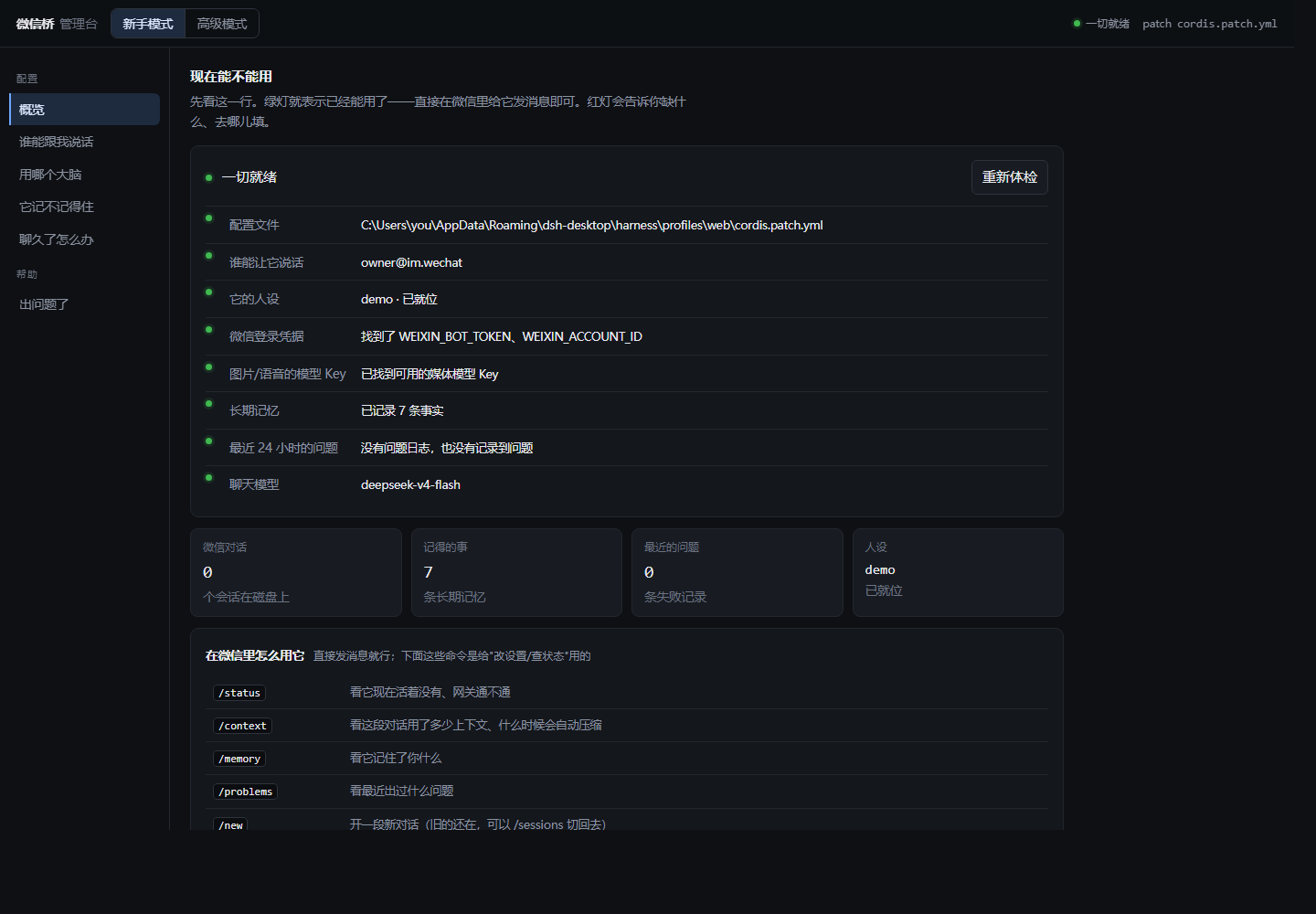
The page has two modes, switched in the top-left corner (the choice is remembered):
| Mode |
For |
What it shows |
| Beginner |
people who do not want to learn the config surface |
only the few things that must be understood, in plain language: who may talk to it (allowlist) / which brain it uses (model dropdown) / whether it remembers (memory + daily consolidation time) / what happens when a chat gets long (two choices), plus a "something broke" page with the raw log; one health summary line on top |
| Advanced |
people who want all of it |
every config key (grouped) / provider and image routes / memory and problem-log paths / every context scheme (manual + the five rotation policies) with knobs and the raw JSON / conversations and transcripts / config backups and one-click rollback / the full environment self-check |
Beginner mode — one glance at whether it can work right now; a red dot names what is missing
and where to put it:
Advanced mode — every config key, grouped into required / optional, with secret fields masked:
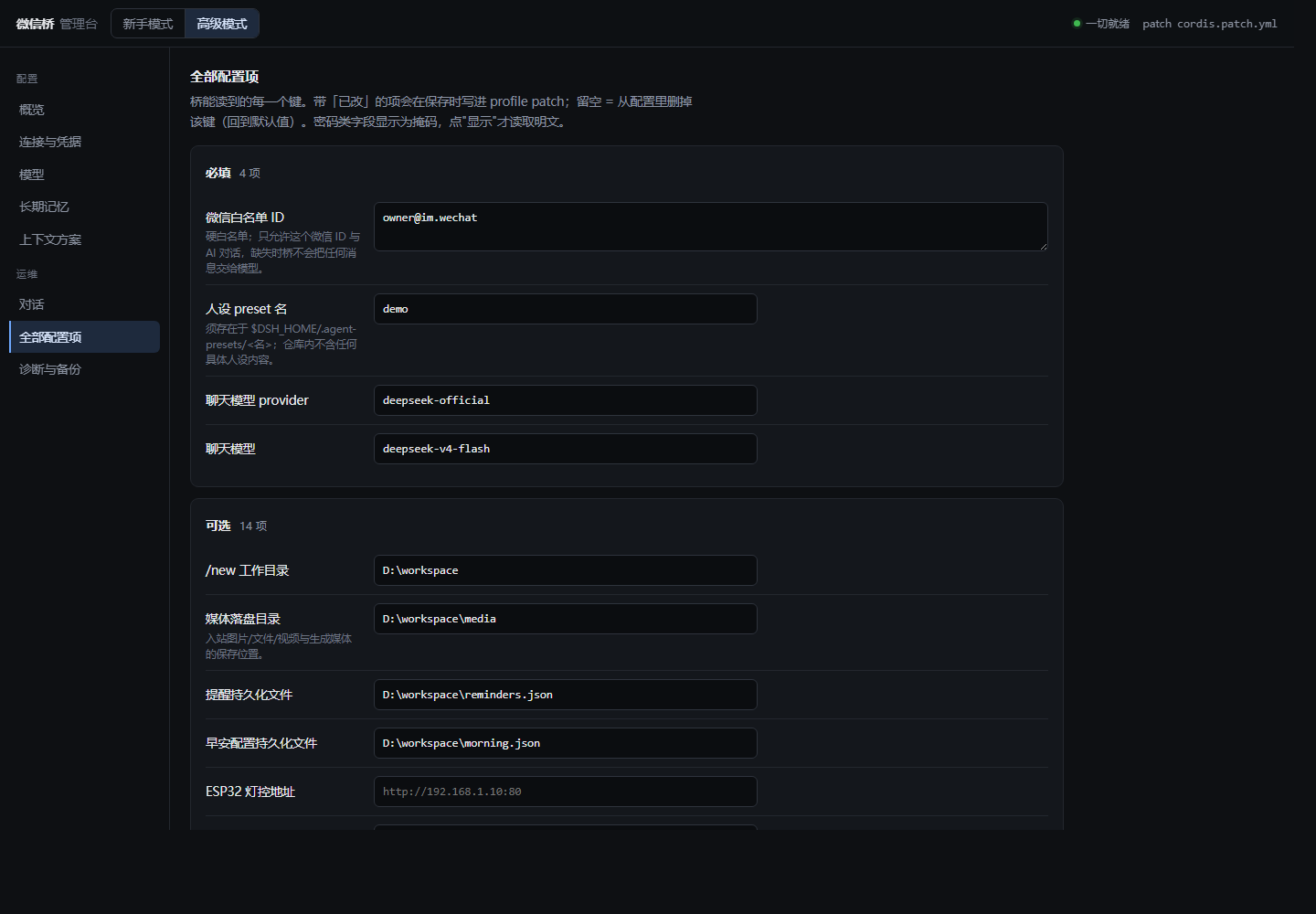
Both screenshots come from a demo instance: every value, path and persona is placeholder data.
| Endpoint |
What it does |
GET /api/state |
config values (secrets masked), field definitions, context schemes, conversations |
GET /api/health |
the 8 checks: config file / allowlist / persona / WeChat credentials / media keys / long-term memory / recent problems / chat model |
GET /api/problems · GET /api/memory |
the problem ledger, raw · the long-term memory, raw |
GET /api/models |
the real model list read from settings.yaml (including third-party relay names) |
GET /api/backups · POST /api/rollback |
backup list (newest by time) · roll back (the current config is backed up first) |
POST /api/config · POST /api/scheme |
write the patch (only changed keys) · switch context scheme |
GET /api/conversations · /api/transcript · POST /api/session/* |
conversations / transcript / new / forget (recoverable) |
Security posture — binds to 127.0.0.1 only · token minted on first start into
admin/.admin-token (override with WECHAT_ADMIN_TOKEN) · every API call needs that token ·
mutations additionally need the x-wechat-admin: 1 guard header, which is a real second factor
now (it used to sit behind two return true branches and was therefore unreachable) · the Host
header must be a loopback authority, so a DNS-rebinding page cannot reach it · a config file that
cannot be read is refused rather than overwritten (that used to replace the whole patch,
taking every other plugin's entries with it) · numeric fields are validated server-side, because a
quoted "25 分钟" in an integer key makes the plugin fail its schema and takes the whole profile
down. Session commands are queued on disk ($DSH_HOME/wechat-admin/queue/) and executed by the
bridge within ≤ 2 s; the console also shows the bridge's last reports. The token file is
git-ignored.
[!NOTE]
Since v0.3.0 there is no in-GUI settings page — the config-api plugin row was removed
(see v0.3.0 → Fixed). Configure through cordis.patch.yml or this console.
🧪 Development
pnpm install
pnpm build          # src/ -> lib/ (tsc)
pnpm typecheck
pnpm test           # node --test test/*.test.ts — 255 tests, no WeChat account
pnpm smoke          # manual live-account check
pnpm setup          # interactive config wizard
test/fake-ilink-server.ts implements the iLink endpoints (long-poll, sendmessage, sendtyping,
getconfig, QR login, encrypted CDN download) and replays test/fixtures/inbound.ndjson, so the
inbound → session → outbound loop runs offline in CI (.github/workflows/ci.yml).- Coverage includes gateway dedup (message id and payload fingerprint), inbound routing /
media-failure paths / the message envelope, the command surface, the approval bridge, context
rotation policies (including the token-budget fallback chain), light control, preset
compatibility across both host versions, and
boot-safety.test.ts, which pins the "never
produce an unhandled rejection" property that used to crash the host.
- Honest gaps (not unit-tested): OCR success/failure branches, the voice-download-to-ASR flow,
outbound media upload (the fake server has no
/upload), /send, /help, restart resume, and
the native-image block itself (vision.test.ts covers the mode/policy decision against a stub
catalog; attachments.saveImage runs only on a live host). Live smoke covers the happy paths.
- Test spread (255):
memory 36 · node 33 · context-policy 21 · gateway 18 · light 15 ·
vision 10 · commands 11 · problems 10 · approvals 9 · morning 9 · markdown 9 ·
outbound-guard 8 · context-report 8 · robustness 8 · patch-config 7 · dedup 6 ·
inbound-media 6 · resume 5 · config-surface 5 · user-message-envelope 5 · reminders 4 ·
email 4 · picker 4 · packaging 3 · boot-safety 1
- Guard tests added in v4.0:
config-surface (the four config key sets must be equal — this is
what stops the "SMTP config dropped by the host" class of bug), problems (ledger dedup,
notification rate limiting, log rotation), robustness (refused writes, atomic writes,
backup pruning by time, log rotation) and outbound-guard, whose cases are the real text from
the 2026-09-13 incident.
⚠️ Known limits
-
Reference only — verified on one specific environment (2026-09); portability is not promised.
The protocol was reconstructed from existing iLink clients, with synthetic fixtures in-repo.
-
Outbound voice/video arrive as file attachments (mp3/mp4), not native bubbles (iLink
limitation). silk.ts and gateway.sendVoice() exist as unused spares (silk needs external
ffmpeg + pilk).
-
Some command receipts still contain emoji that are not stripped to match an emoji-free persona.
-
Generated images/voice accumulate under mediaDir/generated (no auto-cleanup yet).
-
WeChat silk-encoded voice needs real-device verification (m4a verified).
-
Only 1:1 text messaging is targeted; group chats are ignored by design (MVP).
-
The rotate-pressure context size is a proxy (serialized event characters), not model tokens;
rotate-tokens is the accurate one when the host exposes session projections.
🛡️ Risks
| Risk |
Mitigation |
| iLink exclusive lock — two pollers on one token → 403 + dropped messages |
Dedicated account; loud fatal error + polling stop on 403 |
| Account restriction — unofficial gateway |
Dedicated, disposable account; stated plainly in this README |
| DSH v0.1 churn |
Two host versions verified (v0.3.0 → Other); optional services via ctx.get(); boot-safety tests |
| An unhandled rejection killing the host |
All async entry points resolve; .catch() at call sites; hot-reload stress pass |
| Protocol opacity |
Protocol reconstructed from existing clients; synthetic fixtures in the repo |
| Credential files in the repo root |
client-config.json / account.json / admin/.admin-token are git-ignored |
📚 Version history
v5.0 — QQ as a second platform · one console for both · console path guard
- Two platforms, one bridge: WeChat and QQ, each with its own allowlist, memory file, problem
ledger and session namespace. A per-platform seam decides which channel a turn belongs to, so an
answer always goes back to the channel it came from.
- Multi-platform admin console: serve several profiles under one URL and switch between them;
every file the console reads is keyed by platform id, so sessions, memory and the problem ledger
actually show up instead of rendering empty.
- Security: the console's
?platform= value is validated before it can become a path — unknown or
traversing names are refused with a 4xx, and the profile list is validated at startup. Both are
covered by regression tests.
- Fixed: string-typed numeric values (a QQ AppID) are no longer written as bare YAML numbers,
which used to make a saved profile fail to load on the next start.
- Fixed: the problem ledger and the console's command queue are addressed by platform id rather
than by profile name.
- 294 offline unit tests.
See releases/v5.0-release-notes.md.
v4.1 — gateway transport self-heals · long-poll window capped · earlier progress
- Transport self-heals: after a connection-level failure the next request takes a brand-new
connection (
node:http, agent: false) instead of the poisoned pool — the fix grew out of an
incident where nothing could be sent for 18 straight minutes and only a process restart helped.
- Long-poll window capped: the server's
longpolling_timeout_ms can no longer override the
configured window without limit; it is now min(server, longPollTimeoutMs) and both numbers are
logged.
- First progress line in ~20s on a long turn (it used to wait a full
digestIntervalSec, 300s).
- Fixed: the
robustness test that was red on Linux CI (chmod 000 then read back without
restoring permissions), and the light-control breaking change is now documented
(esp32BaseUrl no longer has a built-in default).
- 261 offline unit tests (was 255).
See releases/v4.1-release-notes.md.
v4.0 — context rebuild · admin console rewrite · long-term memory
- Context: one session by default;
/context shows the real usage and the compaction trigger
point; write the compaction parameters as thresholdRatio 0.65 / retainRatio 0.25 (that avoids
the "keep only the last message" overflow path); memory is re-injected after a compaction.
- Long-term memory:
MEMORY.md + a daily 04:30 consolidation + the remember_fact tool +
/memory.
- Admin console: beginner / advanced modes, 8 health checks, backups and one-click rollback,
and the mutation guard header actually enforced.
- Problem ledger:
wechat-problems.log + /problems + gateway health in /status, with
notification rate limiting.
- Fixed: config silently dropped by the host (the real reason
send_email said "SMTP 未配置"),
the model writing the owner's lines, tool-calling steps reported as empty replies, the heartbeat
timer leak, HTTP 403 after a hot reload, a NaN busy loop in the timers, and more.
- 255 offline unit tests (was 167).
See releases/v4.0-release-notes.md.
v0.3.1 — weather and command-surface fixes
- The weather push reports real failure reasons and retries directly, ignoring a host proxy.
- Bare
1 / 2 answer permission requests again; /yes and /no no longer claim to be unknown.
- The retired light vocabulary (
/gear /off /low /mid /high) works again, proxy-safe.
- 167 offline unit tests (was 143).
See releases/v0.3.1-release-notes.md.
v0.3.0 — stability, context lifecycle, standalone console
Context rotation policies, host-stability hardening, failure visibility and the standalone admin
console — see releases/v0.3.0-release-notes.md.
- 143 offline unit tests (was 86).
v0.2.2 — DeepSeek 4.1 multimodal + native image input
- Inbound pictures reach the model as a real
image block when the routed model declares image
input, and as DeepSeek-OCR text otherwise; imageInput and /识图 choose the policy, and a
route that refuses an image is suppressed for three hours.
- Declaring the modality is the switch (see Configuration → Native image input vs OCR); the
models: snippet replaces the plugin catalog rather than extending it.
send_email over implicit-TLS SMTP; client-config.json / account.json git-ignored.
v0.2.1 — Web management page and persona editing
- Settings → Plugins → "微信桥配置" edited every placeholder in the browser, with masked
secrets and timestamped backups; the same page edited agent preset personas.
(Removed in v0.3.0 — see v0.3.0 → Fixed / Notes above.)
v0.2.0 — `/perm`, and files & videos both ways
/perm two-step permission-preset switcher, plus pnpm setup.- Inbound files/videos download and decrypt to
mediaDir with the original name preserved;
wechat_send_file / wechat_send_video send local files and clips back.
- Persona residue removed from the repo.
Full changelog: CHANGELOG.md · all announcements: releases/
🗺️ Roadmap
- Next — group chats (opt-in, risk-heavy), multi-account, a shared-poller proxy to coexist
with hermes-agent / OpenClaw.
- Later — WeCom / DingTalk / Feishu bundles reusing the
node/ layer.
🙏 Acknowledgements
- Protocol references — the iLink wire details were reconstructed from existing WeChat bot
clients (hermes-agent and OpenClaw); synthetic fixtures live in
test/fixtures/inbound.ndjson
(no real account data), so CI never needs a live account.
- Platform — DeepSeek Harness and the
Cordis plugin model (
cordis, schemastery) that this bundle extends.
- Services used by the optional media helpers — SiliconFlow (DeepSeek-OCR, Kwai-Kolors,
XingChenASR, CosyVoice2) and Open-Meteo (morning weather).
- Thanks — to the DeepSeek Harness and Cordis communities whose plugins this bundle builds on.
📄 License
MIT — see LICENSE.