
消息通讯
插件

Invoice-Downloader
EthanYoQ
电子发票整理与报销准备工具:从邮箱批量收集 PDF/OFD/XML 发票,OCR 识别、分类归档并生成 Excel 汇总;提供 Windows/macOS 桌面版与 DSH 插件。
PROJECT TOPICS
INSTALL REFERENCE
dsh plugin --profile web add github:Justinis997/dsh-macos-notify
该命令指向仓库当前默认分支;尚无绑定当前 commit 的完整验证结果。
PROJECT README
 [
 ]()
[
 ]()
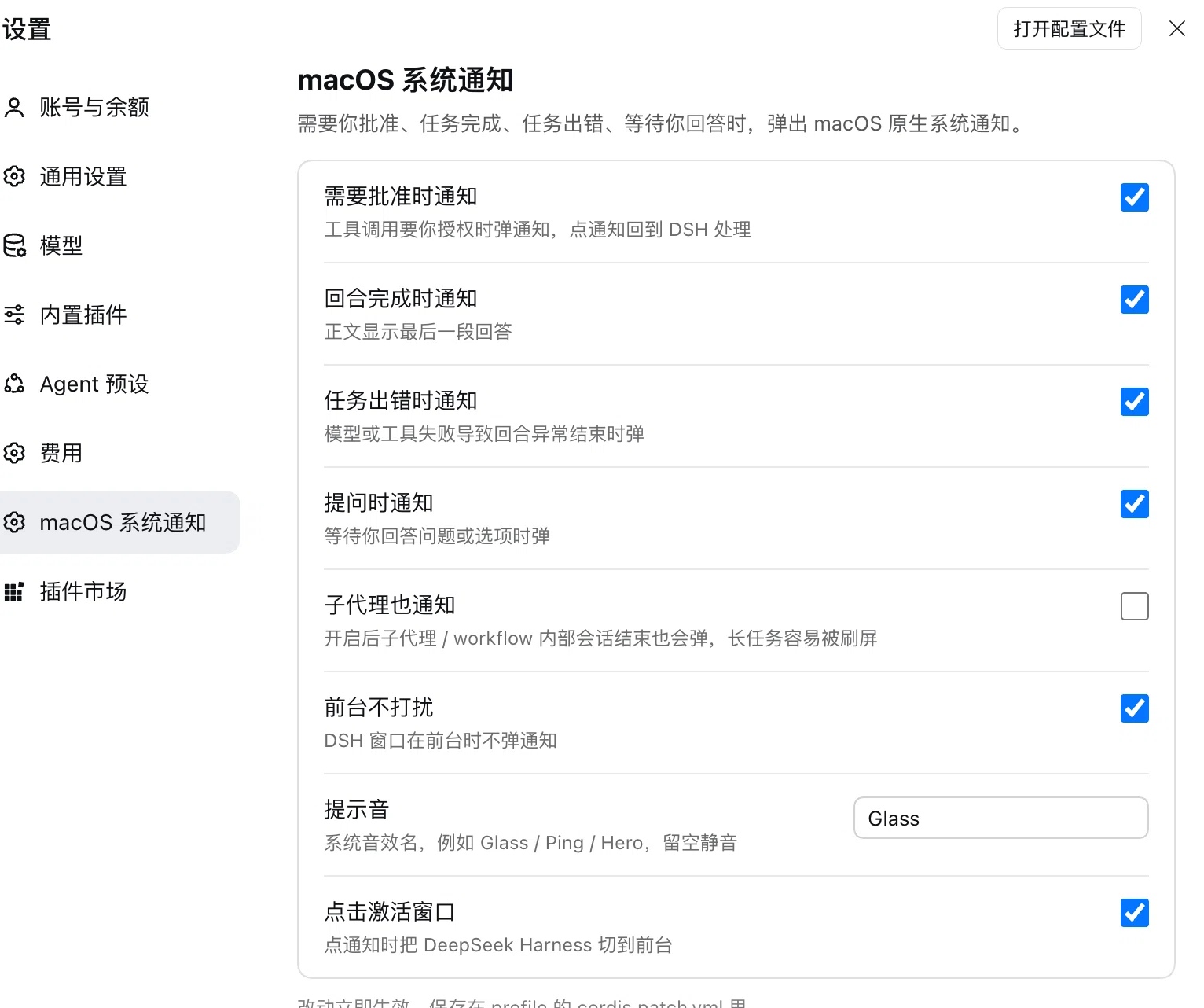
Native macOS notifications for DeepSeek Harness (DSH) — the kind you get from any other app, with the DeepSeek Harness icon: get notified when the agent needs your approval, finishes a turn, hits an error, or waits for your answer.
Install:
git clone https://github.com/Justinis997/dsh-macos-notify.git, then tell DSH "install the DSH bundle at<path>". Details in Install.
| Event | Notification |
|---|---|
approval/asked — a tool call needs your approval |
⚠️ 需要你批准 · tool name + reason |
turn/end with reason.kind = completed |
✅ 任务完成 · last part of the answer |
turn/end with reason.kind = error |
❌ 任务出错 · error message |
tool/call = ask_user_question |
❓ 需要你回答 · the question |
helper/DSHNotify.app) posts through UNUserNotificationCenter, so notifications show the DeepSeek Harness icon and land in Notification Center.Settings › macOS 系统通知, persisted to your profile patch.Recommended — let DSH install it. Clone the repo, then ask the agent:
Install the DSH bundle at
/abs/path/to/dsh-macos-notify
The agent calls plugin_manager install_bundle, which links the package into your profile and activates it.
Manual install.
Link the package into your profile (~/.dsh/profiles/<profile>/):
// package.json
"dependencies": { "dsh-macos-notify": "link:/abs/path/to/dsh-macos-notify" },
"dsh": { "profile": { "bundles": [ /* … */ "dsh-macos-notify" ] } }
Add a row to cordis.patch.yml:
- id: macos-notify
  name: dsh-macos-notify
Install dependencies in the profile and restart DSH.
The first notification triggers a macOS permission prompt — click Allow. The helper then appears under System Settings › Notifications.
Open Settings › macOS 系统通知. Every switch applies immediately and is stored in your profile's cordis.patch.yml under id: macos-notify.
| Key | Default | Meaning |
|---|---|---|
approval |
true |
Notify when an approval is requested |
turnComplete |
true |
Notify when a turn completes |
error |
true |
Notify when a turn ends with an error |
questions |
true |
Notify when the agent waits for your answer |
subagentSessions |
false |
Also notify for subagent / workflow sessions |
skipWhenFocused |
true |
Stay quiet while DSH is frontmost |
sound |
"default" |
Play the macOS default notification sound (empty = silent) |
activateOnClick |
true |
Bring DSH forward when a notification is clicked |
DSH host plugin (index.js)
  ├─ reads durable session events: approval/asked · tool/call · turn/end
  └─ spawns helper/DSHNotify.app, writes one JSON line per notification on stdin
        └─ UNUserNotificationCenter → Notification Center banner
The host plugin listens on session/event, not on approval/request / user-questions/request: those are agent-scoped waterfalls and never reach a root-level plugin listener.
The prebuilt binary is committed so users need no Xcode. To rebuild:
cd helper
swiftc -O DSHNotify.swift -o DSHNotify.app/Contents/MacOS/DSHNotify
codesign --force --deep --sign - DSHNotify.app
Re-signing is mandatory: an unsigned or stale-signature bundle makes macOS reject notifications with UNErrorDomain Code=1.
Check the notification permission straight from the bundle:
cd helper
sleep 2 | ./DSHNotify.app/Contents/MacOS/DSHNotify --probe
# {"ok":true,"status":2}   status 2 = authorized, 0 = not determined, 1 = denied
index.js writes .debug.log next to itself with every load and every payload it hands to the helper — the first place to look when nothing pops.
lsregister -f, and version bumps do not help. Only a fresh bundle id (com.deepseek.dsh.notifier) fixes it.UNUserNotificationCenter. UNNotificationSound(named:) only resolves files inside the app bundle or ~/Library/Sounds, so "Glass" / "Ping" silently played nothing; this plugin therefore plays the macOS default notification sound.attributedBody exists only on iOS.Config schema into the UI by itself; this plugin ships a client page (client.js) for that. Fields must also be marked volatile, otherwise the settings service ignores them.MIT
CLASSIFICATION EVIDENCE
系统优先读取 GitHub Topics,再与站内分类词典和词根规则比对。当前命中: notifications。
EthanYoQ
电子发票整理与报销准备工具:从邮箱批量收集 PDF/OFD/XML 发票,OCR 识别、分类归档并生成 Excel 汇总;提供 Windows/macOS 桌面版与 DSH 插件。

Bytedesk
Open Souce IM with AI powered live-chat, email, ticket support, omni-channel customer service,alternative to slack + zendesk

wenbin-wb
🚀 DeepSeek Harness 多通道远程访问与安全守护插件 | 局域网扫码直连、Cloudflare / 自建公网隧道、微信 / QQ / 飞书 / Telegram 机器人全生命周期对话 | 内置全协议访问安全认证、后台防篡改与容灾保命体系