
部署运维
基础设施

sandbase-harness
sandbaseai
Local-first, self-hosted AI agent runtime and MCP bridge with sandboxed sessions, memory, credentials, audit/replay, and a local Console.
PROJECT TOPICS
INSTALL REFERENCE
dsh plugin --profile web add github:DoggyHU/dsh-plugin-quota-monitor
该命令指向仓库当前默认分支;尚无绑定当前 commit 的完整验证结果。
PROJECT README
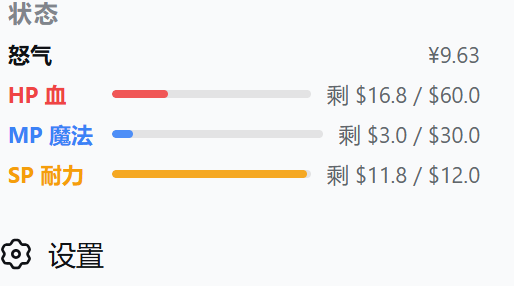
DSH(DeepSeek Harness)侧边栏底部的额度与余额监控插件:一条怒气条 + 各服务商状态条,并在 设置 → 插件管理 → 余额监控里提供完整配置页。
RPG 风格的映射:HP 血(红)= 月额度 · 魔法 MP(蓝)= 周额度 · 耐力 SP(黄)= 5h 额度 · 怒气 Rage(金)= DeepSeek 余额。
| 国家超算中心(scnet · Credits) | OpenCode Go(HP / MP / SP) |
|---|---|
 |
 |
设置页(设置 → 插件管理 → 余额监控):
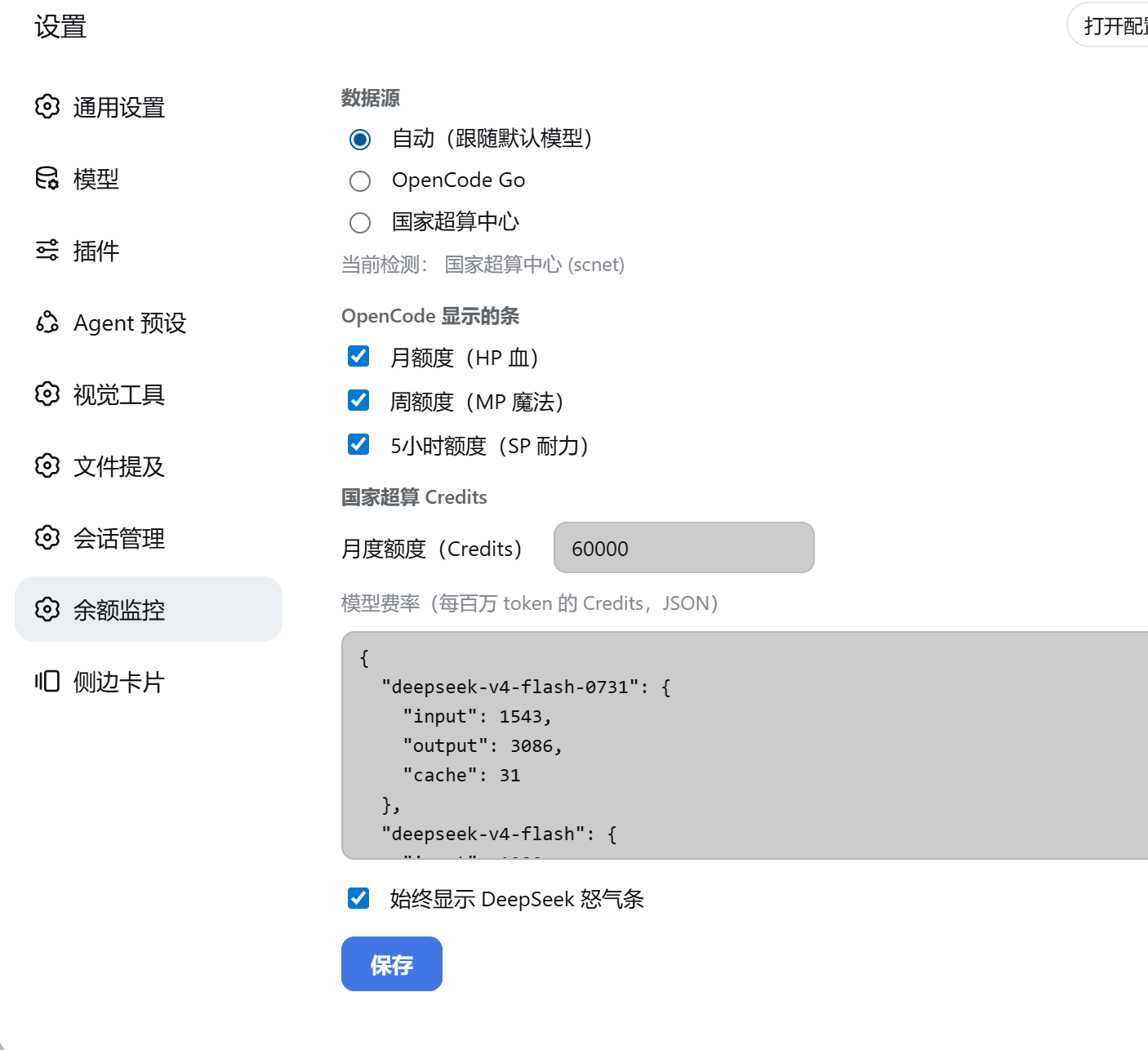
api.deepseek.com/user/balance),显示 ¥ 剩余金额。opencode-go):官方用量接口的 月 / 周 / 5h 三个窗口 → HP / MP / SP,显示剩余 $ 与细条。$DSH_HOME/sessions/**/*.jsonl(.zstd),纯 Node 解压 Zstandard 多帧),统计本月经 scnet 消耗的 token,再按 scnet 官方费率表折算成 Credits。auto —— 从 DSH settings.yaml 的 agent-default-model.provider 自动选择(opencode-go / scnet),也可手动指定。dsh plugin --profile web add dsh-plugin-quota-monitor-<version>.tgz
# 或从 npm
dsh plugin --profile web add dsh-plugin-quota-monitor重启 dsh web 进程后生效(client bundle 与 host 都需要重启进程,刷新页面不够)。
密钥从环境变量或 ~/.dsh/.credentials.yaml 读取(环境变量优先):
| 数据源 | 密钥 |
|---|---|
| DeepSeek 怒气 | DEEPSEEK_API_KEY |
| OpenCode Go | OPENCODE_GO_API_KEY |
| scnet Credits(本地估算) | 无需密钥,读本地会话日志 |
打开 设置 → 插件管理 → 余额监控:
配置保存在 $DSH_HOME/storages/quota-monitor-config.json。
inputTokens / outputTokens / cacheReadTokens),按 scnet 官方费率表折算,因此会自动跟随你在 DSH 里的真实使用,并回填整个自然月。npm pack # 打 tarball
dsh plugin --profile web remove dsh-plugin-quota-monitor
dsh plugin --profile web add ./dsh-plugin-quota-monitor-<version>.tgzlib/index.js — host 半:/balance RPC 通道(snapshot / opencode / scnet / configGet / configSet / detect)。lib/client.js — browser 半:侧边栏卡片 + 设置页(手写 classic-script bundle,零构建)。本项目由 jelly-000/dsh-balance-monitor 大幅扩展而来(MIT)。
CLASSIFICATION EVIDENCE
系统优先读取 GitHub Topics,再与站内分类词典和词根规则比对。当前命中: quota。
sandbaseai
Local-first, self-hosted AI agent runtime and MCP bridge with sandboxed sessions, memory, credentials, audit/replay, and a local Console.

Han-1413141
Cost tracking for DeepSeek Harness: session and model costs, token usage, budgets, provider balances, and coding-plan quotas. Bilingual English/Chinese UI.

weijiafu14
Bridge the Pi and DeepSeek Harness ecosystems: one Pi Host ABI runs unmodified Pi extensions as native DSH plugins. 打通 Pi 与 DSH 生态。