AI 快捷入口
固定在窗口右下角的 AI 快捷入口栏 —— 一点直达 20 个国产与海外 AI 对话网站。






一个 DeepSeek Harness 的本地 bundle 插件:在 Web UI 右下角固定一条快捷栏,点图标用系统默认浏览器打开对应的 AI 网站。
这是什么
@yunlai/dsh-ai-quick-links 把 20 个常用 AI 对话网站(国产 + 海外)收进窗口右下角的一条快捷栏:点图标直接用默认浏览器打开;滑杆面板里勾选哪 4 个上栏(最多 4 个、至少 1 个);选择保存在本地。20 个品牌图标以 SVG data URI 内联,运行时不发任何网络请求。
📸 界面预览
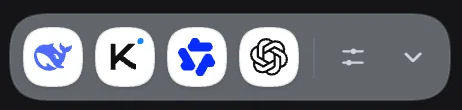
快捷栏:四个品牌入口,右侧是选择按钮与收起按钮
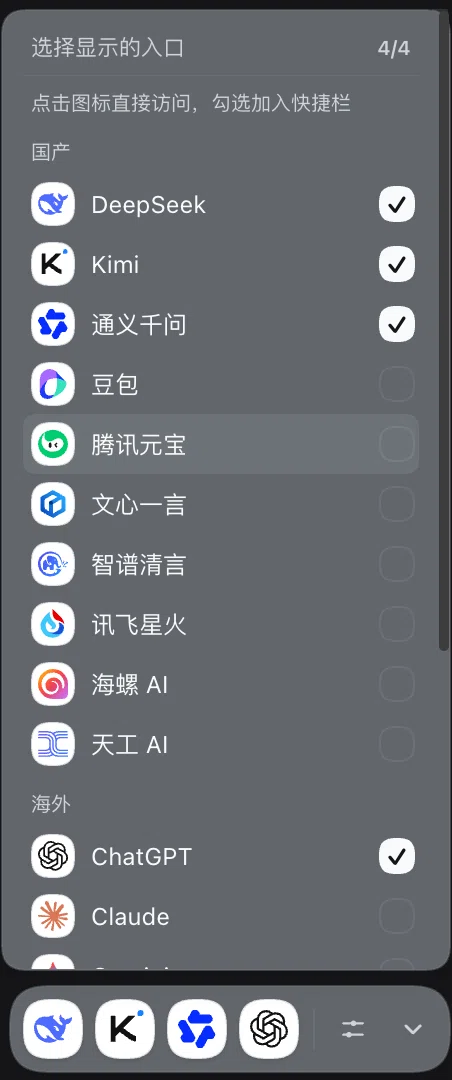
选择面板:点图标直接访问,勾选右侧圆点加入快捷栏(最多 4 个)
收起后只留一个圆形启动按钮
✨ 特性
- 固定右下角:浮在所有界面之上,不随页面滚动,不挡输入框。
- 一点直达:普通
<a target="_blank"> 链接,桌面端由窗口策略调用 shell.openExternal,即系统默认浏览器。
- 20 个入口,默认只占 4 个槽位:DeepSeek、Kimi、通义千问、ChatGPT。
- 自由选择哪 4 个:点滑杆打开选择面板,按「国产 / 海外」分组;点图标或名字直接访问,点右侧圆点勾选加入快捷栏(最多 4 个、至少 1 个),选择会保存。
- 真实品牌图标:来自 LobeHub Icons,白色圆底,深浅色主题都清晰;图标内联为 data URI,运行时不发任何网络请求。
- 中英双语:界面文案跟随 Harness 语言切换。
- 可收起:收起后只留一个圆形启动按钮。
- 零运行时依赖:纯本地 bundle,无需构建;只有图标有生成脚本。
🚀 快速开始
环境
- DeepSeek Harness(桌面版或 Web 版),且当前 profile 具备
shell.overlay 槽位与客户端模块(官方桌面 / Web 组合默认具备)。
- 不需要 Node.js 或 npm。
安装
从 npm 安装(推荐)
在 Harness 里让插件管理器安装 @yunlai/dsh-ai-quick-links(install_bundle,target 为 @yunlai/dsh-ai-quick-links;如果默认 registry 搜不到,再传入 registry: https://registry.npmjs.org/)。安装写入你的 profile,之后每次启动都在右下角出现。
从源码安装(本地开发)
git clone https://github.com/Chengyunlai/dsh-ai-quick-links.git
把克隆目录作为本地 bundle 安装(install_bundle,target 指向该目录绝对路径)。
🖱️ 使用
                                    ┌──────────────────────────────┐
                                    │ ⟨D⟩ ⟨K⟩ ⟨Q⟩ ⟨GPT⟩ │ ⚙ │ ⌄ │   │
                                    └──────────────────────────────┘
                                            固定在窗口右下角
- 点图标:默认浏览器打开对应网站。
- 点 ⚙(滑杆):选择面板。按「国产 / 海外」列出全部入口;点图标/名字直接访问;点右侧圆圈勾选/取消勾选,最多 4 个、至少 1 个;点面板外或按 Esc 关闭。
- 点 ⌄:收起成一个圆形按钮,再点展开。
- 默认四个:DeepSeek、Kimi、通义千问、ChatGPT(Claude 默认不在其中,可自行勾选)。
🗂️ 可选入口(20)
| 国产 |
海外 |
| DeepSeek |
ChatGPT |
| Kimi |
Claude |
| 通义千问 |
Gemini |
| 豆包 |
Perplexity |
| 腾讯元宝 |
Grok |
| 文心一言 |
Copilot |
| 智谱清言 |
Meta AI |
| 讯飞星火 |
Le Chat (Mistral) |
| 海螺 AI |
Poe |
| 天工 AI |
HuggingChat |
🛠️ 自定义
- 编辑
client.js 顶部的 LINKS(id / name / url / group)、DEFAULT_SELECTION(默认四个)和 MAX_SLOTS(最多几个,默认 4)。
- 保存后约 0.5 秒客户端热重载,不需要重启。
- 换图标:把 SVG 放进
icons/,在 build-icons.mjs 的 ICONS 映射里加一行,运行 node build-icons.mjs 重新内联。
🤖 自动发布(GitHub Actions)
合并到 main 后,Release workflow 自动完成发布,不需要本地打 tag:
- 算版本:
package.json 的版本如果已经在 npm 且已打 vX tag → 自动 patch +1,提交 chore(release): vX [release];如果你在 PR 里手动改成了目标版本(如 0.2.0),就按你的版本发布。
- 校验:调用
CI 校验包名 / 客户端模块 id / patch 行一致性、图标齐全、build-icons 幂等、npm pack 内容。
- 发布:
npm publish --provenance --access public(npm trusted publishing,无长期 token),然后打 vX tag 并创建 GitHub Release。
- 手动触发:Actions → Release → Run workflow。
- 首次发布需要手动一次(npm 登录 + OTP);之后在 npm 包设置 → Trusted publishing 里添加:Repository
Chengyunlai/dsh-ai-quick-links,Workflow release.yml。
- 想改成「打 tag 才发布」:把
release.yml 的触发改成 push: tags: ['v*'] 即可。
📁 项目结构
| 文件 |
作用 |
client.js |
浏览器端模块:注册 shell.overlay 入口并渲染快捷栏(图标已内联)。 |
index.js |
Host 端 bundle 入口。 |
cordis.patch.yml |
安装时插入 ai-quick-links 行。 |
icons/ |
20 个品牌图标源文件。 |
build-icons.mjs |
把 icons/ 内联进 client.js(node build-icons.mjs)。 |
locale/ |
插件管理页使用的中英文标题与描述。 |
icon.svg |
插件图标。 |
docs/screenshots/ |
真实运行界面的截图(快捷栏 / 选择面板 / 收起态)。 |
.github/workflows/ |
ci.yml(PR 校验)与 release.yml(自动发 npm + provenance)。 |
scripts/ |
包契约校验与发布版本决策脚本。 |
🎨 图标与许可
✅ 验证状态
- 已验证(macOS 桌面版 DeepSeek Harness 0.2.2-rc.1 / macOS 26.3):bundle 安装、客户端模块加载、
shell.overlay 入口 active、20 个图标 SVG 合法、默认 4 个、选择持久化;上方截图来自真实运行界面(浅色/深色主题下的实际渲染)。
- CI 已验证:GitHub Actions
CI 通过(包名/模块 id/patch 行一致性、图标齐全、build-icons 幂等、npm pack 内容)。
- 未验证:海外站点在受限网络下未逐一实测;20 个入口全部点击跳转未逐条人工确认;目前只有中英文文案。
- 兼容性:桌面应用窗口 origin 为
dsh-app://app,选择可跨重启保留;Web 版若每次端口变化,新 origin 下会回到默认四个。
English
AI Quick Links
A pinned launcher for 20 domestic and international AI chat sites, docked at the bottom-right corner of the DeepSeek Harness Web UI. One click opens the site in your default browser.
Screenshots
Features
- Fixed bottom-right dock, above all columns and outside scroll containers.
- 20 entries with real brand icons (LobeHub Icons, inlined as data URIs — no network requests at runtime).
- Four slots by default: DeepSeek, Kimi, Qwen, ChatGPT. Pick any other four in the picker (max 4, min 1); click an entry to open it, tick the circle to add it to the dock.
- Collapsible to a single round button, bilingual UI (Chinese / English), zero runtime dependencies.
Install
From npm: install @yunlai/dsh-ai-quick-links with the plugin manager (install_bundle, target = @yunlai/dsh-ai-quick-links).
From source: git clone https://github.com/Chengyunlai/dsh-ai-quick-links.git and install the cloned directory as a local bundle.
Customize
Edit LINKS, DEFAULT_SELECTION and MAX_SLOTS at the top of client.js; changes hot-reload in about 0.5 s. To change icons, drop SVGs into icons/, extend the mapping in build-icons.mjs, and run node build-icons.mjs.
Release automation
Merging to main publishes automatically: the Release workflow bumps the patch version when the current version is already on npm (or publishes a version you bumped in the PR), runs CI, publishes with npm provenance through trusted publishing, then tags vX and creates a GitHub Release. The first publish is manual; then configure a trusted publisher for repository Chengyunlai/dsh-ai-quick-links and workflow release.yml in the npm package settings.
Status
Verified on macOS desktop DeepSeek Harness: bundle install, client module load, shell.overlay entry active, 20 valid SVG icons, default four entries, persisted selection. Visual pixel-level verification and overseas site reachability under restricted networks were not performed.
License
MIT © 2026 Cyrus Cheng. Brand icons come from LobeHub Icons (MIT); all brand names and logos belong to their respective owners.


