dsh-translate
English · 简体中文



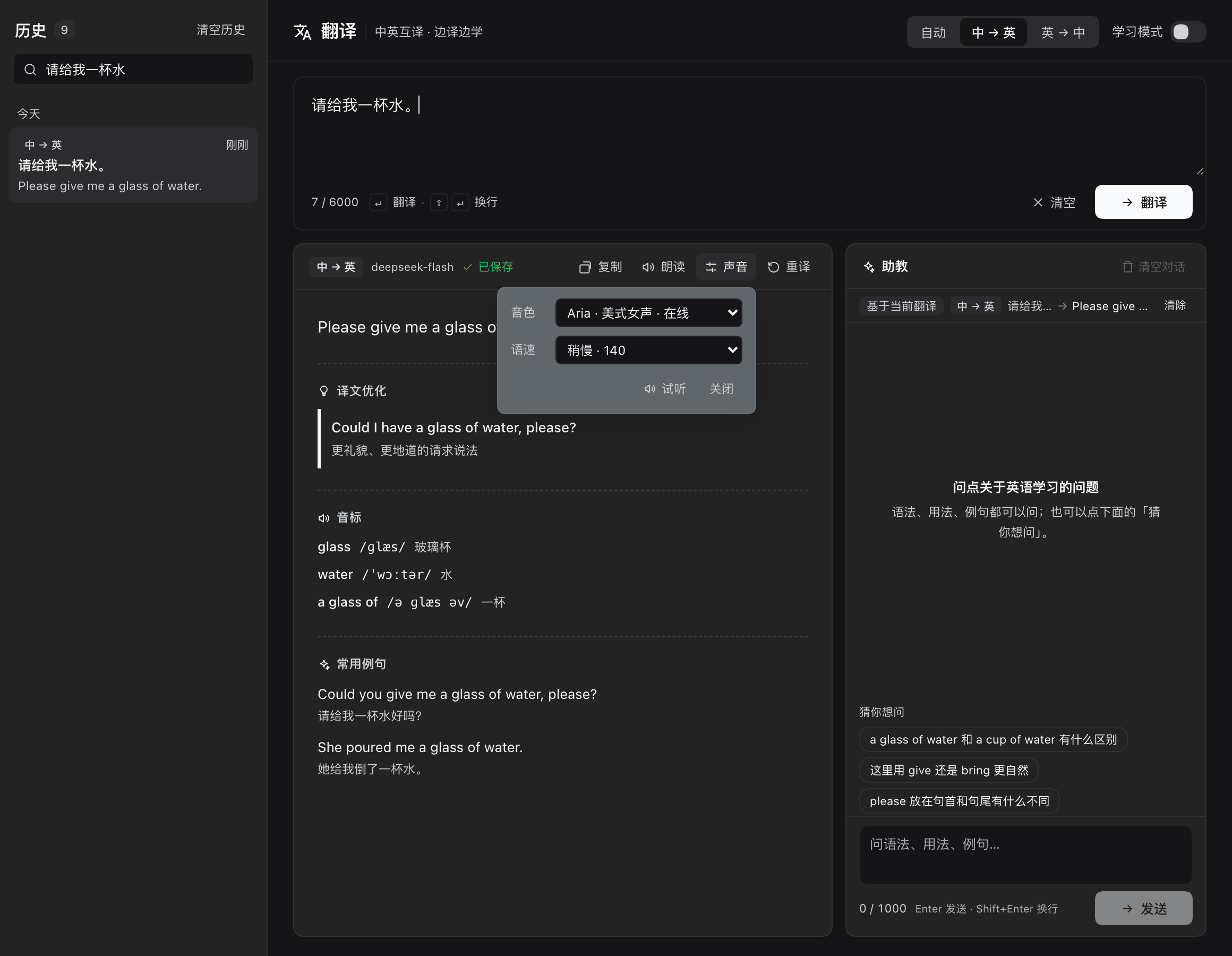
A DeepSeek Harness sidebar plugin that turns the app into a Chinese↔English translation workbench: streaming translation, an always-on AI tutor, automatic example sentences, predicted follow-up questions, source-text corrections, saved history and neural read-aloud.
Features
Translation
- zh↔en with auto direction detection. CJK-heavy input translates zh→en, Latin-heavy input en→zh; you can also lock 中→英 or 英→中 in the header.
- Streaming, low-latency output. Translation calls disable model reasoning and use compact prompts, so in local tests the first token lands in ~0.3–0.8 s and a typical sentence finishes in ~1 s.
- Enter translates.
Enter in the source box starts a translation (pressing it again while streaming stops it); Shift+Enter inserts a newline. The box is focused when the panel opens, so paste + Enter is the whole flow.
- History fast path. Repeating the exact same source in the same direction and study depth replays the saved record instantly — zero model calls, marked
已复用历史 (reused from history). 重译 / Retranslate forces a fresh model rendition.
- Optional study mode. Turn on 学习模式 / Study mode and the same translation call also returns a short teaching note: 2–4 useful expressions with meanings, usage and collocations, plus grammar points when relevant. Off by default; the toggle is remembered.
- Up to 6,000 characters per translation, with a live counter.
- Nothing lost when switching panels. Draft, current result and insight state survive sidebar-panel switches (memory only, cleared when the app restarts).
Always-on AI tutor
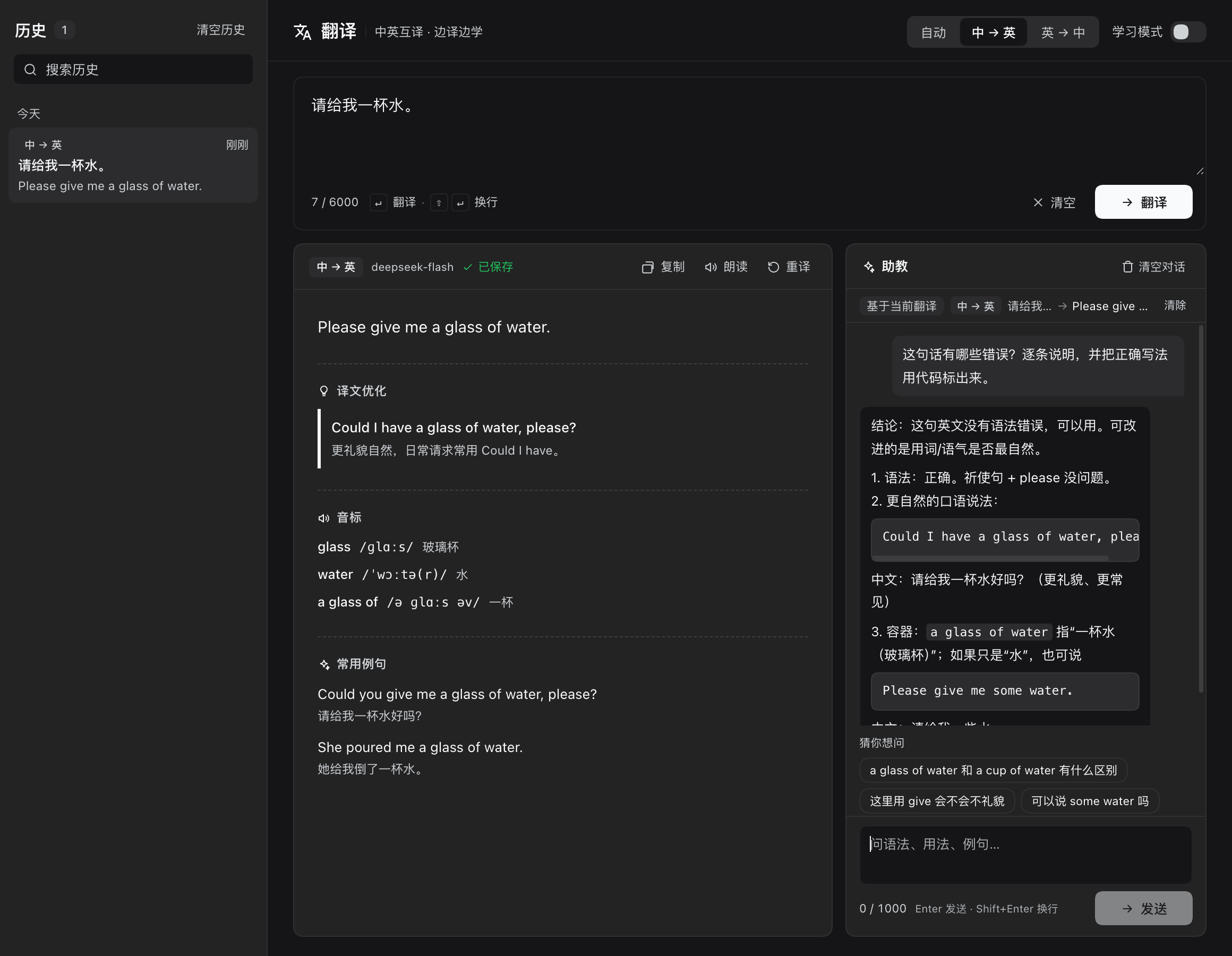
- An IM-style chat column sits next to the result, so asking about the translation never hides it.
- Ask about grammar, usage, collocations, more natural phrasing or example sentences; answers stream, can be stopped, and are rendered with a small markdown-lite renderer (bold / italic / inline code / lists / headings / fenced code blocks) without ever evaluating HTML.
- Each question (up to 1,000 characters) carries the current source, translation and study notes as context; up to 12 completed turns are folded into the prompt.
- The conversation lives in memory only — it is never written to history or persisted to disk.
Insight calls (one model call per translation)
After a translation finishes, the host makes one extra model call that returns every learning aid below at once. The results are stored on the record, so replaying it from history costs zero calls.
| Block |
What you get |
| 常用例句 · Examples |
2–3 example sentences built on useful expressions from the translation: English sentence + Chinese meaning, on separate lines. |
| 猜你想问 · Predicted questions |
2–3 likely follow-up questions; one click sends the question to the tutor. |
| 原文纠错 · Source corrections |
Only the side you typed is checked, in its own language: zh→en checks Chinese typos, grammar and collocations; en→zh checks English grammar (tense, agreement, plural, articles, prepositions, possession, word order), spelling, capitalization and collocations. Each row shows wrong → suggestion, a category badge (spelling / capitalization / grammar / collocation / wording), a one-line reason and a correct example. |
| 音标 · IPA |
2–4 useful English words/phrases with IPA and a Chinese meaning; a misspelt source word is annotated in its corrected form (e.g. check-in /ˈtʃek ɪn/). |
| 译文优化 · Polished alternatives |
1–2 more natural, polite or accurate renderings with a one-line reason — only when the current translation can genuinely be improved. |
Corrections are grounded: any fragment the model quotes must actually occur in your source text, otherwise it is dropped, so the model cannot invent a correction from its own translation. Grammar, spelling, capitalization and collocation are requested as separate sections, so a spelling fix never hides a grammar problem. Every correction can be turned into a one-click "why does X become Y?" question for the tutor.
Read-aloud (TTS)
- Reads the English side only: zh→en reads the English translation, en→zh reads the English source.
- Default Microsoft Edge neural voice Aria (en-US), rendered by the host into an MP3 via a plugin-private
edge-tts environment. 15 online voices are built in across US / UK / AU / CA / IE / IN accents.
- Four speeds — 慢 / 稍慢 / 正常 / 快 (100 / 140 / 165 / 190 wpm, default 140) — mapped to Edge prosody automatically.
- Fallback chain: Edge neural → macOS local voice (
say, including Premium/Enhanced voices) → browser speechSynthesis. On Windows/Linux without Python the plugin stays on the browser voice instead of failing.
- Audio is cached on disk by provider + text + voice + speed, and pre-synthesized in the background as soon as a translation is ready, so clicking 朗读 is near-instant. Click again to stop. Changing voice or speed invalidates the cache and re-warms the current result.
History
- Every completed translation is saved automatically (source, translation, direction, study notes, examples, questions, corrections, IPA, polished alternatives), newest first and grouped by day.
- Search across source, translation and notes; reopen a record in the workbench; delete one record; clear everything with a two-step confirmation.
- Stopped or abandoned translations are never saved. Only the most recent 500 records are kept, and the host writes one dated backup per day (7 kept) beside the history file.
- Reuse matches on source + direction + study depth exactly; use 重译 to bypass it.
Interface and theming
- All colors come from DSH theme tokens, so light and dark mode both work; UI copy is available in Chinese and English and follows the app language.
- On narrow panels (≤ 880 px) the tutor column drops below the result instead of squeezing it.
- Text inputs deliberately show no focus glow; buttons keep a keyboard focus ring.
Install
From GitHub (recommended)
dsh plugin --profile <profile> add github:ChenYichener/dsh-translate
From a local clone
git clone https://github.com/ChenYichener/dsh-translate.git
dsh plugin --profile <profile> add /path/to/dsh-translate
DSH desktop app
Plugins page → Install from local directory → pick the dsh-translate folder → enable it.
After installing, restart dsh web or refresh the page. The sidebar entry appears directly below the Pomodoro item (sidebar order 22; without dsh-pomodoro it simply follows the previous entry).
Requirements
| Dependency |
Notes |
| DSH |
Desktop app or a self-hosted Web profile. Validated against 0.2.1-rc.5; the external plugin API is still early. |
| Node.js |
>= 20 (from engines). |
| Model |
Reuses the current profile's default model — no extra API key for the plugin. |
| Read-aloud, online (optional) |
Python 3.9+ and network on first use. The plugin creates a private venv in ~/.dsh/dsh-translate/tts-venv and installs edge-tts 7.3.1 there (20–60 s, ~20 MB); it never touches the system Python. |
| Read-aloud, local (optional) |
macOS say works out of the box. |
| Read-aloud, fallback |
Browser speechSynthesis — zero dependencies. |
Usage
- Click 翻译 / Translate in the sidebar.
- Type or paste Chinese or English. Leave the direction on 自动 / Auto, or lock 中→英 / 英→中.
- Press
Enter (or click 翻译). The translation streams in; when it finishes, examples, predicted questions, IPA, corrections and polished alternatives appear next to it.
- Ask the tutor follow-up questions in the right-hand chat, or click a predicted question.
- Click 朗读 to hear the English side, 声音 to change voice/speed, 复制 to copy the translation, 重译 to get a fresh rendition.
- History is on the left: search, reopen, delete one record, or clear all (two-step confirm).
Keyboard shortcuts
| Where |
Shortcut |
Action |
| Source box |
Enter |
Translate; while streaming, stop |
| Source box |
Shift + Enter |
Newline |
| Source box |
⌘ / Ctrl + Enter |
Translate (same as Enter) |
| Tutor box |
Enter |
Send question |
| Tutor box |
Shift + Enter |
Newline |
| Tutor box |
⌘ / Ctrl + Enter |
Send (same as Enter) |
Pressing Enter in the tutor box while an answer is streaming stops that answer, matching the source box.
Screenshots
| Always-on tutor |
 |
How it works
- Two halves in one plugin.
index.js is the host half: it mounts a prefix route at /dsh-translate/api on the host webServer, and reads the profile's current model from ctx.get('llm') plus ctx.get('agentDefaultModel'). client.js is the browser half, loaded through the host module loader; it registers the sidebar.panellist row (id translate, order 22) and the main.translate panel through slots.
- Translation flow.
POST /translate is an SSE endpoint: the host resolves auto direction from CJK/Latin ratio, checks the history fast path, then streams llm.stream() with reasoningEffort: 'off' and sends start / delta / done / error events. The finished record is saved host-side and returned in done.
- Insight flow. After
done, the client calls POST /insight once. The host asks the model for fixed sections (【例句】 【猜你想问】 【音标】 【译文优化】 【语法】 【拼写】 【大小写】 【搭配与用词】), parses rows, merges duplicates, drops placeholders and any correction whose quoted fragment is not actually present in the source, then writes the result back onto the matching history record.
- Tutor flow.
POST /ask is a separate SSE route. The host folds the current translation context and up to 12 prior turns into one prompt; answers are not saved. Aborting the request aborts the model stream.
- Read-aloud.
POST /tts returns binary audio: edge-tts (run as a separate process in the plugin venv) produces audio/mpeg, macOS say produces audio/wav, and the x-tts-engine response header reports what actually ran. The client plays the bytes and falls back to speechSynthesis when the host answers 503.
- History durability. Writes use a temp file + rename and a promise queue around read-modify-write, so concurrent translations cannot overwrite each other. A broken history file only costs the fast path, never the translation.
- Local request fence. The route accepts POST only, rejects non-loopback
Host headers, Sec-Fetch-Site: cross-site and cross-origin Origin (DNS-rebinding / CSRF posture), and bounds request bodies and text fields.
- UI state. Translation draft, current result and insight state, plus the tutor conversation, live in module-level stores so a sidebar switch does not lose them; user preferences are persisted in
localStorage.
Data & privacy
| What |
Where it goes |
| Translation prompt, study notes and insight request |
Sent to the model provider configured in DSH. |
| Tutor questions and context |
Sent to the model provider configured in DSH. |
| Text you read aloud with an online voice |
Sent to the Microsoft Edge TTS endpoint. |
| Text read with the local voice |
Stays on the machine (macOS say). |
| History |
~/.dsh/dsh-translate/history.json (last 500 records). |
| History backups |
~/.dsh/dsh-translate/history.YYYY-MM-DD.bak.json (up to 7). |
| Read-aloud environment |
~/.dsh/dsh-translate/tts-venv/ — a plugin-private Python venv. |
| Audio cache |
~/.dsh/dsh-translate/tts-cache/ — MP3/WAV keyed by engine + text + voice + speed. |
| UI preferences |
Browser localStorage, key dsh-translate/prefs/v1. |
The plugin has no telemetry, no analytics, no accounts and no API keys of its own. Tutor conversations are memory-only. Delete tts-venv and tts-cache to reset read-aloud (the next use prepares the venv again). Because the Edge voice is used by default, read-aloud text leaves the machine unless you stay on the local/browser voice (for example while offline).
A saved record looks like this (abridged):
{
  "id": "04ef945ef4fd4968",
  "createdAt": "2026-11-03T04:36:12.000Z",
  "direction": "zh-en",
  "study": false,
  "source": "请给我一杯水。",
  "translation": "Please give me a glass of water.",
  "notes": "",
  "examples": ["Could you give me a glass of water, please? — 请给我一杯水好吗?"],
  "questions": ["a glass of water 和 a cup of water 有什么区别"],
  "corrections": [],
  "phonetics": [{ "word": "glass", "ipa": "/ɡlæs/", "meaning": "玻璃杯" }],
  "polish": [{ "suggestion": "Could I have a glass of water, please?", "reason": "more polite" }]
}
Configuration
There is no config file and no environment variable. Everything is changed in the panel:
- Direction (auto / 中→英 / 英→中) and 学习模式 / Study mode in the header.
- Voice and speed in the 声音 popover. The online voice list is built into the host; the local list comes from the installed macOS voices and refreshes within a minute of installing a new system voice.
- Defaults: Aria (online) or the best installed local voice, 140 wpm.
Preferences persist per browser profile under the dsh-translate/prefs/v1 localStorage key. The default model is whatever the DSH profile has selected — the plugin does not have its own model setting.
Development
There is no build step: both halves are plain JavaScript and ship as-is.
# syntax check
node --check index.js
node --check client.js

# try a local build in a throwaway profile
dsh plugin --profile test add /path/to/dsh-translate
index.js is an ESM module exporting inject and apply; client.js is a browser bundle wrapped in window.__ModuleLoader__.load({ id, factory }). Plugin behavior lives entirely in those two files.
Project layout
dsh-translate/
├── index.js              # host half: /dsh-translate/api routes
├── client.js             # client half: sidebar entry + main.translate panel
├── cordis.patch.yml      # bundle patch that inserts the plugin
├── package.json          # package metadata + dsh bundle/client manifest
├── locale/
│   ├── en.json           # plugin-page title and description
│   └── zh.json
├── icon.svg
├── docs/
│   ├── screenshot.png
│   └── screenshot-tutor.png
├── README.md
├── README.zh.md
└── LICENSE
API surface
The host half exposes one prefix route, /dsh-translate/api. Every endpoint is POST with a JSON body; streaming endpoints use SSE. Responses are JSON { ok, ... } or binary audio.
| Route |
Request |
Response |
/translate |
{ text, direction?, study?, force? } |
SSE: start → delta* → done with the saved record; a cached hit sends start/done with cached: true and no deltas. force: true skips the fast path. |
/insight |
{ source, translation, direction, notes?, id? } |
JSON { examples, questions, corrections, phonetics, polish, record? }. One model call; returns the existing data immediately when the record is already enriched. |
/ask |
{ question, context?, messages? } |
SSE: start → delta* → done. |
/tts |
{ text, voice?, rate? } |
Binary audio/mpeg (Edge) or audio/wav (say), x-tts-engine header; 503 when only the browser voice is available. |
/info |
{} |
Model name, whether AI is available, history file path and count, cumulative modelCalls per kind (translate / insight / ask), and TTS defaults, voices and edge.status (idle / installing / ready / failed). |
/history/list |
{} |
{ records }, newest first. |
/history/delete |
{ id } |
{ deleted }. |
/history/clear |
{} |
Deletes all records. |
Cost per translation
The design is deliberately cheap: a translation is one model call plus one optional insight call, and repeat translations are free.
| Action |
Model calls |
| New translation, including examples / predicted questions / IPA / corrections / polish |
2 — one translation (study notes ride along) + one insight call |
| Repeating an identical translation (history hit) |
0 |
| Tutor question |
1 per question |
| Stopping, switching panels, aborting |
0, and nothing is saved |
/info returns a modelCalls counter (translate / insight / ask) so you can verify the actual usage yourself.
Troubleshooting
| Symptom |
Fix |
| No 翻译 entry in the sidebar |
Check the Plugins page that it is enabled; refresh the page or restart the app; inspect the app log for a dsh-translate load error. |
| Plugin missing from the installed-plugins list after a manual link install |
The plugin manager cached its inventory for this app session — click Refresh on the Plugins page or restart. |
| Read-aloud always uses the local/browser voice |
Check tts.edge.status in /info: installing means the first-time setup is running (20–60 s); failed shows the reason in tts.edge.error (usually no Python 3, a failed first pip install, or a blocked network). Fix Python/network and restart. |
| Online voice suddenly stops working |
Upstream Edge TTS or the network changed; the plugin automatically falls back to the local/browser voice. To stay local-only, delete ~/.dsh/dsh-translate/tts-venv and go offline. |
| Only a few macOS voices |
System Settings → Accessibility → Spoken Content → System Voice → Manage Voices, install Premium/Enhanced voices; they appear within a minute. |
| Reset read-aloud |
Delete ~/.dsh/dsh-translate/tts-venv and tts-cache, then restart the app. |
| Translation not saved |
Only translations that finish are saved; stopping mid-stream saves nothing. |
| Repeated input returns an old translation |
That is the history fast path — click 重译 to force a fresh rendition. |
| No model available |
Select a default model in DSH model settings; the plugin reuses the profile default. |
Compatibility
| Platform |
Plugin |
Read-aloud |
| macOS |
✅ |
Edge neural voice (recommended) / local say (incl. Premium/Enhanced voices) / browser voice |
| Windows |
✅ |
Edge neural voice (needs Python 3.9+ and network, auto-prepared) / browser voice |
| Linux |
✅ |
Edge neural voice (needs python3 and python3-venv) / browser voice |
| Offline |
✅ translation needs the model service |
macOS: local say; others: browser voice |
Validated on macOS with DSH 0.2.1-rc.5. Windows and Linux path/Python detection is implemented per platform but has not been regressed on real hardware — issues and PRs welcome. DSH's external plugin API (webServer, sidebar.panellist / main slots, dsh.bundle.patch) is still early; after a major DSH upgrade, re-check the dsh field in package.json if the plugin stops loading. The browser fallback depends on the Web Speech API's English voices, whose quality varies by system.
Related DSH plugins
| Plugin |
What it does |
| dsh-book |
Markdown draft library + AI copywriting workspace for Xiaohongshu / WeChat / generic posts |
| dsh-notify |
Native desktop notification when a session finishes while DSH is in the background |
| dsh-pomodoro |
Distraction-free Pomodoro timer in the sidebar |
| dsh-translate |
Chinese/English translation workbench with an always-on AI tutor and neural read-aloud |
| dsh-nce |
New Concept English Book 1 study panel (lessons, SRS flashcards, mistake notebook) |
License
- Plugin code: MIT — see LICENSE.
- Online read-aloud uses edge-tts, which is LGPL-3.0. It is installed by the plugin at runtime into a private venv; this repository does not bundle, modify or redistribute it and only invokes it as a separate process. Using the online voice also means accepting the upstream terms and Microsoft's Edge read-aloud service limits.
icon.svg is original to this repository; the UI uses only DSH theme tokens and system fonts.


