
消息通讯
插件

Invoice-Downloader
EthanYoQ
电子发票整理与报销准备工具:从邮箱批量收集 PDF/OFD/XML 发票,OCR 识别、分类归档并生成 Excel 汇总;提供 Windows/macOS 桌面版与 DSH 插件。
PROJECT TOPICS
INSTALL REFERENCE
dsh plugin --profile web add github:CarbeneLee/dsh-mac-notify
该命令指向仓库当前默认分支;尚无绑定当前 commit 的完整验证结果。
PROJECT README
Native macOS notifications for DeepSeek Harness (DSH): a banner appears when a task completes, fails, needs your approval, or needs an answer — so you do not have to babysit the window.
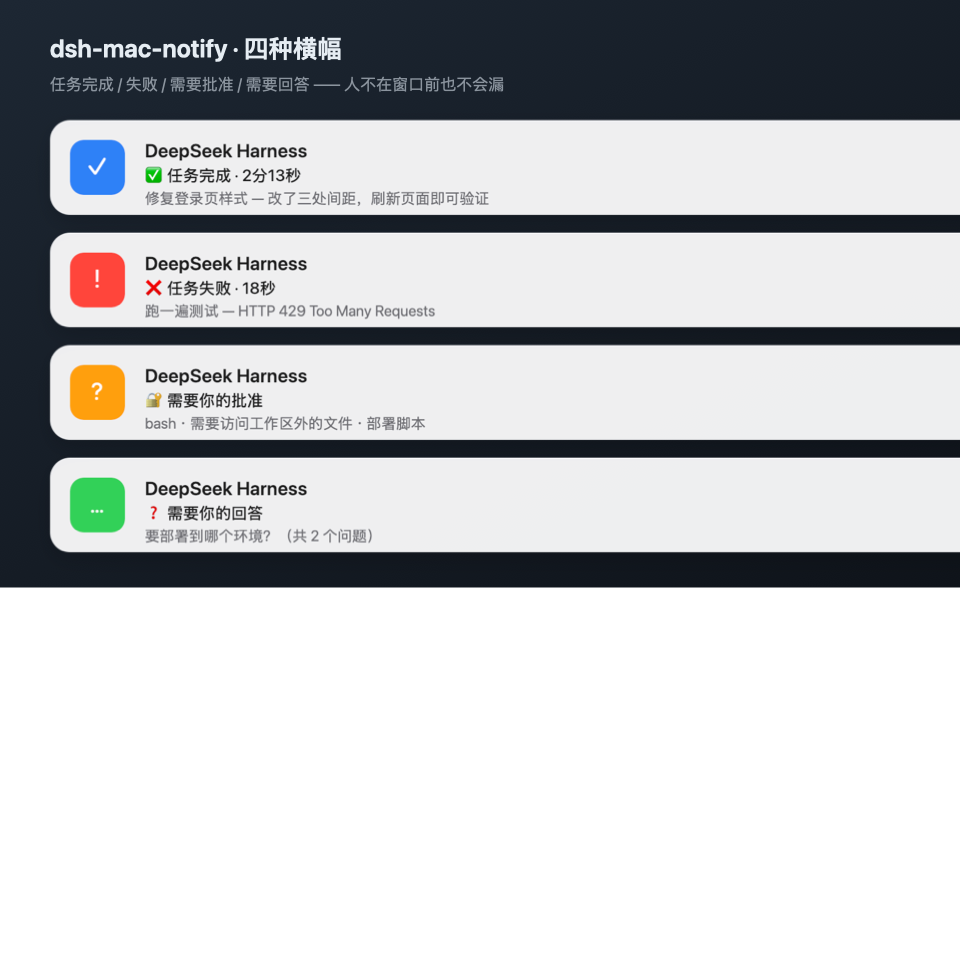
macOS only. The package declares
dsh.bundle.platforms: ["darwin"], so Windows and Linux hosts skip the bundle instead of installing a plugin that can never fire.
| Moment | DSH event | Banner |
|---|---|---|
| ✅ Task complete | turn/end → completed |
duration + your prompt (+ last answer line) |
| ❌ Task failed | turn/end → error / max-tokens |
error message + task |
| 🔐 Approval needed | approval/request |
tool name + reason |
| ❓ Answer needed | user-questions/request |
the question text (count when several) |
| 📋 Plan awaiting review | user-questions/request with plan-review |
dedicated subtitle |
| ⏸ Task blocked | turn/end → blocked |
off by default |
Subagent turns are silent by default: every subagent ends turns constantly and would spam you; only the session you are watching announces itself.
The desktop profile is managed exclusively by the Electron app, so dsh plugin --profile desktop ... is refused. Use Plugins → Install in the sidebar with:
link:/absolute/path/to/dsh-mac-notify     # local checkout
github:CarbeneLee/dsh-mac-notify          # straight from GitHub
The desktop app ships HMR, so the bundle usually mounts without a restart; quit and reopen the app only if no banner appears.
dsh plugin --profile web add dsh-mac-notify                    # from npm (recommended)
dsh plugin --profile web add github:CarbeneLee/dsh-mac-notify  # or straight from GitHub
The default backend is auto: Electron, then the native helper, then terminal-notifier, then osascript. On first mount the plugin builds DSHNotifier.app in the background if it is missing (Xcode Command Line Tools required, a few seconds); until it finishes, notifications still arrive through osascript with the Script Editor icon. Set DSH_MAC_NOTIFY_NO_BUILD=1 to opt out.
Add the dependency and the bundle to ~/.dsh/profiles/<profile>/package.json:
{
  "dependencies": { "dsh-mac-notify": "link:/path/to/dsh-mac-notify" },
  "dsh": { "profile": { "bundles": ["...", "dsh-mac-notify"] } }
}
Then install inside the profile with the pnpm the app ships:
cd ~/.dsh/profiles/desktop
node "/Applications/DeepSeek Harness.app/Contents/Resources/runtime/primary-runtime/dependencies/pnpm/bin/pnpm.mjs" installnode scripts/notify-demo.mjsmac_notify_test and returns the active backend and config.debug: true to append every delivery to ~/.dsh/dsh-mac-notify/debug.log.Overrides live in the profile's cordis.patch.yml:
- id: dsh-mac-notify
  config:
    appName: DeepSeek Harness
    notifyOnComplete: true
    notifyOnError: true
    notifyOnApproval: true
    notifyOnQuestion: true
    suppressWhenFocused: false
    backend: osascript
    completeSound: Glass
debug: false| Field | Default | Meaning |
|---|---|---|
enabled |
true |
master switch |
appName |
DeepSeek Harness |
banner title, and the app name used for focus suppression |
bundleId |
com.deepseek.dsh |
app activated on click |
locale |
auto |
zh / en, auto reads LANG |
notifyOnComplete |
true |
task complete |
notifyOnError |
true |
failure / output limit |
notifyOnApproval |
true |
approval requests |
notifyOnQuestion |
true |
questions, choices, plan review |
notifyOnBlocked |
false |
blocked turns |
includeSubagents |
false |
include subagent turns (noisy) |
suppressWhenFocused |
false |
skip while the DSH window is frontmost |
completeSound |
Glass |
macOS sound name |
errorSound |
Basso |
|
approvalSound |
Ping |
|
questionSound |
Ping |
|
completeSoundFile |
"" |
audio file for the tone; wins over the named sound |
errorSoundFile |
"" |
|
approvalSoundFile |
"" |
|
questionSoundFile |
"" |
|
backend |
auto |
see below |
helperPath |
"" |
helper binary, defaults to $DSH_HOME/dsh-mac-notify/DSHNotifier.app/... |
command |
"" |
command for backend: command |
minIntervalMs |
300 |
throttle for burst notifications |
maxBodyChars |
220 |
body budget |
maxLabelChars |
70 |
task label budget |
debug |
false |
write debug.log |
Sound names are the system ones (Glass, Ping, Basso, Submarine, Hero, …); "" is silent.
*SoundFile accepts anything afplay can play (caf / aiff / wav / mp3), so the notification can sound exactly like WeChat:
mkdir -p ~/.dsh/dsh-mac-notify/sounds
cp /Applications/WeChat.app/Contents/Resources/notify.caf \
   ~/.dsh/dsh-mac-notify/sounds/wechat-notify.caf
- id: dsh-mac-notify
config:
completeSoundFile: "~/.dsh/dsh-mac-notify/sounds/wechat-notify.caf"
errorSoundFile: "~/.dsh/dsh-mac-notify/sounds/wechat-notify.caf"
approvalSoundFile: "~/.dsh/dsh-mac-notify/sounds/wechat-notify.caf"
questionSoundFile: "~/.dsh/dsh-mac-notify/sounds/wechat-notify.caf"Copy the file into your own directory instead of referencing the app bundle, so an app update cannot break it. Each event may use its own tone; empty falls back to the named system sound.
| backend | Notes |
|---|---|
helper (recommended) |
posts through the bundled DSHNotifier.app: the banner wears DSH's own icon, and clicking it activates DeepSeek Harness. Build it once with sh scripts/build-helper.sh |
osascript |
display notification, zero dependencies, works from any macOS process; Notification Center attributes it to Script Editor and the banner is not clickable |
electron |
native Electron notification: attributed to DeepSeek Harness, click activates the app. Only works where the plugin host can load the electron module — the shipped DSH desktop build (Electron 44) does not expose it to plugins, so this backend falls back (see the debug log) |
terminal-notifier |
if brew install terminal-notifier is present; supports grouping |
command |
pipe to your own command; the payload arrives as DSH_NOTIFY_TITLE/SUBTITLE/BODY/SOUND/GROUP |
auto (default) |
Electron → helper → terminal-notifier → osascript |
command example (webhook, noti, a script of yours):
backend: command
command: 'curl -s -X POST -H "Content-Type: application/json" -d "{\"text\":\"$DSH_NOTIFY_BODY\"}" https://example.com/hook'macOS draws a notification's icon from the bundle that posted it: AppleScript shows Script Editor, and terminal-notifier 3.x dropped -appIcon because the system forbids overriding it. The repo therefore ships a tiny native app, DSHNotifier.app:
icon.icns, so the banner shows the DSH whale mark;Build it once (Xcode Command Line Tools required):
sh scripts/build-helper.sh # installs to ~/.dsh/dsh-mac-notify/DSHNotifier.appthen enable it:
- id: dsh-mac-notify
  config:
    backend: helper
Deep-linking to one session is not possible yet: DSH registers the
dsh://scheme but the desktop app has no URL handler, so a click can only raise the app, leaving it on the page it was last showing.
dsh-mac-notify is in dsh.profile.bundles of ~/.dsh/profiles/desktop/package.json.ask policy; the banner is emitted regardless of whether an answerer takes the request.maxBodyChars or switch events off if that matters.Host-only, zero runtime dependencies; it reads no files and opens no sockets:
approval/request       ──┐
user-questions/request ──┼──► compose banner ──► sender.send() ──► Notification Center
session/event turn/end ──┘                        ├─ electron Notification
                                                  ├─ terminal-notifier
                                                  ├─ osascript
└─ custom command{ global: true, prepend: true }, send the banner, then hand the request back with next() — approval outcomes are never changed, and a failing notification can never block a task.npm test # 18 node:test cases, no DSH required
node scripts/notify-demo.mjs # send a real notificationdsh/index.js event routing + wording
dsh/notify.js backends (osascript / electron / terminal-notifier / command)
dsh/config.js defaults and validation
dsh/text.js clamping and duration formatting
test/ node:test suiteosascript banners have no click action; use backend: electron for click-to-activate.MIT
CLASSIFICATION EVIDENCE
系统优先读取 GitHub Topics,再与站内分类词典和词根规则比对。当前命中: notifications。
EthanYoQ
电子发票整理与报销准备工具:从邮箱批量收集 PDF/OFD/XML 发票,OCR 识别、分类归档并生成 Excel 汇总;提供 Windows/macOS 桌面版与 DSH 插件。

Bytedesk
Open Souce IM with AI powered live-chat, email, ticket support, omni-channel customer service,alternative to slack + zendesk

wenbin-wb
🚀 DeepSeek Harness 多通道远程访问与安全守护插件 | 局域网扫码直连、Cloudflare / 自建公网隧道、微信 / QQ / 飞书 / Telegram 机器人全生命周期对话 | 内置全协议访问安全认证、后台防篡改与容灾保命体系