
文件与数据
插件

OpenViking
volcengine
Self-evolving Context Database for AI Agents. Unify Agent Memory, Knowledge RAG and Skills.
PROJECT TOPICS
INSTALL REFERENCE
dsh plugin --profile web add github:1771486218/dsh-workspace-search
该命令指向仓库当前默认分支;尚无绑定当前 commit 的完整验证结果。
PROJECT README
给 DeepSeek Harness 的 工作区文件内容搜索 插件。 DSH 自带的搜索只搜会话标题;这个插件让你直接在会话所在的工作区里 grep 文件文本。
[!IMPORTANT] 本项目全部内容由 DeepSeek 生成。 包括:插件代码(
lib/)、安装/卸载脚本(scripts/)、调试验证台(dev/)、 以及这份 README 在内的所有说明文字(含下面的使用说明)。仓库作者提供需求、安装并做了实测。代码是在 DSH 0.2.0-rc.2(Windows 桌面版) 上按“跑通并实测”的标准验证的,没有做过系统的安全审计。 需要特别注意:它会在本机开一个只读、无鉴权的搜索接口(只监听
127.0.0.1),本机其它进程也能调用它读文件。 使用前请自行审阅代码,风险自负。
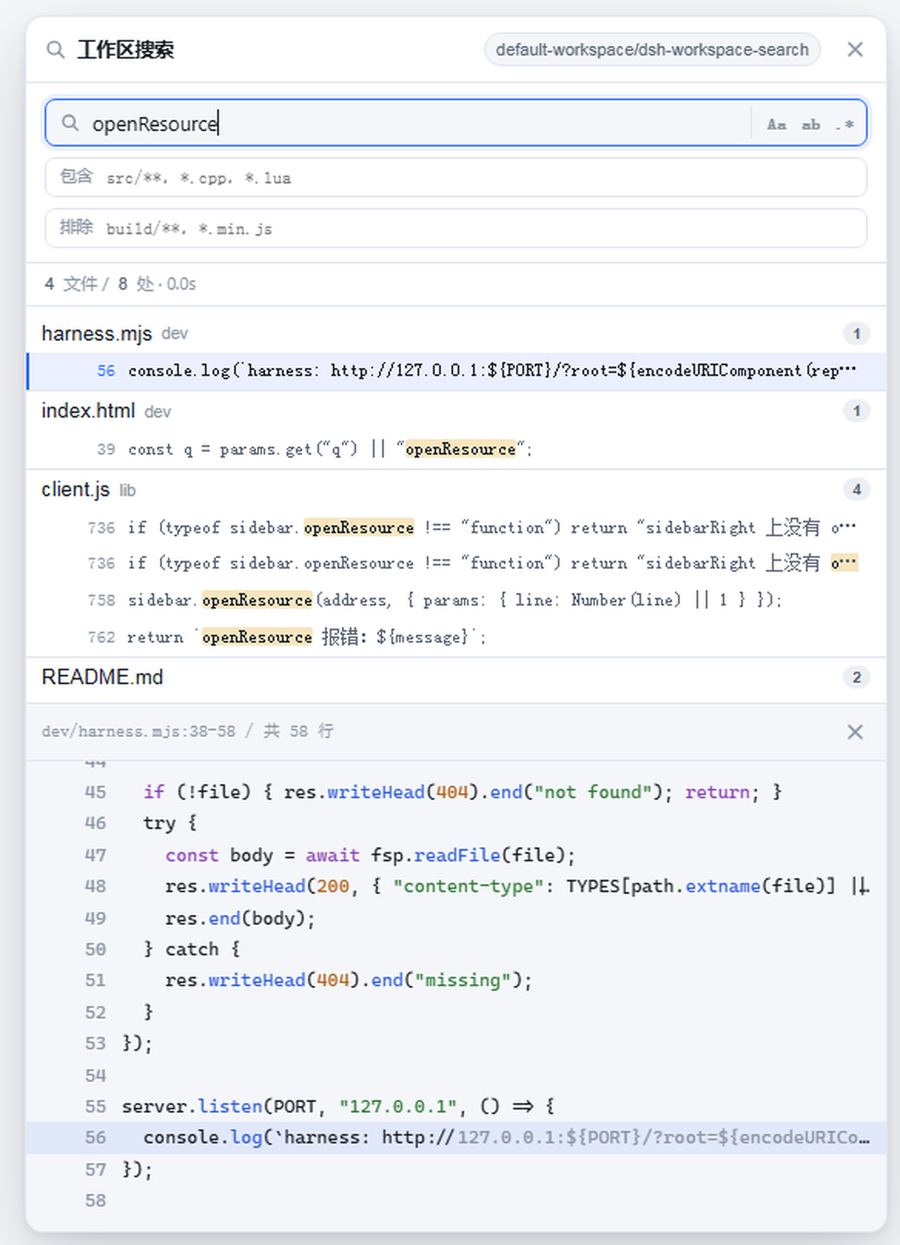
English — A workspace full-text search plugin for DeepSeek Harness: grep file contents (not just conversation titles) from the GUI, with include/exclude globs, regex, grouped results, syntax-highlighted context preview, and double-click to open the hit in DSH's editor at that line. Install with node scripts/install.mjs, then press Ctrl+Shift+F.
文件 + 行号 + 命中的那一行src/**、*.cpp、build/**),大小写、全字、正则三个开关↑↓ 选结果、Enter 看上下文(再按一次跳转)、Esc 关闭在 DSH 0.2.0-rc.2(Windows 桌面版)上开发和验证。
插件用的是 DSH 的插件机制(dsh.bundle / dsh.client)、宿主 webServer 路由和客户端 sidebarRight 服务——
这些属于内部接口,DSH 升级后可能需要跟进适配。装之前建议先看一眼本文末尾的「卸载」。
# 在插件目录里
node scripts/install.mjs            # 默认装进 desktop profile
node scripts/install.mjs myprofile  # 或指定 profile 名
脚本会:
lib/ + package.json + cordis.patch.yml 复制到 <DSH_HOME>/profiles/<profile>/node_modules/dsh-workspace-searchcordis.patch.yml 末尾追加注册条目(原文件先备份成 cordis.patch.yml.bak)$profile = "$env:USERPROFILE\.dsh\profiles\desktop"
New-Item -ItemType Directory -Force "$profile\node_modules\dsh-workspace-search\lib" | Out-Null
Copy-Item .\lib\* "$profile\node_modules\dsh-workspace-search\lib" -Force
Copy-Item .\package.json, .\cordis.patch.yml "$profile\node_modules\dsh-workspace-search\" -Force然后在 $profile\cordis.patch.yml 末尾加上:
- insert:
    - id: workspace-search
      name: dsh-workspace-search
装完重启一次 DSH(宿主侧的路由在进程里加载)。之后改客户端代码只需要刷新窗口(Ctrl+R)。
面板右上角的胶囊显示当前搜索范围,点开可以在你打开过的所有工作区之间切换。
插件分两个半边,同一个包提供:
| 半边 | 文件 | 职责 |
|---|---|---|
| 宿主 | lib/index.js |
在 DSH 的 web server 上挂前缀路由 /dsh-ws-search,遍历目录、按行匹配、带 LRU 缓存;只读,不写文件 |
| 浏览器 | lib/client.js |
window.__ModuleLoader__.load({ id, factory }) 形式的客户端 bundle,纯 DOM 自绘面板,同源 fetch 打上面的接口 |
宿主接口:
| 路由 | 用途 |
|---|---|
GET /dsh-ws-search/api/search |
root、q、inc、exc、case、word、regex、max、deadline |
GET /dsh-ws-search/api/file |
按 path + line + context 取一段文件内容(预览用) |
GET /dsh-ws-search/api/roots |
从 DSH 的 storages/workspace.json 读出已知工作区 |
GET /dsh-ws-search/api/ping |
连通性探测 |
「双击跳转」走 DSH 自己的 sidebarRight.openResource():
sidebarRight.openResource(
  `dsh-resource://file/session/${sessionId}/${absolutePath}`,
  { params: { line } },
);路径用绝对路径:面板允许搜任意目录,而资源地址是相对「当前会话工作区」解析的,用相对路径会打不开(页签显示"文件不存在")。DSH 的文件读取接口本来就接受绝对路径。
c/cpp/h/hpp/lua/py/js/ts/qml/md/json/yml/cmake…),跳过 node_modules、.git、build、dist、target、__pycache__ 等目录node scripts/uninstall.mjs或手动:删掉 profile 的 cordis.patch.yml 里那段 - insert: 条目,再删掉 node_modules/dsh-workspace-search。
改完重启 DSH。
npm run check # 两个文件过一遍语法检查调试客户端界面时,可以用一个「假页面 + 真插件接口」的验证台:
node dev/harness.mjs   # 起在 8140
# http://127.0.0.1:8140/?root=<URL 编码后的绝对路径>&q=<关键字>
改完 lib/ 里的代码后,复制到 profile 并刷新窗口即可看到效果。
MIT
CLASSIFICATION EVIDENCE
系统优先读取 GitHub Topics,再与站内分类词典和词根规则比对。当前命中: search。
volcengine
Self-evolving Context Database for AI Agents. Unify Agent Memory, Knowledge RAG and Skills.

mindscale-noah
该仓库暂未提供项目说明。

himovo
Turn DeepSeek Harness into a self-hosted enterprise Agent platform with knowledge, deep research, content generation, vibe coding, browser automation, governance, and admin controls.