
其他
插件

dsh-bili-scroll
c1overzz
DSH 插件:每天替你刷一轮 B站,读字幕挑出值得的、写一份日报,值得的 @ 你
PROJECT TOPICS
INSTALL REFERENCE
dsh plugin --profile web add github:zzcyydshhh/comfy-png-inspector
该命令指向仓库当前默认分支;尚无绑定当前 commit 的完整验证结果。
PROJECT README
English | 简体中文
One PNG is a full recipe. Drop a ComfyUI image on the page and you get the workflow that produced it, the whole LoRA chain, and every sampler setting — export it as-is, or pour those parameters into your own template and get a fresh workflow back.
A single page you open by double-clicking index.html. No dependencies, no uploads: images never leave your machine and nothing touches the network.
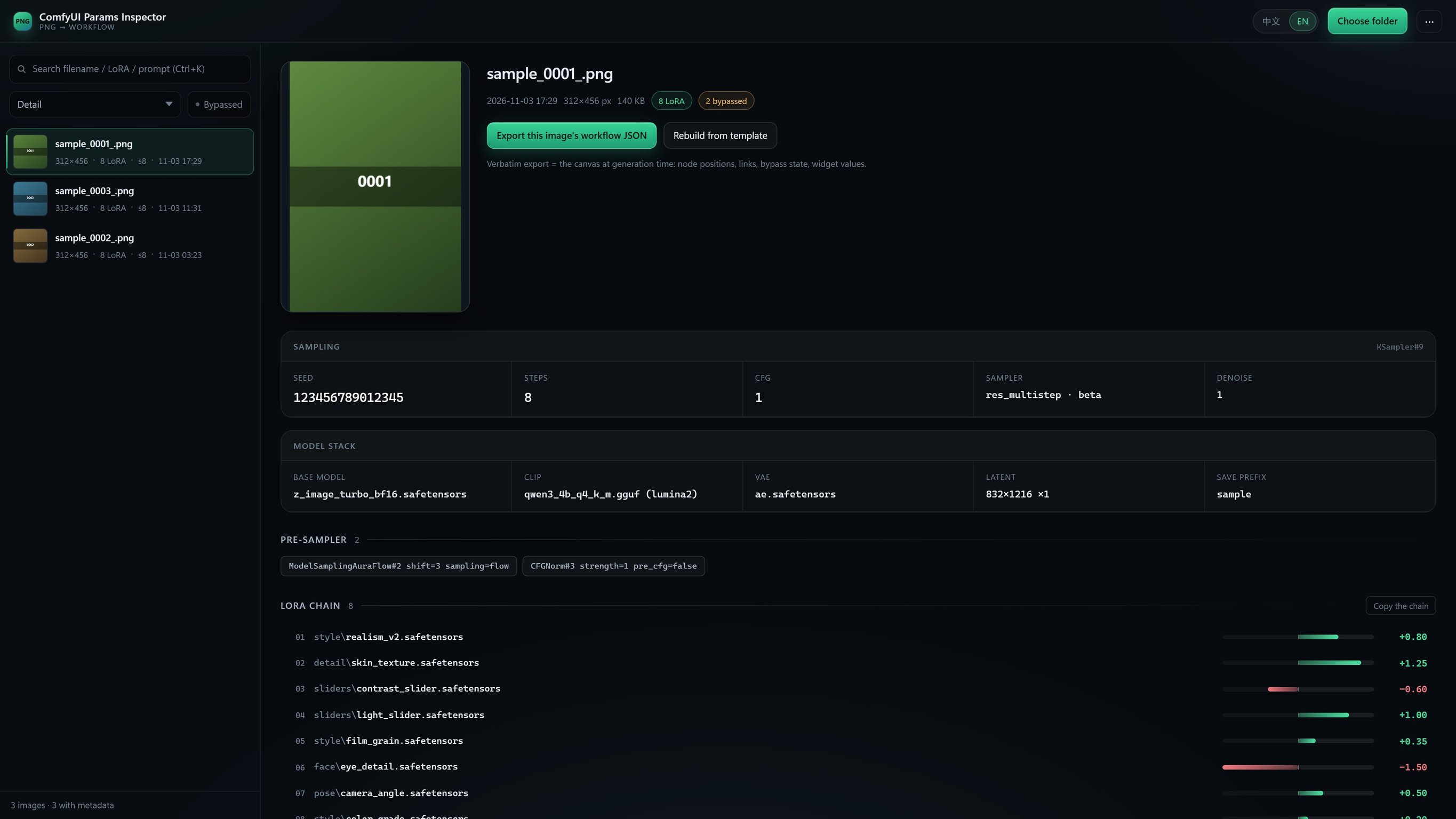
Every filename, model name, LoRA name and prompt in the screenshot is synthetic demo data, unrelated to any real asset. The UI itself is in Simplified Chinese.
| What you want | What you get |
|---|---|
| "How was this image made?" | Drop the PNG (or a whole output folder) → LoRA order and strengths, seed / steps / CFG / sampler, base model, CLIP, VAE, both prompts |
| "I want to reproduce that result" | Click export this image's workflow JSON → a .workflow.json you can drop back onto a ComfyUI canvas |
| "The PNG has parameters but no canvas graph" | Load a template workflow → rebuild from template → every parameter (including the full LoRA chain) is poured in and a new workflow is written out |
| "I need the parameters for a few hundred old images" | Export CSV / JSON, or batch-pack every workflow into a zip |
#91 and #92 sitting right there — both mode: 4 (bypassed), absent from the execution graph entirely. They get their own list here: present but not part of the render.CLIPTextEncode.text is usually blank because the text arrives over a link (the output of ZhPromptEnhance, say). The tool walks the link to its source and names it: CLIPTextEncode#4.text[slot 0] ← ZhPromptEnhance#79.text[slot 0].KSampler.model and lists them in true execution order.ModelSamplingAuraFlow, CFGNorm, …).Ctrl+K to focus, ↑ ↓ to move..workflow.json verbatim, or zip a whole batch.comfy_png_inspect to the model.git clone https://github.com/zzcyydshhh/comfy-png-inspector.git
cd comfy-png-inspectorOpen comfy-png-inspector.html (Chrome / Edge 103+, DecompressionStream required) and drag your ComfyUI output folder into the window.
index.html at the repo root is a one-line redirect kept for GitHub Pages; opening it offline lands on the app too.中文 / EN in the top bar, the choice is remembered, and the default follows your browser language.comfy-png-inspector.html?lang=en (or ?lang=zh).After selecting an image the detail pane offers two buttons. The difference is how much data the file carries:
| Export verbatim | Rebuild from template | |
|---|---|---|
| Button | Export this image's workflow JSON | Rebuild from template |
| Needs | A workflow chunk inside the PNG |
Any canvas workflow loaded as a template |
| Result | The exact canvas from the moment of generation — node positions, links, bypass state | The template's layout, with the parsed parameters poured in |
| Best for | Straight reproduction, most reliable | API-only PNGs, or mapping back onto the template you use today |
Rebuilding replaces base model / CLIP / VAE / latent size / SaveImage prefix / prompt / KSampler fields, then rebuilds the entire LoRA chain in parsed order and rewires its tail into the consumer the template originally used (e.g. the model input of ModelSamplingAuraFlow). An itemised change list is shown first, followed by a self-check: link endpoints exist, no self-links, KSampler wiring complete.
python cli/comfy_png_parse.py ./output --no-text
python cli/comfy_png_parse.py ./output --csv index.csv --json index.json
python cli/comfy_png_parse.py a.png --full     # full prompt text
Standard library only. Same output as the web UI.
This repository is also a DSH bundle (dsh.bundle in package.json). Installed into the Harness it adds one model-facing tool:
comfy_png_inspect(path, limit?, include_prompt?)Point it at a PNG or an output directory and it reports, per image, the LoRA chain, sampler settings, base model / CLIP / VAE, latent size, prompts, and bypassed nodes. Parsing is shared with the web UI through comfy-png-core.js — there is no second implementation.
dsh plugin add https://github.com/zzcyydshhh/comfy-png-inspectortEXt / zTXt / iTXt; zTXt and compressed iTXt are inflated with DecompressionStream('deflate') (zlib stream).KSampler.model and follow inputs.model backwards, bucketing by node class (LoraLoader* = slider, CFGNorm / ModelSampling* = pre-sampler patch). Stops at UNETLoader / CheckpointLoaderSimple, then reverses into execution order.workflow.nodes[].mode — 4 = bypass, 2 = mute. These nodes are absent from the API graph, which is exactly why "on canvas" ≠ "in the run".text is used as-is; a [node_id, slot] ref walks the link to its source. Slot ≠ 0 means the value is produced at runtime, so it is not treated as a literal.tEXt chunk — the UI will say "no ComfyUI metadata".file:// the browser will not let JavaScript scan a directory, so you must pick or drop once per session.comfy-png-inspector.html single-page app (UI + interaction, bilingual)
index.html redirect kept for the GitHub Pages root
comfy-png-core.js parsing & rebuild core, browser and Node
lib/index.js DSH plugin: the comfy_png_inspect tool
cordis.patch.yml DSH bundle plugin rows
cli/comfy_png_parse.py CLI equivalent, standard library onlyMIT
CLASSIFICATION EVIDENCE
系统优先读取 GitHub Topics,再与站内分类词典和词根规则比对。当前命中: 无有效分类标签。
c1overzz
DSH 插件:每天替你刷一轮 B站,读字幕挑出值得的、写一份日报,值得的 @ 你

hellowind777
一个自主的高级智能伙伴,不仅分析问题,更持续工作直到完成实现和验证。

xing-shuyin
Just open your browser — get all your work done.