
模型与 MCP
待识别

rea
morluto
Reverse engineer anything with agents, from app behavior down to native binaries.
PROJECT TOPICS
PROJECT README
English | 中文
A sidebar panel for the DeepSeek Harness Web UI that lists the MCP servers configured in the current profile, shows their live status, expands into full configuration plus every method they expose, and lets you switch a server on or off without editing configuration files.
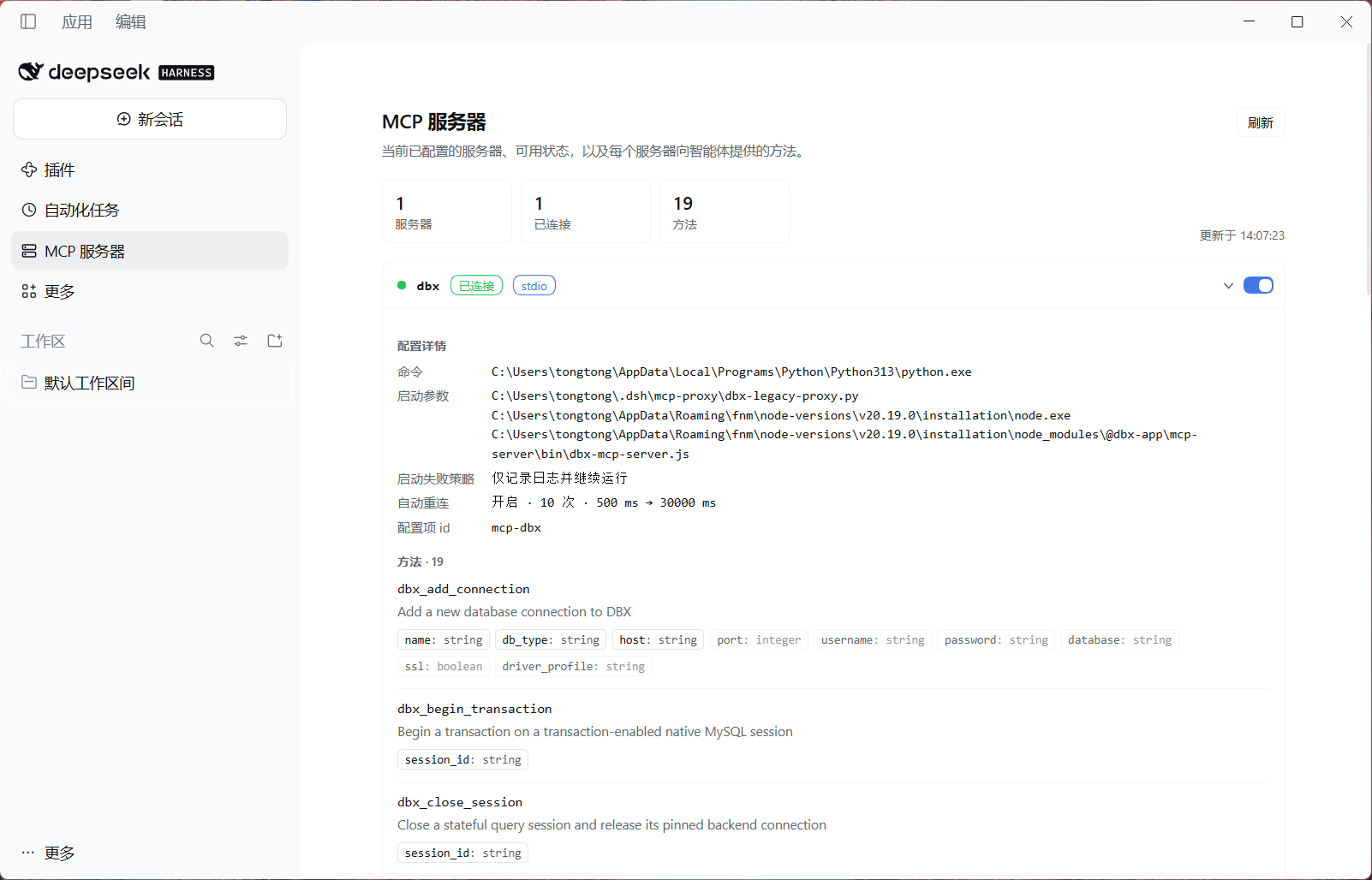
MCP servers icon in the left sidebar opens the global panel.stdio / streamable-http), command, arguments (one per line), working directory, endpoint URL, header and environment names (values hidden), call timeout, instruction cap, startup-failure policy, reconnect policy, entry id.pluginManager.setPluginEnabled(), so it is written to the profile's cordis.patch.yml and survives a restart.@deepseek-ai/dsh-mcp-client rows, for example in the profile's cordis.patch.yml:- insert:
- id: mcp-github
name: '@deepseek-ai/dsh-mcp-client'
config:
serverName: github
transport: stdio
command: npx
args: ['-y', '@modelcontextprotocol/server-github']Clone this repository, then install that directory into Harness (either way):
plugin_manager install_bundle with the repository path as target, or run
dsh plugin --profile <profile> add /absolute/path/to/dsh-mcp-inspector.After installation the MCP servers entry appears in the left sidebar. Client-side code changes need a plugin reload (disable/enable it in the Plugins page, or restart Harness).
The Host half registers two loopback routes and has no user-facing configuration:
| Method and path | Purpose |
|---|---|
GET /mcp-inspector/servers |
Read-only inventory: configured servers, status, configuration, methods |
POST /mcp-inspector/toggle |
Enable/disable one row; body { "entryId": "<Loader entry id>", "enabled": true } |
Security notes:
env and request-headers values never leave the Host; the panel only shows their names.x-mcp-inspector-action: toggle header (a cross-site form cannot send it), refuses cross-site sec-fetch-site, and only toggles rows that the inventory itself reports as MCP servers.| Status | Meaning |
|---|---|
| Connected | The entry is active and its server currently has registered methods |
| No tools yet | The entry is active but no method is registered (still connecting, or the server exposes no tools) |
| Disabled | The entry is disabled (by this switch or by disabled: true in a patch) |
| Failed | The entry failed to activate (for example a broken startup command) |
| Runtime-registered | A server with registered methods but no configuration row |
.
├── package.json        # bundle declaration: dsh.bundle.patch + dsh.client (web)
├── cordis.patch.yml    # inserts the Host row mcp-inspector
├── index.js            # Host half: inventory + toggle routes
├── client.js           # Client half: sidebar entry + main panel (React)
├── locale/{en,zh}.json # plugin display title and description
├── icon.svg            # plugin icon
└── docs/screenshot.png # panel screenshot used by this READMEgithub.com/zwgblue/dsh-mcp-inspector. If you fork the project, update the three URLs in package.json (homepage, repository, bugs).@you/dsh-mcp-inspector) and update the same name in cordis.patch.yml and in the module id at the top of client.js.LICENSE (currently 2026 zwgblue).MIT
CLASSIFICATION EVIDENCE
系统优先读取 GitHub Topics,再与站内分类词典和词根规则比对。当前命中: mcp、model-context-protocol、mcp-client、deepseek-harness。
morluto
Reverse engineer anything with agents, from app behavior down to native binaries.

deepseek-ai
DeepSeek Harness: Everything is a Plugin.

nexu-io
The 1st Collaborative AI Design Agent Workspace. Local-first and open source. Create motion, prototypes, websites, apps, dashboards, presentations, images, and videos with your team and AI agents. Share work, exchange feedback, and iterate together in one workspace.