

模型与 MCP
待识别

rea
morluto
Reverse engineer anything with agents, from app behavior down to native binaries.
PROJECT TOPICS
INSTALL REFERENCE
dsh plugin --profile web add github:zven73/dsh-mobile-fix
该命令指向仓库当前默认分支;尚无绑定当前 commit 的完整验证结果。
PROJECT README





A phone-first fix for the DeepSeek Harness Web UI — a real drawer, edge swipes, readable settings and a working right panel, without touching the core.
DSH 0.2.x is desktop-first: a three-column grid, a 188px settings nav, a 0px right panel and a 14px composer that makes iOS zoom the page. On a phone that leaves a sliver of chat, unreadable settings and no way to reach Files or the code viewer.
No build step, no host code — one client module, MIT licensed.
| Sidebar drawer | Settings | Files and code |
|---|---|---|
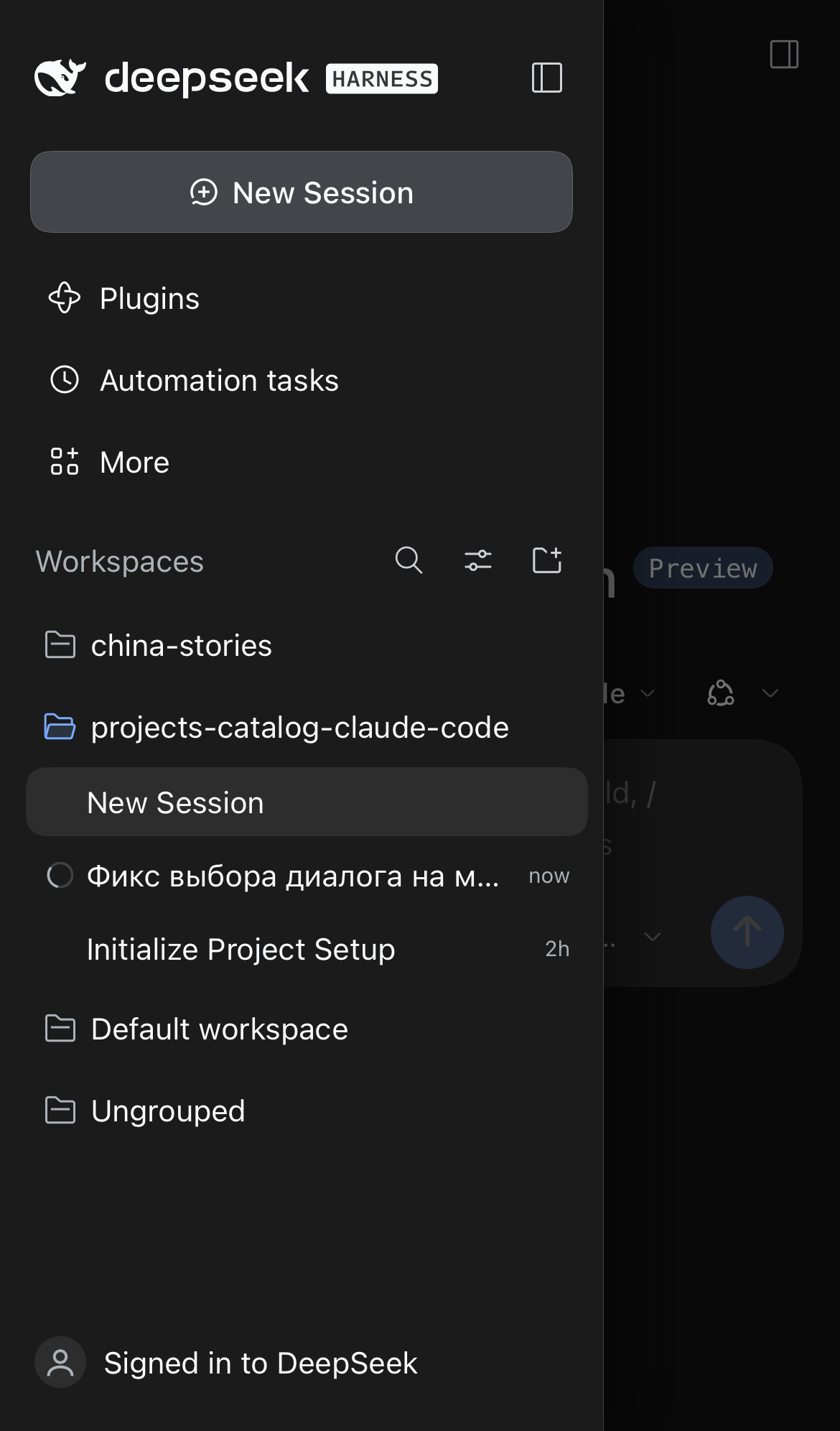 |
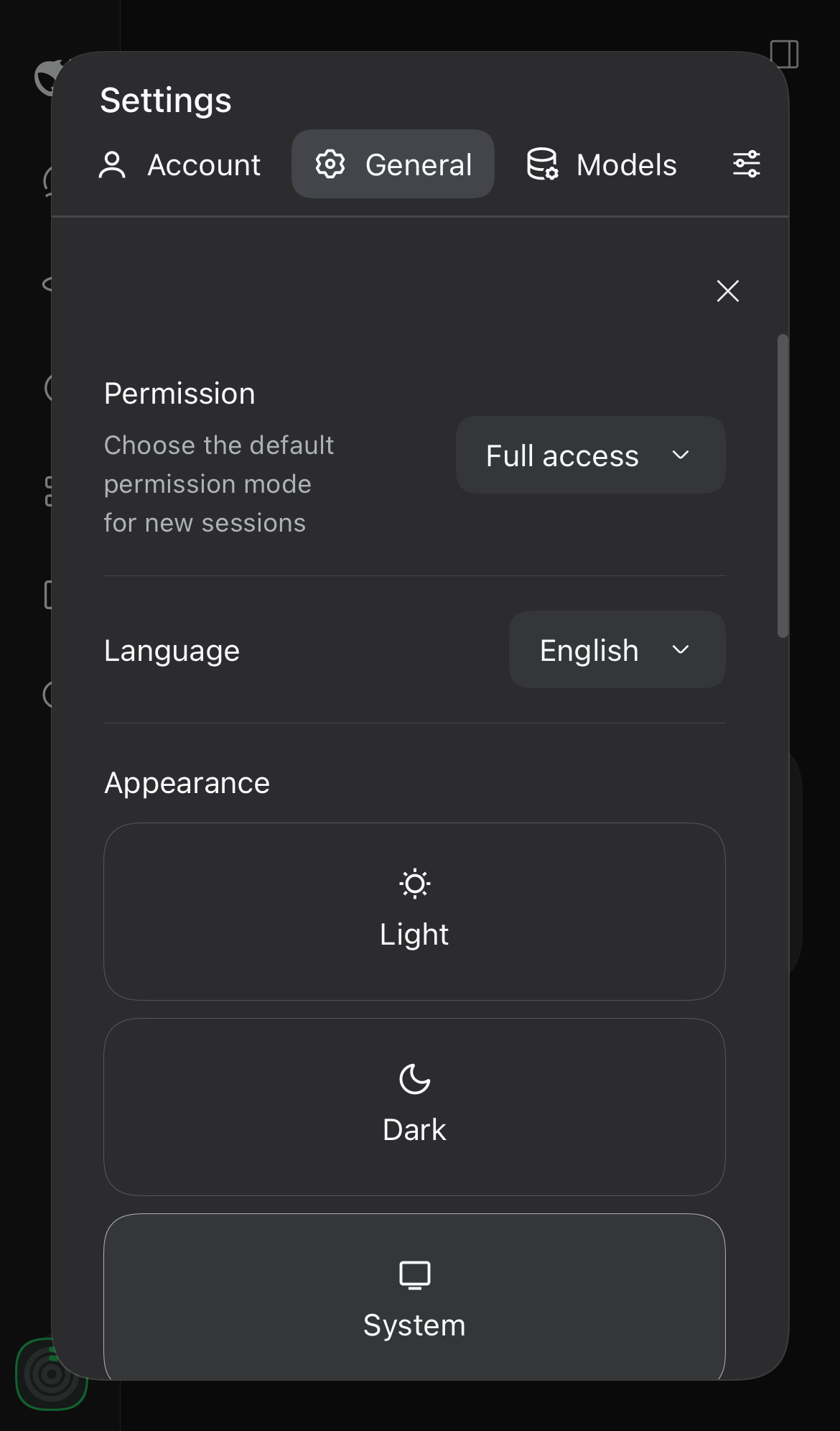 |
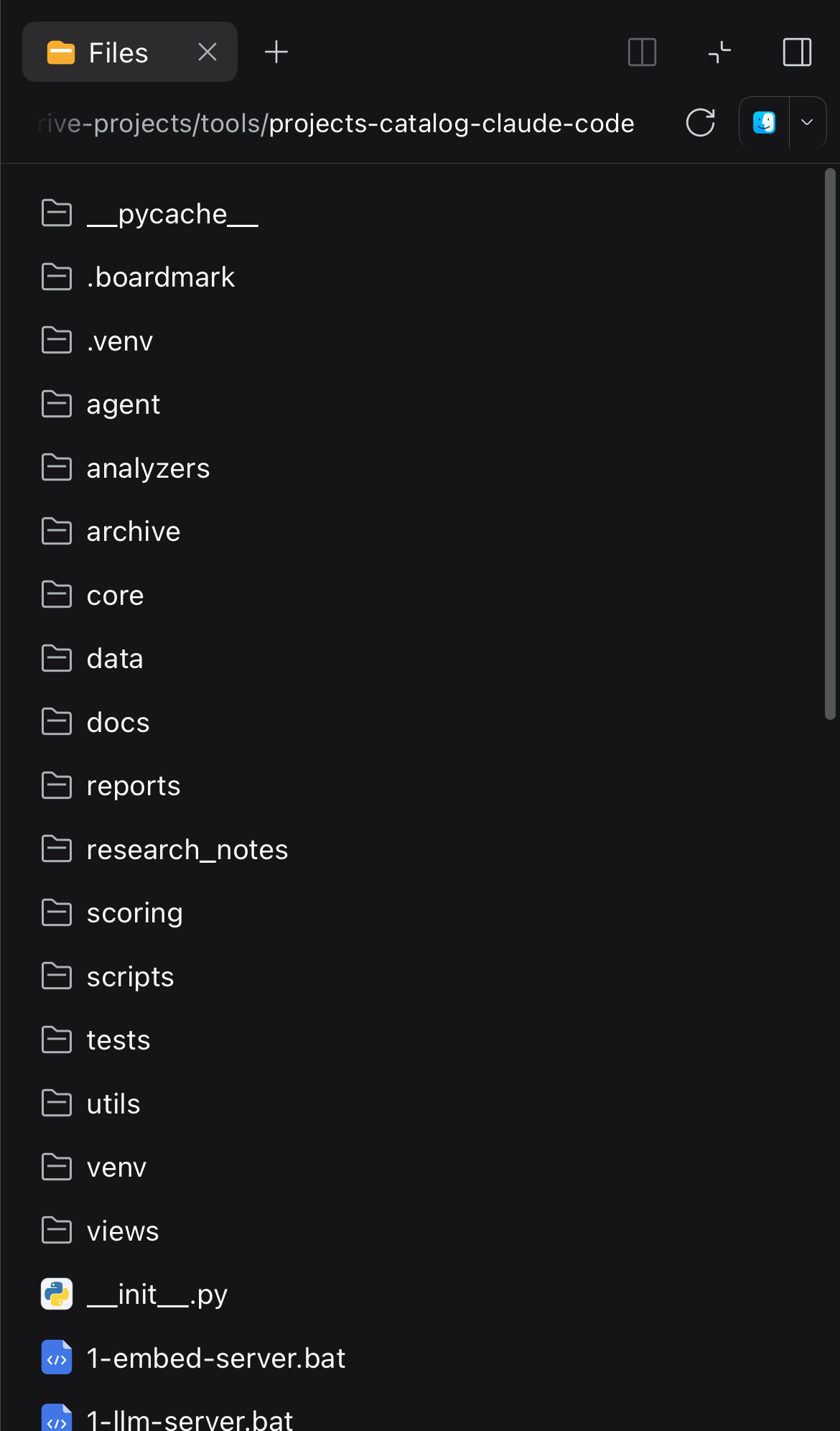 |
input / textarea / contenteditable become 16px on touch devices; the check is the device (html.dsh-mf-touch), not the viewport width, so a phone showing a stretched desktop layout does not zoom either. touch-action: manipulation keeps double taps from moving the next tap off its target.<div role="treeitem"> with a React handler as "not clickable" and holds its click for the double-tap window (~300ms). Closing the drawer first unmounted the row, so the tap only closed the menu. The row's click is now dispatched synchronously from pointerup, and the late native click of the same tap is swallowed.data-sidebar-right-open) the plugin promotes it to a full-screen sheet./api/file URL opened from the installed app hands the resource to iOS, which shows it in a native Quick Look sheet with no way back — the only escape was killing the app. The plugin catches those links (and window.open calls) and shows the file in an overlay: image inline, PDF in a frame, audio and video in players, text and JSON as a preview, and a ZIP as its file list — tap an entry to see the picture or text inside. A group of images pages like a story — swipe, tap the left/right edge, or press ←/→ — with a counter and a save button for the current one. Pictures embedded in an answer open this same sheet (the message's pictures form one gallery); tapping the backdrop beside the picture closes it. Closing an overlay restores the chat scroll position. Close with the button, a tap outside, Escape, or the back gesture.localStorage['dsh-mobile-fix-local'] = '1' (local) or '0' (remote).dsh --profile web binds 127.0.0.1 by default — loopback only. A phone on the same Wi-Fi cannot open it until you bind a real interface address and reopen the URL that carries the process token.
Bind your machine's LAN address. Wildcard addresses (0.0.0.0) are rejected by design; give one concrete literal:
# macOS: ipconfig getifaddr en0     Windows: ipconfig     Linux: hostname -I
dsh --profile web --host 192.168.0.54 --no-open
Allow the port. macOS asks once whether node may accept incoming connections — allow it. On Windows add an inbound rule for that port, otherwise the phone times out silently.
Open the printed URL on the phone. Startup prints dsh web: http://192.168.0.54:3080/?token=…. The token is per process: after a restart the old home-screen shortcut stops working, so re-add it (or paste the new link) — the current link is also in ~/.dsh/link.txt.
HTTPS is optional but changes what works. Over plain HTTP on a LAN address the page is not a secure context, so navigator.share is unavailable and the preview's bottom button reads Download file instead of Save to Files; Chrome also refuses "Install app". iOS Safari still adds the page to the home screen over HTTP. For the full experience serve TLS:
dsh --profile web --host 192.168.0.54 --tls-cert ./chain.pem --tls-key ./key.pemBehind a prefix-stripping proxy or a tunnel, advertise the public root and trust its authority:
dsh --profile web --public-url https://dsh.example.com/ --trusted-host dsh.example.comOnly the Host machine shows "Open in localStorage['dsh-mobile-fix-local'] = '1' (local) or '0' (remote). __dshMobileFixWhere() in the page console prints the decision, the address, the user agent and whether the page is a secure context.
git clone https://github.com/zven73/dsh-mobile-fix.git ~/.dsh/local-plugins/dsh-mobile-fix
dsh plugin --profile web add ~/.dsh/local-plugins/dsh-mobile-fix
dsh plugin needs pnpm on PATH. Restart dsh web (or let the profile re-compose) and reload the page on the phone. Client bundles are served from disk with a content revision, so later updates only need a page reload.
The package id stays
dsh-mobile-fix(the repository was renamed); that is the name you will see in~/.dsh/profiles/web/package.json.
dsh plugin --profile web remove dsh-mobile-fixflowchart LR
A[DSH web client<br/>0.2.x] --> B[client module<br/>lib/client.js]
B --> C[stylesheet<br/>narrow + touch rules]
B --> D[DOM hooks<br/>pointer · touch · click]
C --> E[56px rail + overlay drawer]
C --> F[settings strip · right sheet]
D --> EThe package is a plain DSH client plugin: cordis.patch.yml inserts one empty Host row, and lib/client.js is the browser bundle DSH serves through dsh.client. Everything it does is CSS and DOM events:
sidebarCol, centerCol, rightbarCol, sessionRow, _root, _collapsed, toggle) and the public data-slot names;@media (max-width: 1023px), the 16px field rule is behind a touch-device class;apply (HMR, live composition) replaces the previous one instead of stacking.| DSH | Profile | Checked on | Status |
|---|---|---|---|
0.2.1-rc.5 |
web |
Chromium fixture at 390×844 in CI, plus a real iPhone PWA by hand | tested |
other 0.2.x |
web |
— | expected to work; a large layout redesign may need selector updates |
| Android | web |
Chromium with a Pixel 7 profile, Chrome 158 | layout works; see the Android note below |
| desktop ≥ 1024px | web |
macOS Chrome / Safari | untouched by design |
dsh web authentication required, the token was consumed by the
navigation (a fresh Chrome profile, a scanner's in-app browser or a first-run screen can swallow it).
Reload the page once: the cookie is already set, and the second load goes through. If it does not,
open the tokenized URL directly in Chrome and clear the site's cookies for that host.http://<host>:<port>/ opens straight into the app; keep the
tokenized link only for the first visit after a dsh web restart (the token is per process).--tls-cert/--tls-key (or a tunnel) the install prompt appears and the icon behaves like on iOS.The chat's own setting (Settings → Chat → link opening) decides where an external link goes, and the sandboxed browser tab it needs is disabled in the web profile — the bundle ships it as a desktop-only feature:
# packages/.../cordis.patch.yml
- id: ui-sidebar-browser
  disabled: !!js "ctx.get('profileContext')?.name !== 'desktop'"
Without that tab the chat falls back to window.open, which on an installed app means a trip to Safari (and, with a universal link like GitHub's, a blank in-app Safari left behind). Re-enable the tab in your own profile patch — ~/.dsh/profiles/web/cordis.patch.yml:
- id: ui-sidebar-browser
  name: "@deepseek-ai/dsh-client-ui-sidebar-browser"
  disabled: false
Restart dsh web. Links now open in the right-panel browser, which this plugin already renders full-screen on a phone; the panel's own ↗ hands the page to the system browser when you want that. Some sites (GitHub among them) refuse to be framed and show an empty pane — that is their X-Frame-Options, not the panel.
| Symptom | What to do |
|---|---|
| Page still looks desktop on the phone | Reload the page; check the plugin is in the web profile (~/.dsh/profiles/web/package.json → bundles) |
| Settings does not open, or opens off-screen | Reload the page; if the panel is missing entirely, open an issue with the phone model and the DSH version |
| iOS still zooms on a field | Make sure the build is 0.6.1+ — the rule keys off the touch device, not the width |
| Drawer does not close on a tap | Try a real phone: desktop browser emulation fires click differently |
| Right panel is blank | Open it from the session header; the sheet is per session, not global |
| Session tap selects but does not open | Check the console for a JS error; the fix dispatches click from pointerup |
| Path | What it is |
|---|---|
lib/client.js |
the whole browser bundle: stylesheet, drawer logic, swipes, settings sheet |
lib/index.js |
empty Host half (a valid Loader entry) |
cordis.patch.yml |
inserts the plugin row into the profile |
docs/ |
screenshots and the demo GIF used by the READMEs |
Edit lib/client.js, bump VERSION and package.json, reload the page — the Host recomposes the bundle per request and the URL carries a content revision. There is no build step.
Issues and PRs are welcome. Please describe the device, the DSH version and what exactly you saw; a screenshot of the phone helps more than a paragraph. For a fix, keep the desktop layout untouched and test at 390×844 before sending.
See CHANGELOG.md.
MIT — see LICENSE.
CLASSIFICATION EVIDENCE
系统优先读取 GitHub Topics,再与站内分类词典和词根规则比对。当前命中: deepseek-harness。
morluto
Reverse engineer anything with agents, from app behavior down to native binaries.

deepseek-ai
DeepSeek Harness: Everything is a Plugin.

nexu-io
The 1st Collaborative AI Design Agent Workspace. Local-first and open source. Create motion, prototypes, websites, apps, dashboards, presentations, images, and videos with your team and AI agents. Share work, exchange feedback, and iterate together in one workspace.