
模型与 MCP
待识别

rea
morluto
Reverse engineer anything with agents, from app behavior down to native binaries.
PROJECT TOPICS
INSTALL REFERENCE
dsh plugin --profile web add github:zoyluoblue/deepseek-harness-rewind
该命令指向仓库当前默认分支;尚无绑定当前 commit 的完整验证结果。
PROJECT README
English | 中文
Put the files back. A DeepSeek Harness plugin that
saves your workspace at the end of every turn, so when the agent takes a wrong turn you can restore
the files to any earlier point — from the Settings page or with /rewind.
Your own git repository is never touched. Directories that are not git repositories work too.
The agent has been editing for six turns. Turn 3 was right; turns 4 through 6 made it worse. You want turn 3 back.
git cannot help: you have not committed since turn 1, and the agent's intermediate states were never
commits in the first place. git checkout . throws away everything, including the parts that were good.
The harness does not save workspace files anywhere — its built-in checkpointing (dsh-session-checkpoint-policy)
governs when the session log becomes durable and has nothing to do with your files.
This plugin fills that gap.
$DSH_HOME/rewind/, not in your .git. Your index,
HEAD, stashes, reflog, and gc are outside the blast radius, and a plain directory gets the same
protection a repository does.npx -y @deepseek-ai/dsh plugin --profile web add @zoytown/dsh-rewindThen restart dsh. A Rewind entry appears in the Settings sidebar.
Requires git on the machine. Without it the plugin reports that snapshots are paused and everything
else in dsh keeps working.
To remove it:
npx -y @deepseek-ai/dsh plugin --profile web remove @zoytown/dsh-rewindSnapshots outlive the plugin; delete $DSH_HOME/rewind/ to reclaim the space.
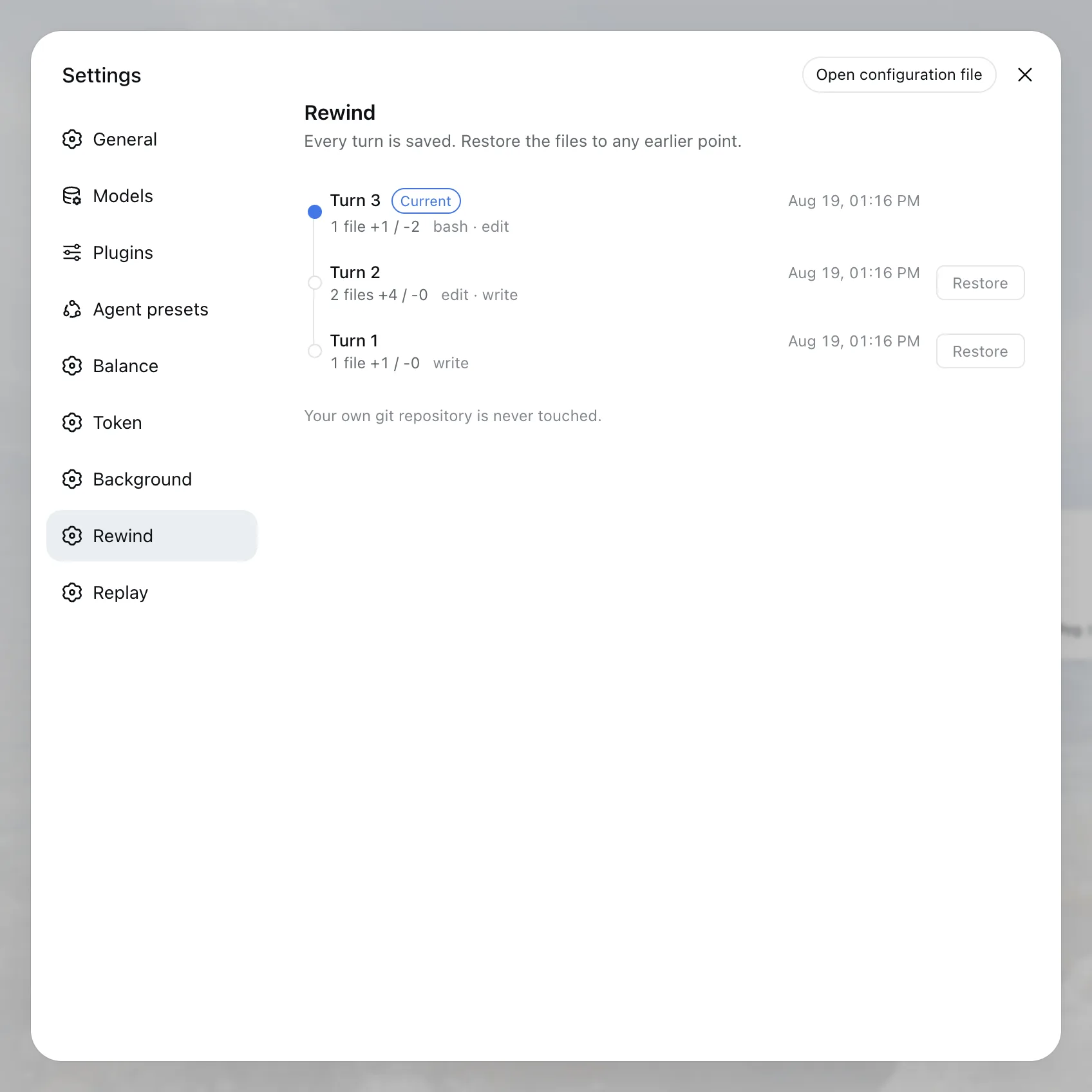
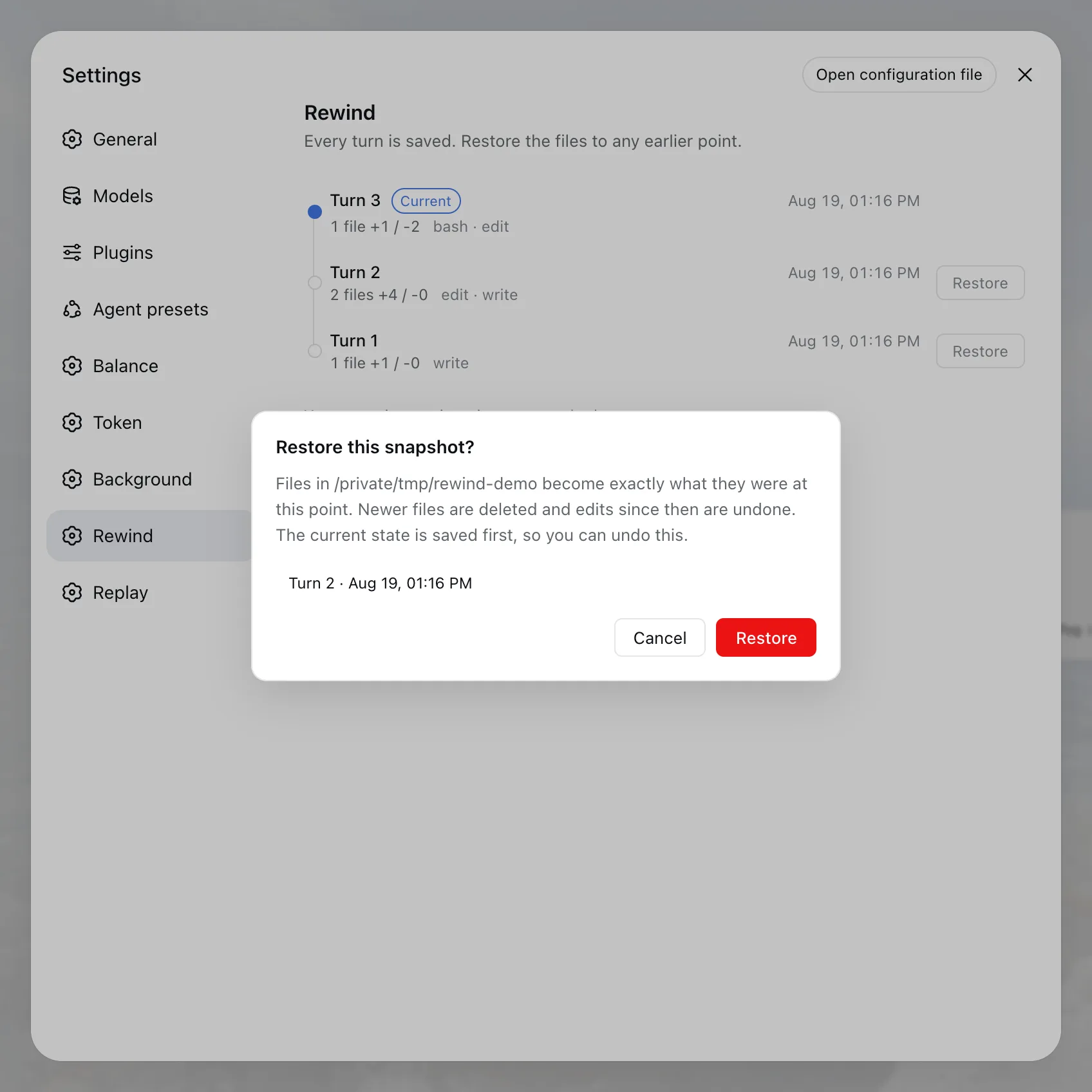
Settings → Rewind lists every saved point for the current workspace, newest first, with what changed and which tools ran. Restore asks for confirmation, spelling out that newer files will be deleted, then puts the files back.
The badge marks the snapshot your files currently equal — after a restore it moves to the restored entry, not the newest one.
/rewind commandCosts no tokens and runs no model turn — it is handled by the harness, not sent to the model.
| Command | What it does |
|---|---|
/rewind |
Restore the previous turn of this session |
/rewind 3 |
Restore the end of turn 3 |
/rewind a1b2c3d4 |
Restore a snapshot by id (a unique prefix of 4+ characters) |
/rewind list |
List this workspace's snapshots |
/rewind save |
Save the current state now, outside a turn |
A restore prints the id of the state it overwrote, so /rewind <that id> undoes it.
Snapshots respect your .gitignore, so ignored files — .env, build output, node_modules — are
not saved and not restored. This keeps snapshots small, and it means a restore leaves those files
exactly as they are.
On top of that, the excludes list below is applied to every workspace, git repository or not. It
exists so a directory with no ignore rules of its own does not swallow node_modules, but it is not
conditional: a project that deliberately tracks dist/ or build/ in git will not have those captured
either. Set excludes: [] if you want nothing beyond your own .gitignore.
.git itself is always excluded and cannot be configured otherwise: saving it would double the size of
every snapshot, and restoring it would overwrite your real commit history with a stale copy.
Edit the dsh-rewind row in your profile's cordis.yml:
- id: dsh-rewind
  name: '@zoytown/dsh-rewind'
  config:
    gitTimeoutMs: 60000
    retentionDays: 30
    maxSessions: 50
    listLimit: 200
exposeTool: 'off'| Option | Default | Meaning |
|---|---|---|
gitTimeoutMs |
60000 |
Deadline for one git command. Raise it for very large workspaces. |
excludes |
common dependency and build directories | Extra paths never saved, applied to every workspace on top of your .gitignore. Set to [] to rely on your .gitignore alone. |
retentionDays |
30 |
Sessions whose newest snapshot is older than this are dropped. |
maxSessions |
50 |
How many sessions to keep per workspace, newest first. |
listLimit |
200 |
Most snapshots shown at once. |
exposeTool |
'off' |
Whether the model can use rewind. See below. |
exposeTool is 'off' by default, which keeps rewind a human-only capability.
| Value | The agent can |
|---|---|
'off' |
nothing — rewind is yours alone |
'read-only' |
read its own history (rewind_list) |
'full' |
also restore the workspace (rewind_restore) |
'full' is genuinely useful — "this approach is wrong, put the files back and start over" is a recovery
move no amount of prompting replaces — and genuinely risky: an agent that misjudges can discard work you
wanted. Every restore still saves the overwritten state first, so it is reversible, but the decision to
enable it should be yours and deliberate.
Type /rewind. It restores the workspace to the end of the previous turn. If you want a specific point,
/rewind list shows every saved turn and /rewind 3 restores turn 3.
No. Snapshots go into a separate repository under $DSH_HOME/rewind/, and your .git is never opened
for writing. Your index, HEAD, stashes, and reflog are unchanged, and git status shows exactly what
it showed before.
Yes. The shadow repository is the plugin's own, so your directory does not need to be a repository — this is the case rewind protects best, because there is nothing else protecting it.
No. Rewind restores files only. The session log is append-only by design in DeepSeek Harness, and the transcript stays exactly as it was — so after a restore the agent still remembers what it did, which is usually what you want when telling it to try a different approach.
Restart dsh — plugins are mounted at boot. If it is still missing, run
npx -y @deepseek-ai/dsh --profile web --dump-config and check that a dsh-rewind row appears; if it does
not, the package was installed as a plain dependency rather than a bundle.
No. Snapshotting runs after the turn ends and is never awaited by the agent loop, and a turn that changed no files costs one tree comparison and stores nothing.
Snapshots share storage the way git commits do: unchanged files are stored once. The cost of a workspace is
roughly one copy of it plus the changes since. Sessions older than retentionDays (30 by default) are
deleted automatically.
Only if you turn it on. exposeTool is 'off' by default; set it to 'full' to let the agent restore
the workspace, or 'read-only' to let it read its history without restoring.
.gitignore are not saved or restored. If the agent breaks .env or something
under node_modules, rewind cannot bring it back.git must be installed. Without it the page says snapshots are paused; nothing else in dsh is affected./rewind is refused while the agent is mid-turn. Those paths wait for an
idle agent. The opt-in rewind_restore tool is the deliberate exception: the agent calls it during its
own turn, so that path does not wait (it is barred from running beside other tool calls instead).excludes applies to every workspace, not only to directories without a .gitignore. A project that
tracks dist/ or build/ in git will not have those files captured or restored unless you set
excludes: [].Each workspace gets a git repository under $DSH_HOME/rewind/<key>/repo.git, bound to your directory
with --work-tree. Saving is add → write-tree → commit-tree → update-ref, which writes only
inside that repository: no file in your workspace is touched and no HEAD moves. Restoring is
read-tree -m -u, which makes the workspace equal the snapshot — including deleting files the snapshot
does not have.
Every git command runs with hooks disabled, signing disabled, and your global excludes neutralized, so your repository's own hooks never fire and a signing passphrase is never demanded. Git runs through the harness's subprocess service, so it executes wherever your files actually live.
Sessions are separate chains inside one workspace repository, so they share storage while staying individually restorable and individually expirable.
Nothing leaves your machine. The plugin has no telemetry and makes no outbound network requests.
Its two HTTP routes are local surfaces for the Settings page, and both require the request to arrive over
the loopback interface and to address the server by a loopback Host — the second check is what a
DNS-rebinding page cannot satisfy. The restore route additionally requires POST and refuses a request
labelled cross-site. Anything already able to run code on your machine as you can, of course, reach them,
exactly as it could reach dsh itself.
The behaviour described above was exercised on 2026-08-19 against DeepSeek Harness packages
0.1.0-rc.6/0.1.0-rc.7 and git 2.50.1, including a full save → restore → undo cycle through the
Settings page. DeepSeek Harness is a developer preview; re-check these claims after a harness upgrade.
git available where dsh runs tools^22.19 || >=24MIT
CLASSIFICATION EVIDENCE
系统优先读取 GitHub Topics,再与站内分类词典和词根规则比对。当前命中: llm、deepseek、deepseek-harness。
morluto
Reverse engineer anything with agents, from app behavior down to native binaries.

deepseek-ai
DeepSeek Harness: Everything is a Plugin.

nexu-io
The 1st Collaborative AI Design Agent Workspace. Local-first and open source. Create motion, prototypes, websites, apps, dashboards, presentations, images, and videos with your team and AI agents. Share work, exchange feedback, and iterate together in one workspace.