
模型与 MCP
待识别

rea
morluto
Reverse engineer anything with agents, from app behavior down to native binaries.
PROJECT TOPICS
INSTALL REFERENCE
dsh plugin --profile web add github:zoyluoblue/deepseek-harness-replay
该命令指向仓库当前默认分支;尚无绑定当前 commit 的完整验证结果。
PROJECT README
English | 中文
A DeepSeek Harness plugin that turns a session into one self-contained HTML file — a full transcript you can open anywhere, with faithful tool cards and playback at the session's original timing.
The harness already ships /export, which downloads the raw session log as a ZIP. That artifact is for machines. This one is for people.
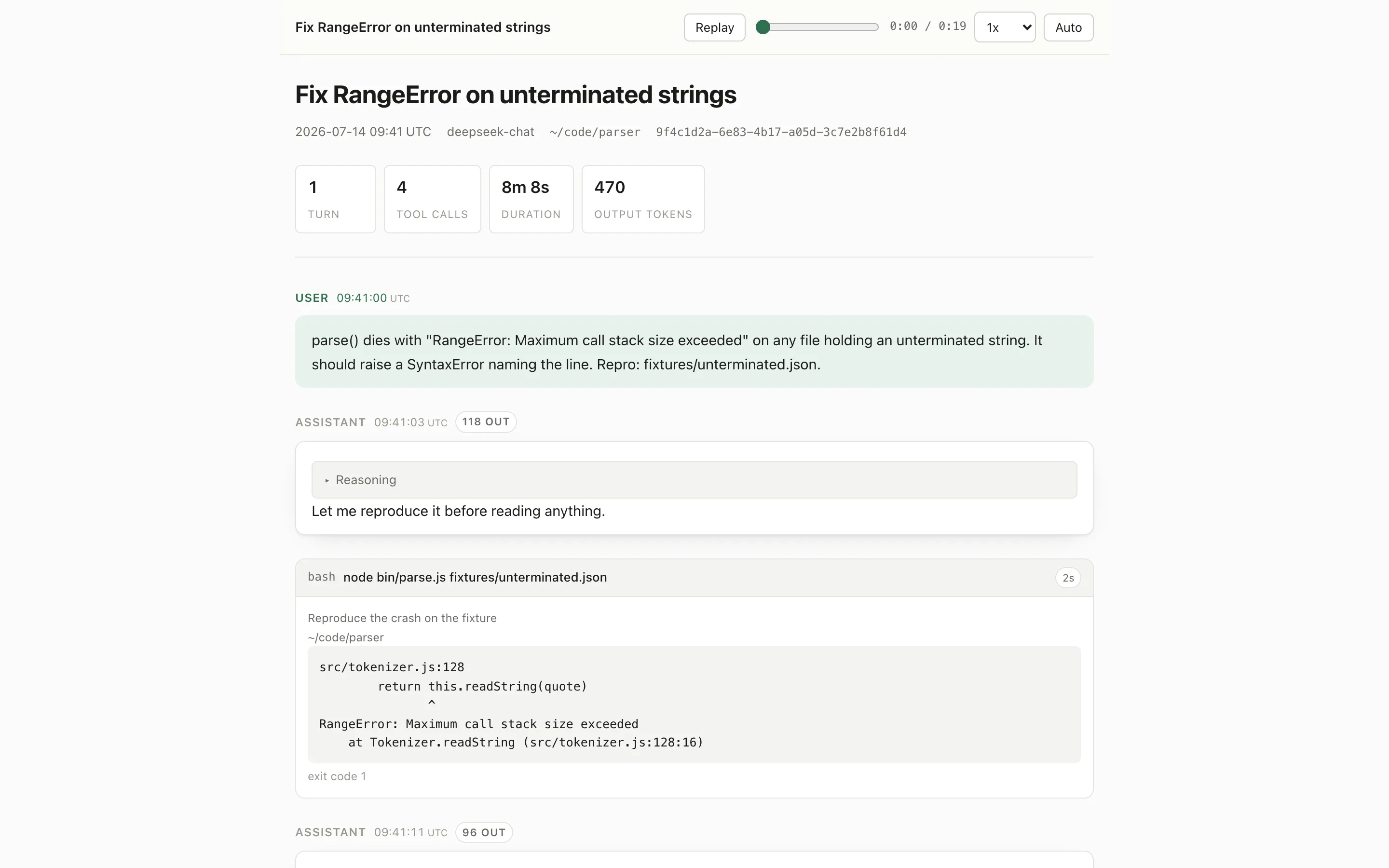
gapCeilingMs are compressed so playback never stalls on thinking time, and a substantial one (over 4x the ceiling) is labelled in the transcript with its real duration.Ctrl+F-able. Playback is a button, not a gate. (The transcript is drawn by the page's own script from an embedded JSON island; a reader that does not run JavaScript still gets the title, timestamps and headline stats, but not the conversation.)prefers-reduced-motion.dsh plugin --profile web add @zoytown/dsh-replayThen restart dsh web. A Replay entry appears in the Settings dialog's left-hand navigation.
To remove it:
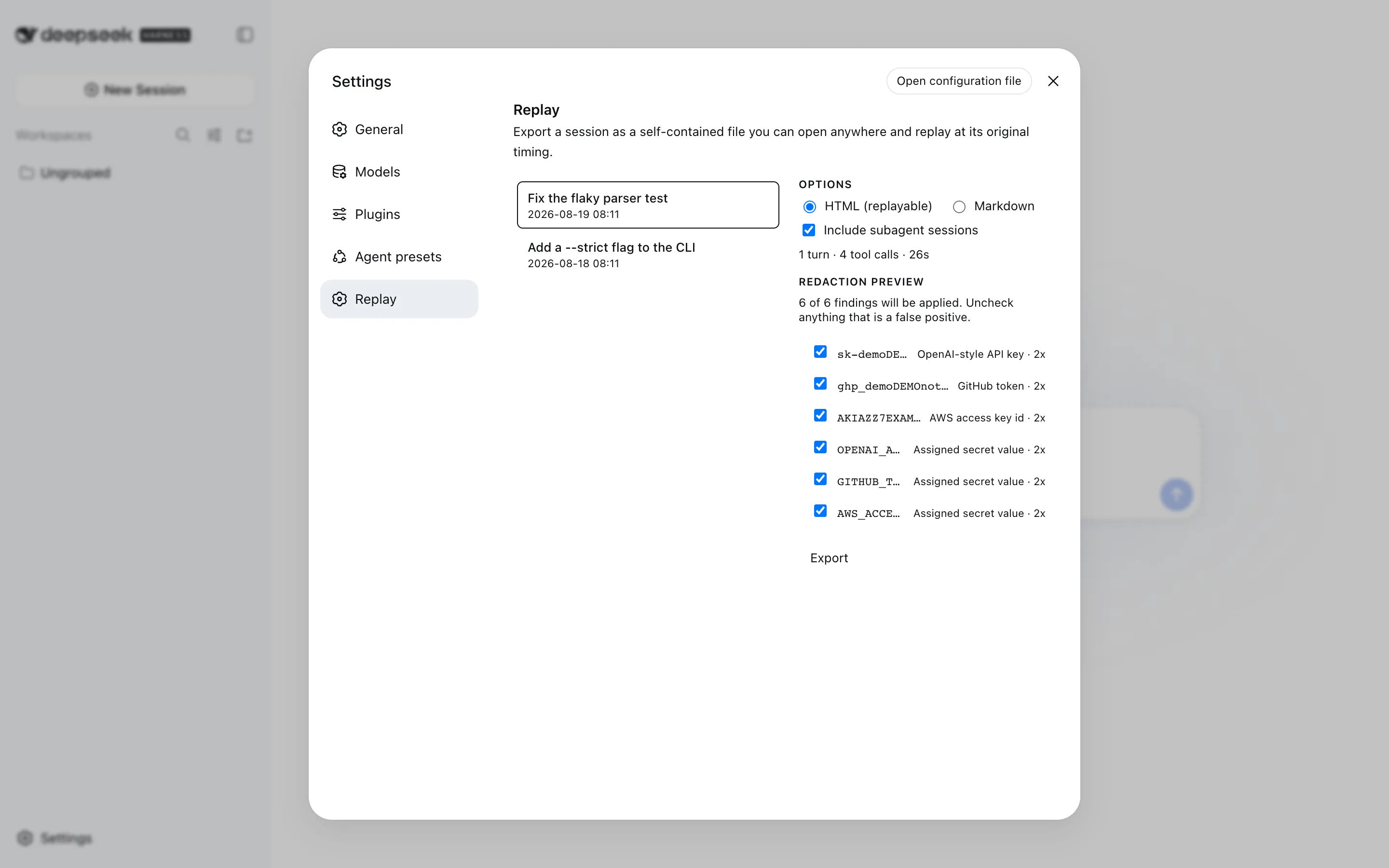
dsh plugin --profile web remove @zoytown/dsh-replayFrom the Settings page. Open Settings → Replay, pick a session, review what redaction would mask, choose HTML or Markdown, and export. The written path is shown with a copy button.
From the composer. /share exports the current session:
/share            → HTML
/share markdown   → Markdown
From the model. A session_export tool lets an agent write a transcript when you ask it to ("export what we just did"). It writes a local file and returns the path — it never uploads or shares anything, it cannot choose the destination, and redaction is always applied on this route regardless of redaction.enabled, because no human reviewed the preview.
Files land in $DSH_HOME/replay/ (by default ~/.dsh/replay/), named <session-title>-<UTC timestamp>.<ext>.
Every documented knob is a cordis.yml field. A few internal limits (the 20,000-character result cap, the 3-level subagent depth, the 4x gap-marker threshold) are fixed; they are listed under Known limitations.
- id: dsh-replay
  name: '@zoytown/dsh-replay'
  config:
    gapCeilingMs: 1200        # longest pause replayed verbatim
    includeSubagents: true    # inline delegated sessions by default
    redaction:
      enabled: true
rules: [] # extra regular-expression sources| Field | Default | Meaning |
|---|---|---|
gapCeilingMs |
1200 |
Pauses longer than this are clamped during playback. Pauses over 4x this value additionally get a N later marker in the transcript, so a long gap is never silently swallowed. |
includeSubagents |
true |
Inline subagent sessions as collapsible blocks. |
redaction.enabled |
true |
Scan human-triggered exports. The session_export tool always redacts regardless of this flag. |
redaction.rules |
[] |
Extra regular-expression sources appended to the built-in rules. An invalid pattern fails the plugin load rather than silently not running. |
dshHome |
$DSH_HOME |
Override the home the replay/ directory lives under. |
Home directory paths (shortened to ~), and values matching OpenAI-style keys, GitHub tokens, AWS access key ids, Slack tokens, Google API keys, Bearer tokens, JWTs, PEM private-key blocks, and assignments to names containing PASSWORD / SECRET / TOKEN / API_KEY / ACCESS_KEY / PRIVATE_KEY.
Rules lean aggressive on purpose: an over-eager match is one click to undo in the preview, while a missed credential is already shared. Redaction is a safety net, not a guarantee — read the preview before you send a transcript anywhere.
This plugin sends nothing anywhere. It reads sessions through ctx.sessionQuery, renders a file, and writes it to your own disk. There is no telemetry, no upload path, and no network access of any kind — the exported page itself makes zero external requests, which you can confirm by opening it with the network disconnected.
It is also strictly read-only with respect to your sessions: it never appends an event and never touches the agent loop.
^22.19 || >=24@deepseek-ai/dsh-base (which provides ctx.sessionQuery). The shipped web profile qualifies.The Settings page, the /share command, and the session_export tool each mount independently: a composition without a settings shell still gets the command, and a headless composition still gets the tool.
pnpm install
pnpm run typecheck
pnpm run build
Mount the local source into a running harness with a --patch overlay. Write a
file anywhere (the path inside it must be absolute):
- insert:
    - id: dsh-replay-dev
      name: '/absolute/path/to/deepseek-harness-replay/src/index.ts'
      config:
        gapCeilingMs: 500
then start the harness with it:
dsh web --patch /absolute/path/to/that-overlay.ymlInspect the composed configuration tree, including which layer supplied each row:
dsh --profile web --dump-configNo. The page makes zero external requests — no CDN, no font download, no analytics. Styles, scripts, and images are inlined at export time, so it renders identically on a machine with no network and no dsh installed. Open it with Wi-Fi off to confirm.
Read the redaction preview first. The built-in rules mask home paths and common credential formats, but they are pattern matches, not a guarantee: a secret in an unusual format, or sensitive business content, will pass through untouched. Treat the export as you would a screen recording of your terminal.
Real. Every session event, including individual stream chunks, carries a millisecond timestamp in the log, so the replay reproduces the actual output rhythm. The one deliberate deviation: pauses longer than gapCeilingMs (default 1200 ms) are clamped so playback does not stall on a human's thinking time. A pause over 4x the ceiling (4.8 s by default) also prints its real duration as a N later marker; shorter clamped pauses are compressed without a marker, since labelling every one of them would put a line between almost every message.
/export?/export downloads the raw session log as a ZIP — JSONL, attachments, descendants — for tooling and debugging. /share produces a readable document for a person. They are complementary, and both remain available.
$DSH_HOME/replay/ (by default ~/.dsh/replay/). The directory is fixed and the file name is derived from the session title and a UTC timestamp; no caller — not the Settings page, not the model — can choose a path. You can relocate the whole tree with the dshHome config field.
Only when you ask it to. The session_export tool writes a local file and returns the path; it has no upload path, no destination parameter, and redaction is always applied on that route regardless of your redaction.enabled setting. There is currently no switch to register the Settings page and /share while withholding the tool — the three mount together — but the tool cannot send anything anywhere, so the worst it can do is write a redacted file to your own disk.
Yes. Everything is reconstructed from the durable session log, so any session your harness still stores can be exported, including ones that finished months ago.
gapCeilingMs.Verified against DeepSeek Harness 0.1.0-rc.7 on 2026-08-19. The harness is a developer preview with documented breaking changes; if a card renders generically after a harness upgrade, that is the first thing to check.
MIT
CLASSIFICATION EVIDENCE
系统优先读取 GitHub Topics,再与站内分类词典和词根规则比对。当前命中: llm、deepseek、deepseek-harness。
morluto
Reverse engineer anything with agents, from app behavior down to native binaries.

deepseek-ai
DeepSeek Harness: Everything is a Plugin.

nexu-io
The 1st Collaborative AI Design Agent Workspace. Local-first and open source. Create motion, prototypes, websites, apps, dashboards, presentations, images, and videos with your team and AI agents. Share work, exchange feedback, and iterate together in one workspace.