
其他
完整应用

deepseek-harness
deepseek-ai
DeepSeek Harness: Everything is a Plugin.
PROJECT TOPICS
PROJECT README
English | 中文
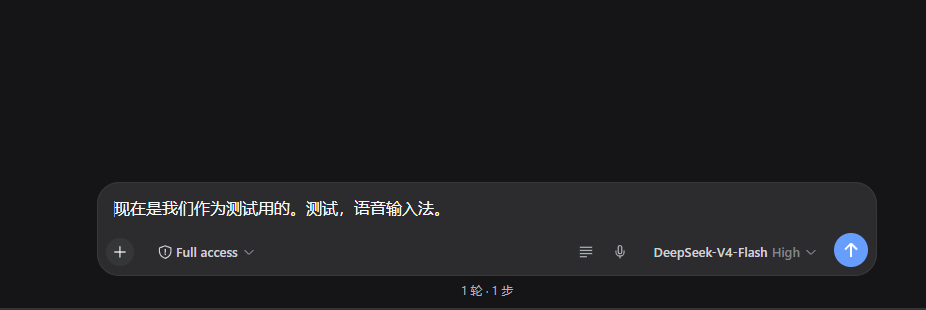
语音输入 + 提示词优化插件 for DeepSeek Harness 的 Web GUI(dsh web)。
输入框工具行右侧(发送按钮左边)有两个按钮:
SpeechRecognition),纯前端。POST /dsh-voice-input/optimize
端点,由 harness 自己的 LLM 服务(ctx.llm,provider/model 取
agentDefaultModel 的当前默认值,即 DeepSeek,已关闭推理)重写为更
清晰、具体的提示词,成功后替换草稿;若优化期间草稿被修改则不覆盖。优化
成功后 ✨ 按钮变为撤回图标(↶),点击恢复优化前的草稿,撤回入口
常驻直到被使用或草稿变化。优化中/成功/失败有状态提示条。zh-CN(普通话),修改 lib/client.js 顶部的
RECOGNITION_LANG 常量后重新部署dsh.client: { platform: "web" };浏览器端 bundle 在
lib/client.js(window.__ModuleLoader__.load({ id, factory }) 工厂格式,
与官方 dsh-client-ui-* 包一致)apply(ctx) 把组件注册进 conversation.input.right 插槽;locale
命名空间 voice.input 提供中/英文案lib/index.js 注入 webServer/llm/agentDefaultModel 服务,
注册 /dsh-voice-input/optimize 精确路由:读请求体 → ctx.llm.stream
(system 提示词限定"只返回优化后的提示词",reasoningEffort: "off",
30s 超时,4096 token 上限)→ 返回 { text };所有错误路径返回 JSON 错误@deepseek-ai/dsh-llm(npm 安装插件时会自动带上)前提:该电脑已能运行 dsh web,浏览器为 Chrome / Edge。
# ① 下载插件源码(或 GitHub 页面 Code → Download ZIP)
git clone https://github.com/zjzqs/dsh-client-ui-voice-input.git D:\dsh-voice-input

# ② web profile 目录
$profile = "$env:USERPROFILE\.dsh\profiles\web"

# ③ 源码放入 profile 树内(必须放 profile 目录下:宿主端 import 依赖时
#    从自身真实路径向上找 node_modules,放 profile 树内才能解析到)
Copy-Item -Recurse -Force "D:\dsh-voice-input" "$profile\voice-input-src"

# ④ 在 $profile\package.json 的 "dependencies" 里加一行:
#      "dsh-client-ui-voice-input": "file:./voice-input-src"
#    然后安装(npm 会自动装插件的依赖 @deepseek-ai/dsh-llm 并建好链接):
& npm.cmd install --no-audit --no-fund --prefix $profile
⑤ 启用插件 —— 编辑 $profile\cordis.patch.yml:
# Voice input + prompt optimization (dsh-client-ui-voice-input).
- insert:
    - id: voice-input
      name: dsh-client-ui-voice-input
⑥ 重启 dsh web,刷新页面后输入框右侧出现 🎤 和 ✨ 即可使用。
注意:
dsh-client-ui-voice-input 必须是 profile package.json 的依赖,否则
npm install 会把它当多余包裁掉agentDefaultModel),
配置好 DeepSeek API key 即可,插件不存任何凭据编辑源码后同步到 profile 内的安装副本,然后重启 dsh web:
Copy-Item -Recurse -Force "本仓库目录\*" "$env:USERPROFILE\.dsh\profiles\web\voice-input-src\"
# 重启 dsh web(杀进程 → 重新启动)
浏览器端 bundle 由服务器按请求实时读取(no-cache),仅改 lib/client.js
时刷新页面即可;改宿主端 lib/index.js 必须重启。
CLASSIFICATION EVIDENCE
系统优先读取 GitHub Topics,再与站内分类词典和词根规则比对。当前命中: 无有效分类标签。
deepseek-ai
DeepSeek Harness: Everything is a Plugin.

anywhere-labs
为 DeepSeek Harness (DSH) 插件生态打造的现代化桌面端解决方案。万物皆「插件」,桌面本身也是「插件」。

walkinglabs
Harness engineering beginner tutorial, from 0 to 1