dsh-llm-oauth
English | 中文
Standalone OAuth / subscription-plan LLM plugin for DeepSeek Harness. Install it into your own profile with dsh plugin add — it does not patch the Harness repo.
Official dsh-llm-pi-ai authenticates with API keys only and never runs an OAuth login or refresh. This plugin reuses the same catalog package, @earendil-works/pi-ai, but constructs Models with a durable CredentialStore so subscription tokens refresh on the request path.
Packaging follows the official plugin guides — your first plugin and publish / install:
package.json → dsh.bundle.patch plus optional dsh.client (Web Settings face)cordis.patch.yml inserts one plugin rowprepare bundles src/ → lib/ (including lib/client.js) on git install- function plugin: export
name, inject, Config, apply — no export default
Providers
| Subscription |
Provider id |
Notes |
| Grok (SuperGrok / X Premium) |
xai |
Model ids come from the installed pi-ai catalog. |
| GitHub Copilot |
github-copilot |
Optional Enterprise URL defaults to public github.com. |
| ChatGPT plan (current) |
openai |
Sign in with ChatGPT — the ChatGPT subscription through pi-ai's official flow (needs @earendil-works/pi-ai ≥ 1.0.0). Do not also configure an openai API key on the first-party plugin: one route id takes one provider. |
| ChatGPT / Codex plan (legacy) |
openai-codex |
Device-code flow for the GPT-5.x Codex models. Needs device-code authorization enabled in ChatGPT — see below. Account-ban risk. |
| Anthropic subscription |
anthropic |
|
| OpenRouter |
openrouter |
Large catalog — enable only if you need it. |
| Kimi For Coding |
kimi-coding |
|
Model ids come from the installed @earendil-works/pi-ai catalog, not from this plugin. Bump that dependency and rebuild when you want a newer catalog.
Enable vs sign-in
After install the plugin is dormant: the catalog lists the providers above, but providers: {}, so the model picker is not flooded with hundreds of models.
| Concept |
Meaning |
How |
| Enable |
Register the LLM route; provider appears in the picker |
Settings → OAuth / Subscriptions, /oauth enable xai, or auto on login |
| Sign in |
Store tokens in pi-ai-oauth.json |
Settings panel, /oauth login xai, or bin/login.mjs |
| Disable |
Remove from picker; keep stored tokens |
Settings panel or /oauth disable xai |
Only enabled providers list models. They sit alongside API-key providers under Settings → Models once enabled.
Install
dsh plugin --profile web add github:ziyou979/dsh-llm-oauth
From a local checkout:
dsh plugin --profile web add ./dsh-llm-oauth
Confirm the layer:
dsh --profile web --dump-config
A git install may ask you to allow prepare in the profile's pnpm-workspace.yaml (pnpm ≥10 refuses lifecycle scripts otherwise):
allowBuilds:
  dsh-llm-oauth: true
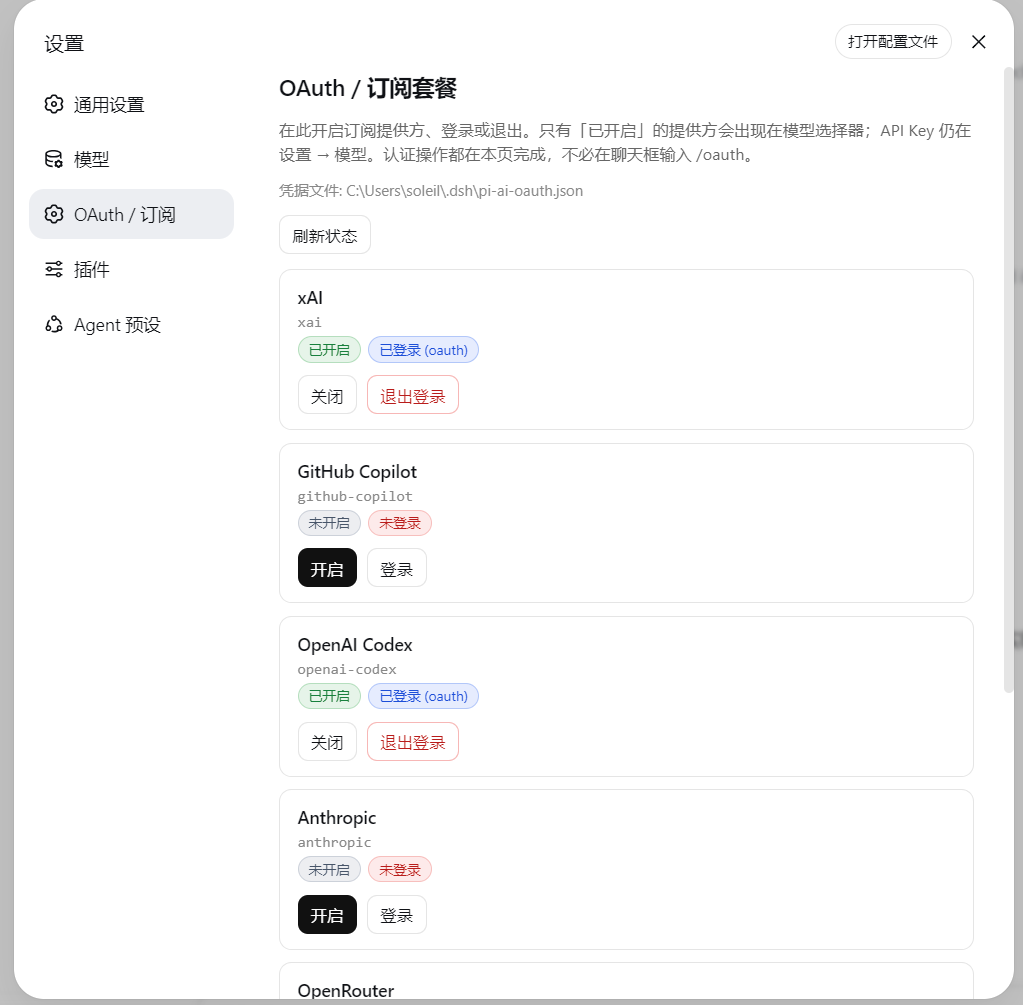
Settings → OAuth / Subscriptions
The Web UI adds a settings section (between Models and Plugins) with:
- Every catalog subscription provider
- Badges: enabled / disabled, signed-in / out, login-in-progress
- Actions: enable, disable, sign in, sign out (buttons on this page — no need to type
/oauth in chat)
- Successful sign-in stores tokens and auto-enables the provider
- Device codes show on the page (with copy); authorization URLs open in a new tab, or via Open authorization page if the popup is blocked
Providers that ask “pick a login method” (e.g. openai-codex) auto-select device code on Web.
Sign in with ChatGPT (openai, pi-ai ≥ 1.0.0) starts pi-ai's callback server on the host at 127.0.0.1:1455. If your browser runs on that machine the sign-in finishes by itself; when it cannot (remote Web UI, port busy) the Settings page shows a paste box for the final redirect URL — from chat, /oauth code openai <redirect-url-or-code> does the same.
After a provider is enabled (and signed in), it also appears under Settings → Models next to API-key routes:
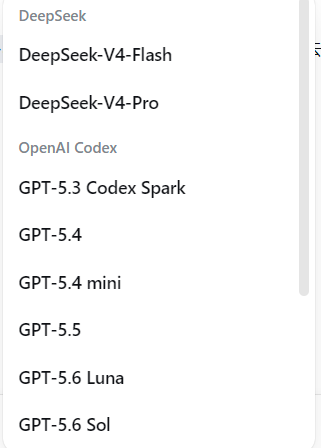
API-key providers stay curated under Settings → Models. OAuth enable + login live on this plugin’s page.
Host HTTP API (same-origin Web):
| Method |
Path |
Body |
GET |
/dsh-llm-oauth/status |
— |
POST |
/dsh-llm-oauth/enable |
{ "provider": "xai" } |
POST |
/dsh-llm-oauth/disable |
{ "provider": "xai" } |
POST |
/dsh-llm-oauth/login |
{ "provider": "xai" } |
POST |
/dsh-llm-oauth/code |
{ "provider": "openai", "code": "<redirect-url-or-code>" } |
POST |
/dsh-llm-oauth/logout |
{ "provider": "xai" } |
ChatGPT: openai (current) vs openai-codex (legacy)
openai is pi-ai's Sign in with ChatGPT flow: the browser ends on the host's 127.0.0.1:1455 callback and the host exchanges the code. Nothing else to switch on, and no device-code toggle needed. When the callback cannot reach the host, paste the final redirect URL back (Settings page box, or /oauth code openai …).
One caveat: openai is also the first-party API-key route id. Configuring an openai API key under Settings → Models and enabling openai here would collide (DUPLICATE_ADAPTER), so this plugin refuses to enable a route another adapter already owns and tells you which id to remove.
ChatGPT / Codex: enable device-code auth first
openai-codex on Web uses device code, not the localhost :1455 browser callback. ChatGPT hides that flow until you turn it on:
- Open ChatGPT → Settings → Apps & connectors (or Settings → Connectors / Codex, depending on the current UI).
- Find Codex and enable Enable device code authorization for Codex.
- Come back here, click Sign in on
openai-codex, then open the authorization URL and enter the code shown on the Settings page.
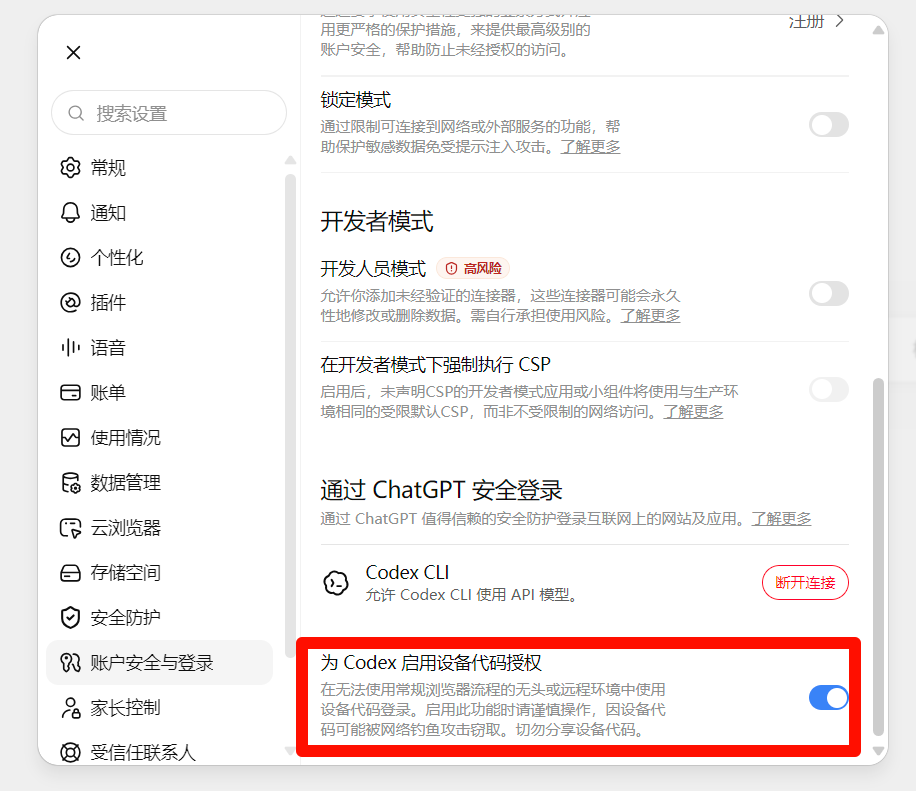
Without that toggle, the device page rejects the code even though this plugin already picked the device-code method.
Risk: signing in to Codex / ChatGPT this way (device code or any unofficial client OAuth) can get the ChatGPT account restricted or banned. OpenAI treats this as using the subscription outside official Codex / ChatGPT apps. Use a disposable account if you try it; do not put a main or paid account you cannot afford to lose on this route. This plugin cannot prevent or reverse a ban.
Login / commands
In the Web UI:
/oauth status
/oauth list
/oauth enable xai
/oauth login xai
/oauth disable xai
/oauth logout xai
/oauth login returns the authorization URL and user code immediately so the chat UI does not hang. Finish in the browser, then run /oauth status or refresh the Settings page. The poll continues in the background.
Credentials are stored at $DSH_HOME/pi-ai-oauth.json (default ~/.dsh/pi-ai-oauth.json).
If you need a terminal (or a provider still requires an interactive prompt):
node bin/login.mjs --list
node bin/login.mjs xai
After a profile install:
node %USERPROFILE%\.dsh\profiles\web\node_modules\dsh-llm-oauth\bin\login.mjs xai
Or enable in settings.yaml without the UI:
llm-oauth:
  providers:
    xai: {}
Do not collide with llm-pi-ai
dsh-base mounts dormant dsh-llm-pi-ai. Declaring the same provider id under an llm-pi-ai: settings section throws DUPLICATE_ADAPTER.
- Subscription / OAuth → this plugin only
- API keys (DeepSeek, official OpenAI API) →
llm-deepseek / llm-pi-ai
Develop
pnpm install
pnpm test
pnpm run build
node bin/login.mjs --list
@deepseek-ai/* packages are peers supplied by the DSH profile. The full test suite requires the host peers to be installed or linked locally. Git installation builds do not typecheck those peers.
Compatibility update
- Pi is pinned by the lockfile to
0.85.1; its Codex catalog includes gpt-6-astra.
- Reviewed against Harness
0.1.5-rc.2 (source commit c291e7961a): leading system messages, selected reasoning efforts, and the ToolCallId rename are handled. Older CallId exports remain supported.
- Settings integration uses the
SettingsProvider.installSection service API; deepEqualJson comes from the host peer @deepseek-ai/dsh-util-values, avoiding removed standalone exports from dsh-settings.
- The lockfile no longer embeds third-party mirror tarball URLs. The project
.npmrc selects the official npm registry, fixing issue #1. Normal Git installs can run prepare; skipping scripts is not required.
Limits
- Model list follows
@earendil-works/pi-ai; this plugin does not maintain a private model table
- No image / vision path
- No full native replay signatures
- No in-browser OAuth callback server (device code / open URL)
- Plain OpenAI API and DeepSeek official stay on API keys
- Settings → Models curated editors still target API keys; OAuth enable + login live under Settings → OAuth / Subscriptions
License
MIT


