
其他
完整应用

deepseek-harness
deepseek-ai
DeepSeek Harness: Everything is a Plugin.
PROJECT TOPICS
PROJECT README
A floating GPU monitor inside the DSH Web UI. Live per-GPU utilization, VRAM, temperature and power, plus the top VRAM-consuming processes when the driver reports them, rendered as a compact, draggable strip (one row per GPU) in the DeepSeek Harness page.
Works on any machine with an NVIDIA driver (Windows or Linux): the data comes from nvidia-smi, so multi-GPU rigs show one instrument block per GPU. nvidia-smi only reports discrete NVIDIA adapters, so integrated GPUs (Intel UHD, AMD iGPU, ...) are never part of the display. No extra service to run and no agent tools to call: the card polls the DSH host's own route.
Note: the plugin is NVIDIA-only (nvidia-smi backend). On machines without an NVIDIA driver it degrades to a small GPU n/a pill and re-probes every 5 minutes, so it lights up on its own once a driver is installed.
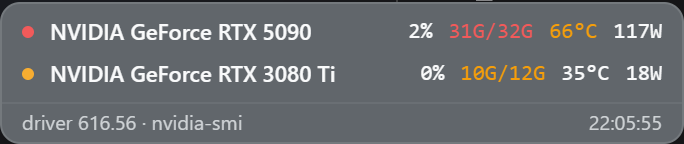
The strip stays on top of side panels and side cards (for example the dsh-better-sidebar Files panel) instead of being covered by them.
The strip starts at the bottom-right corner and is draggable: press and drag it anywhere on the page. The position is remembered (persisted per browser profile), so it stays where you left it across new sessions and reboots. Double-click the strip to reset it to the default corner.
# from GitHub
dsh plugin --profile web add github:zhubaohi/dsh-gpu-pulse

# or from a local clone
dsh plugin --profile web add /path/to/dsh-gpu-pulse
The npm name dsh-gpu-pulse is reserved: dsh plugin --profile web add dsh-gpu-pulse will work once the npm package is published.
Then restart dsh web. The strip appears at the bottom-right corner of the GUI; drag it wherever you like and the spot is remembered.
One row per GPU, intentionally compact (about 85 px for two GPUs):
[N/A] for graphics contexts, in which case this section is omitted)The exact GPU name (as reported by the driver) is shown in every row.
Everything is optional: defaults work out of the box. Override in the profile's cordis.patch.yml (an id-targeted patch replaces the whole config, so restate every field you want to keep):
- id: dsh-gpu-pulse
  config:
    pollMs: 3000            # client poll interval hint, default 2000, floor 500
    showProcesses: true     # also collect per-process VRAM consumers
    nvidiaSmiPath: 'C:\Windows\System32\nvidia-smi.exe'  # default: "nvidia-smi" via PATH
pollMs is a hint served to the client in every status response, so it applies to all open tabs without a browser-side setting.
index.js): registers GET /dsh-gpu-pulse/status on the DSH host web server. Each request runs up to four nvidia-smi queries (--query-gpu metrics, --query-gpu=index,name, --version, and optionally --query-compute-apps) with a 4 s timeout, parses the CSV, and returns JSON. Results are cached for ~1.2 s so several open tabs share one process per poll cycle.client/client.js): a hand-written __ModuleLoader__ bundle (no build step, the only require is the platform react seed) that mounts the widget into the shell.overlay slot. It polls the status route, styles itself with the active theme's --dsw-* token variables (static fallbacks keep older hosts readable), and handles its own pointer events for dragging (the position is stored in localStorage under a dsh-gpu-pulse:pos key). Because side-panel plugins stack above the overlay slot's default z-index, the client promotes the overlay layer to the top of the app's stack at runtime, so side cards and drawers can never cover the widget.dsh web 0.1.0-rc.6+ (the shell.overlay slot)nvidia-smi on PATH (Windows or Linux)MIT, see LICENSE. nvidia-smi is a NVIDIA Corporation tool, invoked read-only.
CLASSIFICATION EVIDENCE
系统优先读取 GitHub Topics,再与站内分类词典和词根规则比对。当前命中: 无有效分类标签。
deepseek-ai
DeepSeek Harness: Everything is a Plugin.

anywhere-labs
为 DeepSeek Harness (DSH) 插件生态打造的现代化桌面端解决方案。万物皆「插件」,桌面本身也是「插件」。

awesome-dsh-plugin
A curated list of plugins for DeepSeek Harness (dsh) · DeepSeek Harness 插件精选列表