
其他
完整应用

deepseek-harness
deepseek-ai
DeepSeek Harness: Everything is a Plugin.
PROJECT TOPICS
PROJECT README
Save-money plugin for DSH (DeepSeek Harness) — define your own "pause / resume" time windows; at pause time running long tasks are paused (not stopped) automatically, and they resume when the window ends. Built for LLM API peak/off-peak pricing (e.g. DeepSeek peak hours 9:00–12:00, 14:00–18:00 Beijing time, off-peak at half price; since 2026-08-23 weekends are off-peak all day — the plugin's weekday switch skips Sat/Sun by default), and equally useful for time-of-use electricity rates, bandwidth off-peak shifting, or any "I don't want the machine working during this period" scenario.
Status: ✅ Implemented, continuously maintained. 中文版
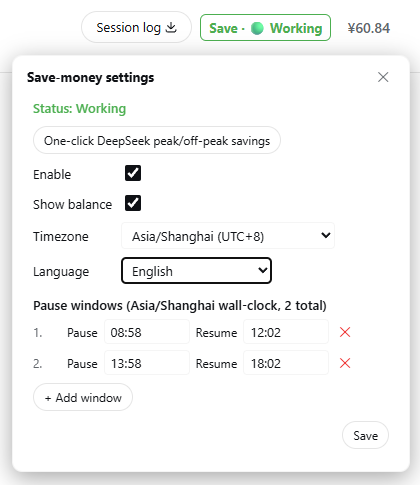
The colored status text in the top-right of the session header (Save · ⚪/🟢/🟡/🔴, color follows the state) is the single persistent entry — click it to open the settings popover. When a pause is upcoming or active, a reminder banner appears at the top of the page (with the End this save mode button).
With "Show balance" enabled, your official DeepSeek account balance appears next to the status text; clicking the balance opens the last-8-hours spend bar chart:
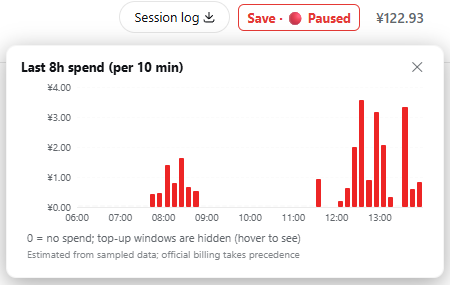
Each bar is a 10-minute window: the X axis shows whole-hour ticks, the Y axis key-point amount ticks (≤5, with gridlines), and hovering shows each window's exact time range and amount. Windows where the balance dropped without any local activity are marked in warning color (changes may come from another device).
deepseek-v4-flash-vision-exp), six toggles total. Checked = paused (saving money); unchecked = exempt (requests flow even during a window). Defaults: the three official tiers checked, all "other" tiers exempt; your changes are persisted and never reset. Any model whose name carries no flash/pro/vision marker (legacy chat/reasoner, unknown models, anything else) is always exempt — it can never block your requests;save-money.config.json (gitignored); configuration survives browser refresh and plugin disable/re-activate, and is loaded on startup with optional reconciliation of paused goals;~/.dsh/dsh-save-money-balance.json (account-level, shared across projects) and survives plugin updates/restarts. The file is keyed by a fingerprint of the API key — changing the key discards the old history automatically;stateDiagram-v2
direction TB
[*] --> Disabled
Disabled : Disabled ⚪ — nothing pauses, no money saved
Working : Working 🟢 — normal use, requests flow
Pausing : Pausing soon 🟡 — yellow banner reminder
Paused : Paused 🔴 — requests suspended, no cost
Disabled --> Working : check "Enable"
Working --> Pausing : a window starts within 5 minutes
Pausing --> Paused : pause time reached
Paused --> Working : window ends, auto-resumes
Paused --> Working : "End this save mode" — resume now
Pausing --> Working : "End this save mode" — cancel this pause
Working --> Disabled : uncheck "Enable"
Pausing --> Disabled : uncheck "Enable"
Paused --> Disabled : uncheck "Enable"The official DSH plugin form is a module exporting apply + cordis.yml mounting (see the DSH official tutorial). You can install from npm (one command, recommended) or build from this repository (three options below: --patch quick try, distributable bundle, or the link + HMR development workflow). Every official form ships the full plugin: Host logic (scheduling, gate, goal freeze, tools, HTTP endpoints) and the browser UI (status text, banner, settings page), which loads automatically — no AI-assisted setup needed.
The plugin is published to npm — one command installs it into your Web profile:
npx @deepseek-ai/dsh plugin --profile web add dsh-save-moneynpx @deepseek-ai/dsh plugin --profile web remove dsh-save-moneyAfter installing, fully restart DSH (Ctrl+C, start again) and hard-refresh the browser (Ctrl+Shift+R) — the "Save" status text appears top-right in the session header.
Using ~/app/ as an example directory (each step assumes the previous one succeeded):
cd ~/app/

git clone https://github.com/zhu168/dsh-save-money.git

cd dsh-save-money
npm install

cd plugin
npm pack                    # runs the build automatically; produces the plugin tarball

ls                          # check the tarball name, e.g. dsh-save-money-1.4.4.tgz

cd ~/app/deepseek-harness   # change to your harness directory (clone it first if missing — see "0." below)

pnpm dsh plugin --profile web remove dsh-save-money   # only if you installed it before; skip if you haven't

pnpm dsh plugin --profile web add ../dsh-save-money/plugin/dsh-save-money-1.4.4.tgz   # use the name from `ls` above

pnpm dsh --profile web      # starts DeepSeek Harness — the plugin appears top-right in the session header
Two notes: ① the tarball name on the
addline must match whatlsprinted (1.4.0is just an example); ② if your harness runs via npx, replace everypnpm dshabove withnpx @deepseek-ai/dsh(install commands too).
The plugin runs inside DSH, so DSH must run before anything below. Two ways:
A. Installed CLI (easiest, needs Node.js):
npx @deepseek-ai/dsh web # starts the Web UI at http://127.0.0.1:3080B. From source (e.g. on a Raspberry Pi; dsh is NOT a global command — you must run pnpm dsh inside the checked-out deepseek-harness directory):
git clone https://github.com/deepseek-ai/deepseek-harness.git
cd deepseek-harness
pnpm install
pnpm run build
pnpm dsh web                    # inside this directory only
In source mode, never type bare
dsh ...— it is not on PATH (command not found: dsh). Usepnpm dsh ...from thedeepseek-harnessdirectory, or./node_modules/.bin/dsh ....
--patch quick try (official, loads local source)Good for trying the plugin on the same machine where you keep this repository.
(Optional) Rebuild the latest plugin module — a fresh clone needs the build deps first:
npm install          # first clone: installs typescript and friends
npm run prepare      # one step: src/*.ts -> dist/*.js -> plugin/index.js + plugin/client.js
Edit cordis.patch.yml, replacing <REPO_ROOT> with the repository's absolute path (it is the only placeholder in the file — use your editor's "replace all"):
- insert:
    - id: save-money
      name: '<REPO_ROOT>/plugin/index.js'
Examples — Windows: name: 'D:/git/github/dsh-save-money/plugin/index.js'; Linux / macOS / Pi: name: '/home/pi/dsh-save-money/plugin/index.js'.
If your profile already has the plugin installed via bundle / link, skip Path 1 (stacking
--patchwould register the plugin twice).
Start with the overlay:
dsh web --patch ./cordis.patch.yml               # globally installed dsh
npx @deepseek-ai/dsh web --patch ./cordis.patch.yml  # npx-launched (Step 0, option A)
# from source: pnpm dsh web --patch ./cordis.patch.yml
Open the browser at the printed URL (default http://127.0.0.1:3080) — the "Save" status text appears in the session header top-right. No extra step needed.
dsh plugin add (official, distributable — recommended for another machine / the Pi)The bundle is a small .tgz that you build once and install anywhere. You do not clone this repository on the target machine — DSH installs the plugin into its own profile (~/.dsh/profiles/web/node_modules/).
Step 1 — build & pack the bundle (on any machine with this repository):
cd dsh-save-money
npm install             # first clone only (typescript dev dependency)
cd plugin
npm pack                # runs the prepare build automatically; produces dsh-save-money-1.4.4.tgz
plugin/ is the standard bundle layout: package.json declares dsh.bundle.patch + dsh.client, cordis.patch.yml inserts the plugin row, index.js is the Host module and client.js the browser UI bundle.
Step 2 — copy the tgz to the target machine (scp / USB stick / however you move files; run this on the build machine, one directory above the repository, adjusting the path to yours):
scp dsh-save-money/plugin/dsh-save-money-1.4.4.tgz pi@<pi-ip>:~/Step 3 — install into a profile (on the target machine; first run initializes the profile with @deepseek-ai/dsh-base):
# DSH run from source (inside the deepseek-harness directory):
pnpm dsh plugin --profile web add ~/dsh-save-money-1.4.4.tgz
# npx-launched (Step 0, option A) or globally installed dsh: works from any directory
npx @deepseek-ai/dsh plugin --profile web add ~/dsh-save-money-1.4.4.tgz
Both commands do the same thing: install the tgz into
~/.dsh/profiles/web/node_modules/. Use whichever matches how you start DSH.
Git install also works: dsh plugin --profile web add github:you/dsh-save-money#<sha> (git install requires prepare builds and allowBuilds, see the DSH publish tutorial).
Step 4 — verify the layer mounted, then start (fully restart DSH, don't just refresh the page):
pnpm dsh --profile web --dump-config   # the output should show a dsh-save-money layer (its plugin rows)
pnpm dsh --profile web                 # Ctrl+C to stop an already-running instance first
Step 5 — open the browser at http://127.0.0.1:3080 and hard-refresh (Ctrl+Shift+R). The "Save" status text appears in the session header; click it for the settings. You can also confirm the plugin is live from a conversation (save_money_status).
Upgrading to a newer version (e.g. 1.3.0 → 1.4.0):
The commands below use
pnpm dsh; if you launched DSH via npx, replacepnpm dshwithnpx @deepseek-ai/dsh.
# on the build machine:
cd dsh-save-money && git pull && cd plugin && npm pack    # fresh dsh-save-money-<new>.tgz
scp dsh-save-money/plugin/dsh-save-money-1.4.4.tgz pi@<pi-ip>:~/

# on the target:
pnpm dsh plugin --profile web remove dsh-save-money
pnpm dsh plugin --profile web add ~/dsh-save-money-1.4.4.tgz
pnpm dsh --profile web                # restart, then hard-refresh the browser
Your settings survive upgrades (they live in save-money.config.json, untouched by remove/re-add).
Uninstalling:
pnpm dsh plugin --profile web remove dsh-save-moneyChanges take effect immediately — no DSH restart and no tgz needed. This is the form used while developing the plugin: dsh plugin add link: links the plugin/ directory straight into the profile, and a cordis-plugin-hmr hot-reload plugin watches the build output. Save the source → npm run prepare → the running DSH hot-swaps the new plugin; hard-refresh the browser to see the client UI.
One-time setup (on the development machine):
Build and link-install:
cd dsh-save-money
npm run prepare                          # src/*.ts -> plugin/index.js + plugin/client.js
pnpm dsh plugin --profile web add link:D:/git/github/dsh-save-money/plugin   # use your repository's absolute path
Configure hot reload: edit ~/.dsh/profiles/web/cordis.patch.yml (create it if missing) and replace root with your repository's plugin directory absolute path:
- insert:
    - id: save-money-hmr
      name: '@deepseek-ai/cordis-plugin-hmr'
      config:
        root: ['D:/git/github/dsh-save-money/plugin']
        ignored: ['**/node_modules', '**/.*']
        debounce: 100
Start DSH (pnpm dsh web / npx @deepseek-ai/dsh web) and open the browser (default http://127.0.0.1:3080).
Daily dev loop:
# after editing src/*.ts, run once:
npm run prepare        # rebuild -> writes plugin/index.js + plugin/client.js
DSH hot-replaces the plugin within ~0.1s (look for [hmr] logs in the terminal) — no restart; hard-refresh the browser (Ctrl+Shift+R) to see client-side changes.
Note:
link:and the Path 2 bundle install are mutually exclusive — if you installed the bundle before, runpnpm dsh plugin --profile web remove dsh-save-moneyfirst, thenadd link:.
The plugin writes its settings to save-money.config.json (excluded by .gitignore, never committed): loaded automatically at startup, persisted immediately on every change. The config file location is resolved at runtime by walking a candidate list — the first directory that actually contains a config file wins:
~/.dsh/save-money-config-path.json (the last real location, so a restart resolves the same file even when no session matches);dsh-save-money (the newest one wins when several exist);process.cwd(), official install form);dsh-save-money directory sibling to the DSH startup directory (the README quick-install layout: ~/app/deepseek-harness next to ~/app/dsh-save-money);sandboxPolicy.workspaceRoot (the DSH install dir).On a fresh install (no config anywhere) the plugin prefers to write the config into the repo directory (the dsh-save-money dir matched by step 4/5) instead of polluting the DSH install dir, and records a pointer in ~/.dsh/ so every later restart loads the same file. Deleting the config file resets all settings.
| Symptom | Cause & fix |
|---|---|
zsh: command not found: dsh / dsh: command not found |
You are running DSH from source — dsh is only available inside the deepseek-harness directory as pnpm dsh ... (or ./node_modules/.bin/dsh). Never use bare dsh outside it. |
Plugin fails to load with ReferenceError: harness is not defined |
You are running a build older than v1.2.2 — the official form was fixed in v1.2.2. Rebuild (npm run prepare), re-pack, reinstall, and restart. |
| Installed but no status text / banner / settings page | Fully restart DSH (Ctrl+C, start again) and hard-refresh the browser (Ctrl+Shift+R) — the Client half is discovered at startup. If it still does not appear, you are running a build older than v1.2.4 — upgrade. |
| UI shows but the Enable checkbox (and other settings) do nothing | You are running a build older than v1.2.5 — the plugin used to start before the Web server was ready, so UI requests could not reach it. Upgrade to ≥ v1.2.5 and restart. |
| Where is my config file? | Resolved automatically from the 6-step candidate list above (session workspace / repo dir preferred; ~/.dsh/save-money-config-path.json records the last location). Deleting it resets all settings. |
The steps below apply to every install form — Path 1 / Path 2 / Path 3 all ship the same settings UI. You can also configure through the tools in a conversation (
save_money_configure,save_money_status).
| Entry | Where |
|---|---|
| Status text (single persistent entry) | Session header top-right (next to the Session log) "Save · 🟢 Working", click to open the settings popover |
| System settings page | Sidebar → Settings → Save-money |
| Floating banner | Top capsule when a pause is upcoming / active + End this save mode button (one-shot: ends only the current window, future windows unaffected) |
| Tool | Purpose |
|---|---|
save_money_status |
Query state / gate state (gate: open|closed) / window / pause record / UTC projection |
save_money_configure |
Configure (enabled / timezone / warnMinutes / windows) |
save_money_end_window |
End save mode for the currently active window only (one-shot, in-memory): resume now / cancel the upcoming pause; next windows still take effect |
save_money_debug_tick |
Dev tool: manually advance the state machine |
src/ holds the TypeScript plugin sources (single source of truth, every file ≤ 400 lines): core.ts / state.ts / config.ts (pure logic: time helpers, state machine, config controller), balance-history.ts / balance-bars.ts / balance-host.ts / balance-client.ts (balance history, model classification + spend bars, balance transport, balance UI helpers), host-goals.ts / gate.ts / balance-tracker.ts / host-http.ts / host-tools.ts (host sub-modules wired by host.ts), i18n/* (10 locale dictionaries + aggregator), ui/* (client components wired by client.ts). tests/ (unit tests, npm test), scripts/build.js (TS → JS plugin bodies), scripts/typecheck.js (type check), scripts/make-plugin.js (official bundle generator), plugin/ (bundle: package.json + cordis.patch.yml + index.js + client.js), cordis.patch.yml (quick-try overlay), package.json / tsconfig.json (build & type config), dist/ (build output, gitignored), save-money.config.json (runtime config, gitignored)src/i18n/* — one dictionary per language (zh.ts, zh-TW.ts, en.ts, de.ts, fr.ts, es.ts, it.ts, pt.ts, ja.ts, ko.ts); the language is auto-detected from the browser locale, manually selectable (Auto + 10), and the choice persists in the configLICENSE)CLASSIFICATION EVIDENCE
系统优先读取 GitHub Topics,再与站内分类词典和词根规则比对。当前命中: 无有效分类标签。
deepseek-ai
DeepSeek Harness: Everything is a Plugin.

anywhere-labs
为 DeepSeek Harness (DSH) 插件生态打造的现代化桌面端解决方案。万物皆「插件」,桌面本身也是「插件」。

walkinglabs
Harness engineering beginner tutorial, from 0 to 1