

模型与 MCP
待识别

rea
morluto
Reverse engineer anything with agents, from app behavior down to native binaries.
PROJECT TOPICS
INSTALL REFERENCE
dsh plugin --profile web add github:zhounian6688-like/dsh-postman-desktop
该命令指向仓库当前默认分支;尚无绑定当前 commit 的完整验证结果。
PROJECT README
Postman 式的 HTTP 调试面板,直接长在 DeepSeek Harness 的 Web GUI 里。侧边栏「发包台」进入,并且给 agent 一个共用同一条发送链路的 http_request_desktop 工具。

dsh)Web profile,engines.dsh >= 0.2.1-rc.1node: 内置模块;前端是纯 React.createElement,无构建步骤$DSH_HOME/postman-desktop/store.json(0600),一个文件即可备份或手改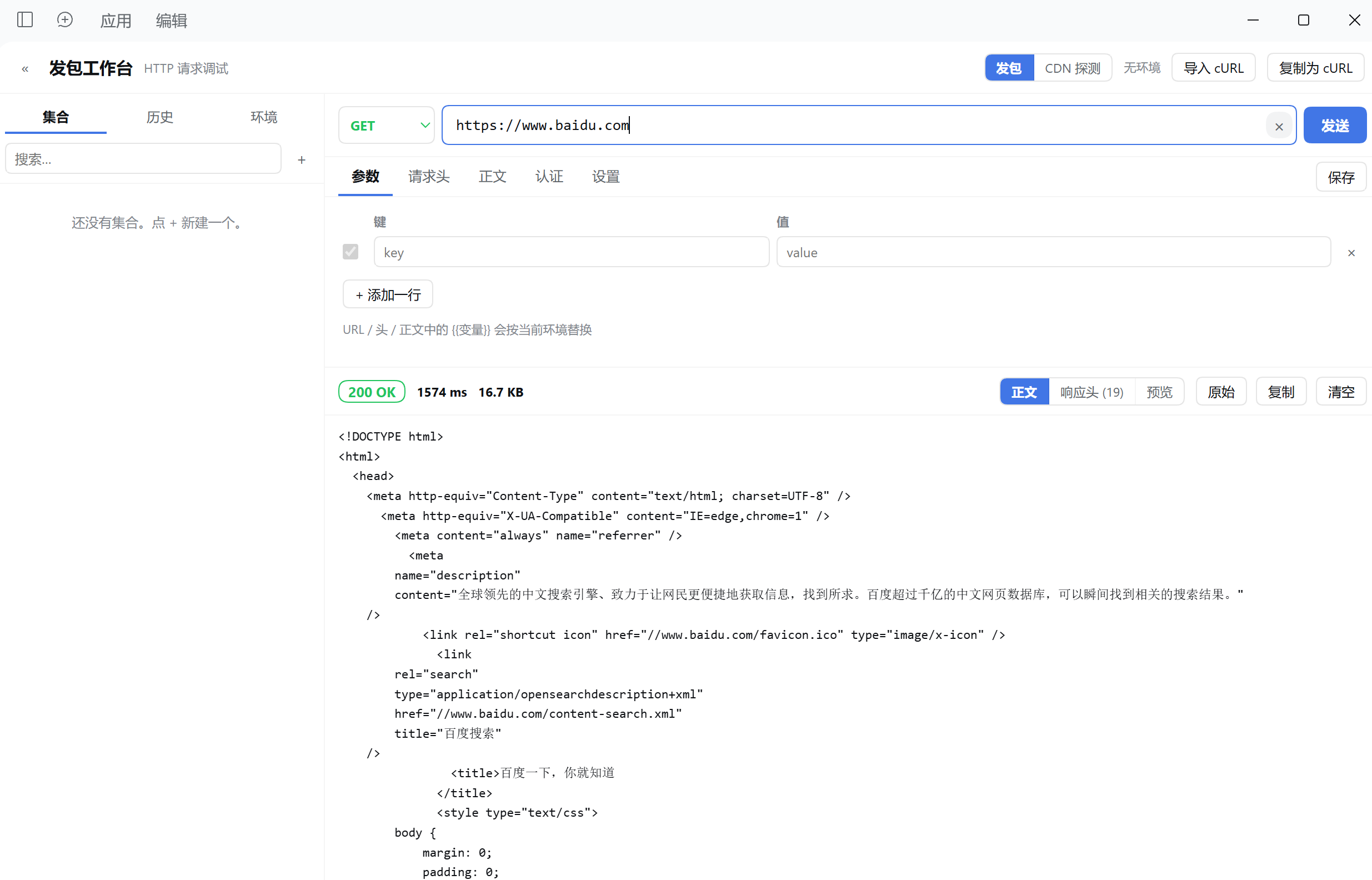
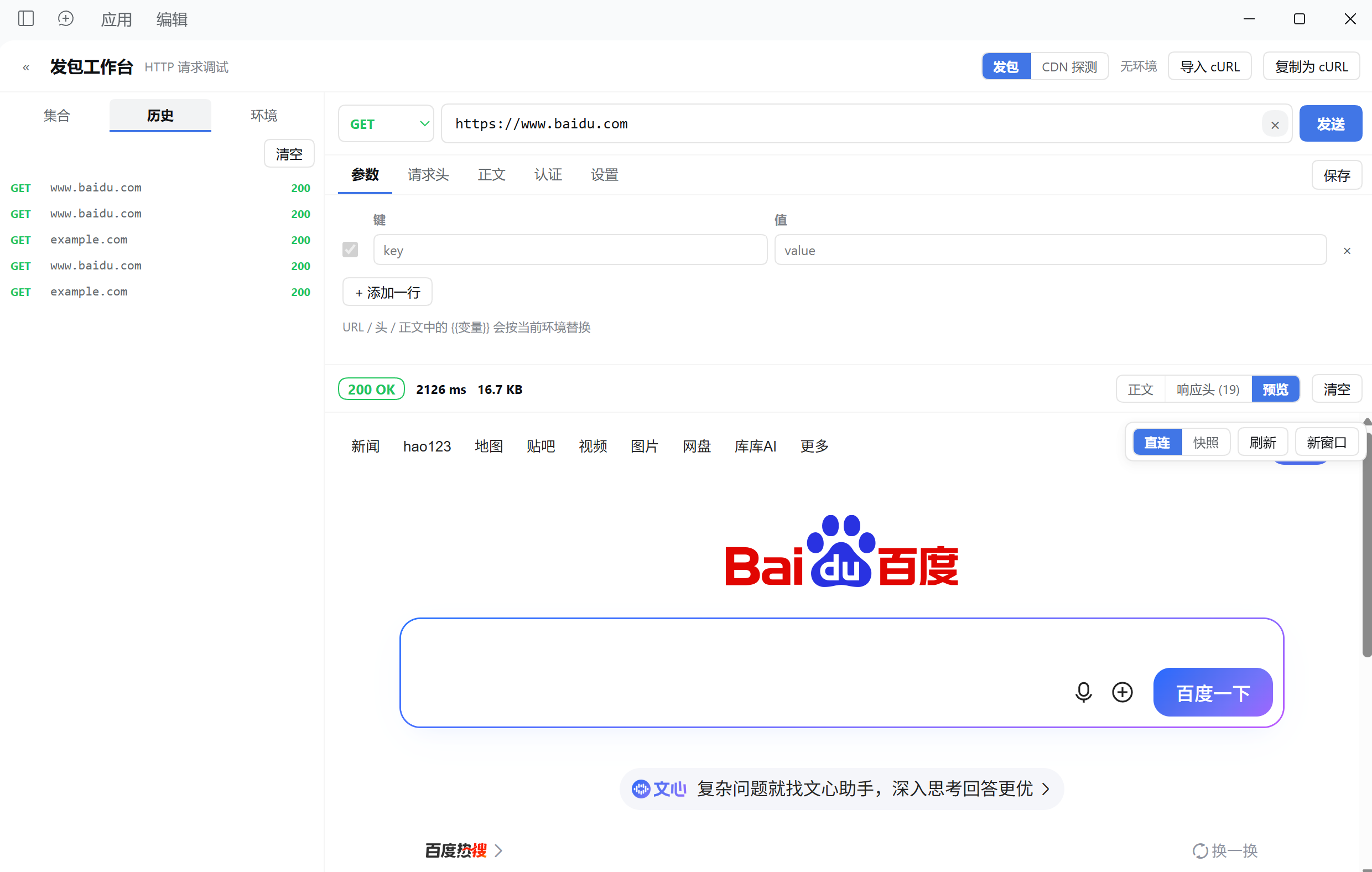
| 历史:每条带状态码,点一下还原整个请求 | CDN 源站探测:判定「已删除」还是「只是边缘缓存」 |
|---|---|
 |
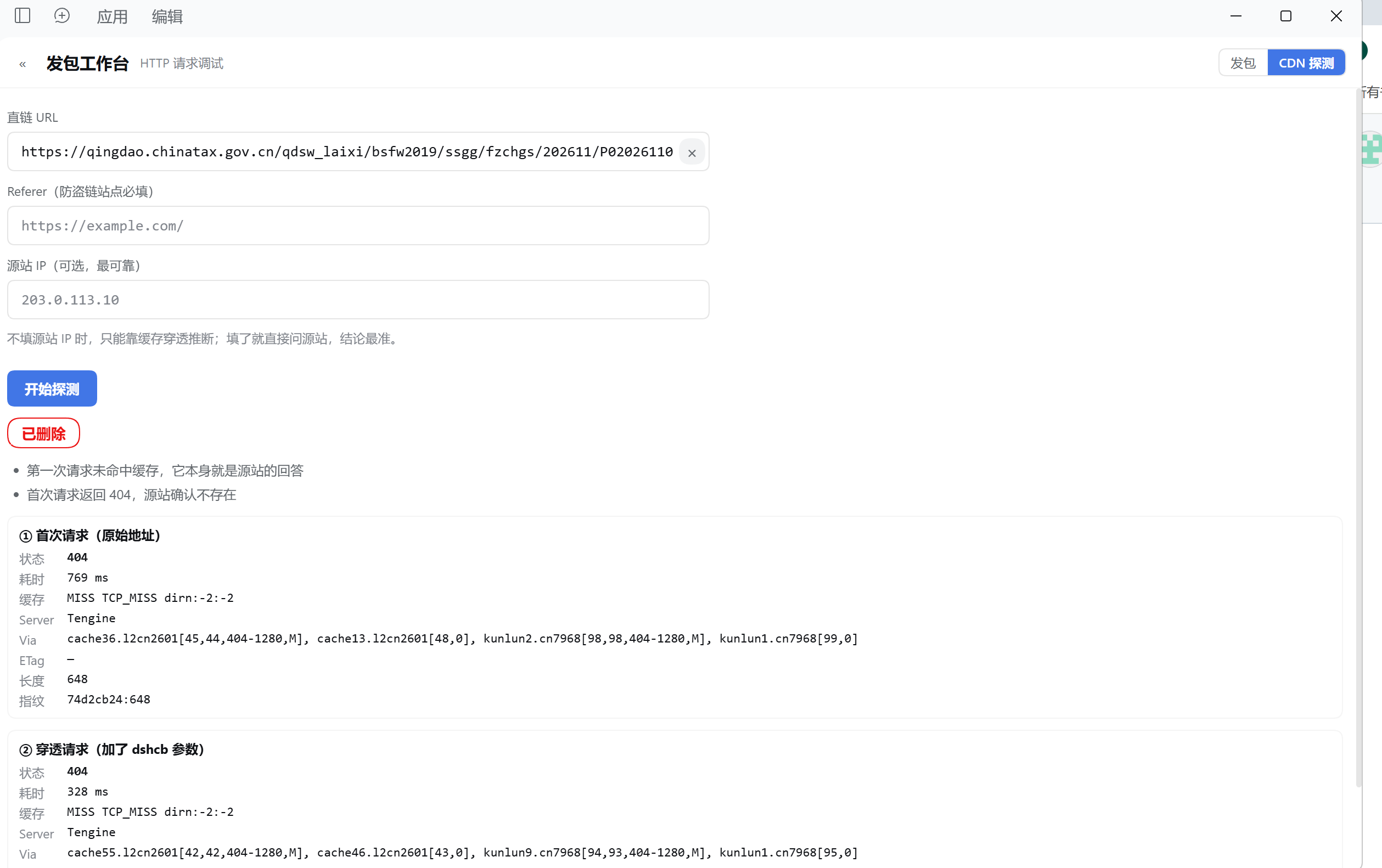 |
真实截图,不是效果图:第一张是发一个 GET 拿到 200 OK 与 HTML 正文,第二张是历史列表加预览页签,第三张对同一个站点连读两次并给出「已删除」的结论。
# 已发 npm 时
dsh plugin --profile web add dsh-postman-desktop

# 或直接用 GitHub Release 的打包文件
dsh plugin --profile web add https://github.com/zhounian6688-like/dsh-postman-desktop/releases/latest/download/dsh-postman-desktop-1.0.1.tgz
装完刷新页面(或重启桌面版)即可看到侧边栏图标。本包同时提供 host 半与 client 半,dsh.bundle 与 dsh.client 都由 cordis.patch.yml 自动挂载,不需要额外的 profile 配置。
{{变量}} 在 URL、参数、请求头、正文、认证字段里都会被替换,支持嵌套(最多 5 层)。-X -H -d --data-raw --data-urlencode -F -u -b -A -e -I -k -L --url),也能把当前请求复制成 curl。Ctrl/Cmd + Enter 全局发送。http_request_desktop —— 与面板共用同一条发送链路(同一套变量解析、认证、正文编码、重定向处理),所以面板里调通的请求,agent 可以直接复现。
http_request_desktop(method="POST", url="https://api.example.com/v1/users",
                     headers={"Content-Type":"application/json"},
body='{"name":"a"}', bodyType="json")| 参数 | 类型 | 说明 |
|---|---|---|
url |
string | 必填。完整 URL,可含 {{变量}} |
method |
string | HTTP 方法;省略时,有正文用 POST,没有用 GET |
headers |
object | 请求头键值对 |
body |
string | 原始正文 |
bodyType |
string | json / text / xml / html / urlencoded,决定默认 Content-Type(默认 json) |
form |
array | 表单字段;给了 form 就按 x-www-form-urlencoded 发送 |
environment |
string | 环境名或 id,用于解析 {{变量}};省略则用当前激活环境 |
timeoutMs |
integer | 超时毫秒,默认 30000,上限 300000 |
followRedirects |
boolean | 是否跟随重定向,默认 true |
verifyTls |
boolean | 是否校验 TLS 证书,默认 true |
返回的是纯文本摘要:状态行(如 GET https://… → 200 OK 809ms 577B)、响应头、正文。正文超过 20000 字符会被截断。
$DSH_HOME/postman-desktop/store.json(DSH_HOME 未设置时是 ~/.dsh,即 ~/.dsh/postman-desktop/store.json),写入权限 0600。
集合、环境、历史全在这一个文件里。它就是一个普通 JSON,可以直接备份、版本管理或手改。
同源、仅供本页面调用:Origin 与 Host 不一致时返回 403。
| 方法 | 路径 | 用途 |
|---|---|---|
| GET | /api/dsh-postman-desktop/store |
读全部数据 |
| PUT / POST | /api/dsh-postman-desktop/store |
整体覆盖写入 |
| POST | /api/dsh-postman-desktop/send |
发送一次请求 |
| POST | /api/dsh-postman-desktop/curl |
解析 curl 命令 |
| GET | /api/dsh-postman-desktop/history |
读历史 |
| DELETE | /api/dsh-postman-desktop/history |
清空历史 |
| POST | /api/dsh-postman-desktop/probe |
CDN 源站探测 |
| GET | /api/dsh-postman-desktop/health |
存活与存储路径 |
http: / https:。binary 与 form-data 里的 @路径 由 host 侧读取,路径必须是 host 进程可访问的位置(不是浏览器所在设备的任意路径)。verifyTls: false)只影响本次请求的 rejectUnauthorized。本包是桌面 / Web 版(webServer 路由 + dsh.client 面板)。路由前缀是 /api/dsh-postman-desktop,与手机版 dsh-postman 的 /api/dsh-postman 不冲突,两者可以并存,但侧边栏会出现两个入口。
package.json 里的 author 与 repository / homepage / bugs 还带着占位符。填一次即可:
node scripts/set-owner.mjs <github-owner> "Your Name" you@example.comnpm test # 无需 dsh 运行时:假 ctx 注册工具与路由,断言同源校验拒绝跨站请求test/smoke.mjs 用 DSH_HOME 指向临时目录,不会碰真实数据。
MIT
A Postman-style HTTP workbench that lives inside the DeepSeek Harness Web GUI. One sidebar entry, one agent tool, one send path.
| History — every send with its status code, one click to restore | CDN origin probe — "gone" vs "the edge is lying" |
|---|---|
|
|
Real screenshots, not mockups: the first sends a GET and shows 200 OK with the HTML body, the second is the history list with the preview tab, the third reads one site twice and concludes the object is gone.
dsh plugin --profile web add dsh-postman-desktop{{var}} substitution across URL, params, headers, body and auth, nested up to 5 levels.http_request_desktop drives the same engine; environment selects an environment, output is truncated at 20000 characters.$DSH_HOME/postman-desktop/store.json, mode 0600.CLASSIFICATION EVIDENCE
系统优先读取 GitHub Topics,再与站内分类词典和词根规则比对。当前命中: deepseek。
morluto
Reverse engineer anything with agents, from app behavior down to native binaries.

deepseek-ai
DeepSeek Harness: Everything is a Plugin.

nexu-io
The 1st Collaborative AI Design Agent Workspace. Local-first and open source. Create motion, prototypes, websites, apps, dashboards, presentations, images, and videos with your team and AI agents. Share work, exchange feedback, and iterate together in one workspace.